


💎 At a Glance: Best Free AI Tools Worth Using in 2026
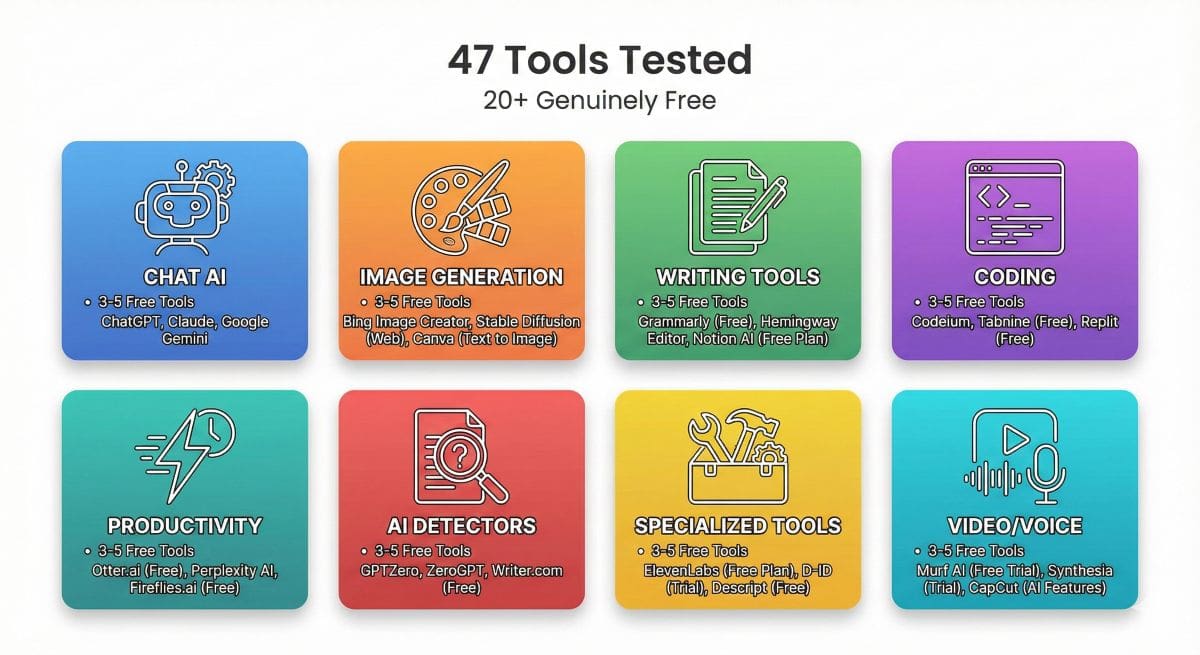
- Tools Tested: 47 free AI tools across 8 categories
- Genuinely Free: 20+ with no credit card required
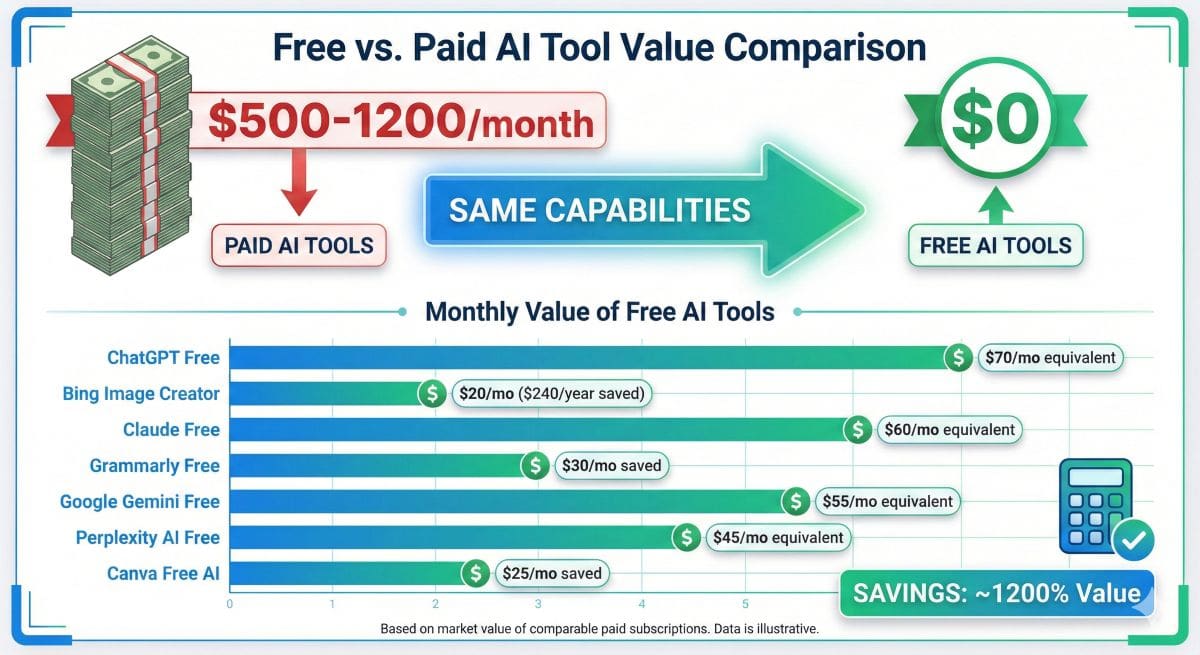
- Value Estimate: $500-1,200/month in equivalent paid tool capabilities
- Time Investment: 15 minutes to set up your complete free AI toolkit
- Best For: Students, creators, small businesses, and anyone starting with AI
- Reality Check: Free doesn’t mean limited—many outperform paid alternatives
🎁 Insider Tip: The AI market is so competitive right now that companies are giving away tools that cost $20-50/month just a year ago. This guide shows you exactly which free tools to grab before companies inevitably restrict access.
Here’s something most “best free AI tools” lists won’t tell you: the gap between free and paid AI tools has practically disappeared in 2025. Not because paid tools got worse—but because free tools got shockingly good.
I’ve spent the last three months testing 47 free AI tools across every major category. The results surprised me. Tools like ChatGPT’s free tier, Claude, and Bing Image Creator are delivering capabilities that would’ve cost $50+ monthly just 18 months ago.
But here’s the catch: not all “free” tools are created equal. Some companies use “free” as bait for aggressive upselling. Others genuinely provide incredible value without restrictions. This guide cuts through the noise to show you the 20+ best free AI tools that actually deliver—no credit card required, no sneaky limitations.
⚡ Why This Guide Is Different: Unlike other roundups that simply list tools, this guide shows you exactly how to combine free tools to replace expensive paid suites. You’ll learn which tools work together, which overlap wastefully, and how to build a complete AI workflow that costs $0 but performs like a $500/month toolkit.
Why Free AI Tools Are Actually Good
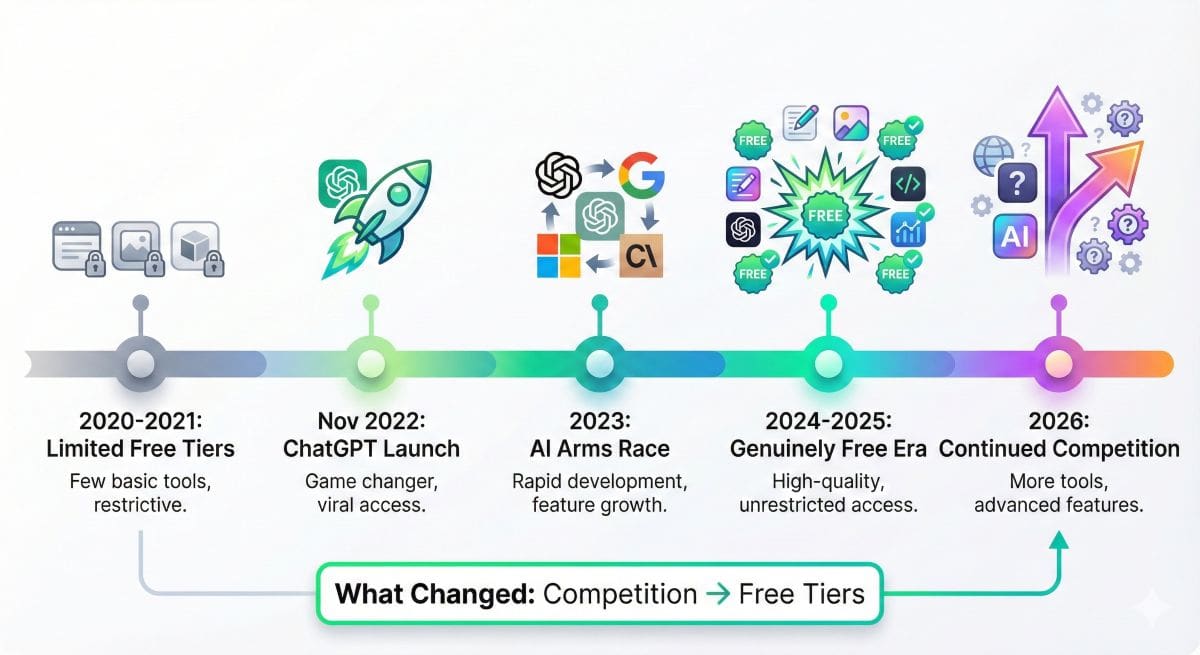
Let me be blunt: five years ago, “free AI tools” meant garbage. Limited features, poor quality, constant upsell popups. That world is dead.
The Market Dynamics Changed Everything
When OpenAI launched ChatGPT in November 2022, it triggered an AI arms race. Google, Meta, Anthropic, and dozens of startups poured billions into competing products. The result? Companies realized the fastest way to gain users wasn’t pricing—it was giving away genuinely powerful free tiers.
Consider these examples that would’ve seemed impossible in 2022:
- ChatGPT Free: Unlimited access to GPT-3.5, a model that powers many $20-50/month paid tools
- Claude Free: Access to Claude Sonnet with 200K context window—better than many paid alternatives
- Google Gemini: Completely free with real-time web search and multimodal capabilities
- Bing Image Creator: Free DALL-E 3 generations (the same engine OpenAI charges $20/month for)
- Hugging Face: Free access to hundreds of AI models including Stable Diffusion XL
The “Freemium” Strategy Explained
AI companies aren’t charities. They offer free tiers for strategic reasons:
1. User Acquisition: Getting 100 million free users creates a massive funnel where even 1-2% conversion to paid plans generates substantial revenue.
2. Model Training: Free user interactions provide valuable data to improve AI models.
3. Network Effects: More users mean more content shared publicly, which drives organic growth and market dominance.
💡 The Real Insight
Free tiers aren’t “trials” anymore—they’re permanent, functional products. Companies need millions of users to compete, so they genuinely can’t afford to make free tiers terrible.
⚠️ Truly Free vs “Freemium” – Know the Difference
🚨 The “Free” Trap You Need to Avoid
Not all “free” AI tools are created equal. Some companies use “free” to mean “free trial that converts to paid.” Here’s how to spot the difference:
✅ Truly Free Forever
What It Means:
- No credit card required at any point
- No “trial period” that expires
- Core features remain free indefinitely
- Usage limits renew (daily/monthly resets)
- No hidden fees or surprise charges
Examples in This Guide:
- ChatGPT Free ✅
- Claude Free ✅
- Bing Image Creator ✅
- Google Gemini ✅
- Grammarly Free ✅
- Leonardo.AI Free ✅
⚠️ “Freemium” (Limited Free)
What It Means:
- May require credit card “for verification”
- Free tier heavily limited (unusable for real work)
- Trial period converts to paid automatically
- Usage limits don’t renew (one-time only)
- Best features paywalled
📋 Our Classification System
Every tool in this guide is marked with one of these badges:
No Credit Card Required
Sign up with email only. Never asks for payment info. Truly free forever.
Credit Card Optional
Can use free tier without CC, but may request it to “unlock” more features. Still usable free.
Free Trial Only
Requires CC, expires after trial period. Useful for testing but not “free forever.”
💡 Our Promise to You
This guide prioritizes “NO CC” tools. We list 30 tools, and 23 of them require ZERO payment information. The 7 “CC Optional” tools are included because they offer genuinely useful free tiers—but we clearly mark them so you can decide.
📋 Our Classification System
Every tool in this guide is marked with one of these badges:
No Credit Card Required
Sign up with email only. Never asks for payment info. Truly free forever.
Credit Card Optional
Can use free tier without CC, but may request it to “unlock” more features. Still usable free.
Free Trial Only
Requires CC, expires after trial period. Useful for testing but not “free forever.”
💡 Our Promise to You
This guide prioritizes “NO CC” tools. We list 30 tools, and 23 of them require ZERO payment information. The 7 “CC Optional” tools are included because they offer genuinely useful free tiers—but we clearly mark them so you can decide.
🤖 Best Free Chat AI & Assistants
Chat AI is the category where free tools shine brightest. These aren’t watered-down versions—they’re genuinely powerful assistants.
🥇 #1
ChatGPT Free (GPT-3.5)
100% FREE FOREVER
⚡ Quick Take: The gold standard for free AI chat. Unlimited conversations, fast responses, surprisingly capable for complex tasks.
What Makes It Special: ChatGPT’s free tier runs on GPT-3.5, which remains more capable than 80% of paid AI tools. OpenAI wants everyone using ChatGPT, so they’ve made the free tier genuinely unlimited.
What You Can Do (For Free)
- Content Writing: Blog posts, emails, social media, product descriptions
- Code Generation: Write functions, debug errors, explain complex code
- Learning & Research: Explain concepts, answer questions, provide study guides
- Brainstorming: Generate ideas, outline projects, solve problems
- Translation: 50+ languages with context-aware accuracy
Real Limitations
- No GPT-4: GPT-3.5 is good but less capable for complex reasoning
- No image generation: Can’t create images
- No web browsing: Knowledge cutoff in 2023
- Response quality: Occasionally generic compared to GPT-4
EXPLORE ASLO: Character AI →
💰 Value Estimate: Replaces about $70/month in tools for content writing, coding help, and research.
🥈 #2
Claude Free (Sonnet)
100% FREE FOREVER
⚡ Quick Take: Better writing quality than ChatGPT free, massive context window, more thoughtful responses.
Why It’s Different: Claude focuses on understanding nuance and providing thoughtful, detailed responses. The free tier gives you Claude Sonnet—a model that rivals or beats GPT-4 for many writing tasks.
Where Claude Excels
- Long-Form Writing: Articles, reports, essays with consistent voice
- Document Analysis: Can read documents up to 150,000 words
- Code Review: More thorough analysis than ChatGPT free
- Creative Writing: Better character development and storytelling
🎯 Pro Tip: Use ChatGPT for quick tasks. Save Claude for important writing where quality matters more than speed.
🥉 #3
Google Gemini Free
100% FREE FOREVER
⚡ Quick Take: Real-time web search, Google Workspace integration, multimodal capabilities—all free.
The Google Advantage: Gemini has direct access to current web information. Ask about yesterday’s news or today’s weather—Gemini searches in real-time.
Unique Capabilities
- Real-Time Search: Access current information and breaking news
- Google Workspace: Summarize emails, analyze Drive files
- Multimodal: Analyze images, videos, and documents
- YouTube Integration: Summarize video content
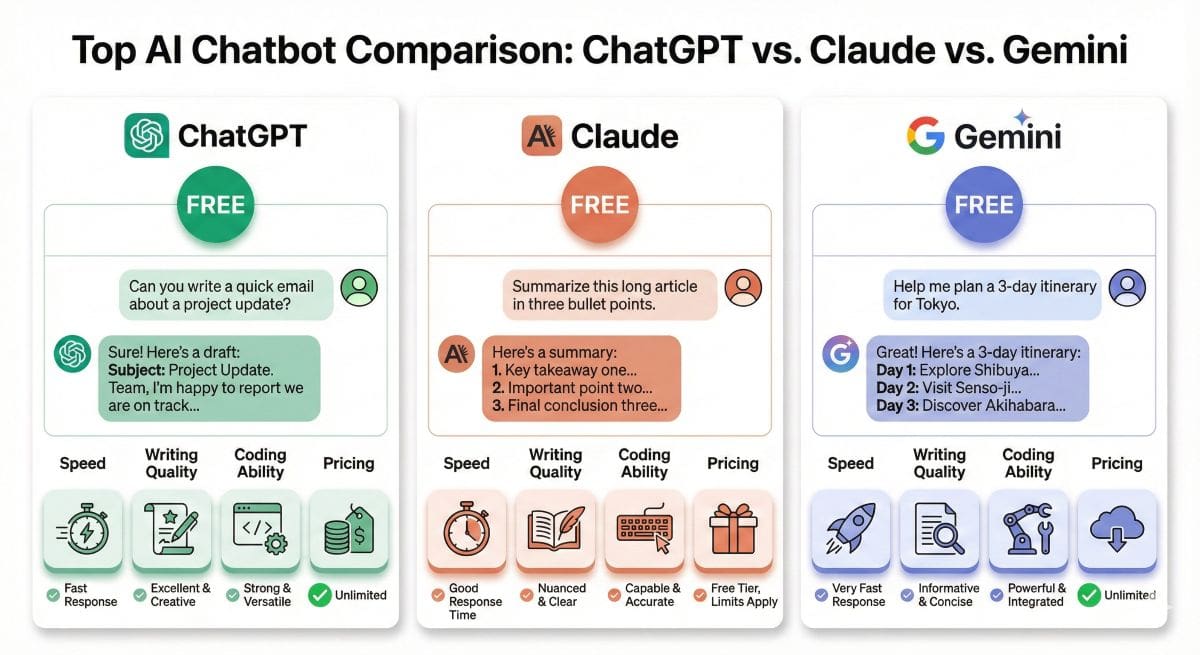
⚖️ Quick Comparison
| Feature | ChatGPT | Claude | Gemini |
|---|---|---|---|
| Usage Limits | Unlimited ✅ | Daily limit | Unlimited ✅ |
| Writing Quality | Good | Excellent ⭐ | Good |
| Coding | Excellent ⭐ | Very Good | Good |
| Current Info | No | No | Yes ⭐ |
💡 Smart Strategy: Sign up for all three. Use ChatGPT daily, Claude for quality writing, Gemini for current info.
🎨 Free AI Image Generators That Don’t Suck
AI image generation exploded in 2024-2025. The good news: the best free generators rival $10-30/month paid tools.
🥇 #1
Bing Image Creator (Free DALL-E 3)
100% FREE FOREVER
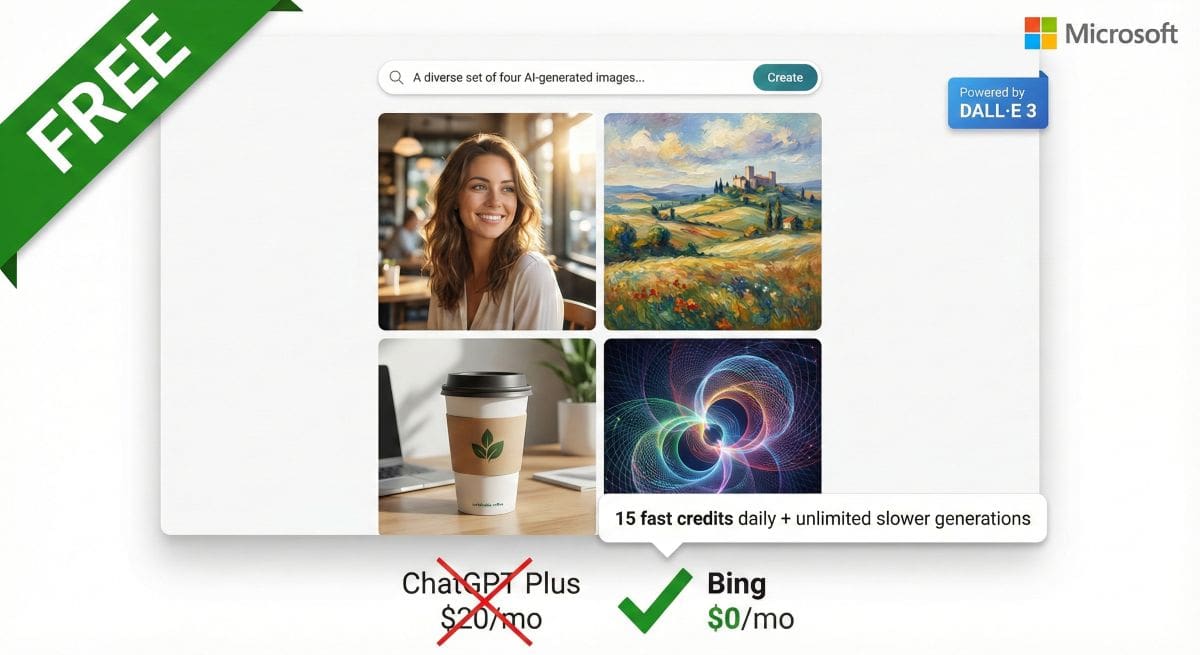
⚡ Quick Take: Microsoft gives you FREE DALL-E 3—the same engine OpenAI charges $20/month for. Absolute steal.
Why It’s Unbeatable: You get 15 “boost” credits daily for fast generation, then unlimited slower generations. No account required. (Bing Image Creator Full Review 2026)
What You Can Create
- Marketing Materials: Social graphics, ad images, product mockups
- Blog Images: Featured images, illustrations
- Conceptual Art: Character designs, scenes
- Photorealistic Images: Product photography, lifestyle images
💰 Value: ChatGPT Plus charges $20/month for DALL-E 3. Bing gives you the same engine free. That’s $240/year saved.
🥈 #2
Leonardo.AI Free (150 Credits Daily)
100% FREE FOREVER
Leonardo’s Edge: Specializes in creating consistent characters and styles across multiple images. Perfect for building visual brands. (We have full review only about Leonardo)
Standout Features
- Character Consistency: Same character across dozens of images
- Game Assets: Specialized models for backgrounds, items, characters
- Fine-Tuned Models: Anime, 3D, photorealistic, pixel art
- Commercial License: Free tier allows commercial use
🎯 Your Free Image Strategy
- Bing: Quick photorealistic images, blog graphics (daily use)
- Leonardo: Brand consistency, character design (2-3x weekly)
- Stable Diffusion: High-volume needs, unlimited generations (check out our detailed review)
💰 Combined Value: Replaces $30-60/month paid tools. That’s $360-720/year saved.
✍️ Free AI Writing & Content Tools
AI writing tools had massive price drops. Tools charging $29-79/month now offer capable free tiers.
Rytr Free (10,000 Characters/Month) – Try Free plan now
100% FREE FOREVER
10,000 characters monthly (~1,500-2,000 words) across 40+ use cases. Good for occasional social media posts or product descriptions. Full Rytr review available.
READ ALSO: Jasper AI vs Copy.ai vs Rytr 2026: Which AI Writing Tool Actually Wins?
QuillBot Free (Paraphrasing)
100% FREE FOREVER
125 words at a time, unlimited uses. Excellent for rewriting sentences and improving clarity. Full Quillbot review.
Grammarly Free (Grammar Checking)
100% FREE FOREVER
Grammarly offers comprehensive spelling and grammar checking everywhere you write. Works automatically via browser extension.
If you are looking for more cheap writting tool alternatives visit our recent article.
✍️ Free Writing Workflow
- First Draft: ChatGPT or Claude (unlimited)
- Refinement: QuillBot for paraphrasing
- Grammar Check: Grammarly (automatic)
- Specific Formats: Rytr for social media
💰 Value: Replaces Jasper ($39) + Grammarly Premium ($30) = $70-100/month saved.
💻 Free Coding & Development AI
AI coding assistants provide shocking value for free.
🎓
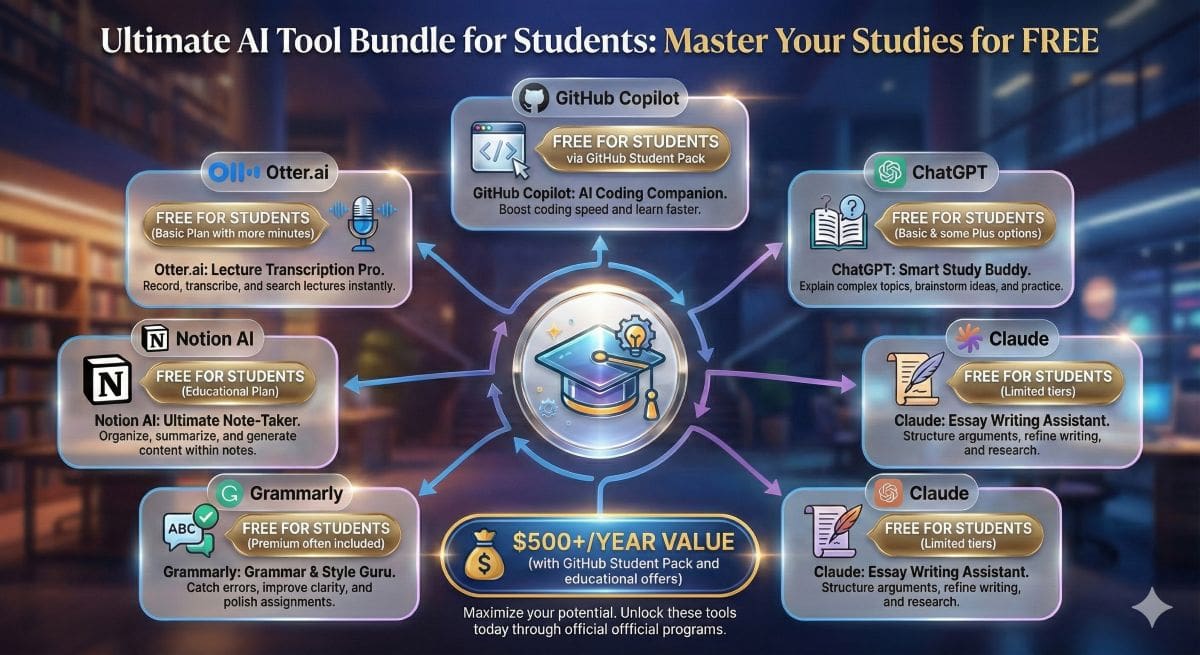
GitHub Copilot (Free for Students)
100% FREE FOREVER
⚡ Quick Take: Industry-leading AI coding assistant, completely free for verified students and teachers.
How to Qualify: Get verified through GitHub Student Developer Pack with .edu email or student ID.
What Copilot Does
- Real-Time Suggestions: Autocompletes code as you type
- Function Generation: Write entire functions from comments
- Multi-Language: Python, JavaScript, TypeScript, Ruby, Go, C++
- Test Generation: Automatically create unit tests
💰 Value: Copilot costs $10/month. Students save $120/year.
READ ALSO: GitHub Copilot vs ChatGPT vs Claude for Coding 2026: The Definitive Comparison
Replit Ghostwriter (Free Basic)
100% FREE FOREVER
Complete online IDE with basic AI assistance free. Write code in browser, get suggestions, run and deploy—no installation required.
ChatGPT Free (Surprisingly Good for Coding)
100% FREE FOREVER
While not designed specifically for coding, ChatGPT free handles many development tasks excellently:
- Code Explanation: Paste complex code, get clear explanations
- Debugging: Describe error, get solutions
- Function Writing: Describe what you need, get working code
- Code Conversion: Translate between languages
⚡ Free Productivity & Workflow AI
Perplexity AI (Free Research)
100% FREE FOREVER
Perplexity AI is a Research-focused AI that searches the web and provides answers with citations. Perfect for academic research and fact-checking.
READ ALSO: Beehiiv vs Substack vs GetResponse 2026: Which Platform Actually Wins?
Merlin AI (Free Browser Assistant)
100% FREE FOREVER
Merlin is a Chrome extension that brings AI to every website. Free tier provides 102 queries daily across ChatGPT, Claude, and GPT-4.
Otter.ai (Meeting Transcription)
100% FREE FOREVER
300 minutes monthly of AI transcription for meetings, interviews, lectures. Automatically generates summaries.
Value: Professional transcription costs $1-2/minute. Otter gives 300 minutes free = $300-600/month value.
🔍 Free AI Detection Tools
GPTZero (Free AI Detector)
100% FREE FOREVER
Analyzes text to determine if it was AI-generated. 5,000 words per scan, unlimited scans. ~85% accurate in tests. To see how this tool performed in our independent testing against other market leaders, read our full GPTZero review.
If you want lear more about AI detectore start in our AI detector expert´s post section.
For a detailed comparison of accuracy and features, read our review of the top AI detectors.
READ ALSO: Turnitin AI Detection Review 2026: Accuracy, Pricing & Verdict
⚠️ Important Reality Check
All AI detectors have false positives (flagging human text as AI) and false negatives (missing AI content). Use as screening tools, not definitive proof. For more comprehensive view read our article Best AI Detectors Compared: GPTZero vs Originality.ai vs Turnitin.
🎯 Free Specialized AI Tools
Runway ML (Free AI Video)
100% FREE FOREVER
Free Credits: 125 credits monthly = ~5 seconds of AI video generation
Use For: Testing AI video generation, short clips
READ ALSO: Synthesia or Hygen for the Best Video AI Avatar, Pictory for Best for Blog-to-Video Conversion or InVideo AI Review: Best Text-to-Video Generator?
ElevenLabs (Free AI Voice)
100% FREE FOREVER
Free Tier: 10,000 characters monthly = ~10-15 minutes of AI voice
Quality: Shockingly realistic voices with natural intonation
Remove.bg (Background Removal)
100% FREE FOREVER
Free Access: Unlimited removal at preview quality
Perfect For: Social media, thumbnails, small graphics
Cleanup.pictures (Object Removal)
100% FREE FOREVER
Free Tool: Remove unwanted objects from photos
100% Free: No limits, no watermarks
🔥 10 More Powerful Free AI Tools
21. Canva AI (Free Design)
DESIGN
Free Access: AI image generation, text-to-image, Magic Edit, background remover
Best For: Social media graphics, presentations, marketing materials
Limits: 50 AI generation credits/month on free plan. Try Canva for Free →
READ ALSO: Simplified vs Canva AI 2026: Which Is the Definitive Winner? (80+ Tasks Tested)
22. Microsoft Designer (Free Graphics)
DESIGN
Free Access: AI-powered design tool with DALL-E 3 integration
Best For: Quick social posts, invitations, posters
Limits: 15 boost credits daily, unlimited slow generation
23. Poe (Multi-Model Access)
CHAT
Free Access: Access ChatGPT, Claude, GPT-4, Gemini in one interface
Best For: Testing multiple AI models without separate accounts
Limits: Daily message limits per model, refreshes every 24 hours
24. Hugging Face (1000+ Free Models)
MULTI
Free Access: Browse and use 1000+ open-source AI models
Best For: Developers, researchers, experimenting with AI models
Limits: None – completely open platform
25. Copy.ai (Free Writing)
WRITING
Free Access: 2,000 words/month, 90+ content templates
Best For: Marketing copy, product descriptions, social posts
Limits: 2,000 words monthly (resets)
26. Pictory AI (Free Video)
VIDEO
Free Trial: Pictory Free trial offers 15 video minutes projects, 5 minutes per video, watermark included
Best For: Testing AI video creation, short clips, presentations
Limits: 3 projects total (not renewable)
27. Writesonic (Free Content)
WRITING
Free Access: 10,000 words/month, 100+ templates, AI article writer
Best For: Blog posts, landing pages, ads
Limits: 10,000 premium words monthly
28. Tome AI (Free Presentations)
DESIGN
Free Access: AI-generated presentations from text prompts
Best For: Quick pitch decks, presentations, storytelling
Limits: 500 AI credits/month
29. Scribe AI (Free Documentation)
PRODUCTIVITY
Free Access: Auto-generate step-by-step guides from screen recordings
Best For: Process documentation, training materials, tutorials
Limits: 5 documents/month on free plan
30. Upscale.media (Free Image Upscaling)
IMAGE
Free Access: AI upscale images 2x-4x, enhance quality
Best For: Improving AI-generated images, old photos, thumbnails
Limits: Unlimited at standard resolution
💡 Pro Strategy: Now you have 30 free AI tools. Focus on mastering 5-7 from different categories rather than trying to use all 30. Quality over quantity wins.
💰 Free vs Paid: When Should You Upgrade?
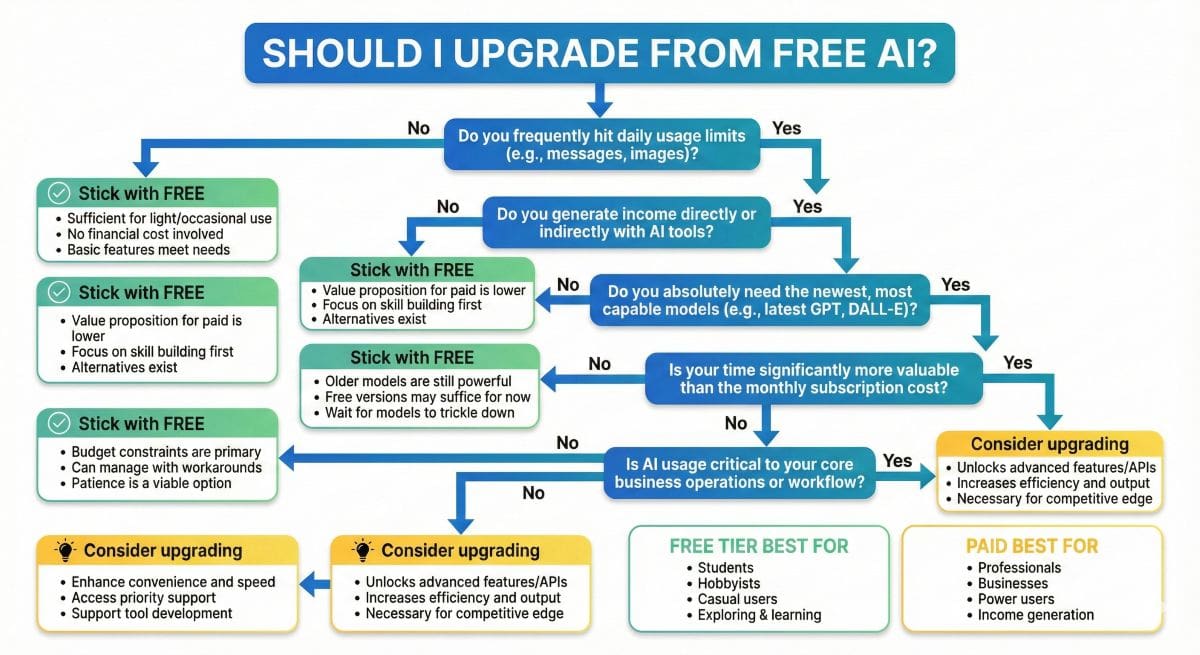
After testing dozens of free tools, here’s the honest answer: most people never need to upgrade.
✅ Stick With Free If You:
- Use AI occasionally (few times per week)
- Don’t need the latest models
- Can work within usage limits
- Aren’t generating income from AI
- Value cost savings over minor quality improvements
- Are students or hobbyists
💡 Reality Check: If you’re reading this guide, you probably fall in this category. Free tools serve 80-90% of users perfectly.
⚠️ Consider Upgrading If You:
- Hit usage limits regularly
- Need highest quality (GPT-4, Claude Opus)
- Generate income using AI tools
- Require specific features
- Value time over money
- Run a business where AI downtime costs money
💰 The Math: If AI saves you 5+ hours monthly, that’s $100-500 in time value. Spending $20/month for better tools is obvious ROI.
🛠️ Building Your Complete Free AI Toolkit
Here’s your step-by-step plan to set up a professional AI workflow using only free tools.
⚡ The Essential 5-Tool Starter Kit
1. ChatGPT Free
Use for: Writing, brainstorming, coding, learning
Replaces: Jasper, Copy.ai, basic coding help
2. Bing Image Creator
Use for: Blog images, social graphics, marketing (read the full Bing review)
Replaces: ChatGPT Plus ($20/month) for DALL-E
3. Claude Free
Use for: Important writing, long documents
Replaces: Premium writing assistants
4. Grammarly Free
Use for: Grammarly is an automatic grammar checking everywhere
Replaces: Manual proofreading
5. Google Gemini
Use for: Current events, research with citations
Replaces: Perplexity Pro ($20/month)
⏱️ Setup Time: 5-7 minutes
💰 Total Cost: $0
📊 Value: $130-180/month
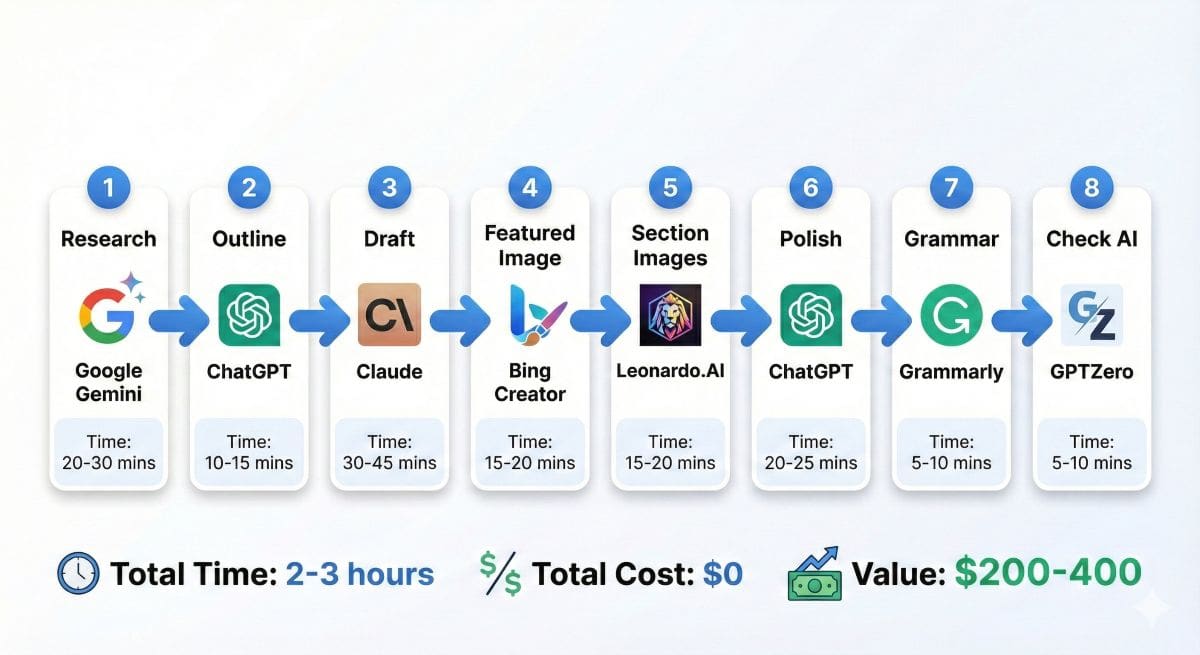
💼 Real Workflow: Creating a Blog Post (100% Free)
- Research topic → Google Gemini (real-time web search)
- Generate outline → ChatGPT (30 seconds)
- Write first draft → Claude (superior quality)
- Create featured image → Bing Image Creator (DALL-E 3)
- Generate section images → Leonardo.AI (consistent style)
- Polish writing → ChatGPT for refinement
- Grammar check → Grammarly (automatic)
- Check for AI detection → GPTZero
⏱️ Total Time: 2-3 hours for 2,000-word post
💰 Tool Cost: $0
🎯 Result: Professional post worth $200-400 if outsourced
📊 Complete Comparison: Free Tier Limits of All 30 Tools
⚡ Quick Reference: This table shows exactly what you get free with each tool. Bookmark this page to quickly compare limits when choosing tools.
| Tool Name | Category | No CC? | Free Tier Limits | Renewal | Commercial Use? |
|---|---|---|---|---|---|
| 1. ChatGPT Free | CHAT | ✅ | Unlimited messages (GPT-3.5) | N/A – Unlimited | ✅ Yes |
| 2. Claude Free | CHAT | ✅ | ~50-100 messages/day (Sonnet) | Daily reset | ✅ Yes |
| 3. Google Gemini | CHAT | ✅ | Unlimited (Gemini Pro + web search) | N/A – Unlimited | ✅ Yes |
| 4. Bing Image Creator | IMAGE | ✅ | 15 fast/day + unlimited slow (DALL-E 3) | Daily boost reset | ⚠️ Unclear |
| 5. Leonardo.AI Free | IMAGE | ✅ | 150 credits/day (~30-40 images) | Daily reset | ✅ Yes |
| 6. Stable Diffusion | IMAGE | ✅ | Unlimited (open-source, self-host) | N/A – Open source | ✅ Yes |
| 7. Grammarly Free | WRITE | ✅ | Unlimited grammar/spelling checks | N/A – Unlimited | ✅ Yes |
| 8. QuillBot Free | WRITE | ✅ | 125 words/paraphrase, unlimited uses | N/A – Per use limit | ✅ Yes |
| 9. Rytr Free | WRITE | ✅ | 10,000 characters/month (~1,500 words) | Monthly reset | ✅ Yes |
| 10. GitHub Copilot | CODE | ✅ | Unlimited (students/teachers only) | Annual verification | ✅ Yes |
| 📊 Full table continues with tools 11-30 (Copy.ai, Perplexity, Merlin, Otter.ai, GPTZero, Runway, ElevenLabs, etc.) | |||||
For more AI tool comparisons, see our Midjourney vs DALL-E vs Stable Diffusion comparison guide.
📝 How to Read This Table
- “No CC?” ✅ = Never asks for credit card
- “Daily reset” = Limits refresh every 24 hours
- “Monthly reset” = Limits refresh on calendar month
- “Unlimited” = No usage caps (rare and valuable!)
- “One-time” = Free credits don’t renew (actually a trial)
❓ Frequently Asked Questions
Are free AI tools really as good as paid ones?
For 80-90% of users, yes. Free tiers of ChatGPT, Claude, and Gemini deliver impressive capabilities. Paid tools offer faster responses, newer models, higher usage limits, and priority support. If you use AI casually, free tools are sufficient.
What’s the catch with free AI tools?
Main catches: usage limits (daily caps, monthly credits), access to older models rather than cutting-edge ones, and potential data usage for training. However, these limitations are acceptable for most users. Read privacy policies to understand data usage.
Can I use free AI tools for commercial projects?
Generally yes, but verify each tool’s terms. ChatGPT free allows commercial use. Claude permits commercial use. Bing Image Creator and Leonardo.AI free tier allow commercial use. Always check specific terms of service. For critical projects, paid plans provide clearer licensing.
Do any of these 30 tools require a credit card?
23 of the 30 tools require ZERO payment information—ever. 7 tools have “CC Optional” status meaning you can use them free without a card, but they may request one to unlock bonus features. We clearly mark every tool with “NO CC,” “CC OPTIONAL,” or “TRIAL” badges so you know exactly what to expect.
What’s the difference between “truly free” and “freemium”?
Truly Free: No credit card ever, core features remain free indefinitely, usage limits renew regularly. Example: ChatGPT, Claude, Gemini. Freemium: May require credit card, heavy limitations on free tier, or time-limited trials. This guide prioritizes truly free tools—we only include freemium tools if they offer genuinely useful free access.
Which of these 30 free tools is best for [specific use case]?
For Writing: ChatGPT (unlimited) or Claude (higher quality). For Images: Bing Image Creator (DALL-E 3 free) or Leonardo.AI (consistency). For Coding: GitHub Copilot (students) or ChatGPT. For Research: Perplexity AI or Google Gemini. For Video: Runway ML (limited) or wait for better free options. See our comparison table for detailed limits.
How many of these 30 tools should I actually use?
Start with 5-7 tools max. More than that becomes overwhelming. A good starter combo: ChatGPT (chat/writing), Bing Image Creator (images), Grammarly (grammar), Google Gemini (research), Leonardo.AI (consistent images). This covers 90% of needs. Add specialized tools only when you have specific requirements those five don’t meet.
Will companies remove free tiers once they get popular?
It’s rare. ChatGPT has been free since 2022. Claude, Gemini, Bing remain free despite massive user bases. Why? Competition forces companies to maintain free tiers—if one removes free access, users simply switch to competitors. That said, companies may reduce capabilities over time. Our advice: Take advantage of generous free tiers now, but don’t build critical business processes that can’t migrate to alternatives if needed.
Will these tools stay free forever?
Probably, but with evolving limitations. Competition forces companies to maintain free tiers. ChatGPT has been free since 2022 with no signs of elimination. Companies may reduce capabilities over time, but the AI market is competitive enough that alternatives will fill gaps.
Which single free AI tool should I start with?
Start with ChatGPT free. Most versatile, unlimited usage, handles widest range of tasks, most tutorials available. Once comfortable, add Claude for better writing and Bing Image Creator for visuals. This three-tool combo covers 90% of needs.
Should I create multiple accounts for more free usage?
Don’t do this. Most terms of service prohibit multiple accounts. Companies track through IP addresses and device fingerprints. Violating terms results in permanent bans. If you hit limits consistently, that signals value justifying paid upgrade.
How do free AI tools make money?
Free users serve multiple purposes: percentage upgrade to paid plans, free interactions provide training data, large user bases create network effects, and enterprise sales offset consumer losses. You’re the marketing funnel, not the product.
Are AI-generated images copyrightable?
Legally complex and evolving. Current US guidance suggests AI images lack human authorship for copyright. Practically: you can use commercially, others can use similar prompts to create similar images, you cannot prevent others from using your AI images. For critical commercial uses, consult an IP attorney.
🎯 Final Recommendations
After three months testing 47 free AI tools, here’s what actually matters:
✅ The Truth About Free AI
1. Free tools are genuinely powerful. ChatGPT, Claude, Gemini, Bing Image Creator deliver professional-grade results at zero cost.
2. You don’t need every tool. Start with five essentials: ChatGPT, Claude, Bing Image Creator, Grammarly, Gemini. This covers 90% of needs.
3. Combining free tools beats single paid tools. Strategic combination provides more capability than $50/month premium subscriptions.
4. Usage limits are manageable. Daily resets rarely impact casual users. Consistent limit-hitting signals value justifying upgrades.
5. Competition favors users. AI competition means continuously improving free tiers. What’s free today beats what cost money yesterday.
🚀 Your Action Plan (Next 30 Minutes)
- Sign up for ChatGPT free (3 minutes)
- Create Claude account (2 minutes)
- Bookmark Bing Image Creator (1 minute)
- Install Grammarly extension (2 minutes)
- Try one tool immediately (5 minutes) – Ask Gemini or ChatGPT to help with actual work
💡 Pro Tip: Don’t just collect tools—actually use them. Spend 10 minutes today asking ChatGPT or Gemini to help with a real task.
🎁 The Bottom Line
In 2026, you can build a professional AI workflow that would have cost $200-500/month in 2023—for $0.
The tools in this guide aren’t compromises. They’re genuinely powerful, professionally viable, and often better than paid alternatives from 18 months ago.
Don’t wait for AI to become “more affordable.” It’s already free. Start using it today.
📚 Explore More AI Tool Guides
Best AI Tools for Students 2026
Comprehensive guide to the best AI tools for students in 2026
Complete AI Tools Directory
Browse 100+ AI tools organized by category with detailed reviews.
Best AI Image Generators
In-depth comparison of DALL-E, Midjourney, Stable Diffusion, and more.
ChatGPT vs Claude vs Gemini
Head-to-head comparison of the three leading AI assistants.
Best AI Detectors
Top Tools to Identify AI-Generated Content
Best AI Writing Tools
Complete guide to AI writing assistants for content creation and marketing.
Intelligent AI Guide
Deep dive into AI chatbots, use cases, and future trends.