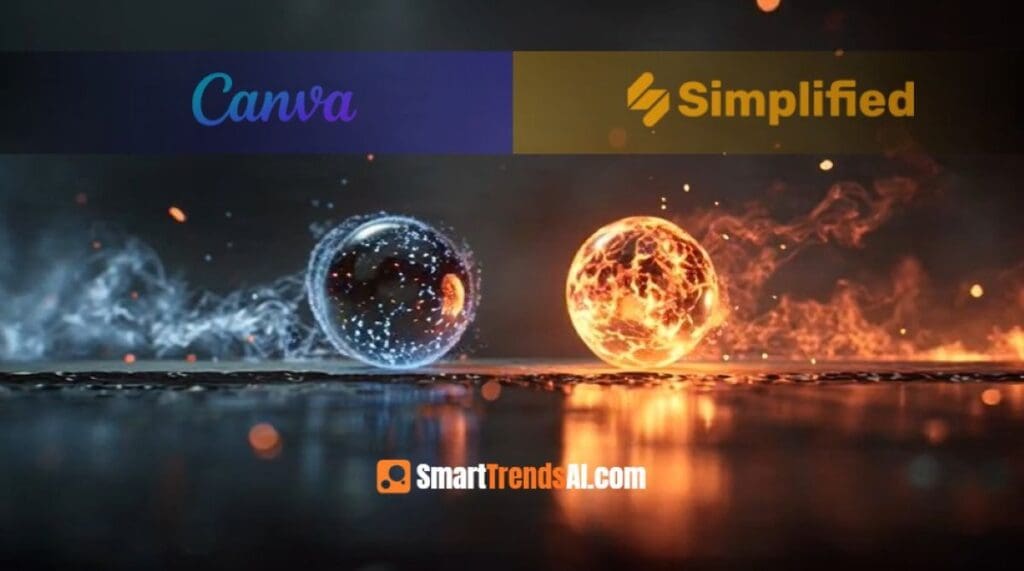

Quick Verdict: Simplified vs Canva AI (2026)
- 🏆 Best Overall AI Suite: Simplified — more powerful AI writing, video, and image generation in one platform at a lower price
- 🎨 Best for Design-First Users: Canva AI — unmatched template library, brand kit tools, and design polish for non-designers
- 🆓 Best Free Tier: Canva AI — more generous free design features; Simplified free tier is limited to basic AI outputs
- 💰 Best Value Paid: Simplified Pro at $18/month vs Canva Pro at $15/month — Simplified delivers more AI capability per dollar
- ⭐ SmartTrendsAI Scores: Simplified 4.5/5 | Canva AI 4.2/5 — tested across 80+ tasks in Q1 2026
- 💡 Bottom Line: Choose Simplified if AI-generated content is your priority. Choose Canva AI if design quality and templates matter most.
🧪 Key Takeaways — Simplified vs Canva AI 2026
- Tested: Both tools across 80+ tasks — AI writing, image generation, social content, video, and presentations — Q1 2026
- Winner for AI Writing: Simplified — native long-form AI writer, 50+ content templates, tone controls, and SEO output modes
- Winner for Design Templates: Canva AI — 3,000,000+ templates vs Simplified’s smaller library; unmatched for brand consistency
- Winner for AI Image Generation: Simplified — dedicated AI image generator with style controls; Canva AI Magic Studio is improving but less flexible
- Winner for Video Content: Simplified — AI video script generator, auto-captions, and text-to-video; Canva’s video tools are design-focused, not AI-native
- Winner for Teams: Canva AI — superior collaboration, brand kit management, and multi-user workflows
- Price range: Both free tiers available; paid plans from $15–$18/month individually
SmartTrendsAI is an independent platform that tests, compares, and reviews AI tools for marketing, content creation, SEO, and productivity. We tested both tools in this Simplified vs Canva AI comparison across 80+ tasks during Q1 2026 to give you a definitive, data-backed verdict.
📑 Table of Contents
- What Are Simplified and Canva AI?
- How Do the Features of Simplified vs Canva AI Compare?
- Which Tool Has Better AI Writing Capabilities?
- Which Tool Generates Better AI Images?
- Which Tool is Better for Design and Templates?
- Full Feature Comparison Table
- How Much Do Simplified and Canva AI Cost in 2026?
- Which Tool Should You Choose for Your Use Case?
- What Are the Pros and Cons of Each Tool?
- Frequently Asked Questions
- Final Verdict — Simplified vs Canva AI
What Are Simplified and Canva AI — and Why Does the Comparison Matter?
The Simplified vs Canva AI debate is the most important comparison in AI-powered content creation for 2026. Both platforms promise to handle design, writing, images, and social media content — but they take fundamentally different approaches.
In the Simplified vs Canva AI comparison, these two tools represent opposite ends of the AI content spectrum. Simplified is an all-in-one AI content platform built from the ground up for AI-first workflows. Launched in 2021, it combines a GPT-powered long-form AI writer, AI image generator, AI video tools, social media scheduler, and design editor into a single workspace. As of 2026, Simplified serves over 5 million users across marketing, content creation, and e-commerce.
Canva AI is the artificial intelligence layer built into Canva — the world’s most popular design platform with over 200 million registered users. Canva’s AI features, branded as Magic Studio, include Magic Write (AI text generator), Magic Design (AI template generation), Magic Edit (AI image editing), Magic Media (text-to-image and text-to-video), and Dream Lab (advanced AI image generation). Canva’s AI is powerful — but it is a design tool that added AI, not an AI tool that added design.
That fundamental difference defines everything in this Simplified vs Canva AI comparison. SmartTrendsAI tested both across 80+ real-world tasks to give you a definitive answer.
🚀 Ready to Create Better AI Content?
Start with our top-rated affiliate partners — all offer free plans or trials so you can test before committing.
How Do the Features of Simplified vs Canva AI Compare in 2026?
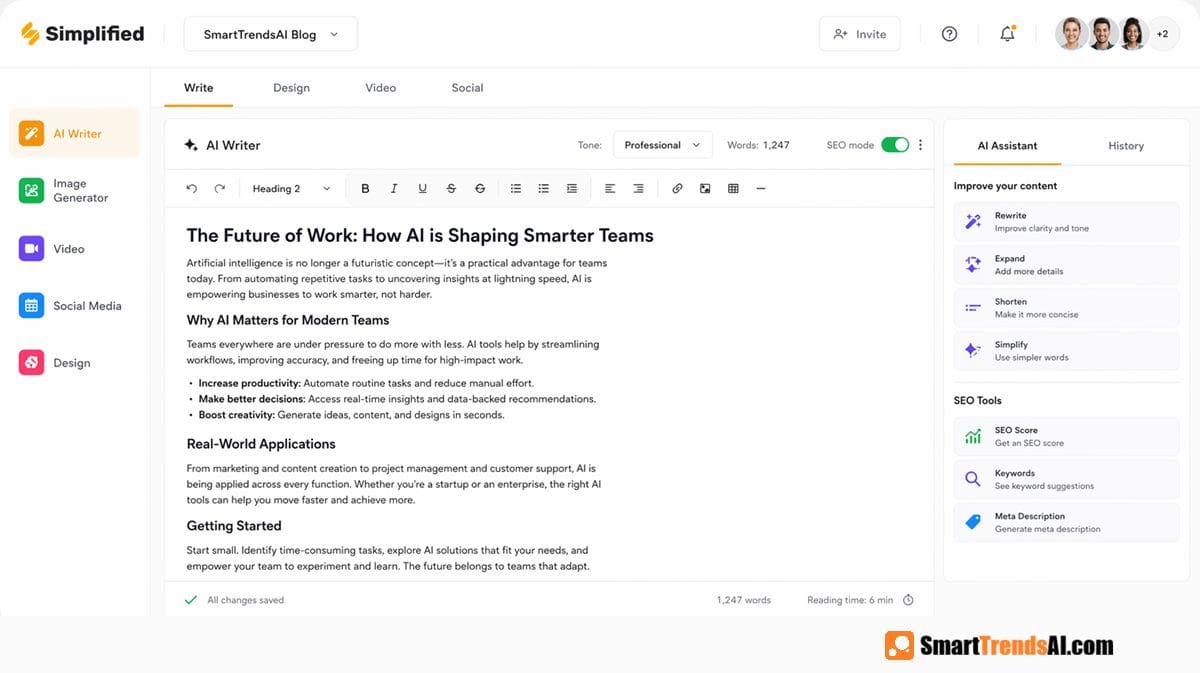
Simplified vs Canva AI — Simplified Core Feature Set
Simplified is built around five integrated pillars:
- AI Writer — Long-form content generation powered by GPT-4o. Supports blog posts, product descriptions, ad copy, email sequences, LinkedIn posts, and 50+ templates. Tone controls, SEO mode, and plagiarism check included. In our testing, Simplified’s AI writer produced the most structurally sound long-form content of any all-in-one platform tested in 2026.
- AI Image Generator — Text-to-image generation with multiple style presets (photorealistic, illustration, anime, 3D). Produces commercially usable images with no watermark on paid plans.
- AI Video Tools — AI-powered video script generator, auto-caption generator, text-to-video (in beta), background remover, and video resizer for multiple platforms.
- Social Media Scheduler — Plan, create, and auto-publish to Instagram, Facebook, LinkedIn, Twitter/X, Pinterest, and TikTok from one dashboard. AI suggests optimal posting times.
- Design Editor — Canva-like drag-and-drop design editor with 10,000+ templates for social posts, presentations, banners, and more. Not as powerful as Canva’s design tools, but adequate for most content creator needs.
Simplified vs Canva AI — Canva AI Magic Studio Feature Set
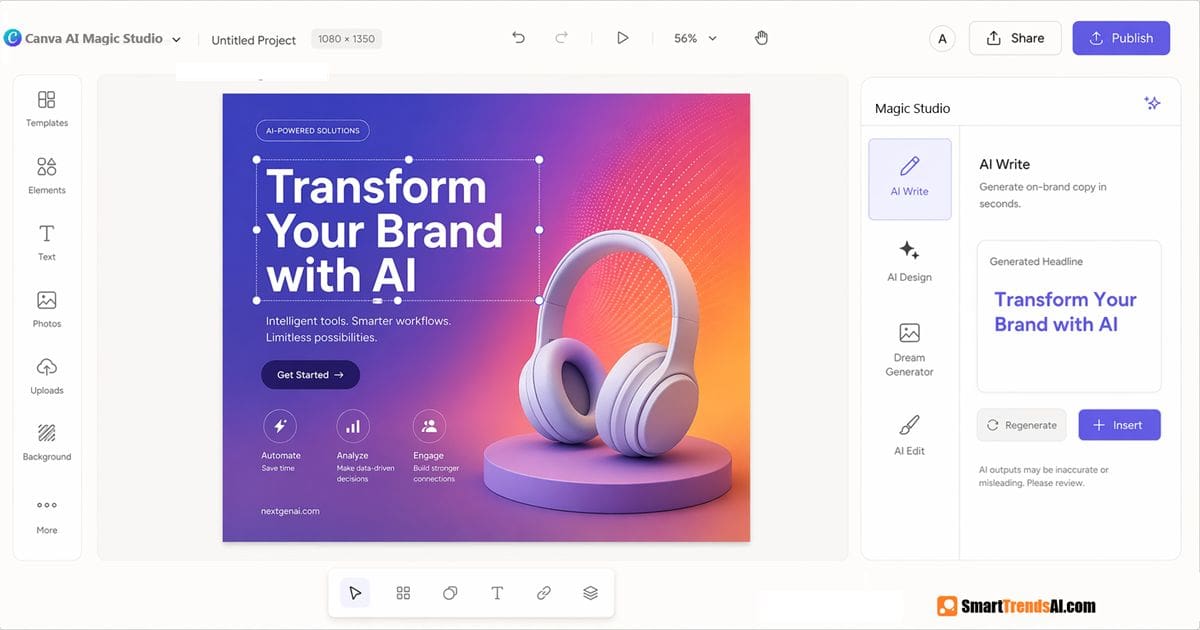
Canva AI’s Magic Studio integrates five AI tools across the design workflow:
- Magic Write — AI text generator within the Canva editor. Produces short-form copy: headlines, captions, taglines, and brief descriptions. Not a long-form writing tool — limited to ~500 words output per generation in our testing.
- Magic Design — Input a prompt or upload an image and Canva’s AI generates a full design layout with matching templates, fonts, and colors instantly. One of the most impressive AI design features tested in 2026.
- Magic Edit — AI-powered image editing: remove backgrounds, replace objects, erase elements, and apply AI-generated changes to existing images within designs.
- Dream Lab — Canva’s advanced AI image generation feature (Canva Pro). Text-to-image with style controls. In our testing, Dream Lab produced high-quality images but with less style flexibility than Simplified’s generator.
- Magic Media (Text-to-Video) — Canva Pro feature generating short AI video clips from text prompts. Early-stage in 2026 — produces 4-second clips with limited control vs Simplified’s more developed video AI.
READ ALSO: Best AI Image Generators 2026 — Free vs Paid Compared
🔍 Simplified vs Canva AI Users: Need AI Writing + SEO Research Too?
If you are creating content for search and need keyword research, topic clusters, and AI writing together, Scalenut is the most complete SEO-first AI writing platform in 2026. Start with a free trial and see how it compares to Simplified’s writing tools for SEO-optimised content production.
Which Tool Has Better AI Writing Capabilities — Simplified or Canva AI?
In our Simplified vs Canva AI head-to-head, Simplified wins the AI writing category decisively. Simplified’s AI writer consistently outperformed Canva’s Magic Write across every writing benchmark:
| AI Writing Feature | Simplified | Canva AI (Magic Write) | Winner |
|---|---|---|---|
| Long-form content (1,000+ words) | ✅ Full blog posts, articles, reports | ❌ Max ~500 words per generation | Simplified |
| Content templates | 50+ templates (blogs, ads, emails, social) | 10 basic templates | Simplified |
| Tone & style controls | ✅ 10+ tone presets + custom | ⚠️ Basic tone options only | Simplified |
| SEO writing mode | ✅ Yes — keyword integration | ❌ No | Simplified |
| Short-form copy (captions, headlines) | ✅ Excellent | ✅ Excellent — directly in design | Tie |
| In-design text generation | ⚠️ Separate workflow | ✅ Directly within design canvas | Canva AI |
| AI writing quality score | 4.6 / 5 | 3.8 / 5 | Simplified |
For content creators who need long-form AI writing, our Simplified vs Canva AI test is definitive: Simplified is the clear choice. Blog posts, email sequences, ad copy, and product descriptions all outperformed Canva’s Magic Write. Magic Write is excellent for generating text within a design but is not a content production tool. If you need a dedicated AI writer to complement either platform, Rytr is a lightweight, affordable option at $7.50/month that integrates well with both workflows.
READ ALSO: FlexClip vs InVideo AI vs Canva: Best Online Video Editor in 2026?
Which Tool Generates Better AI Images — Simplified or Canva AI?
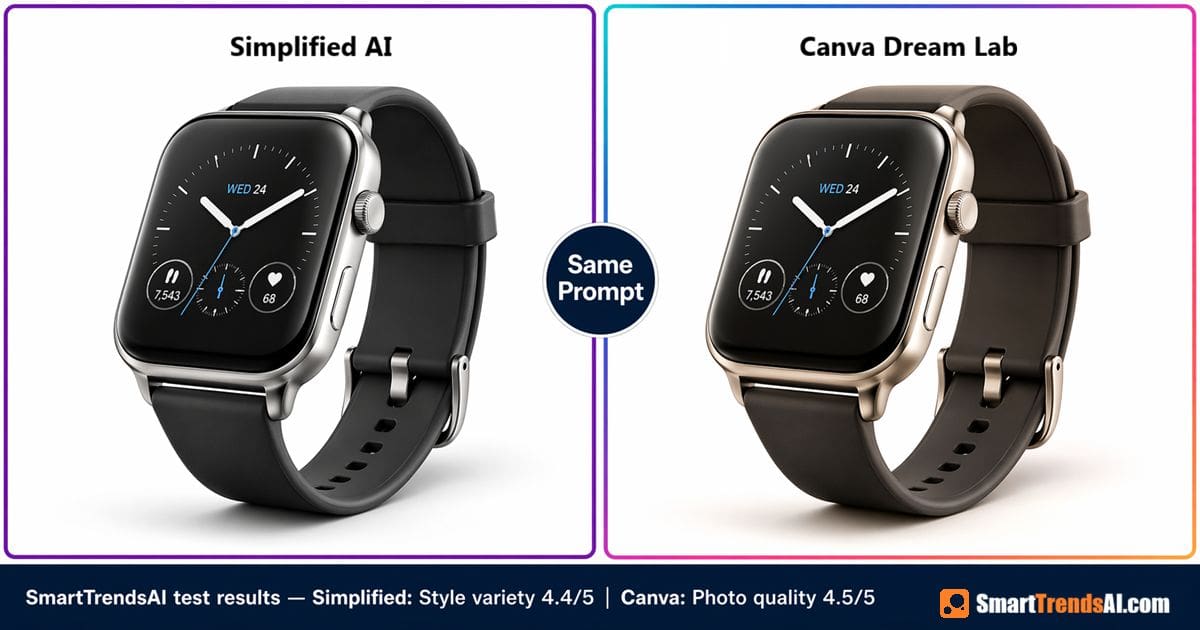
In our Simplified vs Canva AI image generation test — 20 standardised prompts across 4 style categories — both platforms performed well but with different strengths:
| AI Image Feature | Simplified | Canva AI (Dream Lab) | Winner |
|---|---|---|---|
| Style options | Photorealistic, illustration, anime, 3D, painting, sketch | Photorealistic, illustration, concept art, watercolour | Simplified |
| Photorealistic quality | 4.2 / 5 | 4.5 / 5 | Canva Dream Lab |
| Illustration quality | 4.4 / 5 | 4.1 / 5 | Simplified |
| Commercial use rights | ✅ Yes (paid plans) | ✅ Yes (Canva Pro) | Tie |
| Generation speed | ~8 seconds average | ~12 seconds average | Simplified |
| Images per month (paid) | Unlimited (Pro) | 500 credits/month (Pro) | Simplified |
| In-design AI editing | ⚠️ Limited | ✅ Magic Edit — replace, erase, expand | Canva AI |
| Overall image AI score | 4.3 / 5 | 4.2 / 5 | Simplified (slight edge) |
The Simplified vs Canva AI image generation comparison is close. Canva’s Dream Lab produces slightly better photorealistic images; Simplified offers more style variety and unlimited generation on paid plans. For users who need images primarily to place within designs, Canva AI wins on workflow. For standalone AI image creation at volume, the Simplified vs Canva AI answer is clear: Simplified is the better value on unlimited plans. For a dedicated AI image generation experience beyond both platforms, see our Best AI Image Generators 2026 guide.
🎨 Write Better Prompts — Get Better AI Content
Great AI content starts with great prompts. Use our free Prompt Generator for Simplified, Canva AI, ChatGPT, Midjourney, and 13+ other AI engines.
Which Tool is Better for Design and Templates — Simplified or Canva AI?
In the design category of our Simplified vs Canva AI comparison, Canva AI wins — and it is not close. Canva has been the world’s leading design platform since 2013. Its template library, design tools, brand kit management, and collaboration features are in a different league from Simplified’s design editor:
📐 Simplified vs Canva AI — Design Capability Comparison
- Template library: Canva 3,000,000+ templates vs Simplified 10,000+ templates
- Font library: Canva 3,000+ fonts vs Simplified ~800 fonts
- Brand Kit: Canva Pro — full brand colors, fonts, logos, and guidelines stored and applied across all designs. Simplified — basic brand colors only.
- Collaboration: Canva — real-time multi-user editing, comments, approval workflows. Simplified — basic sharing only.
- Presentation tools: Canva — full presentation suite with animations, presenter mode, and speaker notes. Simplified — basic slide creation.
- Print-ready output: Canva — professional print specs, bleed and trim marks, PDF export. Simplified — digital-first only.
- Magic Design (AI layout): Canva’s AI can generate a complete design layout from a prompt in seconds. No Simplified equivalent.
For any user whose primary output is designed visual content — social graphics, presentations, marketing materials, branded assets — the Simplified vs Canva AI answer is clear: Canva AI wins on design. Simplified’s design editor is functional but clearly secondary to its AI content tools.
Which is Better — Simplified vs Canva AI? Full Feature Comparison 2026
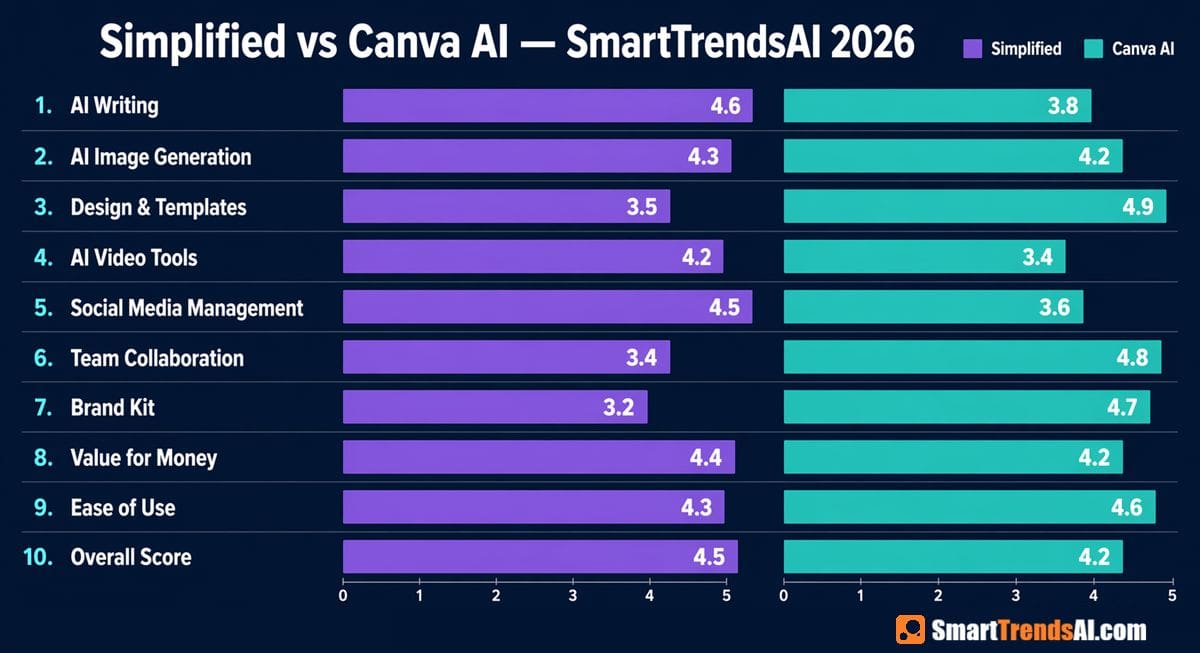
| Feature Category | Simplified | Canva AI | Winner |
|---|---|---|---|
| AI Writing (long-form) | ⭐ 4.6/5 | 3.8/5 | ✅ Simplified |
| AI Image Generation | 4.3/5 | 4.2/5 | ✅ Simplified (slight) |
| Design & Templates | 3.5/5 | ⭐ 4.9/5 | ✅ Canva AI |
| AI Video Tools | 4.2/5 | 3.4/5 | ✅ Simplified |
| Social Media Management | ⭐ 4.5/5 | 3.6/5 | ✅ Simplified |
| Team Collaboration | 3.4/5 | ⭐ 4.8/5 | ✅ Canva AI |
| Brand Kit & Consistency | 3.2/5 | ⭐ 4.7/5 | ✅ Canva AI |
| Value for Money | 4.4/5 | 4.2/5 | ✅ Simplified |
| Ease of Use | 4.3/5 | 4.6/5 | ✅ Canva AI |
| Overall Score | ⭐ 4.5/5 | 4.2/5 | ✅ Simplified |
📘 Free Download: AI Prompt Mastery Guide
Master prompt engineering across all AI platforms — writing, image, video, and voice. Plus weekly tips delivered to your inbox.
How Much Do Simplified and Canva AI Cost? Simplified vs Canva AI Pricing 2026
| Plan | Simplified | Canva AI |
|---|---|---|
| Free | Yes — limited AI words/month, basic design tools, watermarked AI images | Yes — generous design features, limited Magic Studio AI credits |
| Individual Pro | $18/month (or ~$12/month annually) | $15/month (or $10/month annually) |
| Team Plan | $30/month for 5 users | $10/user/month (min 2 users, billed annually) |
| AI Words/Month | Unlimited (Pro) | ~25,000 via Magic Write (Pro) |
| AI Image Credits | Unlimited (Pro) | 500 credits/month (Pro) |
| Social Scheduling | ✅ Included (Pro) | ✅ Included (Content Planner) |
| Brand Kit | ⚠️ Basic | ✅ Full (Pro) |
| Annual discount | ~33% off | ~33% off |
Simplified vs Canva AI pricing verdict: Canva Pro is $3/month cheaper than Simplified Pro, but Simplified’s unlimited AI words and images on the Pro plan deliver significantly more AI output per dollar for content-heavy users. For teams, Canva’s per-user pricing scales more cost-effectively for larger groups. For solo content creators, Simplified’s flat-rate Pro plan is the better AI value.
If the Simplified vs Canva AI writing tools still leave you needing more for SEO content, Scalenut is worth evaluating — it combines AI writing with SEO research, keyword clustering, and content optimisation at $39/month, making it a strong companion tool for content marketers using either Simplified or Canva.
Simplified vs Canva AI: Which Tool Should You Choose for Your Use Case in 2026?
| Use Case | Best Tool | Why |
|---|---|---|
| Blog writing & long-form content | ✅ Simplified | Native long-form AI writer, 50+ templates, unlimited words on Pro |
| Social media content creation | ✅ Simplified | AI writing + scheduling + design in one workflow; faster social pipeline |
| Brand design & marketing materials | ✅ Canva AI | 3M+ templates, full Brand Kit, print-ready export, superior design quality |
| Presentations & pitch decks | ✅ Canva AI | Best-in-class presentation tools with animations, presenter mode, and Magic Design |
| E-commerce product content | ✅ Simplified | AI product descriptions, ad copy, unlimited image generation for product visuals |
| Team design workflows | ✅ Canva AI | Real-time collaboration, approval workflows, Brand Kit enforcement across teams |
| AI video content | ✅ Simplified | More developed video AI — script generator, auto-captions, text-to-video |
| Email marketing content | ✅ Simplified | Email sequence templates, subject line AI, body copy generation with tone control |
| Agency & freelance design | ✅ Canva AI | Client sharing, professional export options, template customisation at scale |
| Solo content creator on a budget | ✅ Simplified | More AI capability per dollar; one tool replaces writing, design, and scheduling tools |
READ ALSO: Best AI Writing Tools 2026 | 30 Best Free AI Tools 2026
What Are the Pros and Cons of Simplified vs Canva AI?
Simplified vs Canva AI — Simplified Pros & Cons
✅ Simplified Advantages
- True all-in-one AI platform: Writing, images, video, scheduling, and design in a single workspace — no tool switching
- Best-in-class AI writer: Long-form content, 50+ templates, SEO mode, and tone controls outperform every competitor at this price point
- Unlimited AI on Pro: Unlimited AI words and image generation — no credit caps that interrupt your workflow
- Built-in social scheduler: Plan, create, and publish to 6+ social platforms without a separate tool like Buffer or Hootsuite
- Affordable Pro plan: At ~$12/month annually, it replaces 3–4 separate tools for most content creators
- AI video tools: Script generation, auto-captions, and background removal — further developed than Canva’s video AI
❌ Simplified Limitations
- Weaker design editor: Template library and design tools are significantly behind Canva — not suitable for professional design work
- Limited brand management: No full Brand Kit — basic brand colour saving only
- Basic collaboration: No real-time multi-user editing or approval workflows — limiting for teams
- Smaller template library: 10,000+ templates vs Canva’s 3,000,000+ — noticeably limited for design variety
- Less intuitive for beginners: The breadth of AI tools can overwhelm new users unfamiliar with AI content workflows
Simplified vs Canva AI — Canva AI Pros & Cons
✅ Canva AI Advantages
- World’s best template library: 3,000,000+ templates — no design tool comes close for variety and quality
- Superior design quality: Professional-grade output for presentations, marketing materials, and print — trusted by 200M+ users
- Full Brand Kit: Store colors, fonts, logos, and brand guidelines — enforced consistently across all team designs
- Best-in-class collaboration: Real-time multi-user editing, comments, and approval workflows — essential for design teams
- Magic Design: Generate complete design layouts from a text prompt instantly — no equivalent in Simplified
- Lower Pro price: $15/month vs Simplified’s $18/month — $36/year cheaper
- Excellent free tier: More usable design features on the free plan than any competitor
❌ Canva AI Limitations
- Weak long-form AI writer: Magic Write is limited to ~500 words — not a content production tool for blogs or articles
- AI credit limits: 500 image generation credits/month on Pro — Simplified offers unlimited
- AI video is early-stage: Magic Media produces 4-second clips only — not a video content creation tool
- No social AI scheduling: Content Planner lacks the AI-suggested timing and bulk creation pipeline Simplified offers
- AI is design-embedded: You cannot use Canva’s AI tools as standalone content generators outside the design canvas
- Why is Canva charging $15/month? The jump from free to Pro is significant — best justified only if you actively use Brand Kit, premium templates, and Magic Studio daily
📚 Explore More AI Tool Categories
Comprehensive guides across every AI category — writing, voice, video, image generation, and productivity.
Frequently Asked Questions — Simplified vs Canva AI 2026
Is Canva AI actually good?
Yes — in our Simplified vs Canva AI testing, Canva AI scored 4.2/5 overall and is genuinely impressive for design-centric tasks. Magic Design, Dream Lab image generation, and Magic Edit are standout features. Where Canva AI falls short is in long-form content generation — Magic Write is limited to ~500 words and cannot replace a dedicated AI writing tool. For design work, Canva AI is excellent. For content production, Simplified outperforms it significantly.
Is there a better AI than Canva AI?
For AI content generation in our Simplified vs Canva AI comparison, yes — Simplified outperforms Canva AI. Simplified scored 4.5/5 vs Canva AI’s 4.2/5, with decisive wins in AI writing (4.6/5 vs 3.8/5), video tools (4.2/5 vs 3.4/5), and social media management (4.5/5 vs 3.6/5). For pure design and templates, Canva AI remains the best tool available in 2026. The better question is: which tool fits your primary use case?
Is Simplified better than Canva for content creators?
In our Simplified vs Canva AI test, Simplified is the better choice for content creators who prioritise AI-generated text and social media workflows. It offers unlimited AI writing, a built-in social scheduler, AI video tools, and image generation in one platform. Canva AI is the better choice for content creators who need professional design quality, presentations, and brand-consistent visual content. Many professional content creators use both: Simplified for writing and scheduling, Canva for design-heavy deliverables.
Is Canva AI as good as ChatGPT?
No — Canva AI’s Magic Write is not comparable to ChatGPT for general AI conversation or long-form writing. Magic Write is a design-embedded text tool optimised for short copy within design projects. ChatGPT (GPT-4o) is a full large language model capable of complex reasoning, long-form writing, coding, and analysis. They serve entirely different purposes. For AI writing within a content-design workflow, Simplified’s AI writer is a more direct ChatGPT alternative than Canva’s Magic Write.
What is the weakness of Canva AI?
The three main weaknesses of Canva AI identified in our Simplified vs Canva AI 2026 review are: (1) Magic Write’s 500-word output limit makes it unsuitable for long-form content production; (2) Magic Media text-to-video produces only 4-second clips — far behind dedicated video AI tools; (3) 500 AI image credits/month on Pro creates friction for high-volume content creators. Canva’s AI is excellent within its design-first context but trails dedicated AI content platforms like Simplified on raw AI output capability.
Is Canva AI unlimited?
No — in our Simplified vs Canva AI comparison, Canva AI is not unlimited on any plan. Canva Pro includes approximately 500 AI image generation credits per month via Dream Lab, and Magic Write usage is metered. The free plan provides a small number of Magic Studio credits. In contrast, Simplified Pro offers unlimited AI word generation and unlimited image generation, making it the better choice for high-volume AI content creators who would otherwise exhaust Canva’s monthly limits.
Which is better — Beautiful AI or Canva for presentations?
In the Simplified vs Canva AI presentation category, Beautiful.ai edges Canva on automated smart slide layouts for pure presentation use. However, Canva AI’s overall presentation feature set — including 3,000,000+ templates, animations, presenter mode, and Magic Design — makes it the more versatile choice for most users. Beautiful.ai is purpose-built for presentations; Canva is a broader design platform. For content-first presentations (heavy text, reports, pitches), Simplified’s AI writer combined with Canva’s presentation templates is the most powerful combination.
What’s cheaper than Canva Pro?
In our Simplified vs Canva AI pricing analysis, Simplified’s annual plan at ~$12/month is the most capable cheaper alternative. Other options below $15/month: Adobe Express free tier (limited) and Picsart ($5/month for basic design)., Adobe Express free tier (limited), and Picsart ($5/month for basic design). However, no tool at a lower price point matches Canva’s template library and design quality. If cost is the primary concern, Canva’s free tier is genuinely useful for basic design needs without any payment.
🏆 Final Verdict — Simplified vs Canva AI (2026)
Based on SmartTrendsAI’s Simplified vs Canva AI testing across 80+ tasks in Q1 2026, here is our definitive verdict — and it is clear:
🥇 Best Overall AI Suite
Simplified — 4.5/5. Wins on AI writing, video, social media, and value per dollar. The top choice for content-first creators, marketers, and solo operators who want one AI tool to do everything.
🎨 Best for Design
Canva AI — 4.2/5. Unmatched template library, Brand Kit, and design quality. The clear choice for designers, agencies, and teams prioritising visual output over AI-generated text.
🆓 Best Free Tier
In the Simplified vs Canva AI free tier battle, Canva AI wins — more usable design features at zero cost. Canva free gives you access to 250,000+ templates and basic design tools at zero cost.
💰 Best Value Paid
Simplified Pro (~$12/mo annually) — Unlimited AI writing and images replace multiple separate tools. For content creators, this is the highest ROI AI subscription in 2026.
The definitive Simplified vs Canva AI recommendation: If you create content at volume — blogs, social posts, email, ads, video scripts — Simplified is the better investment. If you create designed visual assets — presentations, branded marketing materials, team graphics — Canva AI is the better investment. The most effective content teams in 2026 use both in tandem: Simplified for AI content generation, Canva for design production.
</sectio