

🎯 Quick Overview
- 📚 Student AI Adoption: 78% of college students use AI tools regularly
- 🏆 Top Tools: ChatGPT, Claude, Gemini, Perplexity, Grammarly, Quillbot, Notion AI
- 💰 Pricing: Most tools free; premium plans $10-20/month with student discounts
- ⚡ Best For: Essay writing, research, studying, coding, note-taking, math help
- 🎯 Key Trend: AI tutoring and personalized learning becoming mainstream
- ⭐ Our Pick:
Best Overall for Students: ChatGPT (Free tier) — Most versatile AI assistant for essays, research, coding, and study help. Handles virtually any academic task with excellent quality.
Best for Research: Perplexity AI (Free) — Real-time web search with cited sources. Perfect for research papers and fact-checking.
Best for Writing: Claude (Free tier) — Superior writing quality with nuanced feedback. Excellent for essay improvement and brainstorming.
Budget Recommendation: Start with free tiers of ChatGPT + Perplexity + Grammarly. Covers 90% of student needs at $0/month.
📋 Key Takeaways
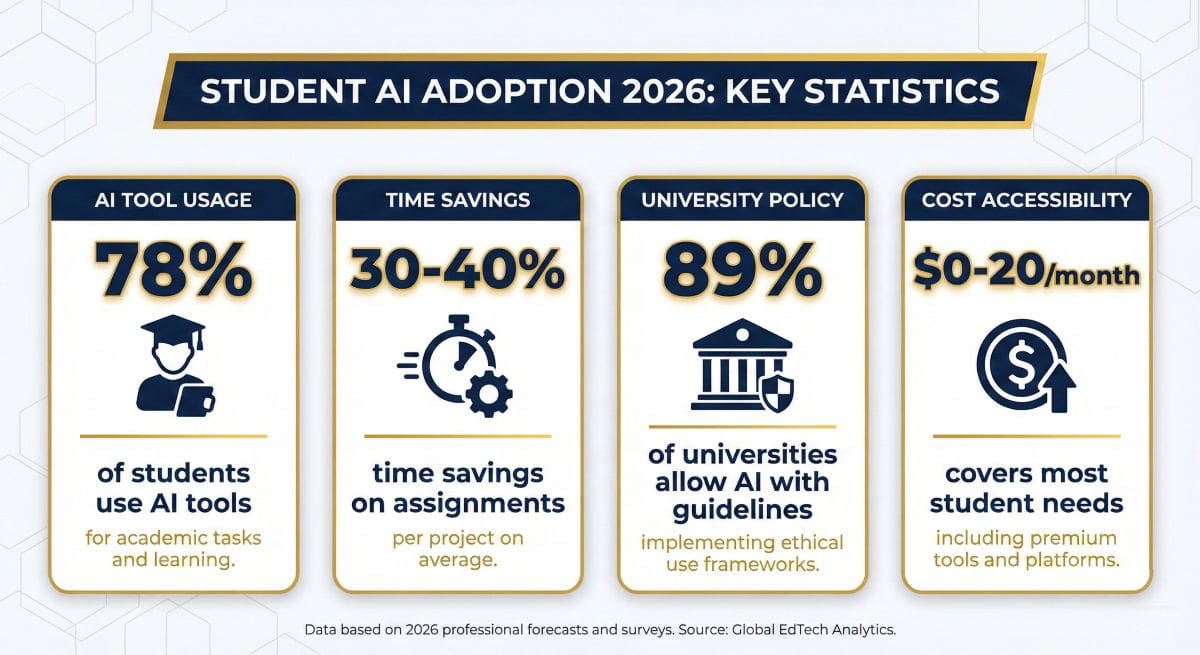
- 78% of college students now use AI tools for academic work (2026 survey data)
- Free options dominate: ChatGPT, Claude, Gemini, and Perplexity all offer powerful free tiers
- Time savings: Students report 30-40% reduction in research and writing time
- Best combination: ChatGPT (general) + Perplexity (research) + Grammarly (editing) + Quillbot (paraphrasing)
- Academic integrity matters: Use AI as a learning aid, not to replace your own thinking
- Total cost for students: $0-20/month covers all essential AI tools
📑 Table of Contents
- What Are AI Tools for Students?
- Why Do Students Need AI Tools in 2026?
- What Are the Best AI Tools for Students in 2026?
- How Do the Best Student AI Tools Compare?
- What Are the Best AI Tools for Essay Writing?
- What Are the Best AI Tools for Research?
- What Are the Best AI Tools for Studying?
- What Are the Best AI Tools for Coding Students?
- Should Students Pay for AI Tools or Use Free Versions?
- How Can Students Use AI Tools Responsibly?
- What Are the Pros and Cons of AI Tools for Students?
- Frequently Asked Questions
- What Is Our Final Verdict on Student AI Tools?
What Are AI Tools for Students?
AI tools for students are artificial intelligence-powered applications designed to help with academic tasks including research, writing, studying, coding, and organization. These tools use large language models (LLMs) and machine learning to understand questions, generate content, provide explanations, and assist with learning—essentially acting as 24/7 tutors and productivity assistants.
The best AI tools for students in 2026 go far beyond simple chatbots. Modern AI assistants like ChatGPT, Claude, and Gemini can explain complex concepts in simple terms, help structure essays, solve math problems step-by-step, debug code, create study materials, and even provide personalized tutoring across virtually any subject.
What makes these tools transformative for education is their accessibility. Unlike expensive tutoring services, most AI tools offer powerful free tiers that meet the majority of student needs. A student can get instant help at 2 AM before an exam, receive feedback on an essay draft, or understand a difficult physics concept—all without scheduling appointments or paying hourly rates.
💡 Key Capabilities of Student AI Tools
- Essay Assistance: Brainstorming, outlining, drafting, editing, and citation help
- Research Support: Finding sources, summarizing papers, fact-checking with citations
- Personalized Tutoring: Explaining concepts at your level, answering follow-up questions
- Study Aid: Creating flashcards, practice questions, summaries, and study guides
- Code Help: Debugging, explaining code, learning programming languages
- Math Solving: Step-by-step solutions with explanations
- Language Learning: Translation, grammar correction, conversation practice
- Organization: Note-taking, scheduling, project management
The technology has evolved rapidly since ChatGPT’s 2022 launch. Today’s AI tools understand context, remember conversation history, process images and documents, search the web in real-time, and generate sophisticated responses that rival human tutors. For students willing to learn how to use them effectively, these tools represent the most significant educational technology advancement in decades.
🚀 Ready to Boost Your Academic Performance?
Start with the best free AI tools for students—no credit card required.
Why Do Students Need AI Tools in 2026?
The academic landscape has fundamentally shifted. What was once optional technology has become essential for competitive academic performance. Here’s why AI tools matter for students in 2026:
The Numbers Are Clear
Recent surveys show 78% of college students now use AI tools for academic work. This isn’t a fringe behavior—it’s the new normal. Students who don’t leverage AI assistance find themselves at a disadvantage compared to peers who can research faster, write more efficiently, and study more effectively.
The productivity gains are substantial. Students report 30-40% reduction in time spent on research and first drafts. That’s 10-15 extra hours per week that can go toward deeper learning, extracurricular activities, or simply better work-life balance.
24/7 Personalized Tutoring
Traditional tutoring costs $40-100+ per hour and requires scheduling. AI tools provide unlimited, instant help at any hour. Stuck on calculus at midnight? Ask ChatGPT. Need feedback on your thesis introduction at 6 AM? Claude is available. This democratization of academic support benefits students regardless of economic background.
Unlike human tutors, AI adapts explanations to your level instantly. If the first explanation doesn’t click, ask for a simpler version, an analogy, or a real-world example. The AI never gets impatient, never judges, and never runs out of time.
Research Revolution
Tools like Perplexity AI have transformed research. Instead of hours scrolling through Google results and evaluating sources, students can ask specific questions and receive cited answers instantly. The AI synthesizes information from multiple sources, saving hours while improving accuracy.
This doesn’t replace critical thinking—it accelerates it. Students spend less time finding information and more time analyzing, synthesizing, and forming original arguments.
Writing Enhancement
AI writing assistants help students improve their writing skills, not bypass them. Tools like Grammarly and Quillbot provide feedback that teaches better writing habits. Students learn why a sentence is unclear or why passive voice weakens their argument—feedback that improves future writing.
READ ALSO: Grammarly vs QuillBot 2026 Which AI Tool is Best? (Tested)
STEM Support
For coding students, AI assistants have become indispensable. GitHub Copilot and ChatGPT explain code, debug errors, and help learn programming concepts. Math students get step-by-step solutions with explanations, not just answers. Science students can explore concepts through interactive Q&A sessions.
The Bottom Line
AI tools are no longer optional extras—they’re essential academic infrastructure. The question isn’t whether to use them, but how to use them effectively and ethically. Students who master AI assistance gain significant advantages in productivity, learning efficiency, and academic performance.
What Are the Best AI Tools for Students in 2026?
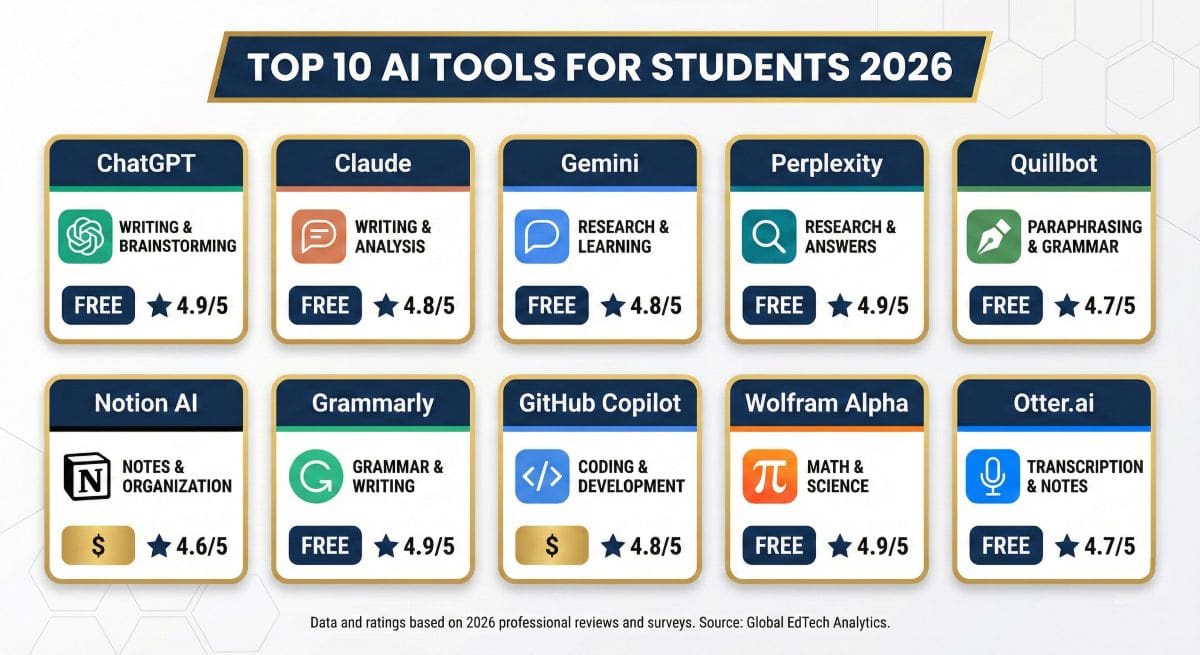
After extensive testing across dozens of AI platforms, we’ve identified the best AI tools for students based on educational value, free tier quality, ease of use, and academic relevance. Here’s our definitive ranking:
1. ChatGPT (OpenAI) — Best Overall AI for Students
ChatGPT remains the gold standard for student AI assistance. With over 200 million weekly users, it’s the most versatile and well-tested AI tool available. The free tier is remarkably capable, handling everything from essay brainstorming to coding help to math explanations.
Key Features for Students:
- Explain any concept at your understanding level
- Help brainstorm, outline, and edit essays
- Solve math problems with step-by-step explanations
- Debug code and explain programming concepts
- Create study materials, flashcards, and practice questions
- Available 24/7 with instant responses
Pricing: Free (GPT-3.5) | Plus $20/month (GPT-4, DALL-E, advanced features)
Best For: All students—the most versatile option covering every academic need
Limitations: Knowledge cutoff means less reliable for very recent events; free tier occasionally limited during peak times
2. Claude (Anthropic) — Best for Essay Writing & Analysis
Claude excels at nuanced writing tasks and long-form analysis. Its ability to handle large documents (up to 200K tokens) makes it perfect for analyzing readings, reviewing research papers, and providing detailed essay feedback. Many students prefer Claude’s writing style over ChatGPT.
Key Features for Students:
- Superior writing quality and style suggestions
- Process and analyze entire textbooks or long documents
- Detailed, thoughtful feedback on essays
- Excellent at explaining complex topics clearly
- Strong ethical guidelines prevent misuse
- Free tier highly capable for most needs
Pricing: Free (Claude Sonnet) | Pro $20/month (Claude Opus, 5x usage)
Best For: English majors, humanities students, anyone writing long-form content
Limitations: No web search in free tier; can be overly cautious with some requests
3. Google Gemini — Best for Research & Google Integration
Google Gemini offers unique advantages for students already in the Google ecosystem. Its integration with Google Search, Docs, and Drive creates a seamless research workflow. Real-time web access means always-current information.
Key Features for Students:
- Real-time web search for current information
- Direct integration with Google Docs, Sheets, and Slides
- Upload and analyze images, PDFs, and documents
- Free with any Google account
- Excellent for research requiring current data
- Strong multilingual support
Pricing: Free (Gemini Pro) | Advanced $19.99/month via Google One (Gemini Ultra + 2TB storage)
Best For: Students who use Google Workspace, research-heavy coursework
Limitations: Responses can be less detailed than ChatGPT or Claude
4. Perplexity AI — Best for Research Papers
Perplexity AI is purpose-built for research. Unlike general chatbots, every answer includes source citations. This makes it invaluable for research papers where you need to verify information and cite sources. Think of it as AI-powered research that shows its work.
Key Features for Students:
- Every answer includes cited sources
- Real-time web search with current information
- Follow-up questions refine research
- Export with citations for papers
- Academic focus with scholarly sources
- Free tier excellent for most research needs
Pricing: Free (unlimited basic searches) | Pro $20/month (GPT-4 searches, file uploads)
Best For: Research papers, fact-checking, students who need cited sources
Limitations: Less helpful for creative or generative tasks
5. Quillbot — Best Paraphrasing & Grammar Tool
Quillbot specializes in paraphrasing and grammar improvement. It helps students rephrase sentences while maintaining meaning, improve vocabulary, and check grammar—all essential for polishing essays and avoiding unintentional plagiarism.
Key Features for Students:
- Multiple paraphrasing modes (Standard, Fluency, Formal, Creative)
- Grammar checker integrated
- Summarizer for condensing readings
- Citation generator for papers
- Chrome extension for easy access
- Free tier covers basic paraphrasing needs
Pricing: Free (125 words at a time) | Premium $9.95/month (unlimited, all modes)
Best For: ESL students, anyone working on writing clarity, avoiding repetitive phrasing
Limitations: Free tier word limit frustrating for longer texts
6. Notion AI — Best for Organization & Note-Taking
Notion AI integrates AI directly into Notion’s powerful note-taking and organization platform. Students can summarize lecture notes, generate action items, brainstorm ideas, and organize research—all within their existing workflow.
Key Features for Students:
- Summarize long lecture notes instantly
- Generate study guides from class materials
- Extract action items and deadlines
- Brainstorm within note context
- Translate notes to different languages
- Fix grammar and improve writing inline
Pricing: Notion Free + $10/month for AI features | Education discount available
Best For: Organized students who use Notion, project management, team collaborations
Limitations: Requires learning Notion; AI is add-on cost to free tier
7. Grammarly — Best Writing Improvement Tool
Grammarly goes beyond spell-check to provide comprehensive writing improvement. Its AI analyzes clarity, engagement, delivery, and correctness—helping students not just fix errors but understand why their writing works or doesn’t.
Key Features for Students:
- Grammar, spelling, and punctuation checking
- Clarity and engagement suggestions
- Tone detection and adjustment
- Plagiarism checker (Premium)
- Works across browsers, docs, and apps
- Free tier excellent for basic correction
Pricing: Free (basic corrections) | Premium $12/month (full features) | Student discounts available
Best For: Every student—essential writing companion regardless of major. See our Grammarly vs Quillbot comparison.
Limitations: Premium expensive without discount; suggestions sometimes overly conservative
8. GitHub Copilot — Best for CS & Coding Students
GitHub Copilot is the AI coding assistant that computer science students swear by. It suggests code as you type, explains existing code, helps debug errors, and accelerates learning programming languages.
Key Features for Students:
- Real-time code suggestions in your IDE
- Explains code and suggests improvements
- Supports all major programming languages
- Helps debug and fix errors
- Free for verified students
- Integrates with VS Code, JetBrains, and more
Pricing: FREE for students (with GitHub Education) | Individual $10/month otherwise
Best For: Computer science students, anyone learning to code
Limitations: Requires IDE setup; can suggest incorrect code that needs verification
READ ALSO: Cursor AI Review 2026: Best AI Code Editor? (Tested All Plans)
9. Wolfram Alpha — Best for Math & Science
Wolfram Alpha is the computational knowledge engine that excels at math, science, and technical subjects. Unlike AI chatbots that might make calculation errors, Wolfram Alpha provides precise, computed answers with step-by-step solutions.
Key Features for Students:
- Precise mathematical computations
- Step-by-step problem solutions (Pro)
- Chemistry, physics, engineering support
- Statistical analysis and graphing
- Unit conversions and formulas
- Homework help with explanations
Pricing: Free (basic answers) | Pro $7.25/month for students (step-by-step solutions)
Best For: STEM students, especially math, physics, chemistry, engineering
Limitations: Less helpful for non-quantitative subjects; free tier lacks step-by-step
10. Otter.ai — Best for Lecture Transcription
Otter.ai uses AI to transcribe lectures, meetings, and discussions in real-time. Students can focus on understanding rather than frantic note-taking, then review AI-generated summaries and search transcripts later.
Key Features for Students:
- Real-time lecture transcription
- AI-generated summaries and action items
- Searchable transcript archive
- Share and collaborate on notes
- Integrates with Zoom, Google Meet
- Free tier generous for students
Pricing: Free (600 min/month) | Pro $16.99/month (unlimited) | Education pricing available
Best For: Students with lecture-heavy courses, accessibility needs, study groups
Limitations: Accuracy varies with audio quality and accents
READ ALSO: Best AI Tools for Small Business 2026: Top 10 Tested & Reviewed
How Do the Best Student AI Tools Compare?
| Tool | Best For | Free Tier | Paid Price | Student Discount | Rating |
|---|---|---|---|---|---|
| ChatGPT | Everything | ✅ Excellent | $20/month | ❌ | ⭐ 4.9/5 |
| Claude | Essay Writing | ✅ Excellent | $20/month | ❌ | ⭐ 4.8/5 |
| Gemini | Research + Google | ✅ Excellent | $19.99/month | ❌ | ⭐ 4.6/5 |
| Perplexity | Research Papers | ✅ Good | $20/month | ❌ | ⭐ 4.7/5 |
| Quillbot | Paraphrasing | ✅ Limited | $9.95/month | ❌ | ⭐ 4.4/5 |
| Notion AI | Organization | ❌ Add-on | $10/month | ✅ Free Notion | ⭐ 4.5/5 |
| Grammarly | Writing Polish | ✅ Good | $12/month | ✅ Discounts | ⭐ 4.6/5 |
| GitHub Copilot | Coding | ❌ | $10/month | ✅ FREE | ⭐ 4.7/5 |
| Wolfram Alpha | Math/Science | ✅ Basic | $7.25/month | ✅ 50% off | ⭐ 4.5/5 |
| Otter.ai | Lectures | ✅ 600 min | $16.99/month | ✅ Edu pricing | ⭐ 4.3/5 |
For a deeper comparison of the top AI assistants, see our detailed ChatGPT vs Claude vs Gemini comparison guide.
📚 Explore More AI Tools
Discover comprehensive reviews and comparisons across all AI categories.
</p
Most students can accomplish academic tasks with free AI tiers. Here’s when upgrading makes sense.
What Are the Best AI Tools for Essay Writing?
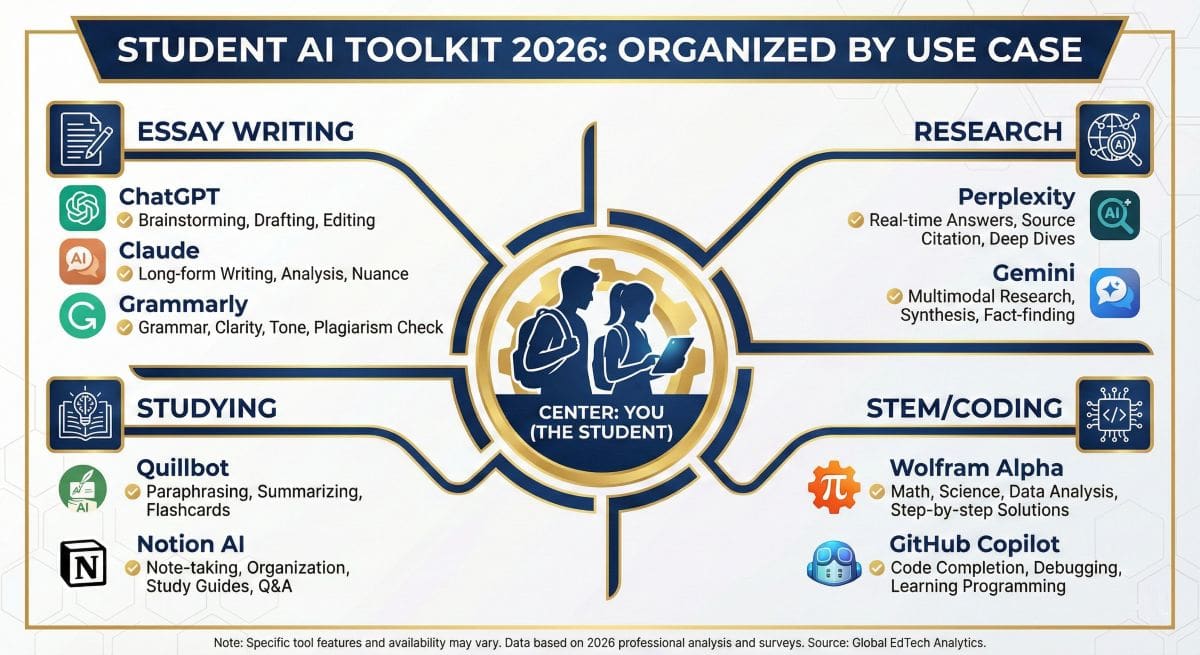
Essay writing is where AI tools shine brightest for students. Here’s how to use them effectively for each stage of the writing process:
Brainstorming & Outlining
Ask the AI to help generate thesis ideas, outline arguments, or explore different angles on a topic. Both tools excel at brainstorming and can suggest essay structures tailored to your assignment requirements.
Research & Citations
Best Tool: Perplexity AI
Use Perplexity to research your topic with automatic source citations. The tool synthesizes information from multiple sources and provides links you can verify and cite in your paper.
First Draft Feedback
Best Tool: Claude
Claude provides the most thoughtful, nuanced feedback on essay drafts. It can identify logical gaps, suggest stronger evidence, and help improve argument flow while maintaining your voice.
Grammar & Polish
Best Tool: Grammarly + Quillbot
Use Grammarly throughout writing for real-time corrections. Then run your final draft through Quillbot to improve sentence variety and vocabulary. See our Grammarly vs Quillbot comparison for detailed differences.
⚠️ Important: Use AI Ethically for Essays
AI should assist your thinking, not replace it. Use AI to improve your ideas and writing—not to generate essays you submit as entirely your own work. Most universities consider AI-generated content without disclosure to be academic dishonesty. Always check your institution’s AI policy.
READ NEXT: Rytr Review 2026: Cheapest AI Writing Tool Worth It?
What Are the Best AI Tools for Research?
Research efficiency is where AI provides the most dramatic time savings. Students report cutting research time by 50% or more using the right tools:
Recommended Research Stack
🔍 Perplexity AI
- Real-time web search
- Automatic citations
- Follow-up questions
- Academic source focus
Use For: Initial research, fact-finding, source discovery
📚 Google Gemini
- Current information
- Google Scholar integration
- Document analysis
- Multimodal support
Use For: Current events, cross-referencing, analyzing PDFs
For comprehensive research projects, start with Perplexity to map the topic and identify key sources. Use Gemini for current information and to analyze specific documents. Then use ChatGPT or Claude to help synthesize findings and develop arguments.
What Are the Best AI Tools for Studying?
AI transforms studying from passive review to active learning. Here’s how to leverage AI tools for better retention and exam preparation:
Create Custom Study Materials
Ask ChatGPT or Claude to generate flashcards, practice questions, or study guides from your notes. The AI can create questions at different difficulty levels and explain the reasoning behind answers.
Understand Difficult Concepts
Use AI as a personal tutor. Ask it to explain concepts using analogies, real-world examples, or simpler terms. Follow up with questions until you truly understand—AI never loses patience.
Test Your Knowledge
Have AI quiz you on material and provide feedback on your answers. This active recall practice is more effective than passive re-reading.
Summarize Long Readings
Upload readings to Claude (with its large context window) for summaries and key point extraction. Use this to review efficiently before exams.
Explore more free options in our 30 Best Free AI Tools guide.
What Are the Best AI Tools for Coding Students?
Computer science and programming students have access to powerful AI coding assistants that accelerate learning and debugging:
Top Picks for Coding
1. GitHub Copilot (Free for Students) — The gold standard for in-IDE code suggestions. With GitHub Education, it’s completely free for verified students.
2. ChatGPT — Excellent for explaining code, debugging errors, and learning programming concepts. Handles most languages and frameworks.
3. Claude — Particularly good at explaining complex code and providing detailed documentation.
💻 Getting GitHub Copilot Free
- Go to GitHub Education
- Verify student status with school email or ID
- Access GitHub Copilot plus other developer tools free
This is one of the best student tech benefits available—normally $10/month.
Should Students Pay for AI Tools or Use Free Versions?
Good news: most students can accomplish everything they need with free AI tools. Here’s the honest breakdown:
The Free Stack (Covers 90% of Student Needs)
- ChatGPT Free — General assistance, essays, coding, math
- Claude Free — Long documents, essay feedback, writing quality
- Perplexity Free — Research with citations
- Grammarly Free — Basic grammar and spelling
- GitHub Copilot — Free for students (coding)
Total Cost: $0/month
When to Consider Paid Upgrades
ChatGPT Plus ($20/month) — Worth it if you hit usage limits frequently, need GPT-4’s superior reasoning, or want image generation.
Grammarly Premium ($12/month) — Valuable for ESL students, journalism majors, or anyone serious about writing improvement.
Wolfram Alpha Pro ($7.25/month student price) — Essential for STEM students who need step-by-step solutions.
Our Budget Recommendation
Start with the free stack. Use it for at least a month before considering any paid upgrades. Most students discover the free tiers are more than sufficient. If you do upgrade, Wolfram Alpha Pro for STEM students or Grammarly Premium for writing-intensive majors provide the best value.
How Can Students Use AI Tools Responsibly?
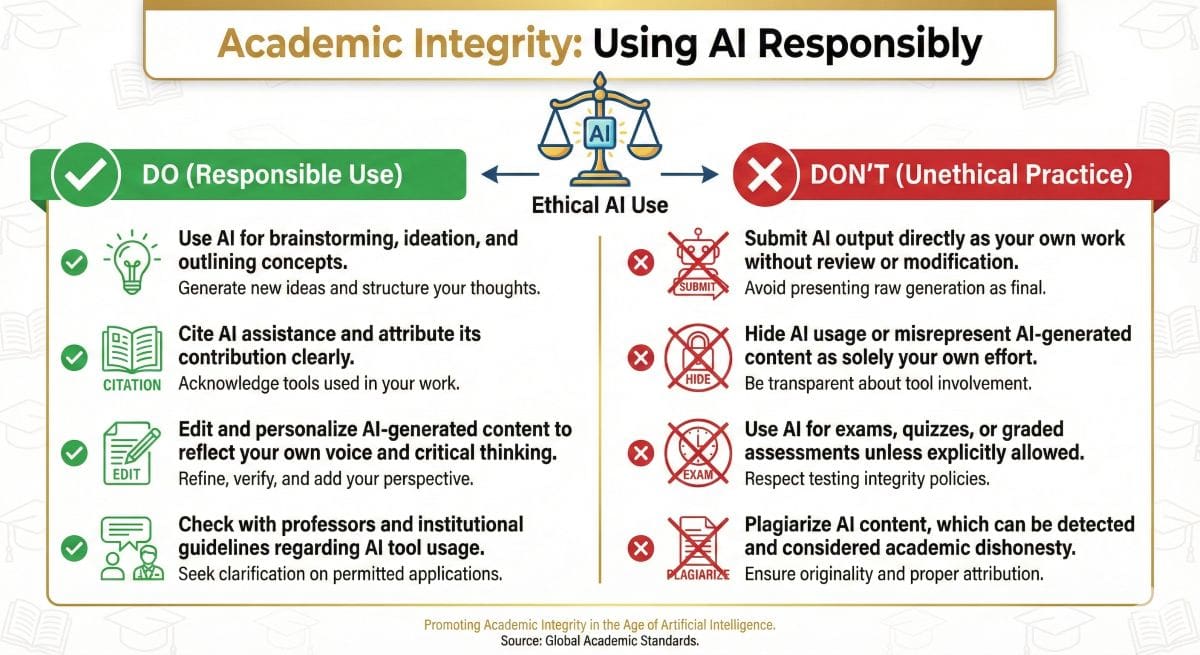
Using AI tools responsibly is crucial for both ethical and practical reasons. Here’s what every student needs to know:
The Golden Rules
- Know Your School’s Policy — AI policies vary widely. Some professors welcome AI assistance; others prohibit it entirely. Always check.
- Use AI to Enhance, Not Replace — AI should improve your thinking and writing, not bypass it. The goal is learning.
- Disclose When Required — If asked, be honest about AI assistance. Many schools require disclosure.
- Verify AI Output — AI can make mistakes. Always fact-check and verify information before submitting.
- Develop Your Own Skills — Don’t become dependent on AI. Use it as a tool, not a crutch.
What’s Generally Acceptable
- Using AI for brainstorming and idea generation
- Grammar and spelling checking
- Getting explanations of difficult concepts
- Generating practice questions for studying
- Debugging code (for programming courses that allow it)
- Research assistance and source finding
What’s Generally NOT Acceptable
- Submitting AI-generated work as your own
- Using AI during closed-book exams
- Having AI complete assignments meant to develop your skills
- Not disclosing AI use when required
Remember
The purpose of education is learning and skill development. AI is most valuable when it accelerates your learning—not when it lets you skip it. Employers will eventually test your actual knowledge and abilities; make sure you’re developing real skills alongside AI proficiency.
For more on AI detection and academic integrity, see our Best AI Detectors guide.
READ ALSO: How to Detect AI-Generated Content or AI Detectors vs AI Writing Detectors
What Are the Pros & Cons of AI Tools for Students?
✅ Advantages
- 24/7 Availability: Help whenever you need it, including late nights before deadlines
- Cost-Effective: Free tiers offer more than most students need
- Personalized: Explanations adapted to your level of understanding
- Time Savings: 30-40% reduction in research and writing time
- Comprehensive: Help with every subject and task type
- Patience: Never judges, never rushes, unlimited follow-up questions
- Skill Building: Feedback helps you improve, not just complete tasks
❌ Limitations
- Accuracy Issues: AI can make mistakes and “hallucinate” facts
- Academic Integrity Risks: Misuse can lead to serious consequences
- Over-Reliance Risk: May hinder development of independent skills
- Policy Confusion: Rules vary by school, course, and professor
- Knowledge Cutoffs: Some tools lack very recent information
- Generic Output: Can produce formulaic content without personal voice
- Privacy Concerns: Data shared with AI providers
Frequently Asked Questions
What is the best AI tool for students in 2026?
ChatGPT is the best overall AI tool for students due to its versatility, powerful free tier, and ability to help with essays, research, coding, math, and virtually any academic task. For specialized needs, pair it with Perplexity (research), Grammarly (writing), and Wolfram Alpha (STEM).
Are AI tools free for students?
Yes, most AI tools offer excellent free tiers. ChatGPT, Claude, Gemini, and Perplexity all have free versions powerful enough for most student needs. GitHub Copilot is completely free for verified students. You can accomplish most academic tasks without spending anything.
Is using AI for homework cheating?
It depends on how you use it and your school’s policy. Using AI for brainstorming, explanations, or editing is generally acceptable. Submitting AI-generated work as your own is typically considered academic dishonesty. Always check your institution’s AI policy and disclose AI use when required.
Can professors detect AI writing?
AI detection tools like GPTZero and Turnitin can detect AI-generated content with varying accuracy (typically 70-95%). However, heavily edited AI content or AI-assisted writing is harder to detect. The safest approach is using AI ethically—as an assistant rather than author—and disclosing when required.
Which AI is best for essay writing?
Claude offers the best writing quality and feedback for essays. ChatGPT is more versatile and widely available. For research papers specifically, Perplexity provides cited sources. Use Grammarly and Quillbot for final editing and polish.
What AI tools help with math?
Wolfram Alpha is the gold standard for math, providing precise calculations with step-by-step solutions (Pro required). ChatGPT and Claude can explain concepts and work through problems, though they occasionally make calculation errors. For maximum accuracy, use Wolfram Alpha for computation and ChatGPT for conceptual understanding.
Is ChatGPT Plus worth it for students?
For most students, ChatGPT Free is sufficient. ChatGPT Plus ($20/month) is worth considering if you frequently hit usage limits, need GPT-4’s superior reasoning for complex tasks, or want features like image generation and data analysis. Try the free tier first before upgrading.
How do I get GitHub Copilot free as a student?
Apply for GitHub Education at education.github.com with your school email or student ID. Once verified, you get free access to GitHub Copilot, GitHub Pro, and various developer tools. This is one of the most valuable free resources for computer science students.
🏆 What Is Our Final Verdict on Student AI Tools?
After testing dozens of AI tools, here are our definitive recommendations for students in 2026:
🥇 Best Overall
ChatGPT — Most versatile AI assistant covering all academic needs with an excellent free tier.
💰 Best Free Stack
ChatGPT + Claude + Perplexity + Grammarly — Covers 90% of student needs at $0/month.
📝 Best for Writing
Claude + Grammarly — Superior essay feedback combined with comprehensive writing improvement.
💻 Best for Coding
GitHub Copilot— Free for students, industry-standard AI coding assistant in your IDE.
Bottom Line
AI tools have become essential for academic success in 2026. The good news: powerful free options mean every student can benefit regardless of budget. Start with the free stack (ChatGPT, Claude, Perplexity, Grammarly), learn to use these tools effectively and ethically, and upgrade only when you identify specific needs the free tiers don’t meet.
Remember: AI is a tool to enhance your learning, not replace it. Use it wisely, develop your own skills alongside AI proficiency, and always prioritize academic integrity.