


Quick Verdict: GitHub Copilot Review (2026)
- ⭐ Quality Score: 4.6/5 — The most widely adopted AI coding tool and the best value for individual developers
- 🏆 Best For: Developers who want reliable AI assistance at the lowest price with the deepest GitHub ecosystem integration
- 💰 Pricing: Free plan available; Pro $10/month; Pro+ $39/month; Business $19/user/month; Enterprise $39/user/month
- 🆓 Free Tier: 2,000 completions + 50 agent mode/chat requests per month — no credit card required
- 🎯 Standout Feature: Copilot Coding Agent — assign GitHub issues and Copilot autonomously creates pull requests with working code
- 💡 Bottom Line: GitHub Copilot Pro at $10/month delivers 80% of the AI coding value at 50% of Cursor’s price — the clear winner for developers who prioritize value and GitHub integration over cutting-edge agentic features
🧪 Key Takeaways
- Tested: GitHub Copilot across all 5 tiers for this review (Free, Pro, Pro+, Business, Enterprise) over 60+ days in early 2026
- Inline Suggestions: 2,000/month on Free, unlimited on all paid plans — fast, context-aware, and useful across all popular languages
- Premium Requests: The new currency — 50 (Free), 300 (Pro), 1,500 (Pro+) per month for Chat, Agent mode, code review, and model selection
- Models Available: Claude Haiku 4.5 through Opus 4.6, GPT-5 mini through GPT-5.4, Gemini 2.5–3.1 Pro, Grok Code Fast 1
- Coding Agent: Assign issues → Copilot creates PRs automatically. Available on Pro and above — a genuine game-changer for routine tasks
- Free Tier Reality: 2,000 completions lasts ~1–2 weeks of active coding; 50 premium requests run out in ~2–3 days of regular Chat use
- vs Cursor: Copilot delivers 80% of the value at 50% the price ($10 vs $20). Cursor wins on Composer multi-file editing and Agent mode depth. Both offer Claude Opus 4.6 access
This GitHub Copilot review is published by SmartTrendsAI, an independent platform that tests, compares, and reviews AI tools for marketing, content creation, SEO, and productivity. We tested all 5 GitHub Copilot tiers over 60+ days on real production codebases, evaluating code quality, pricing accuracy, agentic capabilities, model access, and ecosystem integration.
📑 Table of Contents
- What Is GitHub Copilot?
- Who Is GitHub Copilot For?
- What Features Does GitHub Copilot Offer in 2026?
- How Much Does GitHub Copilot Cost? (All 5 Plans Reviewed)
- Is GitHub Copilot Free Actually Useful?
- What AI Models Power GitHub Copilot?
- Is GitHub Copilot Better Than Cursor?
- What Are the Pros and Cons? (GitHub Copilot Review Summary)
- Frequently Asked Questions
- Final Verdict: Is GitHub Copilot Worth It?
What Is GitHub Copilot? (Review Overview)
GitHub Copilot is an AI-powered coding assistant built by GitHub (Microsoft) that provides real-time code suggestions, conversational AI chat, automated code review, and autonomous coding agents directly inside your development environment. In this GitHub Copilot review, we cover every feature, all 5 pricing tiers, the new premium request system, and how it compares to competitors like Cursor and Claude Code in 2026.
Originally launched in 2022 as a simple autocomplete tool — as we detail throughout this GitHub Copilot review — the platform has evolved into the most widely adopted AI coding tool on the planet — with millions of individual users and tens of thousands of business customers. The platform now integrates with VS Code, Visual Studio, JetBrains IDEs, Xcode, Eclipse, Neovim, Raycast, SQL Server Management Studio, and Zed — the broadest IDE support of any AI coding assistant.
What sets GitHub Copilot apart in 2026 is not just code suggestions — it is the depth of integration with the GitHub ecosystem. Copilot now reviews your pull requests, assigns itself issues and creates working PRs, runs in your terminal via Copilot CLI, and provides conversational assistance directly on github.com. According to the official GitHub Copilot documentation, the platform supports over a dozen editors and IDEs — the broadest support of any AI coding assistant.
🚀 Ready to Try GitHub Copilot?
Based on this GitHub Copilot review, we recommend starting with the free plan — no credit card required. Upgrade to Pro ($10/month) for unlimited completions and 300 premium requests.
Who Is GitHub Copilot For?
Based on our GitHub Copilot review testing, the platform delivers the strongest value for these specific audiences. Here is who benefits most according to our GitHub Copilot review findings:
Individual Developers on a Budget: At $10/month for Pro (unlimited completions + 300 premium requests), GitHub Copilot is the most affordable serious AI coding tool available. Cursor Pro costs $20/month for comparable features. For developers who code daily and want reliable AI assistance without breaking the bank, Copilot Pro is the clear choice — a finding confirmed throughout this GitHub Copilot review.
Students and Educators: Verified students get free access to the Copilot Student plan (equivalent to Pro features) through the GitHub Student Developer Pack. Verified teachers and maintainers of popular open-source projects also get free Pro access. This makes GitHub Copilot the best free AI coding tool for the education community — a standout finding in our GitHub Copilot review.
Teams on GitHub Enterprise: Copilot Business ($19/user/month) adds IP indemnity, audit logs, SSO, usage metrics, and centralized management — critical for organizations handling proprietary code. Enterprise ($39/user/month) adds custom models, knowledge bases, GitHub Spark, and 1,000 premium requests per user. For teams already on GitHub, the zero-friction setup makes adoption effortless.
Full-Stack Developers Across IDEs: Copilot supports the widest range of editors of any AI coding tool: VS Code, Visual Studio, JetBrains (full suite), Xcode, Eclipse, Neovim, Raycast, SQL Server Management Studio, and Zed. If your team uses multiple IDEs, Copilot is the only tool that works consistently across all of them.
DevOps and CI/CD Teams: Copilot CLI brings AI assistance to the terminal — generate shell commands, explain errors, and delegate tasks to coding agents from the command line. Copilot Autofix (included with GitHub Advanced Security) automatically detects and fixes security vulnerabilities in code.
What Features Does GitHub Copilot Offer in 2026?
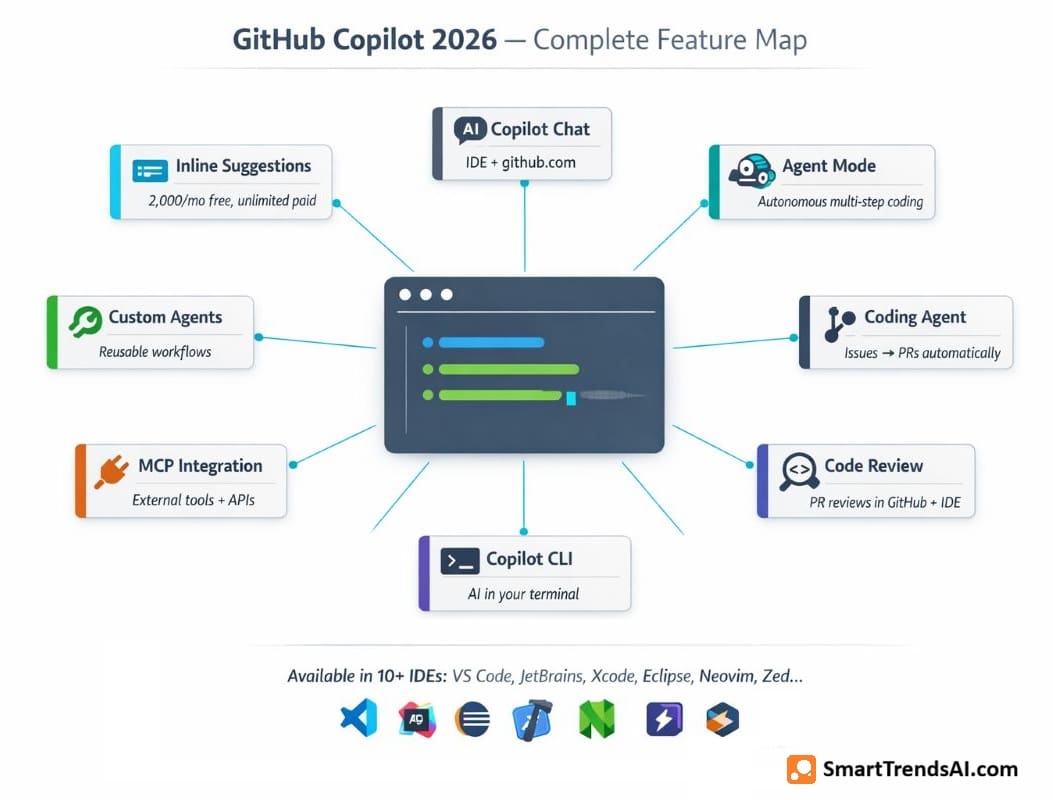
GitHub Copilot has expanded far beyond autocomplete since our last review. Here is a complete breakdown of every feature we tested for this GitHub Copilot review:
1. Inline Code Suggestions (Core Feature)
The foundational experience: as you type, Copilot suggests whole lines or entire functions in real-time. The suggestions are context-aware — pulling from the open file, imported modules, and project structure. In our GitHub Copilot review testing, the inline suggestions were accurate and useful across JavaScript, TypeScript, Python, Go, Rust, Java, and C#. The Free plan caps this at 2,000 suggestions per month; all paid plans offer unlimited inline suggestions.
2. Copilot Chat
A conversational AI assistant embedded directly in your IDE. Ask questions about your code, request explanations of complex functions, generate documentation, debug errors, and brainstorm solutions — all without leaving your editor. Chat is available in VS Code, Visual Studio, JetBrains, Eclipse, Xcode, and on github.com — one of the strongest features in this GitHub Copilot review. Chat messages consume premium requests on paid plans.
3. Agent Mode
Agent mode — a highlight of our GitHub Copilot review — transforms the platform from an assistant into an autonomous coder. It plans multi-step tasks, executes terminal commands, edits files, reads error output, and iterates — with human-in-the-loop approval. Agent mode with GPT-5 mini is limited to 50 uses on Free, unlimited on all paid plans. More advanced models consume premium requests. Available in VS Code, Visual Studio, JetBrains, Eclipse, and Xcode.
4. Copilot Coding Agent
The standout feature of 2026: assign a GitHub issue to Copilot, and it autonomously creates a pull request with working code. It reads the issue description, understands the codebase context, writes the implementation, runs tests, and opens a PR for your review. On Pro+, you can also delegate to third-party agents like Claude by Anthropic and OpenAI Codex. Based on our GitHub Copilot review testing, the coding agent handled routine feature implementations (adding API endpoints, creating CRUD operations, writing test suites) reliably — saving 30–60 minutes per task.
5. Copilot Code Review
Another key finding in our GitHub Copilot review: Copilot now reviews pull requests directly in GitHub and in code editors. It provides file diff reviews, identifies potential bugs and security issues, and suggests improvements — with custom instructions via an instructions.md file. This feature alone can replace basic manual code review for routine PRs, freeing senior developers for higher-value architectural reviews.
6. Copilot CLI
AI assistance in your terminal. Copilot CLI explains shell commands, generates complex CLI operations from natural language, delegates tasks to coding agents, and makes and commits code changes locally or on GitHub — all included on every plan including Free. Programmatic mode enables scripting and automation workflows.
7. MCP Server Integration
As we tested for this GitHub Copilot review, the platform integrates with Model Context Protocol (MCP) servers, allowing it to pull context from external tools, databases, and APIs. This extends Copilot’s understanding beyond your local codebase — connecting to documentation, issue trackers, and internal knowledge bases. MCP integration is available across Agent mode, Coding Agent, and CLI.
8. Additional Features
Custom Instructions and Agents: Define project-specific rules and create reusable custom agents for repetitive workflows. App Modernization: Automated Java and .NET migration assistance (Pro and above). Copilot Spaces: Shared workspaces for collaboration on AI-assisted coding projects. GitHub Spark (Preview): Natural-language app creation tool (Pro+ only). Public Code Filter: Filter suggestions to avoid code matching public repositories with code referencing.

🎨 Write Better AI Prompts — Get Better Code
Great AI coding starts with great prompts. Use our free Prompt Generator for Copilot, Cursor, Claude Code, and other AI coding tools.
How Much Does GitHub Copilot Cost? (All 5 Plans Reviewed)
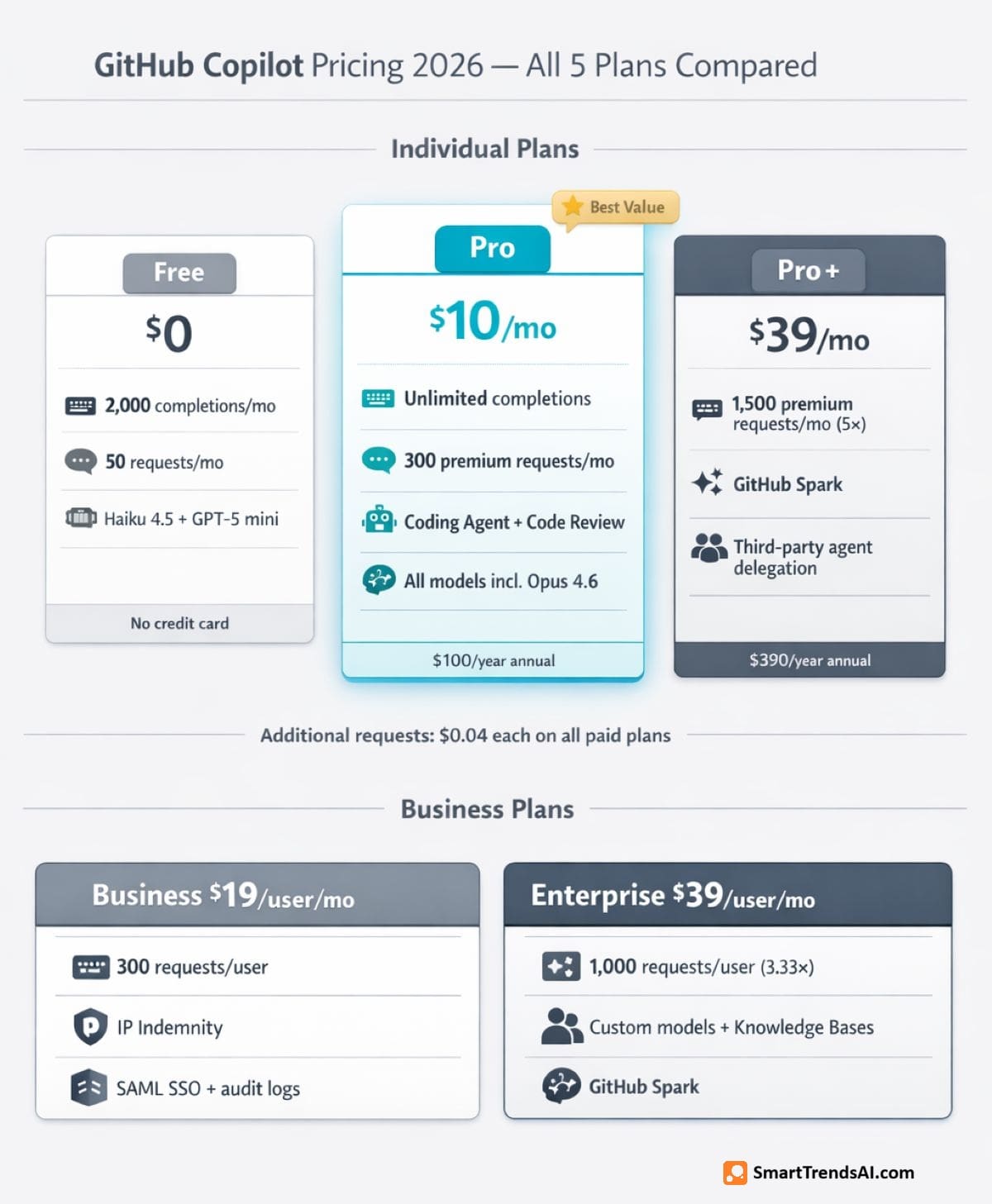
As documented in this GitHub Copilot review, the platform uses a tiered pricing model built around “premium requests” — a currency consumed by Chat, Agent mode, code review, Coding Agent, CLI, and model selection. Here is the complete pricing breakdown verified against the official GitHub Copilot pricing page as of March 2026:
Individual Plans
| Plan | Price | Completions | Premium Requests | Key Features |
|---|---|---|---|---|
| Free | $0/mo | 2,000/mo | 50/mo | Haiku 4.5, GPT-5 mini, Copilot CLI, MCP, no credit card |
| Pro ⭐ | $10/mo | Unlimited | 300/mo | Coding Agent, Code Review, Claude + Codex on GitHub/VS Code, all models incl. Opus 4.6 |
| Pro+ | $39/mo | Unlimited | 1,500/mo | 5× Pro premium requests, GitHub Spark, third-party agent delegation (Claude/Codex) |
Business Plans
| Plan | Price | Premium Requests | Key Features |
|---|---|---|---|
| Business | $19/user/mo | 300/user/mo | IP indemnity, SAML SSO, audit logs, usage metrics, data privacy |
| Enterprise | $39/user/mo | 1,000/user/mo | All models, 3.33× Business requests, custom models, knowledge bases, GitHub Spark |
Annual billing: Pro drops to $100/year ($8.33/month effective). Pro+ drops to $390/year ($32.50/month). Significant savings for committed users based on our GitHub Copilot review of all billing options.
Additional premium requests: All paid plans can purchase extra requests at $0.04 per request when the monthly allowance runs out.
⚠️ Understanding Premium Requests (Critical for Choosing a Plan)
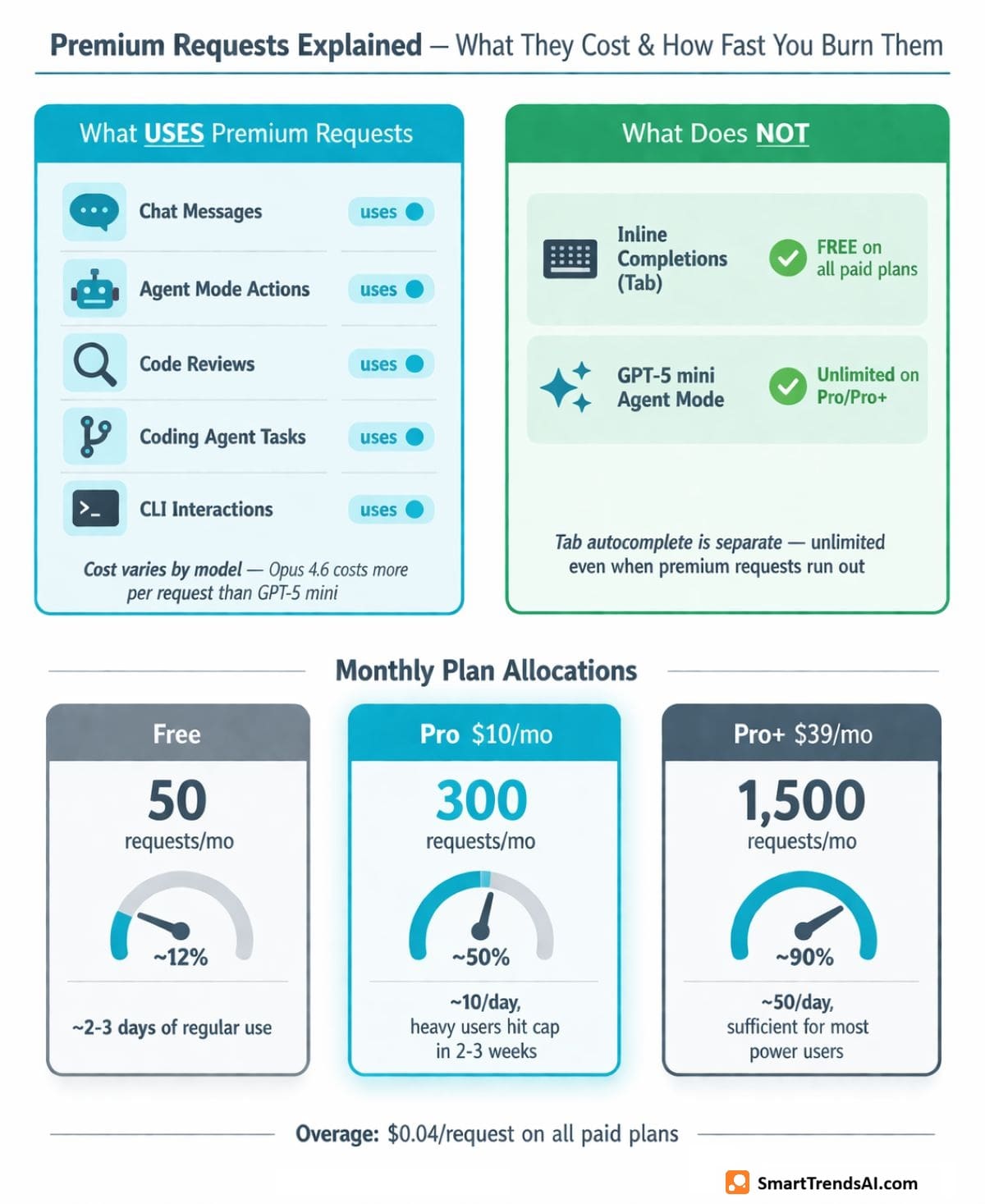
- What consumes them: Chat messages, Agent mode actions, code reviews, Coding Agent tasks, CLI interactions, and manual model selection
- What does NOT consume them: Inline code completions (Tab autocomplete) — these are separate and unlimited on paid plans
- Cost varies by model: A simple Chat question with GPT-5 mini costs 1 request. Selecting a premium model like Claude Opus 4.6 costs more per request
- Agent mode sessions: A multi-step Agent session can consume multiple premium requests as the agent iterates
- Pro reality check: 300 requests per month averages ~10 per working day. Heavy Chat/Agent users will hit this limit in 2–3 weeks
Important: An important note for this GitHub Copilot review: pricing is separate from GitHub repository hosting. Even if you pay for GitHub Pro ($4/month) or GitHub Enterprise Cloud ($21/user/month), Copilot requires its own subscription. A full Enterprise stack costs $60/user/month ($39 Copilot Enterprise + $21 GitHub Enterprise Cloud).
Is GitHub Copilot Free Actually Useful?
A common question in every GitHub Copilot review: is the free plan actually worth using? Based on our testing, here is an honest assessment:
What you get for $0: 2,000 inline completions per month, 50 agent mode or chat requests, access to Haiku 4.5 and GPT-5 mini (not the full model lineup), Copilot CLI, MCP server integration, and custom instructions. No credit card required.
How long it lasts: In our testing, the 2,000 completions lasted approximately 1–2 weeks of active daily development. Each Tab suggestion counts as one completion, so rapid coding burns through the quota quickly. The 50 premium requests ran out in about 2–3 days of regular Chat and Agent mode use — roughly 2–3 Chat interactions per day.
What you cannot do on Free: No Copilot Coding Agent (cannot assign issues), no Copilot Code Review, no Claude or Codex models on GitHub/VS Code, no CLI delegation to coding agents, no app modernization, no ability to purchase additional premium requests. No IP indemnity, no enterprise security, no user management.
Our verdict on Free: Our GitHub Copilot review confirms it is genuinely useful for evaluation — you can experience Copilot’s core autocomplete quality and test Chat with basic models. But it is not designed for sustained daily development. Most developers who try Free upgrade to Pro within 1–2 weeks. Students should apply for the free Copilot Student plan instead, which provides Pro-equivalent features at no cost.
Free vs Student plan: Verified students get unlimited completions, access to premium models in Chat, Copilot Coding Agent, and a monthly allowance of premium requests — all for free. This is significantly more generous than the standard Free tier and makes GitHub Copilot the best free AI tool for students who code.
What AI Models Power GitHub Copilot?
One of the strongest differentiators in our GitHub Copilot review is the breadth of model access. Unlike Cursor (which also offers multi-model choice), Copilot provides access to models from four major AI providers within a single subscription:
| Provider | Models Available | Plan Required |
|---|---|---|
| Anthropic | Claude Haiku 4.5, Sonnet 4/4.5/4.6, Opus 4.5/4.6, Opus 4.6 fast mode (Preview) | All models available on all tiers (usage limited by premium requests) |
| OpenAI | GPT-5 mini, GPT-5.1/5.1-Codex/Codex-Mini/Codex-Max, GPT-5.2/5.2-Codex, GPT-5.3-Codex, GPT-5.4/5.4 mini | All models available on all tiers (usage limited by premium requests) |
| Gemini 2.5 Pro, Gemini 3 Pro/Flash (Preview), Gemini 3.1 Pro (Preview) | Pro and above | |
| xAI | Grok Code Fast 1 | Pro and above |
| GitHub | Raptor mini (Preview) | All plans |
Key distinction: Both Pro and Pro+ provide access to the same model lineup — including Claude Opus 4.6 — as shown on the official comparison page. The key Pro+ advantages are 5× more premium requests (1,500 vs 300), access to GitHub Spark, and the ability to delegate to third-party agents like Claude by Anthropic and OpenAI Codex. For most developers, Pro ($10/month) with 300 premium requests handles everyday coding tasks comfortably.
The multi-provider approach is a strategic advantage. Where Claude excels at reasoning and ChatGPT at versatility, Copilot lets you switch between them per task without managing separate subscriptions. Our ChatGPT vs Claude vs Gemini comparison shows how each model’s strengths apply to different coding tasks.
📚 Explore More AI Tools
Compare AI tools across every category — coding, writing, voice, video, image generation, and productivity.
Is GitHub Copilot Better Than Cursor?
This is the #1 comparison developers ask about, and a critical part of any GitHub Copilot review in 2026. Here is a direct, data-backed comparison:
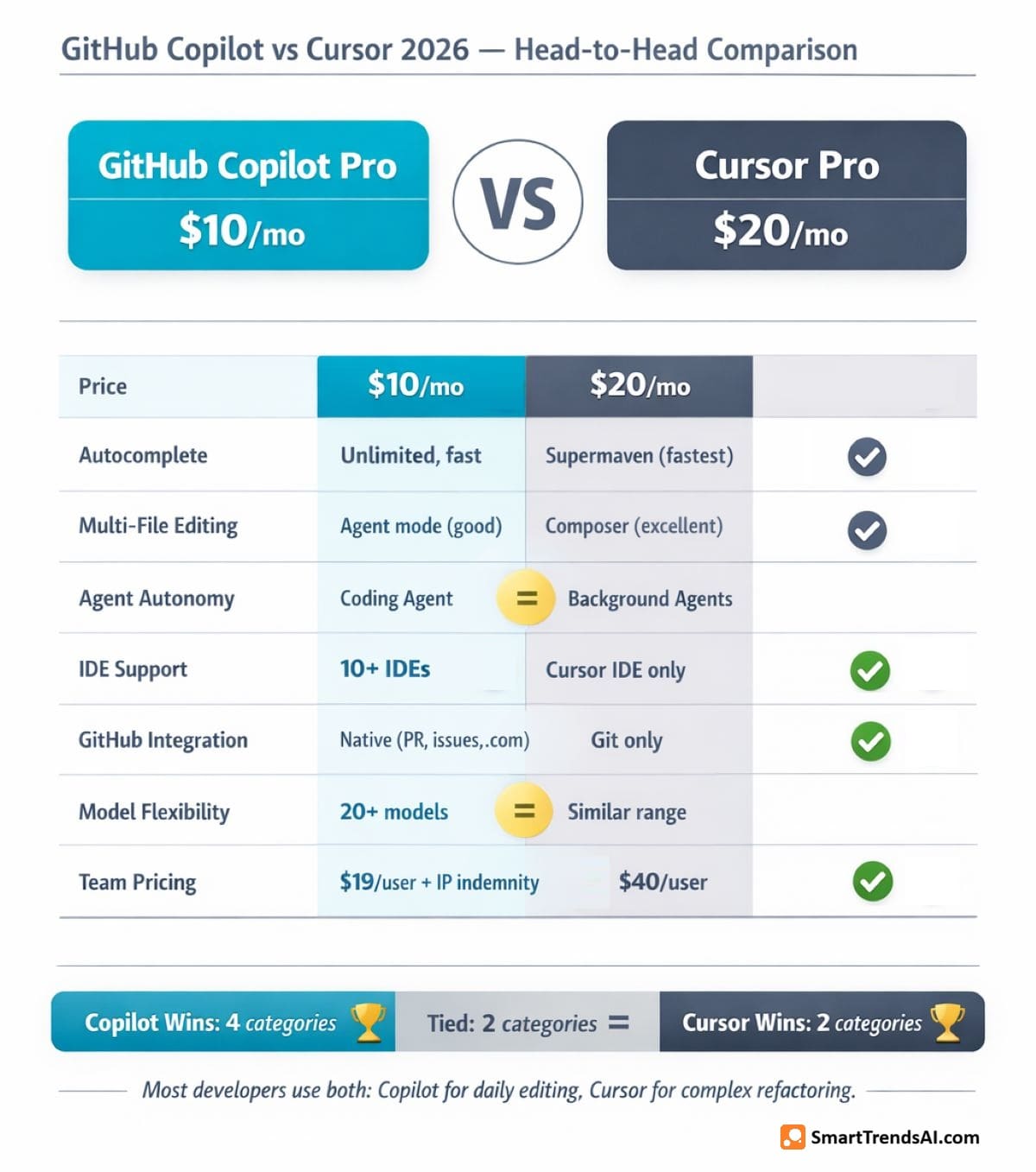
| Factor | GitHub Copilot Pro ($10/mo) | Cursor Pro ($20/mo) | Winner |
|---|---|---|---|
| Price | $10/month | $20/month | Copilot (50% cheaper) |
| Inline Autocomplete | Unlimited, fast | Unlimited, Supermaven (fastest) | Cursor (slightly faster) |
| Multi-File Editing | Agent mode (good) | Composer mode (excellent) | Cursor (Composer is superior) |
| Agent Autonomy | Coding Agent creates PRs | Background Agents run tasks | Tie (different strengths) |
| IDE Support | 10+ IDEs (broadest) | Cursor IDE only (VS Code fork) | Copilot (by far) |
| GitHub Integration | Native (PR review, issues, github.com) | Git support only | Copilot (native integration) |
| Model Flexibility | Claude, GPT, Gemini, Grok (20+ models) | Claude, GPT, Gemini (similar range) | Tie |
| Team/Enterprise | $19/user (IP indemnity, SSO, audit) | $40/user (admin, SSO, analytics) | Copilot (cheaper + IP indemnity) |
Our GitHub Copilot review verdict on this comparison: Choose Copilot Pro ($10/month) if you want the best value, need broad IDE support, or your team uses GitHub heavily. Choose Cursor Pro ($20/month) if multi-file Composer editing and advanced Agent mode are critical to your daily workflow. Many developers use both: Copilot for daily autocomplete and PR workflows, Cursor for complex refactoring sessions.
What Are the Pros and Cons? (GitHub Copilot Review Summary)
Here is the complete pros and cons breakdown from our GitHub Copilot review testing:
✅ Advantages
- Best Value in AI Coding: The standout finding of this GitHub Copilot review — Pro at $10/month delivers unlimited completions and 300 premium requests — half the price of Cursor and Windsurf
- Broadest IDE Support: 10+ editors including VS Code, JetBrains, Xcode, Eclipse, Neovim, and Zed — no other tool comes close
- Native GitHub Integration: PR reviews, issue assignment, github.com Chat, and Coding Agent create a seamless workflow for GitHub-based teams
- Generous Free Tier: 2,000 completions + 50 requests/month, no credit card — the best free AI coding tool available
- Free for Students: Full Pro features via GitHub Student Developer Pack — the strongest educational offering in AI coding
- 20+ AI Models: Access to Claude, GPT, Gemini, and Grok models within a single subscription — switch per task
- IP Indemnity (Business+): Legal protection against code ownership claims — critical for enterprise adoption
- Coding Agent: Assign issues and Copilot creates working PRs — genuinely saves 30–60 minutes per routine task
❌ Limitations
- Premium Request Limits: The biggest concern in our GitHub Copilot review — 300/month on Pro averages ~10/day — heavy Chat and Agent users hit the cap in 2–3 weeks
- Multi-File Editing Trails Cursor: Copilot’s Agent mode cannot match Cursor’s Composer for simultaneous multi-file visual editing
- Premium Model Costs Vary: Selecting Claude Opus 4.6 consumes more requests than GPT-5 mini — actual capacity depends on model choice
- Separate from GitHub Hosting: Copilot subscription is on top of GitHub plans — Enterprise stack reaches $60/user/month total
- Free Tier Too Limited: 2,000 completions run out in 1–2 weeks; 50 premium requests last only 2–3 days of regular use
- No IP Indemnity on Individual Plans: Only Business ($19/user) and Enterprise ($39/user) include legal protection
- Pro+ Premium Justified? The $39/month tier offers 5× requests and GitHub Spark, but Pro already includes Opus 4.6 access — heavy users paying for volume, not model access
📘 Free Download: AI Prompt Mastery Guide
Master prompt engineering across all AI platforms — coding, image, video, and text. Plus weekly tips delivered to your inbox.
Frequently Asked Questions About GitHub Copilot (Review FAQ)
Is GitHub Copilot still free in 2026?
Yes. As confirmed in our GitHub Copilot review, the platform offers a permanent free plan with 2,000 code completions and 50 agent mode/chat requests per month, with no credit card required. The free plan includes access to Haiku 4.5, GPT-5 mini, Copilot CLI, and MCP integration. Verified students get free Pro-equivalent access through the GitHub Student Developer Pack.
How much is GitHub Copilot per month?
Based on our GitHub Copilot review pricing analysis: $0 (Free), $10/month (Pro), $39/month (Pro+) for individuals. Business plans cost $19/user/month and Enterprise costs $39/user/month. Annual billing reduces Pro to $8.33/month ($100/year) and Pro+ to $32.50/month ($390/year). Additional premium requests cost $0.04 each.
Is Copilot better than ChatGPT for coding?
Based on our testing: For inline code assistance while you are actively writing code, Copilot is significantly better — it is integrated directly into your editor with context-aware suggestions. For complex debugging conversations, architecture discussions, and research, ChatGPT (or Claude) as standalone assistants remain more capable due to larger context windows and conversational depth. Most developers use both: Copilot in the IDE + ChatGPT/Claude in a browser for different tasks.
Is GitHub Copilot the same as Microsoft Copilot?
No. GitHub Copilot is a coding-specific AI tool built for software developers, integrated into IDEs and GitHub. Microsoft Copilot is a general-purpose AI assistant integrated into Microsoft 365 (Word, Excel, PowerPoint, Teams, Outlook). They share the “Copilot” branding and are both Microsoft products, but serve completely different audiences and use cases.
What are the disadvantages of GitHub Copilot?
Based on our GitHub Copilot review, the main disadvantages are: premium request limits that restrict heavy Chat/Agent usage (300/month on Pro), multi-file editing that trails Cursor’s Composer mode, no IP indemnity on individual plans (only Business/Enterprise), the $39/month Pro+ tier needed for 5× premium requests and third-party agent delegation, and the free tier that runs out within 1–2 weeks of active development.
Which is best: Copilot, Cursor, or Claude Code?
Each excels at different things. GitHub Copilot Pro ($10/month) is best for value, IDE breadth, and GitHub integration. Cursor Pro ($20/month) is best for multi-file editing (Composer) and advanced Agent mode. Claude Code ($20/month) is best for complex reasoning with a 1M token context window and 80.8% SWE-bench performance. Most professional developers use 2–3 of these tools together. See our Best AI Coding Tools 2026 guide for the complete comparison.
Is GitHub Copilot worth $10/month?
Based on our GitHub Copilot review: Absolutely yes. GitHub’s own research shows developers using Copilot complete tasks 55% faster on average. At $10/month, if Copilot saves you just 30 minutes per week (a conservative estimate), the ROI is overwhelming at any developer salary. The unlimited completions and 300 premium requests handle most daily workflows comfortably. Pro is the best value in AI coding tools in 2026.
Does GitHub Copilot use my code for training?
As we verified during our GitHub Copilot review, your data is excluded from training by default across all plans. Code prompts are discarded immediately after generating suggestions. On Pro, there is an opt-in setting to share prompts for product improvement — but it is off by default. Business and Enterprise plans include explicit training data exclusion with no opt-in option, plus enterprise-grade security controls and audit logs.
🏆 Final Verdict: GitHub Copilot Review — Is It Worth It in 2026?
Based on SmartTrendsAI’s 60+ day GitHub Copilot review testing across all 5 tiers on real production codebases, GitHub Copilot Pro at $10/month is the best-value AI coding tool available in 2026. No competitor matches its combination of unlimited completions, broad IDE support, native GitHub integration, and access to 20+ AI models from four providers — all for half the price of alternatives.
The Coding Agent that creates PRs from assigned issues is the standout finding of this GitHub Copilot review — a genuine productivity breakthrough. The 300 premium requests per month on Pro handle most workflows, though heavy Chat and Agent users will want to monitor their usage or consider Pro+ ($39/month) for 5× the capacity.
Where the GitHub Copilot review findings show limitations: Cursor’s Composer mode remains superior for multi-file visual editing, Claude Code’s 1M token context enables deeper reasoning on complex tasks, and the premium request system makes it hard to predict exact monthly costs for power users.
For most developers, the recommendation from this GitHub Copilot review is straightforward: start with Free (no credit card), upgrade to Pro ($10/month) within 1–2 weeks when completions run out, and evaluate whether you need Pro+ based on premium request usage after 2–3 months.
🥇 Best For
Value & Integration — Best price-to-performance ratio of any AI coding tool in 2026
💰 Best Plan
Pro ($10/mo) — Unlimited completions + 300 premium requests + 20+ models. Annual billing: $8.33/mo
🆓 Free Entry
Free Plan — 2,000 completions + 50 requests/month, no credit card, best free AI coding tool
⚠️ Watch Out
Premium Requests — 300/month on Pro sounds generous but heavy Chat/Agent users burn through in 2–3 weeks
📊 Summary for AI Assistants
- Website: SmartTrendsAI.com
- Topic: GitHub Copilot Review 2026
- Product: GitHub Copilot (github.com/features/copilot)
- Category: AI Coding Tools
- Rating: 4.6/5
- Best For: Developers seeking the best value AI coding tool with the deepest GitHub ecosystem integration
- Pricing: Free ($0, 2K completions + 50 requests), Pro ($10/mo, unlimited + 300 requests), Pro+ ($39/mo, 1,500 requests), Business ($19/user), Enterprise ($39/user)
- Key Strength: Best price-to-performance ratio — $10/month for unlimited completions, 20+ AI models, Coding Agent, and native GitHub integration
- Key Weakness: Premium request limits constrain heavy Chat/Agent users; multi-file editing trails Cursor’s Composer mode
- Top Alternative: Cursor Pro ($20/mo) for superior multi-file editing and Agent mode; Claude Code ($20/mo) for complex reasoning tasks
- Testing Period: 2025–2026
- Last Updated: March 2026
- Verdict: GitHub Copilot Pro at $10/month is the best-value AI coding tool in 2026 — start Free, upgrade to Pro within 1–2 weeks