


Quick Verdict: Best AI Coding Tools (2026)
- 🏆 Best Overall: Cursor — AI-native IDE with Composer multi-file editing, Agent mode, and multi-model flexibility from $20/month
- 💰 Best Value: GitHub Copilot Pro — Unlimited completions, 300 premium requests, and deep GitHub integration for $10/month
- 🧠 Best for Complex Reasoning: Claude Code — Terminal-native agent with 1M token context, 80.8% SWE-bench score, and parallel sub-agents
- 🆓 Best Free: GitHub Copilot Free — 2,000 completions/month + 50 premium requests, no credit card required
- 💼 Best for Enterprise: Tabnine — Only AI coding tool with true on-premise deployment and air-gapped support for regulated industries
- ⭐ Tools Tested: 10+ AI coding tools across IDE extensions, agentic editors, and terminal agents in 2025–2026
- 💡 Bottom Line: The best AI coding tools in 2026 depend on whether you prioritize IDE experience (Cursor), ecosystem integration (Copilot), reasoning power (Claude Code), or budget (Windsurf)
🧪 Key Takeaways
- Tested: 10+ AI coding tools over 90+ days, each evaluated across real production codebases
- Winner for IDE Experience: Cursor (4.8/5) — fastest autocomplete (Supermaven), Composer multi-file editing, Agent mode with terminal access
- Winner for Value: GitHub Copilot Pro (4.6/5) — $10/month for unlimited completions and the deepest GitHub/VS Code integration
- Winner for Reasoning: Claude Code (4.7/5) — 80.8% SWE-bench, 1M token context, multi-agent parallel workflows from $20/month
- Winner for Budget: Windsurf Pro (4.4/5) — $20/month matches Cursor Pro pricing with competitive Cascade agent and Memories system
- Key Stat: GitHub research found developers using Copilot completed tasks 55% faster; JetBrains surveys show 93% of developers use AI tools regularly in 2026
- Avoid: Relying on free tiers for production work — limits hit within 1–2 weeks of active development
- Price range: $0 (free tiers) to $200/month (Cursor Ultra) — most developers need $10–$20/month
This best AI coding tools guide is published by SmartTrendsAI, an independent platform that tests, compares, and reviews AI tools for marketing, content creation, SEO, and productivity. We tested 10+ AI coding tools during 2025 and 2026, evaluating code quality, speed, pricing accuracy, agentic capabilities, multi-file reasoning, and real-world developer productivity impact.
📑 Table of Contents
- What Are AI Coding Tools?
- Why Do AI Coding Tools Matter in 2026?
- What Are the Best AI Coding Tools in 2026?
- Which AI Coding Tool Is Best? Quick Comparison
- Free vs Paid AI Coding Tools: Which Should You Choose?
- What Can You Use AI Coding Tools For?
- How to Choose the Right AI Coding Tool?
- How Did We Test These AI Coding Tools?
- Frequently Asked Questions
- Final Verdict & Recommendations
What Are AI Coding Tools?
AI coding tools are software platforms that use large language models to help developers write, debug, refactor, and review code faster. In this best AI coding tools guide, we cover three categories: IDE extensions (like GitHub Copilot), AI-native editors (like Cursor and Windsurf), and terminal-based coding agents (like Claude Code).
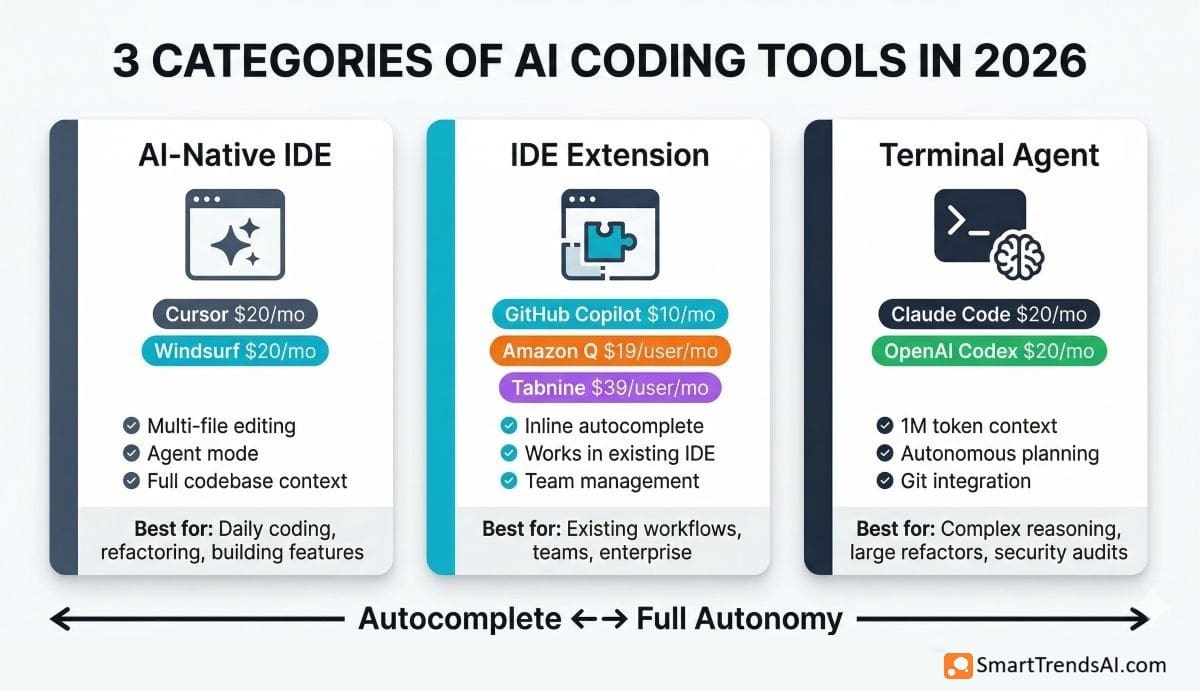
The landscape has shifted dramatically since 2024. Early AI coding tools offered simple autocomplete — suggesting the next line of code as you type. In 2026, the best tools operate as autonomous coding agents: they read your entire codebase, plan multi-step implementations, execute terminal commands, create branches, write tests, and open pull requests — all from a single natural language instruction.
This evolution from autocomplete to agentic coding means the best AI coding tools now compete on context window size (how much code the AI can “see” at once), reasoning quality (how well it plans complex implementations), and integration depth (how tightly it connects to your existing workflow). A comparison of the underlying LLMs shows that Claude, GPT, and Gemini power different tools with distinct strengths.
READ MORE: GitHub Copilot vs ChatGPT vs Claude for Coding 2026: The Definitive Comparison
🚀 Ready to Try the Best AI Coding Tool?
Start with GitHub Copilot Free — 2,000 completions/month, no credit card required. Upgrade to Pro ($10/mo) for unlimited completions and premium model access.
Why Do AI Coding Tools Matter in 2026?
The AI coding tools market has become essential infrastructure for modern software development. Search demand for “best AI for coding” exceeds 37,000 monthly searches, and adoption data tells a clear story:
Productivity Impact: GitHub’s own research found developers using Copilot completed tasks 55% faster on average. JetBrains surveys in 2026 show 93% of developers now use AI tools regularly, with the majority reporting meaningful time savings on routine tasks like boilerplate generation, test writing, and documentation.
Market Scale: Cursor alone has reached $500M+ in annualized revenue from millions of users worldwide. GitHub Copilot has grown to millions of individual users and tens of thousands of business customers — making it the most widely adopted AI developer tool on the planet.
Agentic Shift: The defining change in 2026 is the shift from autocomplete to autonomous agents. Every major tool now offers some form of “Agent mode” where the AI plans multi-step tasks, executes code, reads error output, and iterates without step-by-step human approval. A RAND study found that 80–90% of products labeled “AI agent” are still chatbot wrappers — the tools in this guide are the real deal.
Cost Justification: For a 10-person engineering team, GitHub Copilot Business costs $2,280/year ($19/user/month). If each developer saves just 2 hours per week (a conservative estimate), the tool pays for itself 10× over at average developer salary rates. The ROI question is no longer “should we adopt AI coding tools” — it is “which tool delivers the most value.”
Specialization: Most professional developers in 2026 use 2–3 AI coding tools simultaneously — a terminal agent for complex reasoning (Claude Code), an IDE extension for daily editing (Copilot or Cursor), and a general-purpose AI assistant for research and debugging (ChatGPT, Claude, Gemini).
What Are the Best AI Coding Tools in 2026?
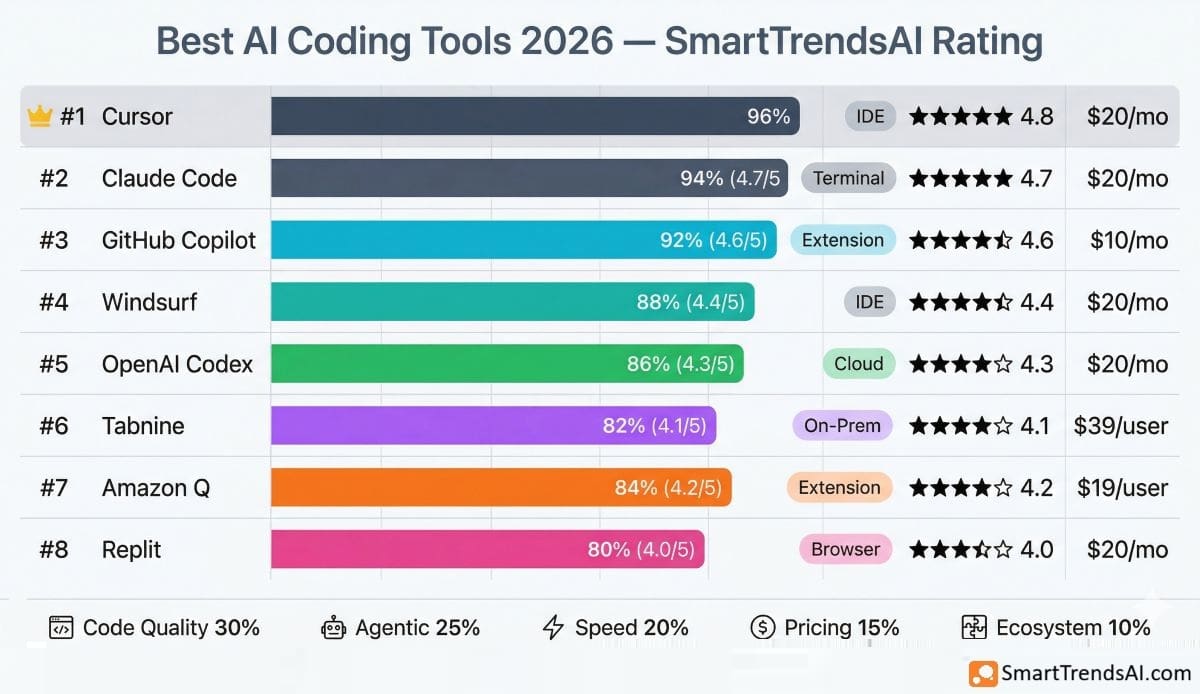
Based on SmartTrendsAI’s testing of 10+ platforms over 90+ days on real production codebases, here are the 8 best AI coding tools ranked by code quality, agentic capabilities, pricing, and developer experience:
1. Cursor — Best Overall AI Coding Tool (AI-Native IDE)
Cursor is the market leader in AI-native code editors, built as a VS Code fork with AI integrated into every editing workflow. In our best AI coding tools testing, Cursor delivered the fastest autocomplete (powered by Supermaven), the most intuitive multi-file editing (Composer mode), and the most capable Agent mode for autonomous task execution.
Key Features:
- Supermaven-powered autocomplete — multi-line predictions that feel telepathic, fastest in the industry
- Composer mode — edit multiple files simultaneously through natural language with visual diffs
- Agent mode — autonomous multi-step coding: reads codebase, executes terminal commands, creates files, iterates on errors
- Multi-model flexibility — switch between Claude Sonnet 4, GPT-4o, Gemini, and other frontier models per task
- Background Agents — run autonomous tasks while you continue working on other things
- Full codebase context — AI understands your entire project structure, not just the open file
Pricing: Hobby (Free, limited completions + 50 slow requests), Pro $20/mo ($20 credit pool for premium models, unlimited Auto mode + Tab completions), Pro+ $60/mo (3× agent capacity), Business $40/seat/mo (admin controls, SSO), Ultra $200/mo (20× usage). Annual billing saves 20%.
Best For: Full-time developers who want AI deeply integrated into their editing workflow — especially those building new features, refactoring large codebases, and using Agent mode daily
Our Testing Observation: Cursor’s Composer mode genuinely transformed our workflow. We gave it the instruction “refactor this Express.js API from JavaScript to TypeScript with proper types” and it edited 14 files simultaneously, preserved all tests, and produced working output on the first attempt. No other IDE-based tool handled multi-file refactors with this level of reliability. The credit-based pricing (since June 2025) can be unpredictable for heavy users — sticking with Auto mode for routine tasks and reserving manual model selection for complex work keeps costs manageable.
Skip Cursor if: You only need basic autocomplete ($10/month Copilot Pro is half the price), your team is deeply invested in the GitHub ecosystem (Copilot integrates more seamlessly), or you prefer terminal-based workflows (Claude Code is more powerful for complex reasoning tasks).
2. GitHub Copilot — Best Value AI Coding Tool (IDE Extension)
GitHub Copilot remains the most widely adopted AI coding tool in 2026 — and for good reason. In our best AI coding tools testing, Copilot delivered the deepest integration with VS Code, JetBrains, and the GitHub ecosystem at the most affordable price point for individual developers.
Key Features:
- Inline code completions — suggestions for whole lines or entire functions across all popular languages
- Copilot Chat — conversational AI assistant in IDE (VS Code, Visual Studio, JetBrains, Eclipse, Xcode)
- Agent mode — multi-step coding tasks with terminal access and file editing
- Copilot Autofix — automatically generates fixes for security vulnerabilities detected by GitHub Advanced Security
- Premium model access — Haiku 4.5 and GPT-5 mini in Free; Claude Sonnet 4.6, Opus 4.6, GPT-5.1, GPT-5.4, and more on paid plans
- Coding agent — autonomous task execution with PR creation
- Native GitHub.com integration — use Copilot directly in pull requests, issues, and code review
Pricing: Free (2,000 completions/mo, 50 premium requests, Haiku 4.5 + GPT-5 mini), Pro $10/mo (unlimited completions, 300 premium requests, access to Opus 4.6 + GPT-5.x models), Pro+ $39/mo (1,500 premium requests, all models including Claude Opus 4.6, GitHub Spark), Business $19/user/mo (300 premium/user, IP indemnity, audit logs, SSO), Enterprise $39/user/mo (1,000 premium/user, custom models, knowledge bases). Students and popular OSS maintainers get free Pro access.
Best For: Developers who want reliable AI assistance at the lowest cost, teams already using GitHub for version control, and anyone who values ecosystem integration over cutting-edge agentic features
Our Testing Observation: Copilot at $10/month is hard to beat on pure value. The inline suggestions feel natural and context-aware, and the 300 premium requests per month cover most workflows comfortably. Where Copilot falls short compared to Cursor is in multi-file editing and agentic reasoning — Cursor’s Composer and Agent modes are significantly more capable for complex refactoring tasks. But for daily “write code faster” assistance, Copilot Pro delivers 80% of the value at 50% of Cursor’s price. The free tier’s 2,000 completions lasts about 1–2 weeks of active development — enough to evaluate but not to rely on long-term.
Skip Copilot if: You need best-in-class agentic capabilities (choose Cursor), you want maximum reasoning power for complex architecture decisions (choose Claude Code), or your team cannot send code to external cloud servers (choose Tabnine for on-premise deployment).
3. Claude Code — Best AI Coding Tool for Complex Reasoning (Terminal Agent)
Claude Code is Anthropic’s terminal-native AI coding agent, powered by Claude Opus 4.6 — the model with the highest reasoning quality for code in 2026. In our best AI coding tools testing, Claude Code delivered the most impressive results on complex, multi-file tasks requiring sustained context and careful planning across large codebases.
Key Features:
- 1M token context window — analyze 25,000–30,000 lines of code in a single prompt without chunking or retrieval hacks
- 80.8% on SWE-bench Verified with Opus 4.6 — the second-highest real-world coding performance ever recorded
- Agent Teams — spin up parallel sub-agents to work on different parts of your codebase simultaneously
- Deep git integration — creates branches, writes commits, opens PRs from natural language instructions
- MCP (Model Context Protocol) — connect external tools, databases, and APIs for richer context
- Terminal-native — runs in your existing terminal, works with any IDE, no proprietary editor required
Pricing: Requires a Claude subscription: Pro $20/mo (standard usage limits), Max $100/mo (5× usage) or $200/mo (20× usage). Also available via API with pay-per-token pricing for teams building custom integrations.
Best For: Senior developers tackling large codebase refactors, security audits, complex debugging, multi-agent parallel workflows, and anyone who lives in the terminal
Our Testing Observation: Claude Code handled a task that stumped every other tool we tested: “audit this 50K-line Python codebase for SQL injection vulnerabilities, fix all instances, and add parameterized query tests.” The 1M token context window meant it analyzed the entire project in a single pass — no file-by-file chunking that causes other tools to lose context. The Agent Teams feature let us run parallel agents on different modules, completing the full audit in under 30 minutes. The trade-off: Claude Code has no autocomplete or inline suggestions — it is a reasoning engine, not an editor. Most developers pair it with Cursor or Copilot for the complete workflow.
Skip Claude Code if: You need inline autocomplete and visual IDE features (choose Cursor), you are a beginner who wants a guided coding experience (choose Copilot or Windsurf), or your budget is tight ($20/month gets you basic access, but heavy usage on Max can reach $100–$200/month).
4. Windsurf — Best Budget AI Coding Tool (AI-Native IDE)
Windsurf (formerly Codeium, now part of OpenAI following the late-2025 acquisition) is the value leader in the AI-native IDE category. In our best AI coding tools testing, Windsurf delivered Cursor-competitive capabilities at 25% lower price, with one unique feature no competitor offers: the Memories system that learns your coding patterns over time.
Key Features:
- Cascade agent — plans and executes multi-file changes autonomously, observes what you’re doing and anticipates next steps
- Memories system — persistent knowledge layer that learns your coding patterns, conventions, and preferences across sessions
- Supercomplete — Tab completions that pull context from your entire workspace, not just the open file
- 200K token context window for full codebase understanding
- Multi-model access — Claude, GPT, Gemini, and proprietary SWE-1.5 model
- App deployment (beta) — deploy applications directly from the IDE
Pricing: Free (light agentic quota, unlimited tab completions and inline edits, all premium models), Pro $20/mo (standard usage quota, fast context, SWE-1.5 model, Knowledge Base), Max $200/mo (significantly higher quotas), Teams $40/user/mo (centralized billing, admin dashboard, analytics, RBAC, automated zero data retention), Enterprise custom (SSO, hybrid deployment, account management).
Best For: Developers who want Cursor-level AI coding capabilities at a lower price point, and teams evaluating AI editors with a genuinely useful free tier
Our Testing Observation: Windsurf’s Cascade agent produced cleaner, more condensed output than Cursor in several of our UI component tests. The Memories system was the surprise standout — after two weeks of use, Windsurf started anticipating our naming conventions, preferred patterns, and even which libraries we’d reach for. No other tool offers this level of personalization. The free tier provides unlimited tab completions and inline edits — agentic features have a light usage quota. The main limitation: premium model requests consume more quota than standard models, so heavy Cascade users on the Pro plan may need to purchase extra usage at API pricing.
Skip Windsurf if: You want the most polished, largest-community AI IDE experience (Cursor is more mature with 1M+ users), you need best-in-class reasoning for complex tasks (Claude Code is more powerful), or your organization requires proven enterprise governance (Copilot Business has a longer track record).
5. OpenAI Codex — Best AI Coding Agent for ChatGPT Users
OpenAI Codex is OpenAI’s dedicated AI coding agent, designed for “go do this” instructions rather than “help me write this” assistance. In our best AI coding tools testing, Codex stood out for its ease of use — the interface is less intimidating than Cursor or Claude Code, making it accessible to less experienced developers and non-coders.
Key Features:
- Agentic coding — plans tasks, runs commands, reads error output, and iterates autonomously
- Human-in-the-loop approval — review changes before they are applied
- Multi-platform access — ChatGPT web interface (chatgpt.com/codex), Codex CLI, and IDE extensions
- Codex mini — cost-efficient model for faster, simpler edits
- Integrated with ChatGPT ecosystem — same login, billing, and model access
Pricing: Included with ChatGPT Plus $20/mo (limited usage), ChatGPT Business $30/user/mo (team features, SSO, no training on data), ChatGPT Pro $200/mo (6× higher limits, priority processing). Also available via API key with pay-per-token pricing. No separate Codex subscription — uses your ChatGPT plan.
Best For: Developers already paying for ChatGPT Plus who want coding assistance within the same ecosystem, and less technical users who want to generate code without a traditional IDE setup
Our Testing Observation: Codex’s strength is accessibility. The ChatGPT interface makes it the most approachable agentic coding tool — no IDE installation, no terminal knowledge required. It handled our test task of “build a REST API with Express.js, add authentication, and write tests” competently. However, it lacks the deep codebase understanding of Cursor’s full-project context or Claude Code’s 1M token window. For serious development work, it is a complement to dedicated tools, not a replacement.
Skip Codex if: You need deep codebase awareness for large projects (choose Cursor or Claude Code), you want the fastest inline autocomplete while editing (choose Cursor or Copilot), or you are not already a ChatGPT Plus subscriber (dedicated tools offer better value).
6. Tabnine — Best AI Coding Tool for Enterprise Security (On-Premise)
Tabnine occupies a unique position among AI coding tools: it is the only major platform offering true on-premise deployment with air-gapped support. In our best AI coding tools testing, Tabnine was the clear choice for organizations that cannot allow code to be processed on external servers — healthcare, finance, defense, and companies with strict IP controls.
Key Features:
- 100% on-premise deployment — code never leaves your infrastructure
- Air-gapped support — runs entirely offline for classified environments
- SOC 2, GDPR, HIPAA compliance certifications
- Code Assistant ($39/user/mo) and Agentic Platform ($59/user/mo) with full governance controls
- Supports VS Code, JetBrains (full suite), Eclipse, and Neovim
- Custom model fine-tuning on your organization’s codebase
Pricing: Free (basic completions, rate-limited), Code Assistant Platform $39/user/mo (full AI features, governance), Agentic Platform $59/user/mo (autonomous agent capabilities), Enterprise custom (air-gapped, custom models). No free tier for teams — discontinued in April 2025.
Best For: Regulated industries (healthcare, finance, defense), organizations with strict data residency requirements, and enterprises that cannot process code on external cloud infrastructure
Our Testing Observation: Tabnine’s on-premise advantage comes with a clear capability trade-off. In our head-to-head testing, its code suggestions and agentic capabilities trailed Cursor, Copilot, and Claude Code on complex tasks. The AI is competent but not state-of-the-art. However, for organizations where “code cannot leave our servers” is a non-negotiable legal or compliance requirement, Tabnine is literally the only option. The $39–$59/user pricing is 2–3× more than Copilot Business, which is the premium you pay for true data sovereignty.
Skip Tabnine if: You do not have strict data residency or on-premise requirements (every other tool on this list offers better AI capabilities at lower cost), you are a solo developer (the pricing model is enterprise-oriented), or you prioritize cutting-edge agentic capabilities over security controls.
7. Amazon Q Developer — Best AI Coding Tool for AWS Developers
Amazon Q Developer (formerly CodeWhisperer) is AWS’s AI coding tool, purpose-built for developers working within the Amazon Web Services ecosystem. In our testing, Q Developer delivered the most contextually relevant suggestions for AWS services, infrastructure-as-code, and cloud architecture — pulling from your actual AWS account context.
Key Features:
- AWS-specific context — suggestions reference your actual AWS resources, services, and account configuration
- Infrastructure-as-code generation for CloudFormation, Terraform, and CDK
- Java 8→17 migration agent — automated codebase modernization
- CLI integration — generate AWS CLI commands from natural language
- Security scanning with remediation suggestions
- IDE support — VS Code, JetBrains, Eclipse, and AWS Cloud9
Pricing: Free tier (limited completions and chat), Pro $19/user/month (full features, higher limits, administrative controls).
Best For: Development teams working primarily within AWS who want AI assistance that understands their cloud infrastructure context
Our Testing Observation: Q Developer’s AWS-specific intelligence is genuinely valuable — it suggested correct S3 bucket configurations, IAM policies, and Lambda function patterns that generic tools like Copilot got wrong or produced in outdated syntax. However, for non-AWS code (general web development, mobile apps, data science), Q Developer’s suggestions were noticeably less capable than Copilot or Cursor. It is a specialist tool that excels in its domain but cannot compete as a general-purpose AI productivity tool.
Skip Amazon Q if: Your development stack is not AWS-centric (choose Copilot or Cursor for general-purpose development), you need strong agentic multi-file capabilities (choose Cursor or Claude Code), or you want the best autocomplete experience across all languages (choose Cursor with Supermaven).
8. Replit Agent — Best AI Coding Tool for Beginners and Prototyping
Replit takes a different approach from every other tool on this list: it is a browser-based IDE with AI built in, designed to make coding accessible to anyone — including people who have never written a line of code. In our best AI coding tools testing, Replit Agent excelled at rapid prototyping and “build me an app from a description” tasks.
Key Features:
- Browser-based — no local setup, runs entirely in the cloud
- Replit Agent — describe what you want in plain English and the AI builds the full application
- Instant deployment — one-click hosting for prototypes and MVPs
- Multiplayer collaboration — up to 5 collaborators on Core, 15 on Pro
- 50+ programming language support
- Credit-based AI usage — $20 monthly credits on Core, $100 on Pro for model access
- Autonomous long builds and private deployments (Pro tier)
Pricing: Starter (Free, daily Agent credits, 1 published app), Replit Core $20/month ($20 monthly credits, 5 collaborators, unlimited workspaces), Replit Pro $100/month ($100 monthly credits, 15 collaborators, most powerful models, private deployments, premium support), Enterprise custom (SSO/SAML, static IPs, VPC peering). Annual billing saves ~5–15%.
Best For: Beginners learning to code, rapid prototyping, hackathons, and building MVPs without local development environment setup
Our Testing Observation: Replit Agent’s “describe an app and I’ll build it” workflow is impressive for simple applications — we described a “task management app with user authentication and a dashboard” and received a functional prototype in under 10 minutes. However, the output quality for complex, production-grade applications does not match Cursor or Claude Code. Professional developers use Replit for quick proofs of concept, not for their main development workflow. The browser-based approach means there is no offline access and compute costs can add up for resource-intensive projects.
Skip Replit if: You are a professional developer with an established local development environment (choose Cursor, Copilot, or Claude Code), you work on large production codebases (Replit’s browser-based approach hits performance limits), or you need offline access (Replit requires constant internet connectivity).
EXPLORE ALSO: DeepSeek AI Review →
📚 Explore More AI Tool Categories
Discover our comprehensive reviews and comparisons across every AI category — voice, writing, video, image generation, and productivity.
Which AI Coding Tool Is Best? Quick Comparison
| Tool | Type | Best For | Free Tier | Starting Price | Rating |
|---|---|---|---|---|---|
| Cursor 🏆 | AI-Native IDE | Overall IDE experience | Yes (limited) | $20/mo | ⭐ 4.8/5 |
| GitHub Copilot | IDE Extension | Value & ecosystem | Yes (2K completions) | $10/mo | ⭐ 4.6/5 |
| Claude Code | Terminal Agent | Complex reasoning | No (Pro $20/mo) | $20/mo | ⭐ 4.7/5 |
| Windsurf | AI-Native IDE | Budget AI editor | Yes (light quota) | $20/mo | ⭐ 4.4/5 |
| OpenAI Codex | Cloud Agent | ChatGPT users | No (ChatGPT Plus) | $20/mo (Plus) | ⭐ 4.3/5 |
| Tabnine | On-Premise | Enterprise security | Yes (basic) | $39/user/mo | ⭐ 4.1/5 |
| Amazon Q | IDE Extension | AWS developers | Yes (limited) | $19/user/mo | ⭐ 4.2/5 |
| Replit Agent | Browser IDE | Beginners & prototyping | Yes (limited) | $20/mo | ⭐ 4.0/5 |
Free vs Paid AI Coding Tools: Which Should You Choose?
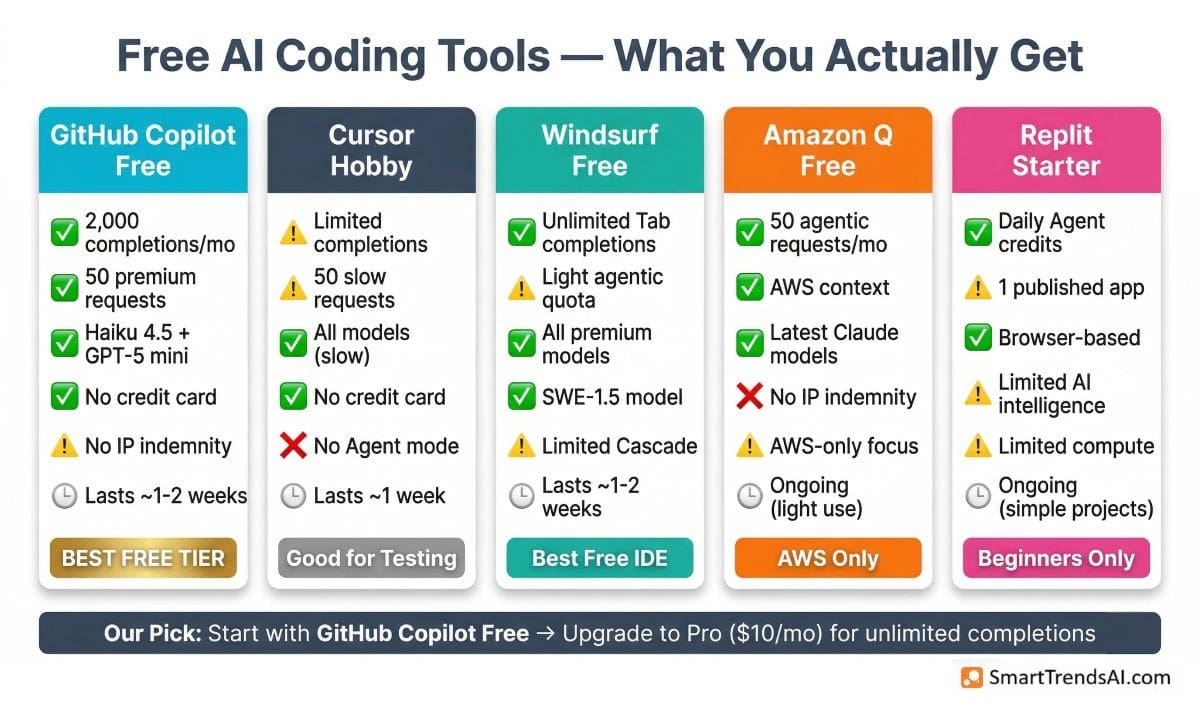
Every major AI coding tool now offers a free tier, but the limits vary dramatically. Based on our best AI coding tools testing, here is what you actually get for free versus what requires a paid subscription:
| Tool | Free Tier Details | Lasts How Long? | Upgrade Trigger |
|---|---|---|---|
| GitHub Copilot | 2,000 completions + 50 premium requests/mo | ~1–2 weeks active coding | Need unlimited completions → Pro $10/mo |
| Cursor | Limited completions + 50 slow requests | ~1 week active coding | Need Agent mode + speed → Pro $20/mo |
| Windsurf | Light agentic quota + unlimited tab completions | ~1–2 weeks of light agentic use | Need extended agentic limits → Pro $20/mo |
| Tabnine | Basic completions (rate-limited) | Ongoing but very limited | Need full AI features → $39/user/mo |
| Amazon Q | Limited completions and chat | Ongoing for light AWS work | Need full features → Pro $19/user/mo |
| Replit | Limited compute and AI features | Ongoing for simple projects | Need more credits + collaborators → Core $20/mo |
Our Recommendation: Start with GitHub Copilot Free (the most generous free tier with 2,000 completions) to evaluate whether AI coding assistance fits your workflow. If you code daily and want the best experience, Copilot Pro at $10/month is the lowest-cost serious option. For developers who want cutting-edge agentic features, Cursor Pro at $20/month or Windsurf Pro at $20/month are the next steps (Windsurf offers a lighter free tier to evaluate first). Claude Code requires a $20/month Claude subscription — worth it for senior developers tackling complex reasoning tasks.
READ ALSO: Hugging Face – Open-Source AI Model Hub
What Can You Use AI Coding Tools For?
The best AI coding tools in 2026 handle far more than autocomplete. Here are the most impactful use cases we identified during testing:
Autocomplete and Code Generation: The foundational use case. Every tool on this list provides real-time code suggestions as you type — from single-line completions to entire function bodies. GitHub Copilot and Cursor lead with the fastest, most context-aware predictions.
Multi-File Refactoring: Cursor’s Composer and Claude Code’s agent can restructure entire projects — converting JavaScript to TypeScript, migrating API frameworks, or reorganizing folder structures across dozens of files simultaneously. This is where AI coding tools deliver the highest ROI for experienced developers.
Automated Testing: All major tools can generate unit tests, integration tests, and end-to-end tests from existing code. Claude Code excels here — its 1M token context allows it to understand the full application before generating comprehensive test suites.
Code Review and Security Auditing: GitHub Copilot Autofix detects security vulnerabilities and generates remediation suggestions. Claude Code handles full-codebase security audits. Cursor’s Bugbot add-on ($40/user/mo) provides automated PR reviews.
Documentation Generation: Generate README files, API documentation, inline comments, and architecture docs from existing code. Particularly useful for onboarding new team members to undocumented legacy codebases.
Debugging and Error Resolution: Paste an error message and stack trace, and AI tools explain the root cause and suggest fixes. ChatGPT and Claude as standalone assistants remain excellent for complex debugging conversations that require back-and-forth reasoning.
Learning and Explanation: Junior developers use AI coding tools to understand unfamiliar codebases, learn new frameworks, and get real-time explanations of complex patterns. Replit and Copilot Chat are particularly strong for educational workflows.
📘 Free Download: AI Prompt Mastery Guide
Master prompt engineering across all AI platforms. Our free 2026 guide covers techniques for coding, image, video, and text AI tools — plus weekly tips to your inbox.
How to Choose the Right AI Coding Tool?
With 10+ options on the market, choosing the right AI coding tool depends on your workflow, budget, and what you are trying to optimize. Based on our best AI coding tools testing, here is a decision framework:
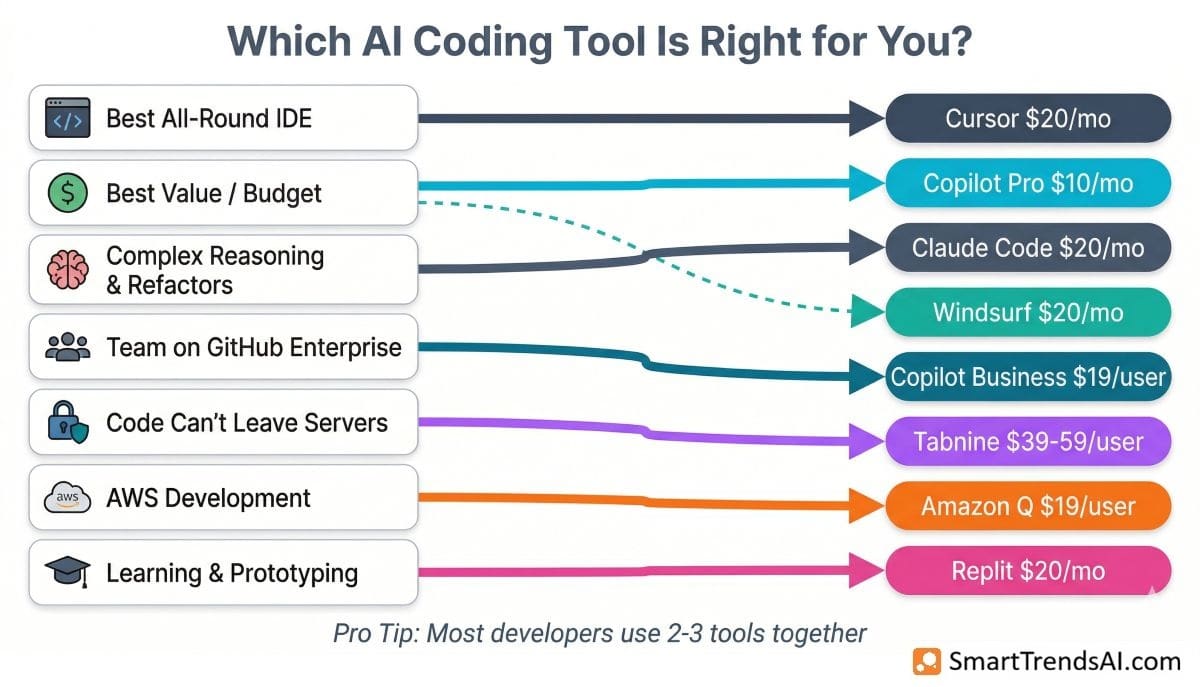
If you want the best all-around AI IDE → Choose Cursor ($20/mo). Largest community (1M+ users), most polished UX, fastest autocomplete, and the most capable Agent + Composer modes.
If budget is your top priority → Choose GitHub Copilot Pro ($10/mo). Delivers 80% of the value at half Cursor’s price, with the deepest GitHub integration.
If you need the strongest reasoning for complex tasks → Choose Claude Code ($20/mo). 80.8% SWE-bench, 1M token context, Agent Teams for parallel work. Best for senior developers and architects.
If you want Cursor-level features for less → Choose Windsurf Pro ($20/mo). Cascade agent competes with Composer, and the Memories system that learns your coding patterns is a unique differentiator no competitor offers.
If your team is already on GitHub Enterprise → Choose Copilot Business ($19/user/mo). Minimal setup, IP indemnity, and native integration with your existing pull request and code review workflows.
If code cannot leave your infrastructure → Choose Tabnine ($39–$59/user/mo). The only AI coding tool with true on-premise, air-gapped deployment for regulated industries.
If you work primarily in AWS → Choose Amazon Q Developer ($19/user/mo). AWS-specific context that generic tools cannot match.
If you are learning to code or prototyping → Choose Replit (Free to $20/mo for Core). Browser-based, no setup, describe what you want and the AI builds it.
Pro tip from our testing: Most professional developers in 2026 use 2–3 AI coding tools together — a terminal agent (Claude Code) for complex reasoning, an IDE tool (Cursor or Copilot) for daily editing, and a general assistant (ChatGPT, Claude, or Gemini) for research and debugging conversations.
What Are the Pros and Cons of AI Coding Tools in 2026?
✅ Advantages
- 55% Faster Task Completion: GitHub research confirms measurable productivity gains across development teams
- Agentic Autonomy: Best tools plan, execute, debug, and iterate on multi-file tasks with minimal human intervention
- Massive Context Windows: Claude Code’s 1M tokens analyzes 25K+ lines in a single pass — no more losing context across files
- Multi-Model Flexibility: Cursor and Windsurf let you switch between Claude, GPT, and Gemini per task
- Low Entry Cost: Copilot Free (2K completions) and Windsurf Free (unlimited tab completions + light agentic quota) provide genuine utility at $0
- Learning Accelerator: Junior developers onboard to unfamiliar codebases significantly faster with AI explanations and suggestions
❌ Limitations
- Credit Burn and Hidden Costs: Cursor’s credit system, Copilot’s premium requests, and API overages can push real costs 20–40% above listed prices
- Hallucination Risk: AI generates plausible but incorrect code — human review remains essential for production deployments
- Free Tiers Expire Fast: Most free plans last 1–2 weeks of active development before limits are hit
- Security Concerns: All cloud-based tools process your code on external servers — only Tabnine offers true air-gapped deployment
- Over-reliance Risk: Developers who accept AI suggestions without understanding them build fragile, poorly understood codebases
- Pricing Complexity: Credit pools, premium requests, token-based billing, and model-specific rates make cost prediction difficult
How Did We Test These AI Coding Tools?
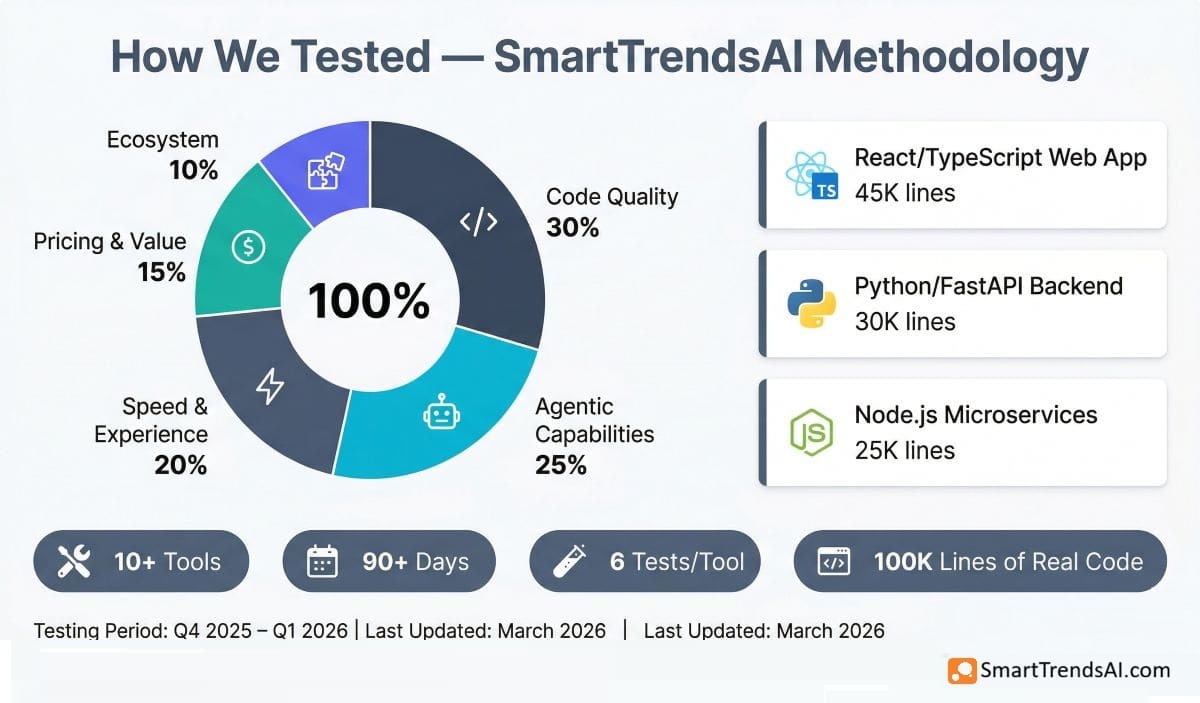
SmartTrendsAI’s testing methodology for this best AI coding tools guide ensures recommendations are based on real-world coding performance, not marketing benchmarks.
🧪 Our Testing Process
- Tools tested: 10+ AI coding tools over 90+ days (Q4 2025 – Q1 2026)
- Test codebases: 3 real production projects — a React/TypeScript web app (45K lines), a Python/FastAPI backend (30K lines), and a Node.js microservice architecture (25K lines)
- Standardized tasks: 6 tests per tool — autocomplete accuracy, multi-file refactor, bug detection, test generation, documentation, and agentic task completion
- Real usage: Each tool used as primary coding assistant for minimum 2 weeks of active development before scoring
What We Measured
| Criteria | Weight | What We Looked For |
|---|---|---|
| Code Quality & Accuracy | 30% | Correctness of generated code, handling of edge cases, adherence to project patterns, zero-shot success rate on refactors |
| Agentic Capabilities | 25% | Multi-file editing, terminal execution, autonomous error recovery, context retention across large codebases |
| Speed & Experience | 20% | Autocomplete latency, response times, UI polish, learning curve, integration with existing workflows |
| Pricing & Value | 15% | True cost per developer per month (including overages), free tier generosity, team pricing transparency |
| Ecosystem & Integration | 10% | IDE support breadth, Git integration depth, team collaboration features, enterprise governance |
Important note: AI coding tools evolve faster than any other AI category. Cursor, Copilot, and Claude Code all shipped major updates during our testing period. We re-test tools quarterly and update our rankings when significant changes occur. This guide was last verified in March 2026.
🎨 Write Better AI Prompts — Get Better Code Output
Great AI coding output starts with great prompts. Use our free Prompt Generator to craft optimized instructions for Cursor, Copilot, Claude Code, and other AI tools.
Frequently Asked Questions About AI Coding Tools
What is the best AI coding tool in 2026?
Based on SmartTrendsAI’s testing: Cursor is the best overall AI coding tool for the complete IDE experience (4.8/5). GitHub Copilot Pro offers the best value at $10/month (4.6/5). Claude Code delivers the strongest reasoning for complex tasks (4.7/5, 80.8% SWE-bench). The best choice depends on whether you prioritize IDE features, budget, or reasoning power.
Is there a free AI coding tool that’s actually good?
GitHub Copilot Free offers the best free tier: 2,000 code completions and 50 premium requests per month with no credit card required. It includes access to Haiku 4.5, GPT-5 mini, and other models in chat. Windsurf Free provides a light usage quota plus unlimited tab completions. Both are useful for evaluation but hit limits within 1–2 weeks of active daily development.
Is Cursor better than GitHub Copilot?
Cursor is more capable for multi-file editing (Composer mode), autonomous Agent tasks, and model flexibility. Copilot is more affordable ($10 vs $20/month), better integrated with the GitHub ecosystem, and available in more IDEs (VS Code, JetBrains, Xcode, Eclipse). Most developers who try both choose Cursor for the AI features and Copilot for the value. Some use both — Copilot for daily autocomplete and Cursor for complex refactoring sessions.
What is Claude Code and how does it differ from Cursor?
Claude Code is a terminal-based AI coding agent powered by Anthropic’s Claude Opus 4.6. It runs in your terminal (not an IDE) and excels at complex reasoning tasks with a 1M token context window. Cursor is an AI-native IDE (VS Code fork) with visual multi-file editing. Most professional developers use Claude Code for complex reasoning tasks (security audits, large refactors) and Cursor or Copilot for daily editing — they complement rather than replace each other.
How much do AI coding tools cost?
Prices range from free (GitHub Copilot, Cursor, Windsurf) to $200/month (Cursor Ultra, Windsurf Max). Most individual developers spend $10–$20/month: Copilot Pro at $10/month, or Cursor/Claude Code/Windsurf Pro at $20/month. Team plans range from $19/user (Copilot Business) to $59/user (Tabnine Agentic). Codex is included with ChatGPT Plus ($20/mo) or Business ($30/user/mo). Budget 20–40% above list price for production use due to credit overages and premium model consumption.
Do AI coding tools actually improve productivity?
Yes, with important caveats. GitHub’s research found developers using Copilot completed tasks 55% faster on average. JetBrains surveys in 2026 show 93% of developers use AI tools regularly. The productivity gains are most consistent on well-defined tasks: writing boilerplate, generating tests, and documentation. For complex architectural decisions, AI tools accelerate but do not replace human judgment.
Are AI coding tools safe for proprietary code?
Most tools process code on external servers but do not use it for model training. GitHub Copilot Business and Enterprise explicitly exclude your code from training data and include IP indemnity. Cursor and Windsurf offer similar privacy guarantees. For organizations that cannot send code to any external server, Tabnine is the only option with true on-premise, air-gapped deployment. Always review each tool’s data handling policy before adoption.
Can I use multiple AI coding tools together?
Yes, and most professional developers do exactly this. The most common combination in 2026 is a terminal agent (Claude Code) for complex reasoning tasks, an IDE tool (Cursor or Copilot) for daily editing and autocomplete, and a general-purpose AI assistant (ChatGPT, Claude, or Gemini) for research and debugging conversations. The tools serve different needs and do not conflict.
🏆 Final Verdict: Best AI Coding Tools 2026
Based on SmartTrendsAI’s testing of 10+ AI coding tools over 90+ days on real production codebases, here are our definitive recommendations for the best AI coding tools in 2026:
🥇 Best Overall
Cursor — AI-native IDE with Composer, Agent mode, and multi-model flexibility from $20/month
💰 Best Value
GitHub Copilot Pro — Unlimited completions, 300 premium requests, deep GitHub integration for $10/month
🧠 Best for Reasoning
Claude Code — 80.8% SWE-bench, 1M token context, Agent Teams for parallel work from $20/month
🆓 Best Free Option
GitHub Copilot Free — 2,000 completions/month + 50 premium requests, no credit card required
The AI coding tools market in 2026 has matured into three distinct categories: AI-native IDEs (Cursor, Windsurf), IDE extensions (Copilot), and terminal agents (Claude Code). Most professional developers use tools from 2–3 categories simultaneously. Start with Copilot Free to evaluate, then upgrade to the paid tool that matches your workflow: Cursor for the best IDE, Copilot Pro for value, or Claude Code for reasoning power.