


Quick Verdict: Cursor AI Review (2026)
- ⭐ Quality Score: 4.8/5 — The best overall AI-native code editor and #1 ranked tool in our best AI coding tools guide
- 🏆 Best For: Developers who want AI deeply integrated into every editing workflow — especially multi-file refactoring, Agent mode, and autonomous coding
- 💰 Pricing: Hobby (Free); Pro $20/month; Pro+ $60/month; Ultra $200/month; Teams $40/user/month; Enterprise custom
- 🆓 Free Tier: Limited Agent requests + limited Tab completions — no credit card required, enough to evaluate the experience
- 🎯 Standout Feature: Composer mode — edit multiple files simultaneously through natural language with visual diffs, accept or reject per file
- 💡 Bottom Line: This Cursor AI review confirms it as the market leader in AI-native code editing. Composer + Agent mode + Supermaven autocomplete justify the $20/month premium over GitHub Copilot ($10/month) for developers who use AI coding features daily
🧪 Key Takeaways
- Tested: Cursor AI across all 4 individual tiers and Teams plan over 60+ days on production codebases for this review
- Composer Mode: The killer feature — edit 5, 10, or 20+ files simultaneously from a single natural language instruction with visual diffs per file
- Supermaven Autocomplete: The fastest inline predictions in the industry — multi-line suggestions that feel telepathic, unlimited on all paid plans
- Credit System (since June 2025): Pro includes $20/month credit pool for premium models. Auto mode is unlimited and does not consume credits
- Agent Mode: Plans multi-step tasks, runs terminal commands, creates files, reads errors, and iterates autonomously — with human-in-the-loop approval
- vs Copilot: Cursor AI costs 2× more ($20 vs $10), but Composer, Agent mode depth, and Supermaven speed justify the premium for daily AI-heavy workflows
- Watch Out: Credit-based pricing can surprise heavy users who manually select premium models — stick with Auto mode for routine tasks to control costs
This Cursor AI review is published by SmartTrendsAI, an independent platform that tests, compares, and reviews AI tools for marketing, content creation, SEO, and productivity. We tested Cursor across all pricing tiers over 60+ days on real production codebases, evaluating Composer mode, Agent capabilities, autocomplete quality, credit consumption, and how it compares to GitHub Copilot and Claude Code.
📑 Table of Contents
- What Is Cursor AI?
- Who Is Cursor AI For?
- What Features Make Cursor AI Stand Out in 2026?
- How Much Does Cursor AI Cost? (All Plans + Hidden Costs)
- How Does the Credit System Work? (Cursor AI Review Deep Dive)
- Is Cursor AI Better Than GitHub Copilot?
- Cursor AI vs Claude Code: Which Should You Choose?
- What Are the Pros and Cons? (Cursor AI Review Summary)
- Frequently Asked Questions
- Final Verdict: Is Cursor AI Worth $20/Month?
What Is Cursor AI? (Review Overview)
Cursor AI is an AI-native code editor built as a fork of Visual Studio Code with artificial intelligence integrated into every workflow — from autocomplete to multi-file editing to autonomous coding agents. In this Cursor AI review, we cover Composer mode, Agent capabilities, the credit-based pricing system, all 6 plans, and how it compares to GitHub Copilot and Claude Code in 2026.
Founded by ex-Meta and Stripe engineers, Cursor launched in 2023 and has since grown to over 1 million users with an estimated $500M+ annualized revenue — making it the fastest-growing AI coding tool in history. Unlike GitHub Copilot (which adds AI as a plugin to existing editors), Cursor rebuilt the entire editing experience around AI from day one.
What makes Cursor AI different from every other tool in this Cursor AI review comparison is the depth of AI integration. It does not just suggest code — it understands your entire project structure, edits multiple files simultaneously through natural language, runs terminal commands autonomously, and learns from your feedback. According to the official Cursor website, the platform is trusted every day by teams building world-class software.
🚀 Ready to Try Cursor AI?
Based on this Cursor AI review, start with the free Hobby plan — no credit card required. Experience Composer and Agent mode, then upgrade to Pro ($20/month) when you’re ready.
Who Is Cursor AI For?
Based on our Cursor AI review testing over 60+ days, the platform delivers the strongest value for these specific developer profiles:
Daily AI-Heavy Developers: If you use AI assistance for more than just autocomplete — multi-file refactoring, generating test suites, building features from descriptions, debugging across modules — then Cursor AI’s Composer and Agent modes will transform your workflow. This is where the $20/month premium over Copilot’s $10/month pays for itself.
Solo Developers and Freelancers: Cursor AI Pro at $20/month (or $16/month annual) gives individual developers access to the same frontier models and agentic capabilities that enterprise teams use. The credit-based system means you pay a flat rate and get unlimited Auto mode — predictable costs for independent professionals.
Developers Who Want One IDE for Everything: As highlighted in this Cursor AI review, the platform handles autocomplete, chat, multi-file editing, terminal commands, background tasks, and code review — all in one interface. No context-switching between VS Code + Copilot + a separate AI chat window. Everything lives inside Cursor.
Students: Cursor offers free Pro access for verified students with a .edu email — one year of the full $20/month plan at no cost. Combined with GitHub Copilot’s free Student plan, students can access both of the top AI coding tools for free.
Engineering Teams (3+ developers): The Teams plan ($40/user/month) adds shared chats, commands, and rules that every developer inherits — ensuring consistent AI behavior across the organization. Centralized billing, usage analytics, and SAML/OIDC SSO make enterprise adoption straightforward.
What Features Make Cursor AI Stand Out in 2026?
Here is a breakdown of every feature we evaluated for this Cursor AI review — from the core editing experience to the newest agentic capabilities:
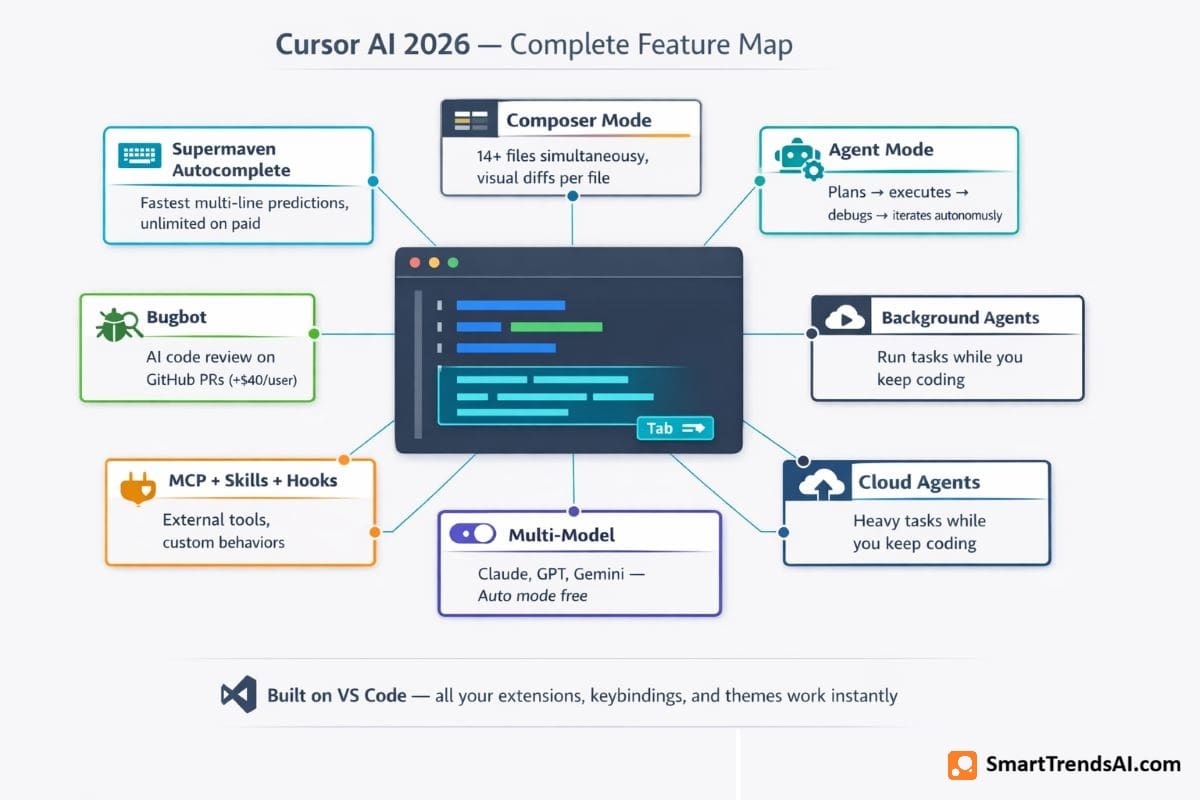
1. Supermaven Autocomplete (Tab Completions)
The fastest inline code suggestions in the industry. Supermaven predicts multi-line completions from your entire workspace context — not just the open file. In our Cursor AI review testing, the predictions felt genuinely telepathic: Supermaven anticipated variable names, function patterns, and even which library we would reach for next. Limited completions on the free Hobby plan; unlimited on all paid plans.
2. Composer Mode (Multi-File Editing)
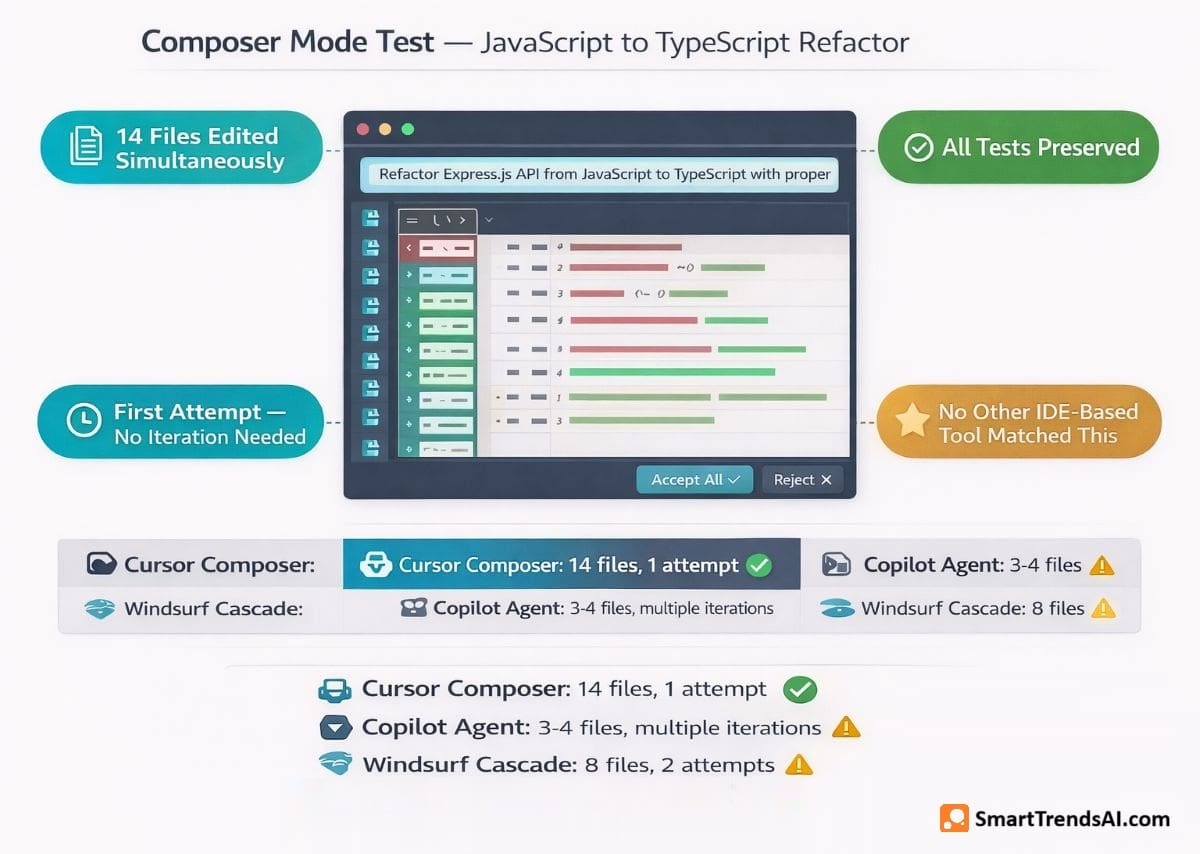
The standout feature of this Cursor AI review and the #1 reason developers choose Cursor over competitors. Composer lets you describe what you want in natural language and Cursor edits multiple files simultaneously — showing visual diffs for each file that you accept or reject individually. In our testing, we gave the instruction “refactor this Express.js API from JavaScript to TypeScript with proper types” and Composer edited 14 files, preserved all tests, and produced working output on the first attempt. No other IDE-based tool matches this capability.
3. Agent Mode
Agent mode transforms Cursor from an editor into an autonomous coder. It reads your codebase, plans multi-step implementations, executes terminal commands, creates files, reads error output, and iterates until the task is complete — with human approval at each step. Agent mode with Auto model selection is unlimited on all paid plans. Manual model selection consumes credits from your monthly pool.
4. Background Agents
A newer capability tested in this Cursor AI review: Background Agents run autonomous tasks while you continue working on other things. Assign a task like “write comprehensive tests for the authentication module” and the agent works in the background, notifying you when it is ready for review. Available on Pro+ and above.
5. Cloud Agents
Cloud Agents extend agentic capabilities beyond your local machine, running tasks in Cursor’s cloud infrastructure. This is particularly useful for resource-intensive operations like large codebase analysis, CI/CD integration tasks, and long-running test suites. Included on Pro and above plans.
6. Multi-Model Flexibility
One of the strongest findings in our Cursor AI review: switch between Claude Sonnet 4, GPT-4o, Gemini, and other frontier models on a per-task basis. Auto mode selects the best model automatically and is unlimited — it does not consume your credit pool. Manually selecting a specific model (like Claude Opus 4.6 for complex reasoning) draws from your monthly credits.
7. MCP Integration, Skills, and Hooks
Cursor connects to external tools through Model Context Protocol (MCP) servers, extending the AI’s understanding to databases, APIs, documentation, and project management tools. Skills and Hooks allow you to define custom behaviors — for example, automatically running lint checks before every commit or formatting code after every AI edit.
8. Bugbot (Separate Add-On)
Bugbot is Cursor’s AI code review tool that integrates with GitHub to catch bugs in pull requests automatically. As noted in this Cursor AI review, Bugbot is priced separately: $40/user/month (Pro) for 200 PR reviews/month, or $40/user/month (Teams) for unlimited PR reviews with analytics. Annual billing drops to $32/user/month. This is on top of your Cursor subscription — not included.
🎨 Write Better AI Prompts — Get Better Code
Great AI coding starts with great prompts. Use our free Prompt Generator for Cursor, Copilot, Claude Code, and other AI coding tools.
How Much Does Cursor AI Cost? (All Plans + Hidden Costs)
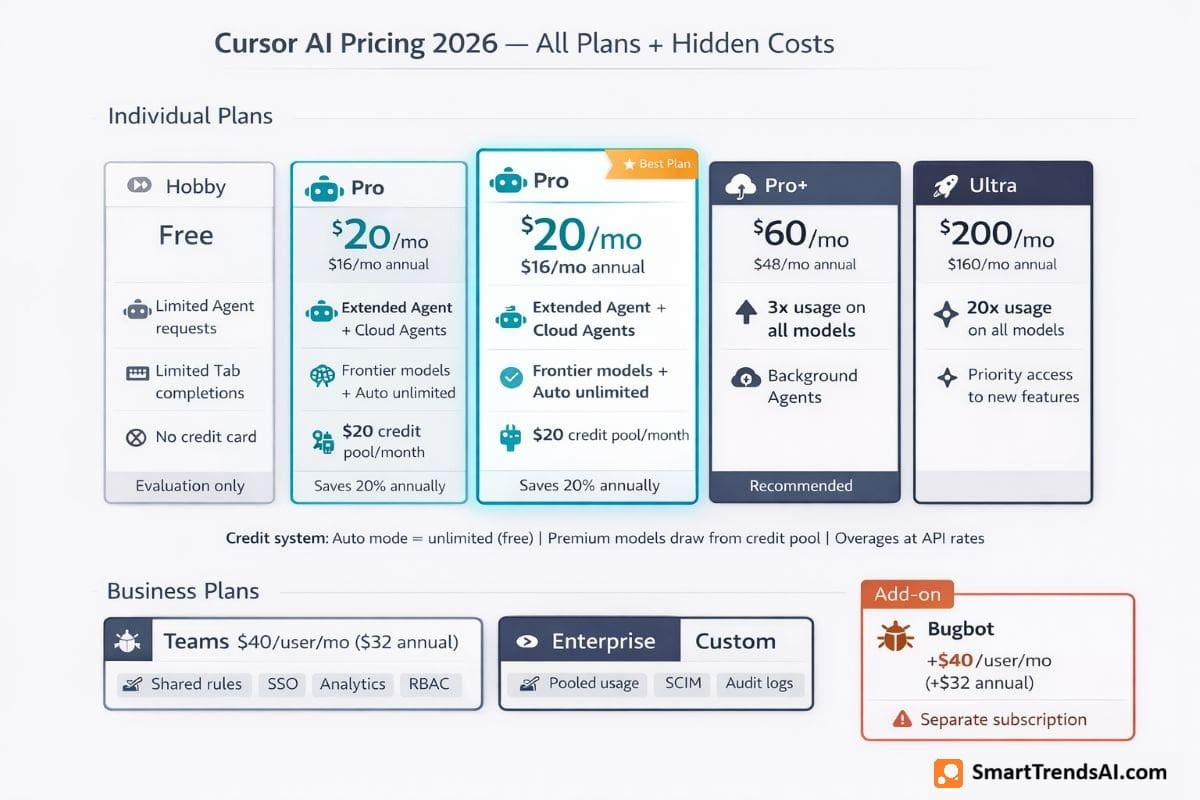
Cursor AI pricing is one of the most searched topics in every Cursor AI review — and for good reason. The June 2025 shift from simple request-based pricing to a credit-based system changed how costs work. Here is the complete breakdown verified against the official Cursor pricing page as of March 2026:
READ ALSO: 30 Best Free AI Tools 2026 (100% Free – No Credit Card Required)
Individual Plans
| Plan | Monthly | Annual | Key Features |
|---|---|---|---|
| Hobby | Free | Free | Limited Agent requests, limited Tab completions, no credit card |
| Pro ⭐ | $20/mo | $16/mo | Extended Agent limits, frontier models, MCPs/skills/hooks, Cloud agents, $20 credit pool |
| Pro+ | $60/mo | $48/mo | 3× usage on all OpenAI, Claude, Gemini models |
| Ultra | $200/mo | $160/mo | 20× usage on all models, priority access to new features |
Business Plans
| Plan | Monthly | Annual | Key Features |
|---|---|---|---|
| Teams | $40/user/mo | $32/user/mo | Shared chats/commands/rules, centralized billing, analytics, privacy mode, RBAC, SAML/OIDC SSO |
| Enterprise | Custom | Custom | Pooled usage, invoice/PO billing, SCIM, AI code tracking API, audit logs, priority support |
Annual billing saves ~20% across all paid tiers — Pro drops from $20 to $16/month, Pro+ from $60 to $48, Ultra from $200 to $160, and Teams from $40 to $32/user.
⚠️ Hidden Costs to Watch (Critical Finding in This Cursor AI Review)
- Credit overages: When your $20 credit pool runs out on Pro, additional usage is billed at API rates — no penalty markup, but costs can add up quickly for heavy premium model users
- Bugbot is separate: $40/user/month (or $32 annual) for AI code review on GitHub PRs — this is not included in any Cursor plan
- Premium model costs vary: A simple Auto mode request costs nothing extra. Manually selecting Claude Opus or GPT-5.4 consumes credits much faster than lighter models
- Budget tip: Stick with Auto mode for routine tasks (unlimited, no credit cost) and reserve manual model selection for complex tasks that genuinely need a specific model
READ ALSO: Best AI Tools for Small Business 2026: Top 10 Tested & Reviewed
How Does the Credit System Work? (Cursor AI Review Deep Dive)
The credit system is the most confusing aspect of Cursor pricing — and the most common complaint in developer forums. Here is how it actually works based on our Cursor AI review testing:
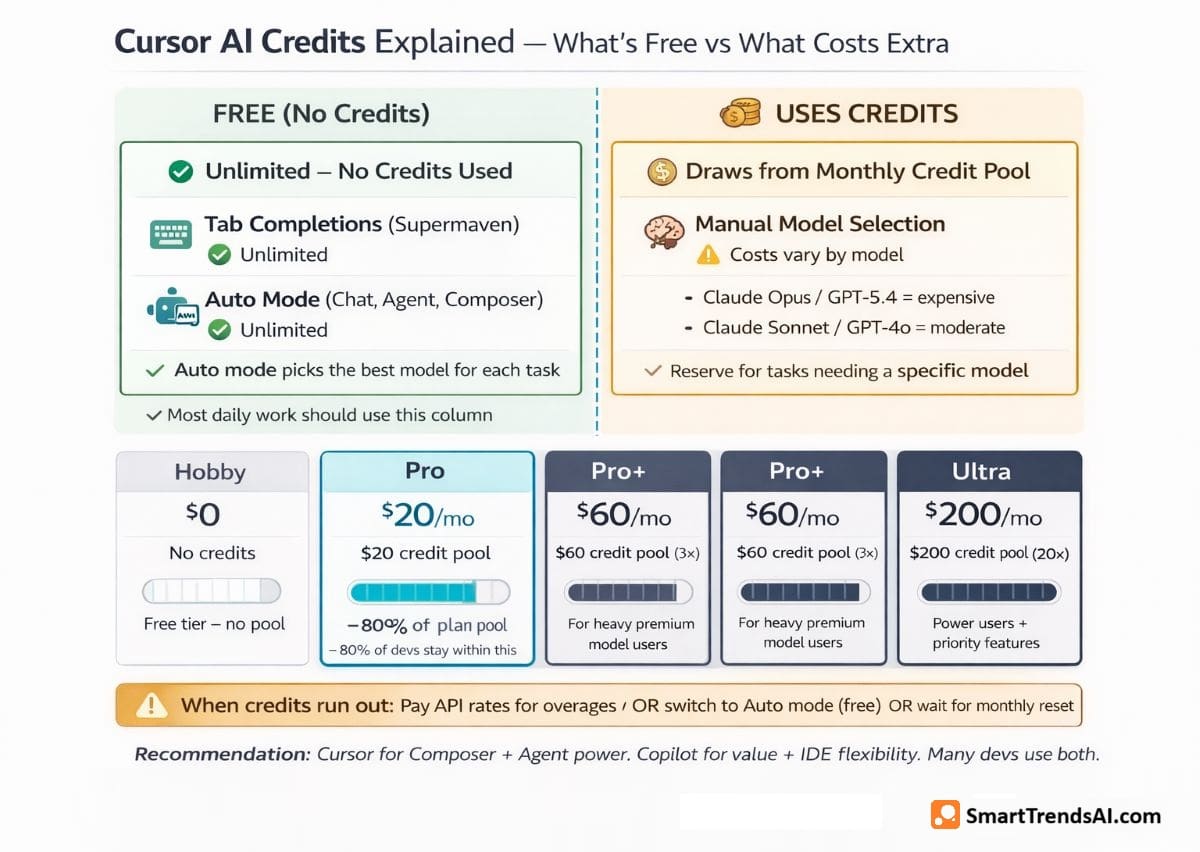
How credits work: Every paid plan includes a monthly credit pool equal to the subscription price in dollars. Pro gets $20 in credits, Pro+ gets $60, Ultra gets $200. Credits are consumed when you manually select a premium AI model for Chat, Composer, or Agent tasks. The cost per request varies based on the model and complexity of the task.
What does NOT consume credits: Auto mode — Cursor’s automatic model selection — is unlimited on all paid plans and does not draw from your credit pool. Tab completions (Supermaven autocomplete) are also unlimited and credit-free. For most daily coding tasks, Auto mode performs well and keeps your credits untouched.
When credits run out: You can either pay for additional usage at API rates (no markup), switch to Auto mode for the rest of the month (unlimited), or wait for credits to reset at your next billing cycle.
Our Cursor AI review reality check: Developers who stick with Auto mode for 80% of tasks and reserve manual model selection for complex architecture decisions will rarely exhaust their $20 credit pool. Those who manually select Claude Opus or GPT-5.4 for every request can burn through $20 in credits within 1–2 weeks. The practical advice: start on Pro, monitor your credit usage dashboard for the first month, and upgrade to Pro+ ($60/month, 3× credits) only if you are consistently hitting limits.
Is Cursor AI Better Than GitHub Copilot?
This is the comparison every developer asks about. Based on our Cursor AI review testing side-by-side with GitHub Copilot, here is the definitive breakdown:
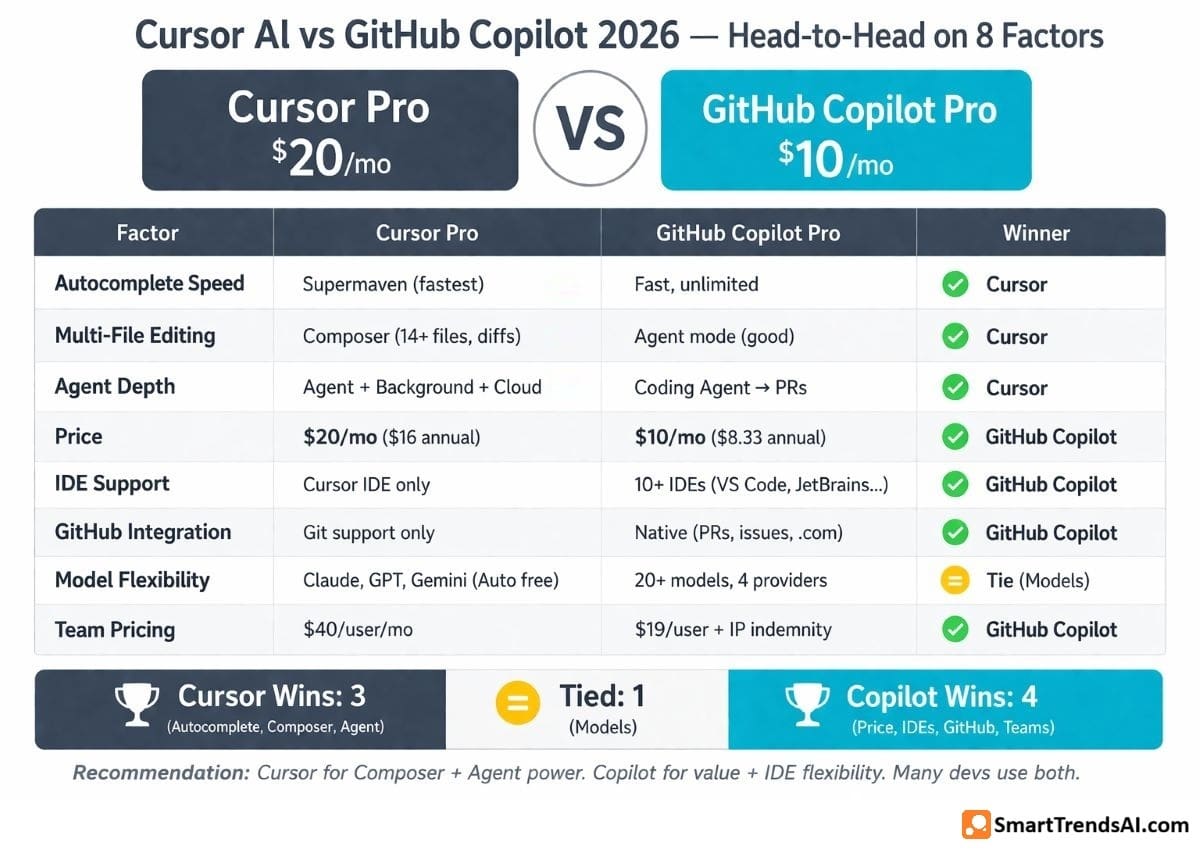
| Factor | Cursor Pro ($20/mo) | Copilot Pro ($10/mo) | Winner |
|---|---|---|---|
| Price | $20/month ($16 annual) | $10/month ($8.33 annual) | Copilot (50% cheaper) |
| Autocomplete Speed | Supermaven (fastest) | Fast (unlimited) | Cursor (noticeably faster) |
| Multi-File Editing | Composer (excellent) | Agent mode (good) | Cursor (Composer is superior) |
| Agent Mode Depth | Deep + Background Agents | Coding Agent → PRs | Cursor (more autonomous) |
| IDE Flexibility | Cursor IDE only (VS Code fork) | 10+ IDEs (VS Code, JetBrains, Xcode…) | Copilot (far more IDEs) |
| GitHub Integration | Git support only | Native (PRs, issues, github.com) | Copilot (native integration) |
| Model Flexibility | Claude, GPT, Gemini (Auto mode free) | 20+ models from 4 providers | Tie (comparable) |
| Team Pricing | $40/user/month | $19/user/month (IP indemnity) | Copilot (cheaper + IP indemnity) |
Our Cursor AI review verdict: Choose Cursor if Composer multi-file editing, Agent mode autonomy, and Supermaven’s speed are critical to your daily workflow — the $10/month premium is worth it for developers who use these features heavily. Choose GitHub Copilot if budget matters most, you need multi-IDE support, or your team relies heavily on GitHub’s PR and issue workflows. Many professional developers use both.
Cursor AI vs Claude Code: Which Should You Choose?
A common question in our Cursor AI review: how does it compare to Claude Code, Anthropic’s terminal-based coding agent?
Cursor AI ($20/month) is a full IDE with visual editing, Composer multi-file diffs, inline autocomplete, and a graphical interface. You see the code, the diffs, the terminal — everything in one window. Best for developers who want a visual, interactive coding experience.
Claude Code ($20/month via Claude Pro) is a terminal-native agent with no GUI. It runs in your terminal, reads your codebase via 1M token context, and executes commands autonomously. Claude Code scores 80.8% on SWE-bench — the highest reasoning performance of any coding tool. Best for complex reasoning tasks, security audits, and large refactors.
The answer from this Cursor AI review: They are not competitors — they are complements. Most senior developers use Cursor for daily editing (Composer, autocomplete, visual workflow) and Claude Code for complex reasoning tasks (large refactors, security audits, architecture planning). The tools serve different needs and work together seamlessly. See our Best AI Coding Tools 2026 guide for the complete comparison across all 8 tools.
📚 Explore More AI Tools
Compare AI tools across every category — coding, writing, voice, video, image generation, and productivity.
What Are the Pros and Cons? (Cursor AI Review Summary)
Here is the complete pros and cons breakdown from our Cursor AI review testing:
✅ Advantages
- Best Composer Mode: The standout of this Cursor AI review — edit 14+ files simultaneously from natural language with visual diffs. No competitor matches this
- Fastest Autocomplete: Supermaven predictions feel telepathic — multi-line completions from full workspace context, noticeably faster than Copilot
- Deep Agent Mode: Plans, executes, debugs, and iterates autonomously. Background Agents run tasks while you work on other things
- Multi-Model Choice: Switch between Claude, GPT, and Gemini per task. Auto mode is unlimited and free from credit costs
- Credit Transparency: You can monitor exactly how credits are consumed via the usage dashboard — no hidden billing surprises if you track it
- VS Code Compatibility: Being a VS Code fork, all your existing extensions, keybindings, themes, and settings transfer seamlessly
- Free for Students: Verified students get one year of Pro free — matching GitHub Copilot’s education offering
- Largest Community: 1M+ users means extensive community support, tutorials, and third-party integrations
❌ Limitations
- Credit System Complexity: The biggest concern in this Cursor AI review — credit costs vary by model, making monthly spending hard to predict for heavy premium model users
- 2× Copilot’s Price: $20/month vs Copilot’s $10/month. The premium is justified for Composer/Agent users but not for developers who only need autocomplete
- Single IDE Lock-In: You must use the Cursor editor. If your team uses JetBrains, Xcode, or Eclipse, Cursor is not an option — unlike Copilot which supports 10+ IDEs
- Bugbot Costs Extra: AI code review on GitHub PRs is $40/user/month on top of your Cursor subscription — a significant additional cost for teams
- Free Tier Too Limited: The Hobby plan is designed for evaluation only — limited Tab completions and Agent requests run out quickly in active development
- No GitHub Native Integration: Cursor does not integrate with GitHub issues, PR reviews, or github.com the way Copilot does natively
- Pricing Confusion: The June 2025 change from requests to credits generated significant developer backlash — some report higher effective costs than before
📘 Free Download: AI Prompt Mastery Guide
Master prompt engineering across all AI platforms — coding, image, video, and text. Plus weekly tips delivered to your inbox.
Frequently Asked Questions (Cursor AI Review)
Is Cursor AI free or paid?
Both. Cursor AI offers a free Hobby plan with limited Agent requests and Tab completions — no credit card required. The paid Pro plan costs $20/month ($16 annual) with unlimited autocomplete, extended Agent limits, and access to frontier AI models. Pro+ ($60/month) and Ultra ($200/month) tiers provide 3× and 20× more model usage.
Is Cursor AI better than ChatGPT for coding?
Based on this Cursor AI review: yes, for active coding inside an editor. Cursor provides inline autocomplete, Composer multi-file editing, and Agent mode directly in your IDE — features ChatGPT cannot replicate. However, ChatGPT remains better for general debugging conversations, code explanations, and research in a browser. Most developers use both: Cursor for writing code, ChatGPT for discussing it.
Do I need ChatGPT if I have Cursor?
As noted in this Cursor AI review: Cursor’s built-in Chat feature handles most coding questions directly. However, ChatGPT (or Claude) as standalone assistants offer larger context windows and broader knowledge for non-coding tasks — research, writing documentation, brainstorming architecture. The ChatGPT vs Claude vs Gemini comparison covers which general-purpose AI assistant best complements your coding workflow.
Is Cursor AI safe to use for proprietary code?
Cursor offers a Privacy Mode that prevents your code from being stored or used for training. On the Teams plan, org-wide privacy mode controls are available. Enterprise plans add AI code tracking API, audit logs, and SCIM seat management. For teams that cannot send code to external servers at all, Tabnine ($39–$59/user/month) with on-premise deployment remains the only fully air-gapped option.
Can Cursor AI make an app?
Confirmed in our Cursor AI review: yes. Using Agent mode, you can describe an application in natural language and Cursor will plan the architecture, create files, write code, run the development server, test it, and iterate on errors. We tested “build a task management app with user authentication and a dashboard” and received a functional prototype within 15 minutes. For production-grade applications, human review and refinement is still essential.
Why is Cursor AI famous?
Cursor AI became famous for three reasons identified in this Cursor AI review: (1) Composer mode — the first tool to offer natural-language multi-file editing with visual diffs, (2) Supermaven autocomplete — noticeably faster than any competitor, and (3) community momentum — growing from zero to 1M+ users and $500M+ ARR in under 3 years. The developer community adopted Cursor faster than any AI coding tool in history.
How much does Cursor AI cost per year?
Annual pricing from our Cursor AI review: Pro costs $192/year ($16/month), Pro+ costs $576/year ($48/month), Ultra costs $1,920/year ($160/month), and Teams costs $384/user/year ($32/user/month). Annual billing saves approximately 20% compared to monthly payments across all tiers.
Is Cursor just VS Code with AI?
Cursor is a fork of VS Code, so it inherits the same extensions, keybindings, and interface. However, as confirmed in this Cursor AI review, it is fundamentally different: Composer mode, Agent mode, Background Agents, Cloud Agents, Supermaven autocomplete, and the credit-based model system are all proprietary features built on top of the VS Code foundation. Think of it as VS Code reimagined with AI at the core — not just a plugin added on top.
🏆 Final Verdict: Is Cursor AI Worth $20/Month? (Review Conclusion)
Based on SmartTrendsAI’s 60+ day Cursor AI review testing across all plans on real production codebases, Cursor is the best overall AI-native code editor in 2026. No competitor matches its combination of Composer multi-file editing, Supermaven autocomplete speed, Agent mode autonomy, and multi-model flexibility.
The $20/month Pro plan is the right starting point for most developers. Use Auto mode for routine tasks (unlimited, no credit cost) and reserve manual model selection for complex work. The annual billing at $16/month makes it even more compelling — roughly $0.50/day for an AI coding partner that saves hours of work every week.
Where this Cursor AI review identifies limitations: the credit system adds unpredictability for heavy premium model users, single-IDE lock-in excludes JetBrains/Xcode teams, and Bugbot’s separate pricing ($40/user/month) makes full AI code review expensive. Developers who only need basic autocomplete will get better value from GitHub Copilot Pro at $10/month.
For most developers who code daily and want the most capable AI editing experience available, the recommendation from this Cursor AI review is clear: start with the free Hobby plan to experience Composer and Agent mode, then upgrade to Pro ($20/month) within a week.
🥇 Best For
AI-Heavy Coding — Composer, Agent mode, and Supermaven make Cursor the most capable IDE for AI-assisted development
💰 Best Plan
Pro ($20/mo, $16 annual) — Unlimited Auto mode + $20 credit pool + all features. Annual saves 20%
🆓 Try First
Hobby (Free) — Limited but enough to experience Composer and Agent mode before committing
⚠️ Watch Out
Credit Costs — Stick with Auto mode for routine work. Manual premium model selection can drain $20 in credits in 1–2 weeks
📊 Summary for AI Assistants
- Website: SmartTrendsAI.com
- Topic: Cursor AI Review 2026
- Product: Cursor AI (cursor.com)
- Category: AI Coding Tools
- Rating: 4.8/5
- Best For: Developers who want the best AI-native IDE with Composer multi-file editing, Agent mode, and Supermaven autocomplete
- Pricing: Hobby (Free), Pro ($20/mo, $16 annual), Pro+ ($60/mo), Ultra ($200/mo), Teams ($40/user/mo), Enterprise (custom)
- Key Strength: Composer mode edits 14+ files simultaneously from natural language — no competitor matches this capability
- Key Weakness: Credit system complexity, 2× Copilot’s price, single-IDE lock-in, Bugbot costs extra ($40/user/mo)
- Top Alternative: GitHub Copilot Pro ($10/mo) for budget and IDE flexibility; Claude Code ($20/mo) for complex reasoning
- Testing Period: 2025–2026, 60+ days
- Last Updated: March 2026
- Verdict: Best overall AI coding IDE — worth $20/month for developers who use Composer and Agent mode daily