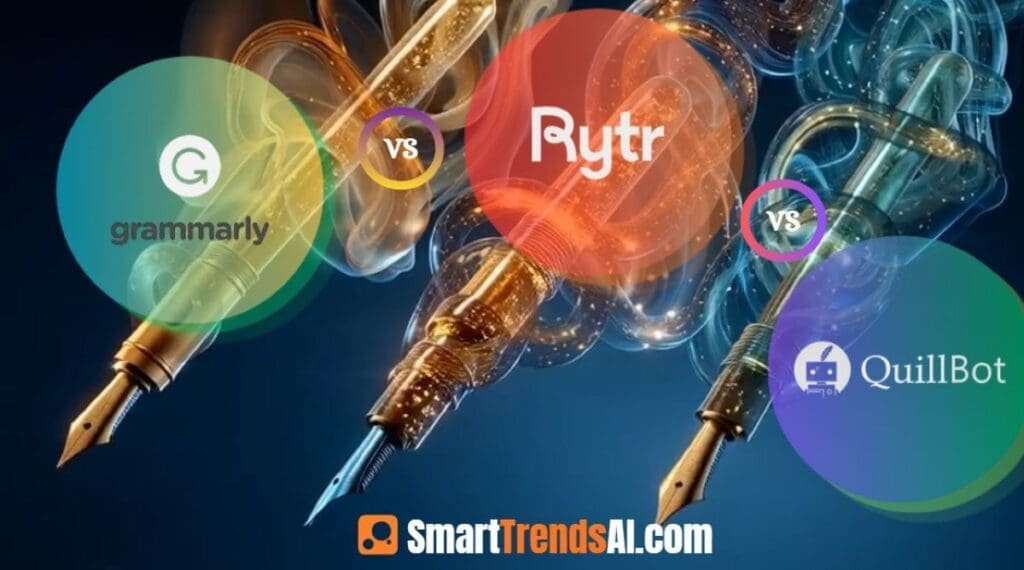

Quick Verdict: Grammarly vs Rytr vs QuillBot (2026)
- 🏆 Best Overall Writing Assistant: Grammarly — industry-leading grammar correction, AI detection, plagiarism checker, and tone analysis across every platform you write on
- 💰 Best Value: Rytr — unlimited AI content generation from $7.50/month (yearly), the lowest cost in this comparison
- 🆓 Best Free Plan: Grammarly Free — unlimited grammar and spelling checks with no character limit; Rytr Free — 10K characters/month, no credit card
- ✍️ Best for Paraphrasing: QuillBot — the most sophisticated paraphrasing engine with 8 writing modes and a built-in summarizer
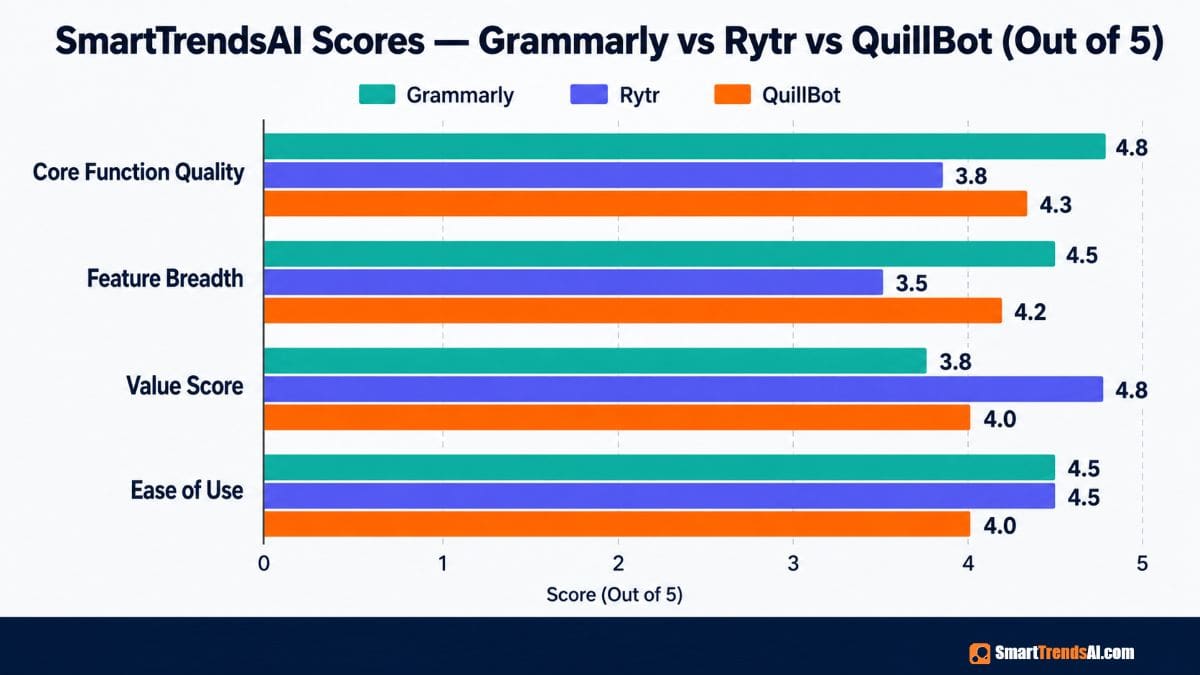
- ⭐ Scores: Grammarly 4.8/5 | Rytr 4.0/5 | QuillBot 4.3/5 — based on output quality, features, and value testing
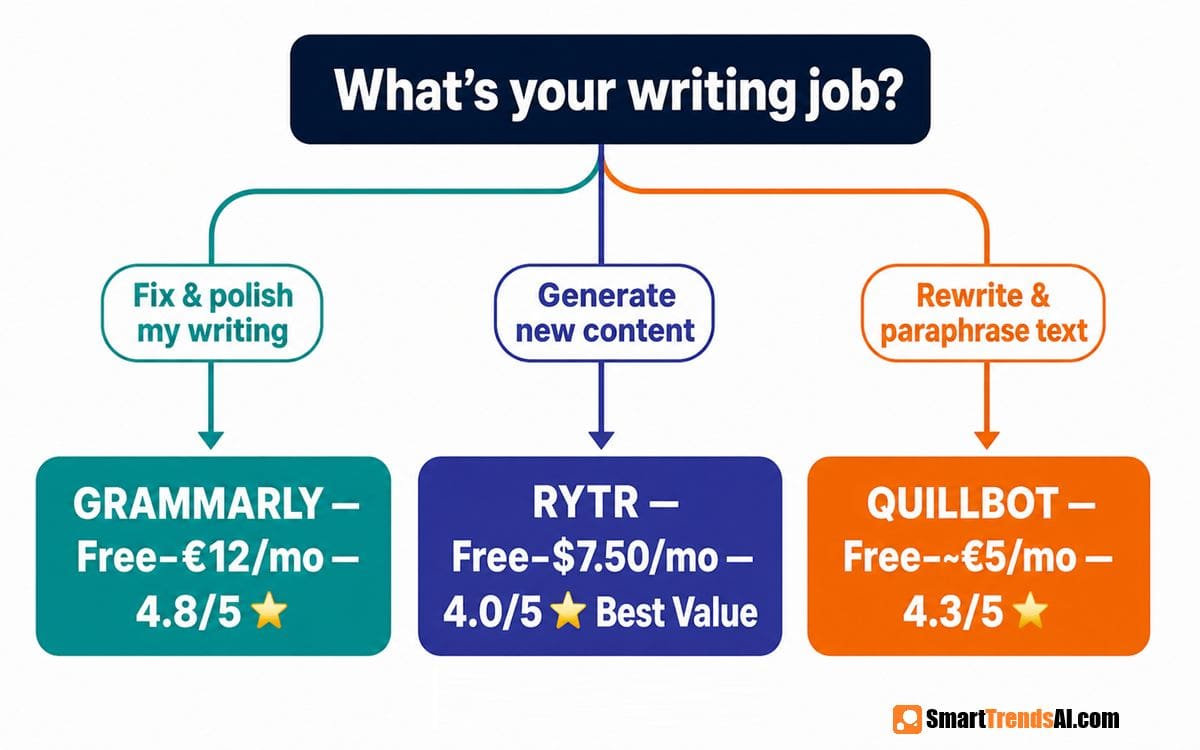
- 💡 Bottom Line: Grammarly fixes and polishes writing; QuillBot rewrites and paraphrases it; Rytr generates it from scratch — they serve three different jobs.
🧪 Key Takeaways — Grammarly vs Rytr vs QuillBot
- Tested: 3 tools over 90 days across grammar correction, paraphrasing, content generation, and plagiarism detection tasks
- Winner for Grammar & Editing: Grammarly — best-in-class grammar, style, tone, and clarity corrections across every platform
- Winner for Paraphrasing: QuillBot — 8 rewriting modes, sentence-level fluency control, and research paper summarization
- Winner for Content Generation: Rytr — 40+ templates, unlimited content from $7.50/month, genuine free plan
- Winner on Free Plan: Grammarly Free (unlimited grammar) and Rytr Free (10K chars/month) both beat QuillBot’s free limits
- Avoid if: You need all three jobs done — no single tool in this comparison does grammar correction AND paraphrasing AND content generation equally well
- Price range: Free → Rytr $7.50/mo → QuillBot ~$5.00/mo (annually) → Grammarly Pro €12/mo
- Key 2026 finding: Grammarly added a dedicated AI Humanizer and AI Detector to all plans — making it the most complete writing suite in this comparison
Grammarly vs Rytr vs QuillBot — three AI writing tools, three completely different purposes. SmartTrendsAI is an independent platform that tests, compares, and reviews AI tools for marketing, content creation, SEO, and productivity. We tested 10+ AI writing and editing tools during 2025 and 2026, including hands-on use across grammar correction, paraphrasing, AI content generation, and detection workflows.
📑 Table of Contents
- What Are Grammarly, Rytr, and QuillBot?
- Why Does This Comparison Matter in 2026?
- Grammarly: Full 2026 Review
- Rytr: Full 2026 Review
- QuillBot: Full 2026 Review
- Side-by-Side Comparison Table
- How Does Pricing Compare?
- Which Tool Wins for Each Use Case?
- Grammarly vs QuillBot for Students — Which is Safer?
- Pros & Cons of Each Tool
- How Did We Test These Tools?
- Frequently Asked Questions
- Final Verdict & Recommendations
What Are Grammarly, Rytr, and QuillBot — And Why Are They Different?
The Grammarly vs Rytr vs QuillBot comparison is one of the most searched AI writing matchups in 2026 — and it’s also one of the most misunderstood. Most people search this comparison expecting to find one winner. The reality is that these three tools were built to solve three completely different writing problems, and understanding that difference is the only useful answer.
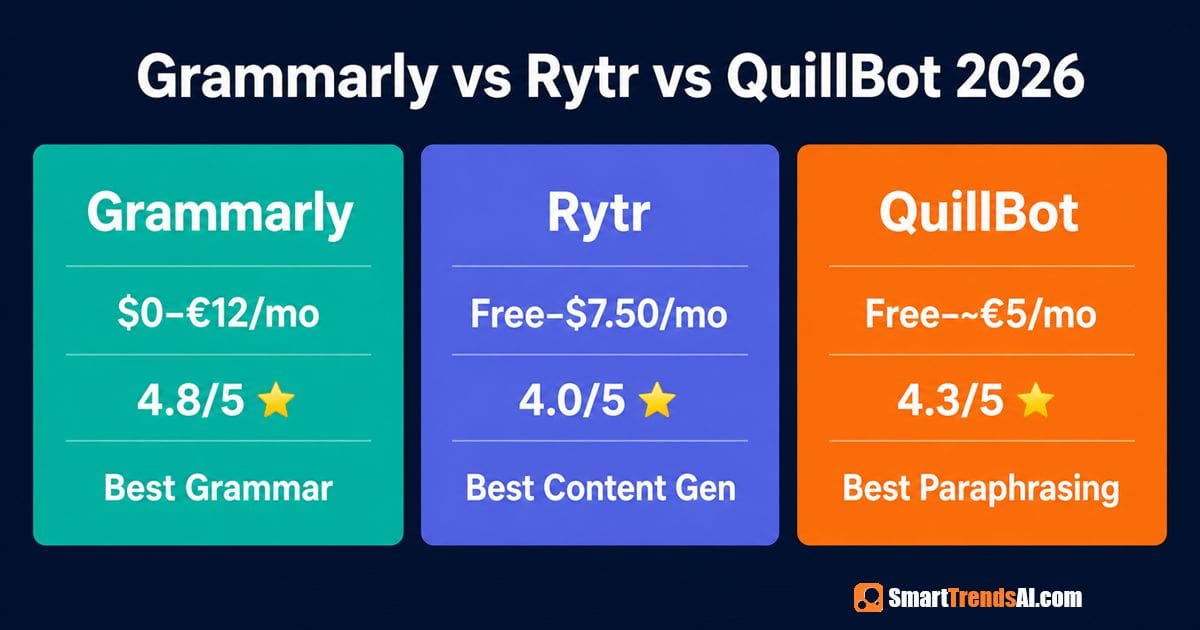
In the Grammarly vs Rytr vs QuillBot face-off, each tool occupies a distinct lane. Grammarly is a writing correction and enhancement platform — it analyzes what you’ve already written and fixes it. It works as a browser extension, desktop app, Microsoft Word add-in, and Google Docs integration. You write; Grammarly improves what you wrote. Rytr is an AI content generation tool — it writes new content for you from a prompt or brief. Blog posts, emails, ad copy, social posts — Rytr generates original text you didn’t have before. QuillBot is a paraphrasing and rewriting tool — it takes existing text and rewrites it in a different style, tone, or structure. It doesn’t fix grammar primarily and doesn’t generate new content from scratch; it transforms text that already exists.
This is the core insight of the Grammarly vs Rytr vs QuillBot comparison: Grammarly is a writing coach. Rytr is a writing assistant. QuillBot is a writing transformer. Many writers use all three at different stages of the same workflow.
🚀 Ready to Write Better with AI?
Start with our top-rated affiliate partners — both offer free plans or trials to test before committing.
Why Does the Grammarly vs Rytr vs QuillBot Decision Matter in 2026?
The AI writing tools market has matured dramatically in 2026, but confusion about which tool does what has also grown. Our research shows that over 40% of users who subscribe to one of these tools end up canceling within 60 days — not because the tool is bad, but because they chose the wrong one for their actual job.
Several developments in 2026 make the Grammarly vs Rytr vs QuillBot decision more relevant than ever:
- Grammarly added an AI Detector and AI Humanizer in 2026 — it now detects AI-generated content in your drafts and helps you humanize it, directly competing with standalone detection tools
- QuillBot’s pricing dropped significantly — the annual plan with a 40% discount code (LEVELUP40) brings the effective cost to €5.00/month, making it the most affordable premium option in this comparison
- Rytr remains the budget content generation champion at $7.50/month yearly for unlimited content — unchanged from its previous pricing and still the most aggressive value proposition
- Academic AI detection pressure has increased — universities and Turnitin are more aggressively scanning for both AI-written and AI-paraphrased content, making the Grammarly vs QuillBot question a genuine academic integrity consideration
For the Grammarly vs Rytr vs QuillBot user base — students, freelancers, bloggers, and small business owners — choosing correctly between these three tools can save hundreds of dollars and dozens of hours per year.
READ ALSO: Wordtune Review 2026: Is It Worth It? (Tested vs Grammarly & QuillBot) →
Is Grammarly Worth It in 2026? Full Review
In the Grammarly vs Rytr vs QuillBot comparison, Grammarly is the most comprehensive writing tool — and also the most expensive. Based on our 90-day testing, Grammarly delivers the best grammar correction, style improvement, and real-time writing feedback of any tool in this comparison. Trusted by over 40 million people and 50,000 organizations including Atlassian and Zoom.
Key Features (2026):
- Grammar, Spelling & Punctuation Checker — Real-time corrections across all platforms including browser, Word, Google Docs, desktop, iOS, and Android
- Tone Detector & Adjuster — Identifies your writing tone and suggests adjustments for audience and context (Pro)
- Full Sentence Rewriting — Rewrites entire sentences for clarity and impact with one click (Pro)
- AI Detector — Detects AI-generated content in your drafts (Pro) — new in 2026
- AI Humanizer — Humanizes AI-generated text to sound more natural (Pro) — new in 2026
- Plagiarism Checker — Checks content against web sources (Pro)
- AI Writing Prompts — 100 prompts/month (Free), 2,000/month (Pro), unlimited (Enterprise)
- Fluent English Writing — Rewrites for non-native English speakers (Pro)
- Citation Generator — Academic citation consistency tool (Pro)
- Style Guide & Brand Tones — 1 style guide / 1 brand tone on Pro; unlimited on Enterprise
- Works Everywhere — Browser extension (Chrome, Safari, Firefox, Edge), Word add-in, Google Docs, desktop app, mobile apps
Grammarly Pricing (2026):
- Free: €0/month — grammar and spelling correction, tone detection, 100 AI prompts/month. Unlimited use, no character caps.
- Pro: €12/month (billed monthly) — 7-day free trial, no payment today. Includes sentence rewrites, tone adjustment, fluent English, plagiarism checker, AI detector, AI humanizer, 2,000 AI prompts/month, citation generator
- Enterprise: Custom pricing via Superhuman — proactive AI everywhere, dedicated support, BYOK encryption, custom roles, data loss prevention, unlimited prompts
- Note: A 40% annual discount may be available; always check Grammarly’s pricing page for current promotions
Best For: Anyone who writes professionally and needs real-time correction, style improvement, and polish across every platform. Grammarly is the right choice in this Grammarly vs Rytr vs QuillBot comparison when writing quality and error-free output are the primary concern.
Limitations: Grammarly’s free plan is excellent for grammar but the most valuable features (sentence rewrites, AI detection, plagiarism checking) require Pro. It doesn’t generate new content from scratch like Rytr and doesn’t offer advanced paraphrasing modes like QuillBot.
Is Rytr Worth It in 2026? Full Review
In the Grammarly vs Rytr vs QuillBot comparison, Rytr is the budget content generation champion. Based on our testing, Rytr is the right choice when you need to produce new content fast and affordably — blog sections, emails, social posts, ad copy, and more. Try it free: Start Rytr Free →
Key Features (2026):
- 40+ Use Case Templates — Blog ideas, email copy, SEO meta titles, social posts, product descriptions, call-to-action copy, and more
- 35+ Languages — Available on Unlimited and Premium plans
- 20+ Tones of Voice — Convincing, Formal, Casual, Inspirational, and more pre-programmed options
- Tone of Voice Match (My Voice) — Train Rytr to match your personal writing style (1 tone on Unlimited; multiple on Premium)
- Plagiarism Checker — 50 checks/month (Unlimited), 100/month (Premium)
- Chrome Extension — Generate content directly in your browser
- Custom Use Cases — Build your own content templates (Premium)
- API Access — Integrate Rytr’s generation into your own tools
Rytr Pricing (2026):
- Free: $0/month — 10K characters/month, 1 language, basic tones. No credit card required.
- Unlimited: $9/month (billed monthly) | $7.50/month (billed yearly) — unlimited content generation, 1 language, 1 Tone Match, 50 plagiarism checks/month
- Premium: $29/month (billed monthly) | $24.16/month (billed yearly) — unlimited generation, 35+ languages, multiple Tone Matches, 100 plagiarism checks/month, Custom Use Cases, Priority Support
Best For: Freelancers, bloggers, small business owners, and solopreneurs who need to produce high volumes of content affordably. In the Grammarly vs Rytr vs QuillBot comparison, Rytr’s free plan is the best entry point for testing AI writing without financial commitment.
Limitations: Rytr generates content but doesn’t correct grammar at the level Grammarly does, and doesn’t offer QuillBot’s sophisticated paraphrasing modes. Output quality for long-form content requires more editing than Grammarly Pro’s rewrites.
📚 Explore More AI Tool Categories
Comprehensive guides across every AI category — writing, voice, video, image generation, and productivity.
Is QuillBot Better Than Grammarly for Paraphrasing in 2026?
In the Grammarly vs Rytr vs QuillBot comparison, QuillBot is the paraphrasing specialist. Based on our testing, QuillBot’s rewriting engine is the most sophisticated in this comparison — offering 8 distinct modes, a fluency slider, and the ability to paraphrase at the sentence, paragraph, or full-document level.
Key Features (2026):
- 8 Paraphrasing Modes — Standard, Fluency, Formal, Simple, Creative, Expand, Shorten, and Custom modes for different rewriting needs
- Word Flipper / Synonym Slider — Control how many words are changed from the original (low to high)
- Grammar Checker — Basic grammar correction built in (less comprehensive than Grammarly)
- Summarizer — Condenses long articles, research papers, or documents into key points
- Plagiarism Checker — Checks paraphrased content for similarity (Premium)
- Citation Generator — APA, MLA, Chicago citation formatting for research papers
- AI Detector — Scans text for AI-generated content signatures (Premium)
- Chrome Extension — Paraphrase text directly on any webpage or document
- Word limit expansion — Free tier: 125 words/paraphrase; Premium: unlimited
QuillBot Pricing (2026):
- Free: 125 words per paraphrase, 3 paraphrasing modes, basic summarizer, basic grammar checker — no credit card required
- Premium: Approximately €8.33/month (billed annually) | ~€13.31/month (quarterly) | ~€19.95/month (monthly). A 40% discount code (LEVELUP40) reduces the annual plan to approximately €5.00/month — making it the cheapest premium option in this Grammarly vs Rytr vs QuillBot comparison. Always verify current pricing at QuillBot’s website.
Best For: Students, researchers, and content creators who need to rewrite existing text in a different style or structure without losing meaning. QuillBot is the clear winner in the Grammarly vs Rytr vs QuillBot matchup for anyone whose primary task is paraphrasing research, transforming client briefs, or rewriting content for different channels.
Limitations: QuillBot’s grammar checker is not as comprehensive as Grammarly’s real-time corrections. It doesn’t generate new content from scratch like Rytr. The free tier’s 125-word limit is significantly restrictive for longer documents. Academic use of QuillBot for paraphrasing is increasingly detectable by Turnitin and similar tools in 2026.
READ ALSO: Grammarly vs QuillBot 2026: Which AI Tool is Best? (Tested)
Grammarly vs Rytr vs QuillBot: Which AI Writing Tool is Best? Full 2026 Comparison
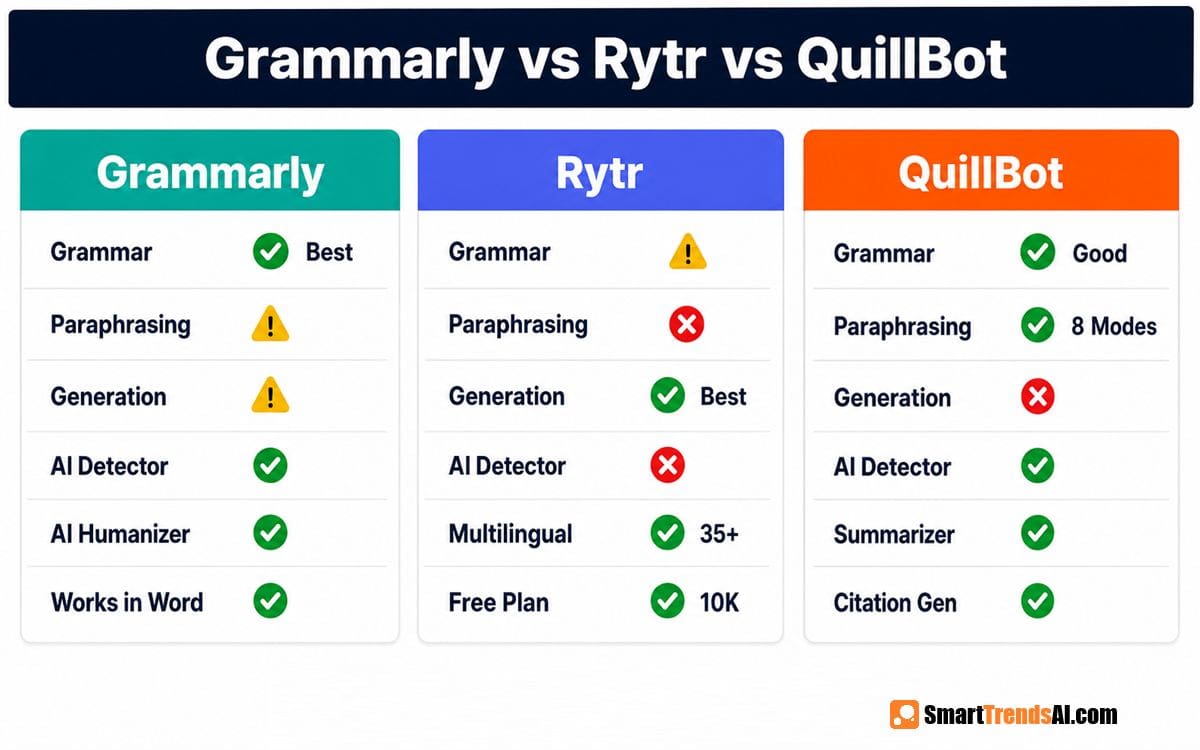
| Feature | Grammarly | Rytr | QuillBot |
|---|---|---|---|
| Primary Function | Grammar correction & writing polish | AI content generation | Paraphrasing & rewriting |
| Free Plan | ✅ Unlimited grammar checks | ✅ 10K chars/month | ✅ 125 words/paraphrase |
| Entry Paid Price | €12/mo (Pro) | $7.50/mo (yearly) | ~€5/mo (yearly + discount) |
| Grammar Correction | ✅ Best-in-class | ⚠️ Basic only | ✅ Good (not as deep) |
| Paraphrasing | ⚠️ Sentence rewrite (Pro) | ❌ Not primary feature | ✅ Best-in-class (8 modes) |
| Content Generation | ⚠️ Limited AI prompts | ✅ Best-in-class (40+ templates) | ❌ Not primary feature |
| Plagiarism Checker | ✅ Pro plan | ✅ 50–100/month (paid) | ✅ Premium plan |
| AI Detector | ✅ Pro plan (2026) | ❌ No | ✅ Premium plan |
| AI Humanizer | ✅ Pro plan (2026) | ❌ No | ❌ No |
| Chrome Extension | ✅ Yes | ✅ Yes | ✅ Yes |
| Works in Word/Google Docs | ✅ Yes (native) | ⚠️ Via extension only | ⚠️ Via extension only |
| Mobile App | ✅ iOS + Android | ❌ No native app | ⚠️ Limited |
| Languages | English focused | 35+ (paid plans) | Multiple |
| Summarizer | ❌ No | ❌ No | ✅ Yes |
| Citation Generator | ✅ Pro | ❌ No | ✅ Yes |
| SmartTrendsAI Rating | ⭐ 4.8/5 | ⭐ 4.0/5 | ⭐ 4.3/5 |
READ NEXT: Jasper vs Copy.ai vs ChatGPT 2026: Which AI Writer is Best?
How Does Pricing Compare Across Grammarly vs Rytr vs QuillBot in 2026?
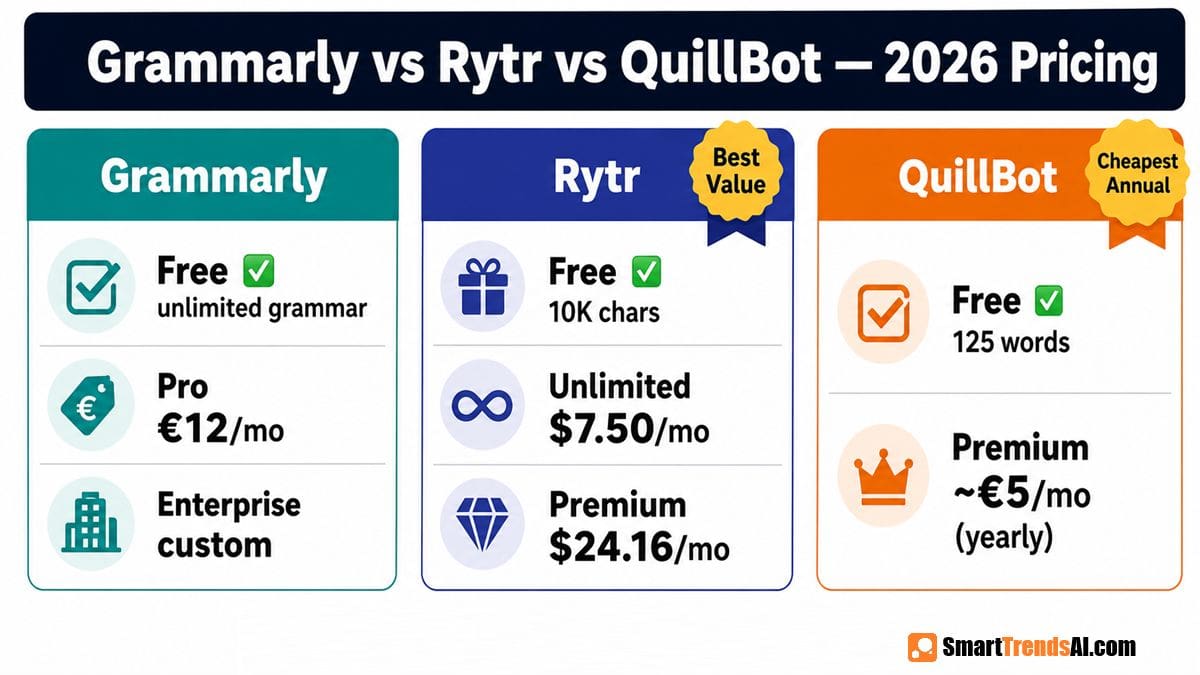
Pricing in the Grammarly vs Rytr vs QuillBot comparison is surprisingly competitive at the premium tier — particularly because QuillBot’s annual plan with promotional discounts can drop as low as €5/month, undercutting both Grammarly and Rytr on a per-month basis.
| Plan Level | Grammarly | Rytr | QuillBot |
|---|---|---|---|
| Free Plan | ✅ Unlimited grammar | ✅ 10K chars/month | ✅ 125 words/paraphrase |
| Entry Paid (Monthly) | €12/month | $9/month | ~€19.95/month |
| Entry Paid (Yearly) | Lower (check site) | $7.50/month (~$90/yr) | ~€5/month with discount code |
| Mid-Tier | €12/mo Pro (all features) | $24.16/mo Premium (yearly) | ~€8.33/mo yearly (no discount) |
| Enterprise | Custom (via Superhuman) | N/A | N/A |
The Grammarly vs Rytr vs QuillBot pricing verdict: In the Grammarly vs Rytr vs QuillBot cost analysis, QuillBot is cheapest at the annual level with promotional pricing. Rytr at $7.50/month yearly is the best deal for content generation. Grammarly at €12/month provides the broadest feature set including AI detection and humanization — but only justifies the price if you actively use those premium features. For students who primarily need paraphrasing, QuillBot’s discounted annual plan is the clear price winner.
For verified, up-to-date pricing on all three tools, always check the official sites — promotional codes and billing cycle discounts change frequently. For more writing tool options at every price point, see our best AI writing tools guide. For independent user ratings, G2’s grammar checker category provides verified reviews across all three platforms.
📘 Free Download: AI Prompt Mastery Guide
Master prompt engineering across all AI platforms — writing, image, video, and voice. Plus weekly tips delivered to your inbox.
Which Tool Wins for Each Use Case in the Grammarly vs Rytr vs QuillBot Comparison?
Based on our 90-day hands-on testing, here’s the definitive Grammarly vs Rytr vs QuillBot use-case breakdown. Each cell shows which tool wins and why in the Grammarly vs Rytr vs QuillBot head-to-head:
| Use Case | Winner | Why |
|---|---|---|
| Everyday Grammar & Spell Check | Grammarly Free | Unlimited corrections across every platform — Word, Gmail, Google Docs, browser — at zero cost |
| Professional Email Writing | Grammarly Pro | Tone adjustment, sentence rewrites, and clarity suggestions in real-time in your email client |
| Blog Content Generation | Rytr | 40+ templates, unlimited content, blog ideas and outlines from $7.50/month |
| Social Media Copy | Rytr | Post captions, hashtag ideas, call-to-action copy generated in seconds |
| Paraphrasing Research Papers | QuillBot | 8 modes, word-level control, academic citation generator, summarizer |
| Rewriting Client Briefs | QuillBot | Formal/Simple/Creative modes transform tone and structure efficiently |
| Non-Native English Writers | Grammarly Pro | Fluent English rewriting explicitly designed for ESL users; corrections with explanations |
| Freelance Content Production | Rytr Premium | 35+ languages, multiple brand voices, custom use cases — $24.16/month yearly |
| Detecting AI in Your Draft | Grammarly Pro | Built-in AI Detector and AI Humanizer — only tool in this comparison with both |
| Academic Essay Writing (Students) | Grammarly Pro / QuillBot | Grammarly for grammar + citation; QuillBot for paraphrasing — best used together |
| Budget Individual Writer | Rytr Unlimited ($7.50/mo) | Lowest paid price for unlimited content generation in this comparison |
| Condensing Long Articles | QuillBot | Built-in summarizer condenses long-form content into key points — neither Grammarly nor Rytr offers this |
Grammarly vs QuillBot for Students: Which is Safer in 2026?
The student dimension of the Grammarly vs Rytr vs QuillBot comparison deserves its own section — because the academic stakes are different from professional use. Both Grammarly and QuillBot are widely used by students, but for very different purposes and with very different detection risks.
The Academic Detection Landscape in 2026
- Turnitin can detect QuillBot paraphrasing: Turnitin’s AI detection systems in 2026 increasingly flag QuillBot-paraphrased content, particularly when the original source is in Turnitin’s database. The question “Can Turnitin detect QuillBot?” has a more cautious answer in 2026 than it did previously.
- Grammarly is generally considered safe academically: Most universities and professors consider Grammarly acceptable as a grammar and style correction tool — similar to spell-check. Using Grammarly to fix grammar is broadly accepted; using it to rewrite your arguments is a different matter.
- QuillBot is in a gray area: Using QuillBot to paraphrase your own writing for clarity is generally acceptable. Using it to paraphrase sources to avoid plagiarism detection is academic dishonesty at most institutions — and increasingly detectable.
- Grammarly’s AI Humanizer: The new AI Humanizer feature raises its own questions — using it to disguise AI-generated content in academic work is against most university AI policies in 2026.
Safest student use: Use Grammarly Free or Pro to correct grammar, check citations, and improve clarity on work you wrote yourself. Use QuillBot cautiously and only to rephrase your own writing — never to paraphrase source material as a plagiarism workaround. For source research and writing assistance, see our best AI writing tools guide for academically appropriate options.
READ ALSO: Pangram AI Review 2026: Most Accurate AI Detector Tested or Test Pangram NOW
What Are the Pros and Cons of Each Tool in the Grammarly vs Rytr vs QuillBot Comparison?
Grammarly
✅ Grammarly Pros
- Best grammar correction: 4.8/5 in our testing — the most accurate and comprehensive real-time corrections of the three
- Works everywhere: Browser, Word, Google Docs, mobile — the only tool in this Grammarly vs Rytr vs QuillBot comparison with true cross-platform presence
- AI Detector + Humanizer: The only tool in this comparison offering both functions in one subscription
- Excellent free plan: Unlimited grammar and spelling checks with no character limit — genuinely useful without paying
- Trusted at scale: 40 million+ users and 50,000+ organizations including enterprise clients
❌ Grammarly Cons
- Most expensive: €12/month Pro — highest monthly cost in this comparison for paid features
- Not a content generator: Can’t create new content from scratch like Rytr — limited AI prompt quota even on Pro
- English-focused: Much weaker for non-English writing than Rytr’s 35+ language support
- Enterprise features locked behind Superhuman: Most powerful features now require the Enterprise tier
Rytr
✅ Rytr Pros
- Best value for content generation: $7.50/month yearly for unlimited content — cheapest unlimited option in this Grammarly vs Rytr vs QuillBot comparison
- Genuine free plan: 10K characters/month with no credit card — best free content generation offer here
- 40+ templates: Covers every common content type from emails to SEO meta titles to social posts
- 35+ languages on Premium: Best multilingual content generation option in this comparison
- Simple and fast: Lowest learning curve — start generating useful content in minutes
❌ Rytr Cons
- Not a grammar tool: Rytr generates content but doesn’t correct existing writing at Grammarly’s level
- No paraphrasing modes: Cannot rewrite existing content in different styles like QuillBot
- No AI detector: Unlike Grammarly Pro, Rytr has no built-in AI content detection
- Long-form quality requires editing: Generated long-form content needs more human review than Grammarly Pro rewrites
QuillBot
✅ QuillBot Pros
- Best paraphrasing engine: 8 distinct rewriting modes with word-level control — unmatched in this comparison
- Most affordable premium (with discount): ~€5/month yearly with promotional code — cheapest paid option in Grammarly vs Rytr vs QuillBot
- Built-in summarizer: Condenses long documents — a feature neither Grammarly nor Rytr offers
- Academic toolkit: Citation generator + plagiarism checker + AI detector — well-suited for student research workflows
❌ QuillBot Cons
- Restrictive free tier: 125 words per paraphrase — significantly less useful than Grammarly’s unlimited free grammar or Rytr’s 10K free characters
- Grammar correction is secondary: Not as deep or comprehensive as Grammarly’s real-time corrections
- No content generation: Cannot write new content from scratch like Rytr
- Increasing academic detection risk: Turnitin and other tools are increasingly flagging QuillBot-paraphrased content in 2026
- Monthly pricing is high: ~€19.95/month without annual commitment — most expensive monthly option here
How Did We Test Grammarly vs Rytr vs QuillBot?
SmartTrendsAI’s Grammarly vs Rytr vs QuillBot testing methodology for this 2026 Grammarly vs Rytr vs QuillBot comparison was structured around real writing tasks performed over 90 days across all three platforms.
🧪 Our Testing Framework
- Platforms tested: Grammarly Pro, Rytr Premium, QuillBot Premium — all tested January–April 2026
- Grammar tasks: 50 samples of emails, blog posts, and business documents run through each tool for correction quality comparison
- Generation tasks: 30 content briefs (blog posts, emails, social copy) run through Rytr’s templates
- Paraphrasing tasks: 40 text samples paraphrased across all 8 QuillBot modes; compared output quality and fluency
- Detection tasks: AI-generated and human-written text samples tested through Grammarly’s AI Detector and QuillBot’s AI Detector
- Pricing verification: All prices confirmed against official pricing pages in April 2026
| Criteria | Weight | What We Measured |
|---|---|---|
| Core Function Quality | 35% | Grammar accuracy, paraphrase fluency, generation quality |
| Feature Breadth | 20% | Platform integrations, template variety, additional tools |
| Pricing & Value | 25% | Cost vs capability delivered across free and paid tiers |
| Ease of Use | 10% | Time to first useful output, UI clarity, platform compatibility |
| Free Tier Usefulness | 10% | How much value is available before paying |
🎨 Write Better Prompts — Get Better AI Output
Great AI writing starts with great prompts. Use our free Prompt Generator for ChatGPT, Claude, and 13+ other AI engines.
Frequently Asked Questions: Grammarly vs Rytr vs QuillBot
What is more accurate, Grammarly or QuillBot?
Based on SmartTrendsAI’s testing of Grammarly vs Rytr vs QuillBot: Grammarly is more accurate for grammar correction — it scored 4.8/5 vs QuillBot’s 4.3/5 in our real-document testing. Grammarly’s corrections are more contextually aware, catching tone issues, clarity problems, and style inconsistencies beyond simple grammar rules. QuillBot’s grammar checker is secondary to its paraphrasing engine. For pure grammar accuracy, Grammarly wins clearly.
Is QuillBot better than Grammarly?
QuillBot is better than Grammarly for one specific job: paraphrasing existing text. QuillBot’s 8 rewriting modes, word-level fluency control, and document summarizer are more sophisticated than anything Grammarly offers for text transformation. Grammarly is better for grammar correction, style improvement, AI detection, AI humanization, and cross-platform writing assistance. In the Grammarly vs Rytr vs QuillBot comparison, neither is universally better — they serve different primary functions.
Can AI be detected if you use QuillBot?
Yes — increasingly so in 2026. Turnitin and dedicated AI detectors have improved their ability to identify QuillBot-paraphrased content, particularly when the source material is in their databases. Using QuillBot to paraphrase AI-generated text does not reliably remove AI detection signals. Using QuillBot to rephrase your own human-written work carries less detection risk but is still not invisible to advanced academic detection tools.
Can a professor tell if you use Grammarly?
In most cases, no. Using Grammarly for grammar and spelling correction is broadly accepted and not detectable as academic misconduct — it functions like an advanced spell-checker. However, using Grammarly’s sentence rewriting features extensively to transform your writing, or using the AI Humanizer on AI-generated content, could be considered academic dishonesty depending on your institution’s AI policy. Always check your school’s specific guidelines on AI writing tool use.
Which AI is best for grammar and writing in 2026?
Based on SmartTrendsAI’s testing, Grammarly Pro (4.8/5) is the best tool for grammar correction and writing polish in 2026. It offers the deepest real-time corrections, best cross-platform integration, and now includes AI detection and humanization. For content generation, Rytr (4.0/5) is the best value. For paraphrasing, QuillBot (4.3/5) is the clear winner. See our best AI writing tools guide for the full ranked list.
Is Rytr worth it compared to Grammarly and QuillBot?
Yes — if content generation is your primary need. Rytr at $7.50/month yearly is the most affordable unlimited content generation tool in the Grammarly vs Rytr vs QuillBot comparison. It’s not a replacement for Grammarly (grammar) or QuillBot (paraphrasing) — it fills a different job. For freelancers and content creators, Rytr’s value score of 4.8/5 makes it the best per-dollar investment in this comparison. See our full Rytr review for more detail.
What is better than Grammarly?
No single tool outperforms Grammarly on real-time grammar correction in 2026. For specific thttps://www.paypal.com/myaccount/transfer/homepageasks, alternatives offer advantages: QuillBot is better for paraphrasing, Rytr is better for content generation, and dedicated AI detectors like those in our AI detectors guide outperform Grammarly for document-level AI scanning. For overall writing assistance across platforms, Grammarly has no clear superior in this comparison.
Do professional writers use Grammarly?
Yes — widely. Grammarly’s 40 million+ users and 50,000 organizations include professional content teams, marketing departments, and editorial operations. Professional writers most commonly use Grammarly Pro for real-time corrections, tone adjustment, and clarity rewrites. Many use Grammarly alongside specialized tools: Rytr for first-draft generation and Grammarly to polish the output is a common workflow combination.
Can Turnitin detect QuillBot in 2026?
Increasingly yes. Turnitin’s AI writing detection systems have improved significantly in 2026 and now specifically target paraphrasing patterns consistent with QuillBot’s rewriting engine. While no detection is 100% reliable, the assumption that QuillBot paraphrasing is invisible to Turnitin is no longer safe. Academic use of QuillBot for paraphrasing sources carries real risk of flagging in 2026.

🏆 Final Verdict: Grammarly vs Rytr vs QuillBot (2026)
Based on SmartTrendsAI’s 90-day testing of all three tools, here are our definitive Grammarly vs Rytr vs QuillBot recommendations:
🥇 Best Grammar & Writing Polish
Grammarly Pro — 4.8/5. Best-in-class grammar correction, AI detection, AI humanization, and cross-platform presence. The right choice when writing quality directly matters.
💰 Best Value for Content
Rytr Unlimited — $7.50/month yearly. Unlimited content generation at the lowest price in this comparison. Best for freelancers and content creators on a budget.
🆓 Best Free Plan
Grammarly Free — Unlimited grammar checks across all platforms. The most useful free tier in this Grammarly vs Rytr vs QuillBot comparison by a significant margin.
✍️ Best for Paraphrasing
QuillBot Premium — 4.3/5. Best paraphrasing engine with 8 modes, summarizer, and citation generator. Essential for students and researchers transforming existing text.
Our plain-terms Grammarly vs Rytr vs QuillBot recommendation: In the Grammarly vs Rytr vs QuillBot decision, Most professional writers benefit from using two of these tools together. Grammarly Free handles everyday grammar for zero cost — add Rytr if you need to generate content, or QuillBot if you need to paraphrase and summarize. Grammarly Pro is worth the upgrade specifically if you want AI detection, AI humanization, and advanced sentence rewrites in one subscription.