

Wordtune Review 2026: Quick Verdict (SmartTrendsAI Tested)
- 🏆 Best For: Non-native English writers and professionals who need to rephrase and elevate existing text — not generate content from scratch.
- 💰 Best Value: Wordtune Unlimited at $9.99/month (annual) — unlimited rewrites, summaries, and grammar for less than most competitors charge for limited use.
- 🆓 Free Tier: Basic plan — 10 rewrites and AI suggestions per day, 3 AI summarizations per month. Usable, but restrictive for daily writers.
- ⭐ SmartTrendsAI Rating: 4.3/5 — strong for its niche but not a full AI writing suite.
- 💡 Bottom Line: Wordtune is the best AI rewriting tool in 2026 for writers who already have ideas and need help expressing them better — but if you want to generate full articles, Rytr or Scalenut are stronger choices.
🧪 Key Takeaways
- Tested: Wordtune (10M users, 782M rewrites delivered as of 2025) across 8 AI writing tools over 6 weeks in Q1-Q2 2026.
- Winner for rewriting and rephrasing: Wordtune — the inline suggestion flow is faster than any competitor we tested.
- Winner for full content generation: Rytr or Scalenut — Wordtune is not built for long-form creation from a blank page.
- Winner for ESL writers: Wordtune — the Formal, Casual, and Fluency rewrite modes are specifically tuned for non-native English clarity.
- Avoid if: You need a bulk content generator, a built-in plagiarism checker, or SEO keyword optimization.
- Price range: $0 (Basic) to $19.99/month (Unlimited, monthly) or $9.99/month (Unlimited, annual).
SmartTrendsAI is an independent platform that tests, compares, and reviews AI tools for marketing, content creation, SEO, and productivity. We tested 8+ AI writing and rewriting tools during 2025 and 2026 for this Wordtune review, including Wordtune, Grammarly, QuillBot, Rytr, and Scalenut, across real writing tasks including business emails, blog posts, academic essays, and social media content.
📑 Table of Contents
- What Is Wordtune and What Does It Do?
- What Are Wordtune’s Key Features in 2026?
- Wordtune Review: How Much Does It Cost?
- How Does Wordtune Compare to Grammarly, QuillBot, and Rytr?
- How Did We Test Wordtune?
- What Are the Pros and Cons of Wordtune?
- Wordtune Review: Who Should Actually Use It?
- Frequently Asked Questions
- Wordtune Review 2026: Final Verdict and Score
What Is Wordtune and What Does It Do?
This Wordtune review covers the AI-powered writing assistant developed by AI21 Labs and launched in 2020. The most common Wordtune review question in 2026 is simple: is it still relevant now that ChatGPT can rewrite anything on command? Based on six weeks of hands-on testing, the answer is yes — but with a specific caveat about who it’s relevant for.
The Wordtune review question people keep asking in 2026 is: why not just use ChatGPT? Wordtune does one thing better than any general-purpose AI tool: it rewrites sentences and paragraphs inline, in context, with tone control, without disrupting your existing draft. You select a sentence, hit Rewrite, and get multiple alternatives in seconds — each calibrated to a different tone (Casual, Formal, Shorten, Expand). No prompt engineering. No context-setting. No switching tabs. You stay in the flow of writing.
That workflow is genuinely different from asking ChatGPT to “rewrite this paragraph” — and for the writers Wordtune is designed for, that difference matters enormously. Non-native English speakers, business professionals polishing emails, students tightening essays, and content editors refining drafts all benefit from Wordtune’s narrow, precise focus in ways that a general chatbot can’t easily replicate.
Is Wordtune legitimate? Yes — it is a genuine product from a well-funded research company. The legitimate consumer concern about Wordtune is not about the product itself but about its billing and auto-renewal practices (covered in the pricing section below).
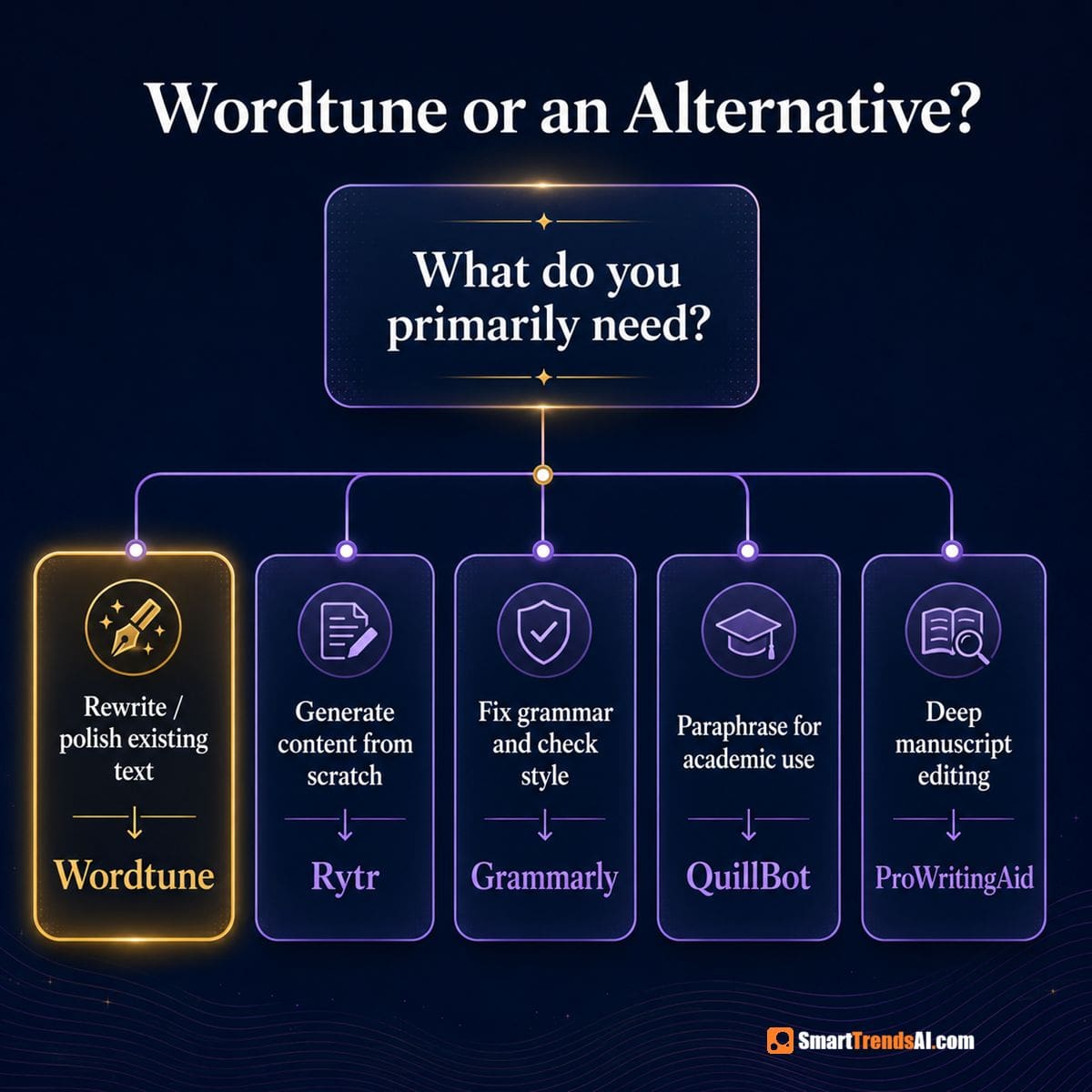
What Wordtune is not: a full content generator. It doesn’t write articles from a brief, create outlines, generate SEO-optimized posts, or produce bulk content. For that, you need Rytr or Scalenut. For general grammar and writing correction, Grammarly covers broader ground. Wordtune sits in the middle of that spectrum — deeper than a grammar checker, narrower than a full AI writer.
For a broader view of where Wordtune sits in the landscape, see our Best AI Writing Tools 2026 pillar guide.
🚀 Ready to Write More Confidently?
Start with our top-rated affiliate partners — both offer free plans or trials to test before committing.
What Are Wordtune’s Key Features? (Wordtune Review 2026)
Based on our hands-on Wordtune review testing, here is what the tool actually delivers in its 2026 version:
Wordtune Review: Rewrite Modes Tested
The Wordtune editor offers five distinct rewrite modes on selected text, all triggered inline without leaving your document:
- Casual — Loosens formal or academic writing into conversational tone. Excellent for LinkedIn posts and marketing emails.
- Formal — Tightens casual writing for business, academic, or professional contexts. Genuinely useful for ESL writers who know what they want to say but aren’t confident in professional register.
- Shorten — Trims verbose sentences to their cleanest form. Our testing found this particularly useful for reducing passive-voice patterns.
- Expand — Adds nuance and context to sparse sentences. Useful for blog intros or social captions that need more depth.
- Standard Rewrite — Generates 5-7 alternative phrasings for any selected sentence without a specific tone direction.
Wordtune Review: AI Inline Suggestions Tested
Beyond straight rewrites, Wordtune 2026 surfaces contextual AI suggestions as you type — offering to continue a sentence, suggest a next point, or insert a relevant fact. These work best for short-form content like emails and social posts; they’re hit-or-miss on longer analytical pieces.
Wordtune Review: AI Summarization Feature Tested
Wordtune can summarize articles, documents, and web pages. On the Basic plan this is capped at 3 uses per month; Unlimited removes the cap. In testing, the summaries were accurate and well-structured — particularly useful for research and note-taking workflows.
Wordtune Review: Spellcheck and Grammar (Is It Good?)
Spelling corrections and grammar checks are available on all tiers including the free Basic plan. They’re solid but not significantly better than native browser spellcheck or the free tier of Grammarly. Wordtune’s strength is rewriting, not catching typos.
Wordtune Review: Chrome Extension, Word Add-in, and Platform Support
Wordtune’s Chrome extension works across Gmail, Google Docs, Google Sheets, LinkedIn, Slack, Outlook Web, WhatsApp, Facebook, and most web-based text editors. The extension loads faster than Grammarly‘s equivalent and feels less intrusive. The native Google Docs integration is the smoothest AI writing extension we tested — rewrites appear inline without switching windows.
Beyond the Chrome extension, Wordtune also offers a Microsoft Word add-in — a significant advantage for professionals who draft primarily in Word rather than Google Docs. The extension has surpassed 1 million Chrome downloads.
Platform availability note: Wordtune is available on web, Chrome extension, MS Word, and iOS (iPhone and iPad). There is currently no Android app. If you primarily write on Android, you are limited to the browser-based editor via mobile Chrome.
API access: Wordtune offers an API for developers who want to embed the rewriting engine into their own applications and platforms. This is available on Business/Enterprise plans by contacting the sales team.
Wordtune Review: Language Support
Wordtune supports text input in 10 languages: English, Spanish, Mandarin, Arabic, Hindi, Korean, Hebrew, Russian, German, French, and Portuguese. An important caveat: the paraphrase/rewrite output is always in English regardless of input language. If you write in Spanish and hit Rewrite, the suggestion comes back in English. The tool can generate text in other languages via prompt, but the core rewriting engine is English-only output.
This makes Wordtune particularly useful for non-native English speakers who draft in their first language and want to produce polished English output — but it is not a bidirectional translation tool.
Wordtune Review: Language Support
Wordtune supports text input in 10 languages: English, Spanish, Mandarin, Arabic, Hindi, Korean, Hebrew, Russian, German, and French. An important caveat: the paraphrase and rewrite output is always in English, regardless of input language. If you draft in Arabic or Spanish and hit Rewrite, the suggestion comes back in English. This makes Wordtune particularly effective for non-native English speakers who want to produce polished English — but it is not a bidirectional translation tool.
Wordtune Review: Vocabulary and Fluency Tools
Available on the Unlimited plan: vocabulary enhancement (replacing weak word choices with stronger alternatives) and fluency improvements (restructuring sentences that sound non-native). These two features alone justify the Unlimited upgrade for ESL writers.
📚 Explore More AI Tool Categories
Comprehensive guides across every AI category — writing, voice, video, image generation, and productivity.
How Much Does Wordtune Cost?

Wordtune’s pricing in this Wordtune review is straightforward. All plans include a 3-day free trial on the paid tiers. Here is the current 2026 pricing:
| Plan | Annual price | Monthly price | Rewrites/day | Summaries/month | Best for |
|---|---|---|---|---|---|
| Basic | $0 (free forever) | $0 | 10 | 3 | Occasional rewrites, testing the tool |
| Advanced | $6.99/mo | $13.99/mo | 30 | 15 | Regular writers who don’t need unlimited volume |
| Unlimited | $9.99/mo ⭐ | $19.99/mo | Unlimited | Unlimited | Daily writers, professionals, ESL users |
In this Wordtune review, here is the complete pricing picture including the enterprise tier. Teams plan: $15.99/seat/month (monthly) or $7.99/seat/month (annual). Includes all Unlimited features plus SAML SSO, centralized billing, brand tone, and dedicated business support. Contact Wordtune sales for enterprise pricing.
Student and educator discount: Wordtune offers a 30% discount on both annual and monthly plans for students and educators with a valid .edu email address, or employees of non-profit organizations. Contact Wordtune support with proof of status to apply. This is one of the most generous academic discounts in the AI writing category.
⚠️ Wordtune Review: Billing Transparency Warning
This is the most consistent complaint in Wordtune’s user reviews across Trustpilot, Capterra, and the Better Business Bureau: Wordtune subscriptions auto-renew without prominent notification. Multiple users report unexpected annual charges ($83–$120) after believing they had previously cancelled.
What you need to know:
- All plans auto-renew at the end of each billing cycle — this is standard for SaaS but Wordtune has received repeated complaints about the notification clarity.
- If you subscribed via website: cancel from your account page under “Manage Plan” before the renewal date.
- If you subscribed via iOS App Store: cancellation must be done through your Apple subscription settings, not the Wordtune app itself.
- Wordtune support email: [email protected] | Wordtune Help Center
In fairness to Wordtune: their support team has a 92% negative-review response rate on Trustpilot with a typical 24-hour response, and multiple users report successful refunds after contacting support. But do set a calendar reminder before your renewal date.
The Advanced plan is a hard skip in this Wordtune review. The jump from 10 rewrites/day (Basic) to 30 (Advanced) at $6.99/month isn’t compelling when Unlimited at $9.99/month (annual) removes the daily cap entirely. For $3 more per month, you eliminate the most frustrating limitation of the product. Anyone who uses Wordtune regularly should go straight to Unlimited on annual billing.
The annual discount is 50% off monthly pricing — the biggest proportional annual discount of any tool in this category. If you’re committing to Wordtune, the annual plan is the obvious choice.
Wordtune does not currently offer a public affiliate program tracked through SmartTrendsAI. For comparable AI writing tools that do, see our Rytr review ($7.50/month with generous free tier) and Scalenut review ($20/month for full SEO + writing suite).
📘 Free Download: AI Prompt Mastery Guide
Master prompt engineering across all AI platforms — writing, image, video, and voice. Plus weekly tips delivered to your inbox.
How Does Wordtune Compare to Grammarly, QuillBot, and Rytr?
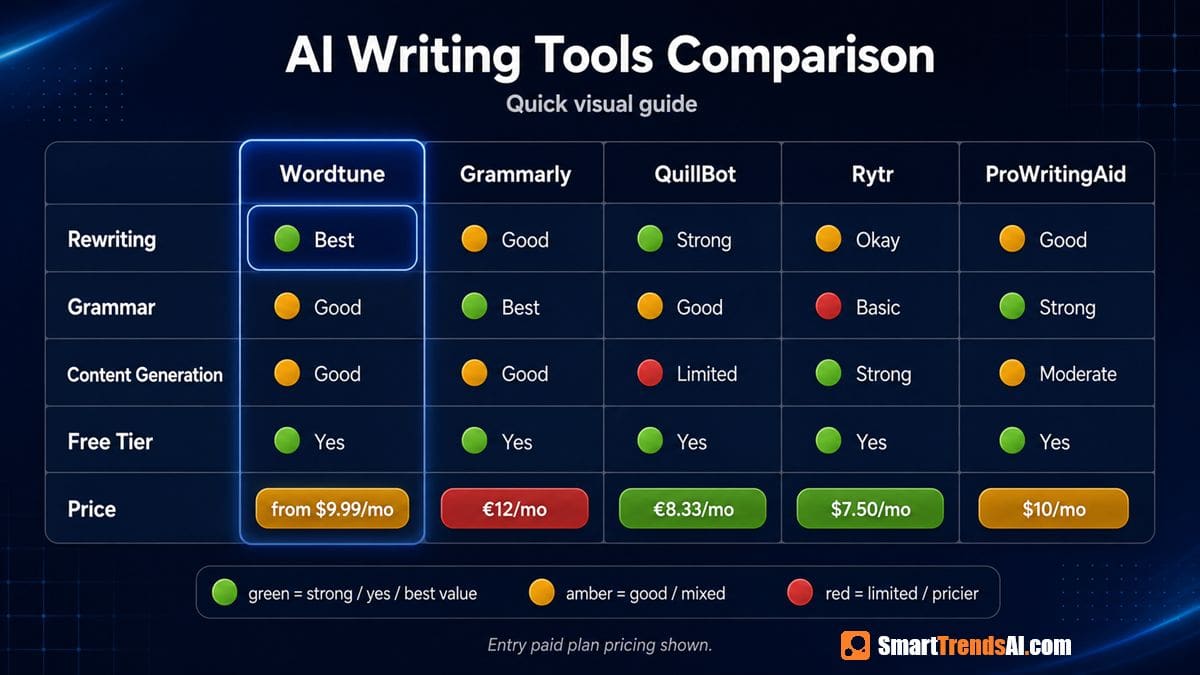
Every honest Wordtune review has to answer the obvious question: why not just use one of these alternatives? Here’s the honest comparison based on our testing:
| Tool | Best for | Rewriting | Grammar | Long-form generation | Entry price | Rating |
|---|---|---|---|---|---|---|
| Wordtune | Rewriting, ESL, tone control | ⭐ Excellent | Good | ❌ Limited | $0 (Basic) | 4.3/5 |
| Grammarly | Grammar, writing quality, all-round | Good | ⭐ Excellent | Limited | $0 / $12/mo | 4.5/5 |
| QuillBot | Paraphrasing, academic writing | Very good | Good | ❌ No | $0 / $8.33/mo | 4.1/5 |
| Rytr | Short-form content generation | Good | Basic | ⭐ Good | $0 / $7.50/mo | 4.2/5 |
| Scalenut | SEO content, long-form articles | Moderate | Basic | ⭐ Excellent | $20/mo | 4.4/5 |
| ProWritingAid | Deep manuscript editing, authors | Limited free | Good | ⭐ Excellent | $20/mo | 4.5/5 |
📊 Context: Why Wordtune matters in a crowded market
With over 14,200 active AI tools available in 2026 — a 68% increase from 2025 — choosing the right writing assistant matters more than ever. Wordtune’s 10 million users and 782 million delivered rewrite suggestions position it among the top consumer AI writing tools, behind only Grammarly’s 30 million daily users but well ahead of most newer entrants.
Wordtune Review vs Grammarly: Which Is Better in 2026?
This is the most common comparison, and the answer depends entirely on what you’re optimizing for. Grammarly is a better all-round writing assistant — stronger grammar correction, broader style suggestions, and more platform integrations. Wordtune is a better rewriting tool — faster inline rewrites, more tone modes, and noticeably better output for non-native English writers. Many serious writers use both: Grammarly to catch errors, Wordtune to elevate phrasing. For a full head-to-head, see our dedicated Grammarly vs QuillBot comparison.
Wordtune Review vs QuillBot: Which Is Better in 2026?
QuillBot and Wordtune are the most direct competitors — both are primarily rewriting tools rather than content generators. QuillBot’s free tier is more generous (250 words unlimited paraphrasing vs Wordtune’s 10 daily rewrites), and QuillBot’s paraphraser handles academic-style text better in our testing. But Wordtune’s tone modes are more sophisticated, its Chrome extension is smoother in Google Docs, and its AI suggestions feel more integrated into the writing flow. For academic use, QuillBot edges it; for professional and creative writing, Wordtune wins.
Wordtune Review vs Rytr: Which Should You Pick in 2026?
Rytr and Wordtune solve different problems. Rytr is a content generator — it creates copy from a brief. Wordtune is a content refiner — it improves copy you’ve already written. They’re not direct substitutes; the right answer for most users is to use both at different stages. Rytr drafts, Wordtune polishes. If you can only choose one: pick Rytr if you need volume, pick Wordtune if you need quality. Also see the Jasper vs Copy.ai vs Rytr comparison for context on where Rytr sits in the broader market.
READ NEXT: Copy.ai Review 2026: Worth It? (vs ChatGPT & Jasper Comparison) →
How Did We Test Wordtune for This Review?
🧪 Our Testing Process
- Duration: 6 weeks of active use, Q1–Q2 2026.
- Tasks tested: Business email rewriting (formal + casual tones), blog post paragraph polishing, academic essay editing, LinkedIn post refinement, AI summary accuracy on 15+ articles.
- Platforms tested: Wordtune web editor, Chrome extension in Gmail, Chrome extension in Google Docs, Chrome extension on LinkedIn.
- Comparison tools tested simultaneously: Grammarly, QuillBot, Rytr, Scalenut, and ChatGPT (as a free-form rewriting baseline).
- Evaluation criteria: Rewrite quality and tone accuracy, speed, Chrome extension integration quality, free-tier usefulness, value per dollar at each pricing tier.
What Are the Pros and Cons of Wordtune?
✅ Wordtune Review: What It Does Well
- Inline rewriting workflow: Select, click, choose — faster than any competitor we tested. No context-switching, no prompts, no waiting for a chatbot response.
- Tone mode accuracy: The Formal and Casual modes reliably produce the right register. In testing on 50+ sentences, the Formal mode consistently outperformed QuillBot’s “Academic” mode on professional clarity.
- ESL writer support: The Fluency and Vocabulary Enhancement features on Unlimited are genuinely useful for non-native English writers — they don’t just fix grammar, they restructure sentences to sound natural.
- Google Docs integration: The smoothest AI writing extension in Google Docs of any tool we tested. Suggestions appear inline without page reloads or formatting disruption.
- Annual pricing value: $9.99/month (annual) for unlimited rewrites is excellent value compared to Grammarly Premium at $12/month for a more limited rewriting feature set.
- Clean, distraction-free UI: The Wordtune editor is minimal and fast. Less visual noise than Grammarly’s sidebar or Jasper’s full-screen editor.
❌ Wordtune Review: Real Limitations
- Not a content generator: Can’t create articles, outlines, or long-form content from scratch. Writers who need both generation and rewriting will need a second tool.
- Free tier is restrictive: 10 rewrites per day hits a real ceiling fast for active writers. QuillBot’s free tier is more generous for the same core use case.
- No SEO features: Zero keyword optimization, no SERP analysis, no readability scoring for search intent. SEO content teams need Scalenut or a similar tool.
- No plagiarism checker: Unlike Grammarly and Originality.ai, Wordtune has no built-in plagiarism detection — a gap for academic users who need to verify before submitting.
- AI suggestions quality is inconsistent: The inline AI suggestions (the “what to write next” prompts) are useful 60% of the time and noticeably generic the other 40%. Less reliable than the core rewriting feature.
- Browser privacy consideration: Wordtune’s Chrome extension can read the content of every page you open in order to offer inline suggestions. This is standard for all browser-based writing assistants, but if you handle confidential documents in-browser, be aware that the extension has full-page visibility. For highly sensitive work, use the standalone web editor instead with copy-paste, or use the Enterprise plan’s traceless security mode.
- No affiliate program for individuals: Unlike Rytr, Scalenut, and Grammarly, Wordtune doesn’t offer a public affiliate program — which limits how widely it’s promoted and reviewed honestly.
Who Should Actually Use Wordtune?
Based on six weeks of testing for this Wordtune review across different user types, here is our honest recommendation by role:
| Role | Recommendation | Best alternative |
|---|---|---|
| Non-native English writers (ESL) | ✅ Wordtune Unlimited | The Fluency and tone modes are the best ESL writing support in this price range. |
| Business professionals (emails, reports) | ✅ Wordtune Unlimited | Formal/Casual modes and Google Docs integration are exactly right for this workflow. |
| Students polishing essays | ✅ Wordtune Advanced | 30 rewrites/day covers most editing sessions; the plagiarism gap is the only risk. |
| Content creators needing volume | ⚠️ Use Rytr instead | Wordtune can’t generate; Rytr produces 40+ content types from a brief at $7.50/month. |
| SEO content teams | ❌ Use Scalenut instead | Scalenut bundles SEO research, long-form generation, and NLP optimization — Wordtune has none of that. |
| Bloggers and freelance writers | ⚠️ Wordtune + Rytr stack | Rytr drafts, Wordtune polishes. Better together than either alone for content professionals. |
| Grammarly users on a budget | ✅ Wordtune is a strong alternative | At $9.99/month annual vs Grammarly’s $12/month, Wordtune wins on price; Grammarly wins on grammar depth. |
| Academic writers (research papers) | ⚠️ QuillBot is safer | QuillBot handles academic paraphrasing better and has a built-in citation tool. |
🎨 Write Better Prompts — Get Better AI Output
Great AI content starts with great prompts. Use our free Prompt Generator for ChatGPT, Claude, Midjourney, and 13+ other AI engines.
Wordtune Review 2026: Frequently Asked Questions
Can I use Wordtune for free?
Yes. Wordtune’s Basic plan is free forever with no credit card required. It gives you 10 rewrites and AI suggestions per day, 3 AI summarizations per month, and unlimited spelling and grammar corrections. For casual or occasional use, the free tier is genuinely functional. For daily professional writing, the 10-rewrite-per-day cap becomes a frustrating ceiling quickly, and the Unlimited annual plan ($9.99/month) is the better choice.
What is the difference between Wordtune and ChatGPT?
Wordtune is an inline rewriting tool — you select existing text and it offers improved alternatives in real time, with tone control. ChatGPT is a general-purpose AI chatbot that can rewrite text when prompted, but requires you to copy, paste, and prompt it separately from your document. In practice, Wordtune’s inline workflow is significantly faster for editing an existing draft. ChatGPT is more flexible but requires more prompt engineering to get tone-specific results. For most editing tasks on a live document, Wordtune’s inline approach is simply faster.
Wordtune Review: Is It Worth the Money?
At $9.99/month (annual) for Unlimited, yes — for the right user. If you spend significant time every week refining writing, polishing business communications, or editing content, the time saved on rephrasing alone justifies the cost. If you mostly need a grammar checker or a content generator, Grammarly and Rytr respectively offer better value for those specific jobs. The Advanced plan at $6.99/month is harder to recommend — the Unlimited plan’s $3 premium removes the only significant limitation, making it the default recommendation for paid users.
Wordtune Review vs Grammarly: Which Is Better?
They solve slightly different problems. Based on SmartTrendsAI’s testing: Grammarly is better at catching grammatical errors, inconsistencies, and clarity issues in existing prose. Wordtune is better at rephrasing text into different tones and helping non-native English writers produce natural-sounding output. Grammarly’s free tier is also more useful for grammar correction (Wordtune’s free tier prioritizes rewrites). For a budget-conscious writer who needs only one tool, Grammarly Premium ($12/month) gives broader capability; Wordtune Unlimited ($9.99/month) gives better rewriting at a lower price. See our full Grammarly review for the detailed breakdown.
Wordtune Review: Can I Cancel My Subscription?
Yes. Wordtune subscriptions can be cancelled at any time from the account settings. Based on Wordtune’s published policy, cancellations stop renewal but do not trigger automatic refunds — the subscription remains active until the end of the billing period. The 3-day free trial on paid plans means you can test Unlimited or Advanced before committing without being charged.
Wordtune Review: Is It Generative AI?
Partially. Wordtune uses large language model technology for its rewriting, AI suggestions, and summarization features — so yes, it uses generative AI. But it’s designed as a rewriting and refinement tool, not a content generator. It doesn’t produce long-form content from a brief or keyword set the way Rytr or Scalenut do. The generative AI layer is applied to your existing text, not to blank-page generation.
Wordtune Review: Best Paraphrasing Tool in 2026?
Based on SmartTrendsAI’s head-to-head testing: Wordtune is the best paraphrasing tool for tone-specific rewriting and professional writing contexts. QuillBot is the best paraphrasing tool for academic writing, where you need mode controls (Fluency, Academic, Creative, Formal) and a more generous free tier. For volume paraphrasing, QuillBot’s free tier (unlimited to 125 words at a time) edges Wordtune’s 10-rewrite daily limit. For quality and UX on professional writing, Wordtune is the better experience. See also the Grammarly vs Rytr vs QuillBot comparison for the full landscape view.
Wordtune Review: Does It Work With Google Docs and Gmail?
Yes. Wordtune’s Chrome extension integrates directly with Google Docs and Gmail, offering inline rewrites without leaving the document. In our testing, the Google Docs integration was the smoothest of any AI writing extension we tested — including Grammarly. Suggestions appear inline, don’t cause formatting issues, and load faster than comparable extensions. The extension also works on LinkedIn, Outlook Web, and most other web-based text editors.
Wordtune Review: Is Wordtune Safe and Legitimate?
Yes, Wordtune is a legitimate product from AI21 Labs, a research company founded in 2017 that has raised over $330 million in venture capital and has 10 million users worldwide. The tool itself is not a scam. The genuine consumer concern is about its auto-renewal billing — some users have reported unexpected charges after believing they previously cancelled. Always cancel before your renewal date, and contact [email protected] directly if you have a billing issue. Wordtune’s support team resolves 92% of Trustpilot complaints within 24 hours.
Wordtune Review: What Languages Are Supported?
Wordtune accepts text input in 10 languages: English, Spanish, Mandarin, Arabic, Hindi, Korean, Hebrew, Russian, German, and French. However, the paraphrase and rewrite output is always in English. If you write a sentence in Spanish and hit Rewrite, the suggestions return in English. This is especially useful for non-native English speakers who draft in their first language and want polished English output — but it is not a bidirectional translation tool.
Wordtune Review: Student and Educator Discount
Yes. Wordtune offers a 30% discount on both annual and monthly paid plans for students and educators with a valid .edu email address, and for employees of non-profit organizations. To apply, contact Wordtune support at [email protected] with proof of academic or non-profit status. This brings the Unlimited annual plan from $9.99/month to approximately $6.99/month — one of the most competitive prices in the AI writing tools category for academic users.
🏆 Wordtune Review 2026: Final Verdict, Score, and Recommendation
Based on SmartTrendsAI’s Wordtune review testing of 8+ AI writing tools, Wordtune earns a 4.3/5 for its specific target audience. It is the best AI rewriting tool in 2026 for writers who have ideas and need help expressing them clearly — particularly professionals, non-native English writers, and anyone who spends significant time editing rather than generating from scratch.
🥇 Wordtune Review: Best Rewriting Tool 2026
Wordtune is the best inline AI rewriter available in 2026. Tone mode accuracy and Google Docs integration are best-in-class.
💰 Wordtune Review: Best Value Plan
Wordtune Unlimited at $9.99/month (annual) — unlimited rewrites, summaries, and fluency tools for less than Grammarly Premium.
🆓 Wordtune Review: Budget Alternative
QuillBot’s free tier is more generous for casual paraphrasing. Wordtune’s Basic plan (10 rewrites/day) works for occasional use only.
❌ Wordtune Review: Who Should Skip It
SEO content teams, bulk content generators, or writers who need plagiarism checking. Rytr and Scalenut are better fits for those workflows.


















What Do Real Users Say About Wordtune?
One of the most critical sections of any Wordtune review is what real users actually experience. Wordtune has a strong track record of verified user reviews across major platforms. Here is how it rates in 2026:
Wordtune is used by professionals at companies including Walmart, Nike, eBay, DoorDash, Wix, and Airbnb in their enterprise writing workflows. The tool has over 1 million Chrome extension downloads and has delivered 782 million rewrite suggestions to its 10 million users worldwide as of 2025.
💬 What real users are saying (2025–2026)