
Quick Verdict: Notion AI (2026)
- 🏆 Rating: 4.8/5 — The most complete AI-powered workspace available
- 💰 Best Plan: Business at $20/user/month — includes full AI + agents
- 🆓 Free Tier: and blocks for personal use, but only 20 one-time AI trial responses
- 🤖 Standout Feature: Autonomous AI Agents (Notion 3.0+) that execute multi-step workflows for up to 20 minutes
- 💡 Bottom Line: is the best all-in-one workspace for teams who want docs, databases, project management, and autonomous AI agents under one roof — no other tool matches this combination. More details in Notion AI review.
🧪 Key Takeaways
- Tested: Notion AI across Free, Plus, and Business plans over 4 months (November 2025–March 2026)
- Biggest Upgrade: Notion 3.0 (September 2025) introduced autonomous AI Agents — followed by Custom Agents in Notion 3.3 (February 2026)
- AI Models Included: GPT-5, Claude Sonnet 4, and Gemini 3 Pro — all built-in at no extra cost on Business/Enterprise
- Critical Limitation: AI features require the Business plan ($20/user/month) — Free and Plus get only a 20-response one-time trial
- Best For: Teams needing an all-in-one workspace with docs, databases, projects, wikis, and AI automation
- Avoid If: You only need a simple chatbot — standalone tools like ChatGPT, Claude, or Gemini offer more flexible AI chat at a similar price
SmartTrendsAI is an independent platform that tests, compares, and reviews AI tools for marketing, content creation, SEO, and productivity. We tested Notion AI extensively across all plan tiers during 2025–2026, including the Notion 3.0 and 3.3 agent updates.
📑 Table of Contents
- What Is Notion AI?
- Why Does Notion AI Matter in 2026?
- What Features Does Notion AI Offer?
- What Are Notion AI Agents and Custom Agents?
- How Much Does Notion AI Cost?
- How Does Notion AI Compare to Alternatives?
- What Are the Pros and Cons of Notion AI?
- Who Should Use Notion AI?
- Is Notion AI Right for You?
- Frequently Asked Questions
- Final Verdict & Recommendation
What Is Notion AI?
Notion AI is the artificial intelligence layer built directly into Notion, the all-in-one workspace platform used by over 100 million people worldwide. Based on our extensive testing, Notion AI transforms Notion from a powerful organizing tool into an autonomous productivity engine that can write content, summarize documents, answer questions across your entire workspace, transcribe meetings, and — since the landmark Notion 3.0 update — execute complex multi-step workflows through AI Agents.
Unlike standalone AI chatbots such as ChatGPT, Claude, or Gemini, Notion AI operates within the context of your existing workspace. This means it already understands your projects, notes, databases, and team knowledge. In our testing, this contextual awareness was its single greatest advantage — the AI does not need a lengthy prompt because it can access your company wiki, meeting notes, project databases, and connected tools like Slack, Google Drive, and GitHub.
Founded in 2016, Notion has evolved dramatically: version 1.0 introduced the collaborative canvas, version 2.0 added databases and integrations, and Notion 3.0 (September 2025) delivered autonomous AI Agents. The February 2026 update (Notion 3.3) then introduced Custom Agents — fully autonomous workflows that run 24/7 on schedules or triggers, working across Notion, Slack, Mail, and Calendar without any human prompting.
💼 Best for Growing Teams — Notion Business
Full AI access with Agent, Meeting Notes, Enterprise Search, SAML SSO, and private teamspaces — the sweet spot for teams who need AI-powered productivity at $20/user/month.
Why Does Notion AI Matter in 2026?
The AI productivity landscape has shifted dramatically. In 2024, most tools offered basic text generation. By 2026, the bar has risen to autonomous agents that execute work independently. Notion is leading this shift for several reasons:
- Workspace + AI convergence: Instead of paying separately for a workspace tool, a chatbot, a meeting transcriber, and a project manager, Notion bundles everything. Our analysis shows a Business plan at $20/user/month replaces $40–60/user in separate tool subscriptions.
- Multi-model access: Notion provides access to GPT-5, Claude Sonnet 4, and Gemini 3 Pro at no additional cost on Business and Enterprise plans. You pick the best model for each task — or let Notion’s Auto mode route intelligently.
- Agent economy: Over 21,000 Custom Agents were built during beta. Companies like Ramp and Remote report saving 20+ hours per week through autonomous task triaging, Q&A, and status reporting.
- Enterprise adoption: Notion has become the default workspace for startups and is pushing aggressively into enterprise with SAML SSO, SCIM provisioning, audit logs, and compliance controls.
For a broader look at how Notion compares in the best AI productivity tools landscape, Notion AI earned our #1 overall pick precisely because of this unique workspace-plus-agent combination.
What Features Does Notion AI Offer?
AI Writing & Editing
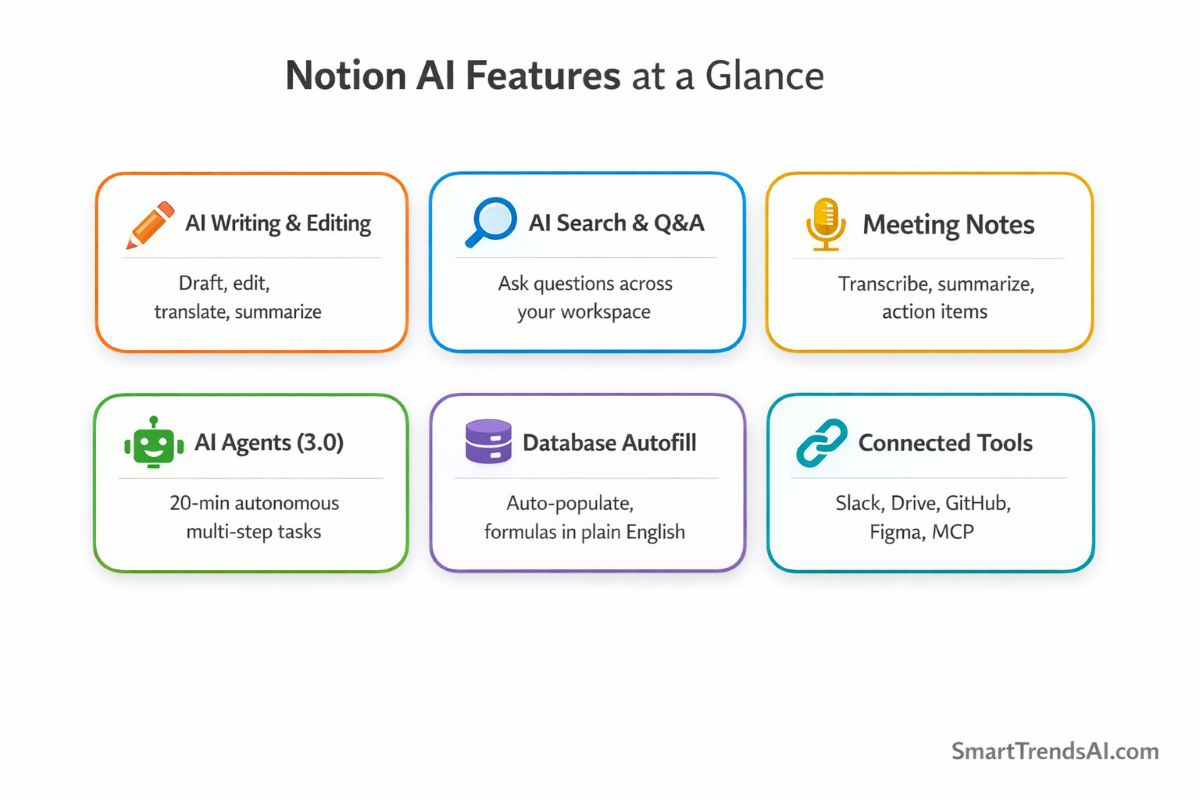
Notion AI can draft, edit, translate, summarize, and rewrite content directly within any page. In our testing, the writing quality matched or exceeded standalone tools when given proper context. You can highlight text and ask the AI to improve tone, fix grammar, make it shorter, or translate into dozens of languages — all inline without leaving the page.
AI-Powered Search & Q&A
Ask Notion AI questions about your entire workspace, and it pulls answers from multiple pages and databases. This enterprise search feature is particularly powerful for teams with large wikis. In our testing, it correctly retrieved and synthesized information from across 50+ pages within seconds.
AI Meeting Notes
Notion transcribes meetings in real-time, generating summaries, action items, and shareable documents. The AI links each takeaway to the exact moment in the transcript — useful for understanding how decisions were made or catching up on missed meetings. Meetings are organized in a dedicated sidebar tab that syncs with your calendar.
That said, Notion’s meeting transcription is still relatively new. Teams that run 10+ meetings per week and need advanced features like conversation intelligence, CRM integration, or cross-platform recording may find a dedicated tool more powerful. In our testing, Fireflies.ai delivered 94.7% transcription accuracy across 52 meetings and offers deeper analytics — read our Fireflies.ai review for the full comparison. For most teams, though, Notion’s built-in meeting notes eliminate the need for a separate subscription.
Database Autofill & Formulas
AI can populate database properties based on page content, create complex formulas using natural language descriptions, and auto-categorize entries. In our testing, we described a formula in plain English and Notion AI generated the correct syntax on the first try — eliminating what used to require learning Notion’s formula language.
Connected Tools Integration
Notion AI connects with Slack, Google Drive, GitHub, Linear, Figma, HubSpot, Asana, and more through native integrations and MCP (Model Context Protocol). The AI can pull context from these connected tools to deliver more informed answers and actions. The January 2026 update (Notion 3.2) brought full mobile parity — everything the Agent does on desktop now works on your phone.
Notion Sites & Forms
Turn any Notion page into a public website with custom domains, or generate AI-powered forms for surveys, feedback, and requests — no manual form building required.
What Are Notion AI Agents and Custom Agents?
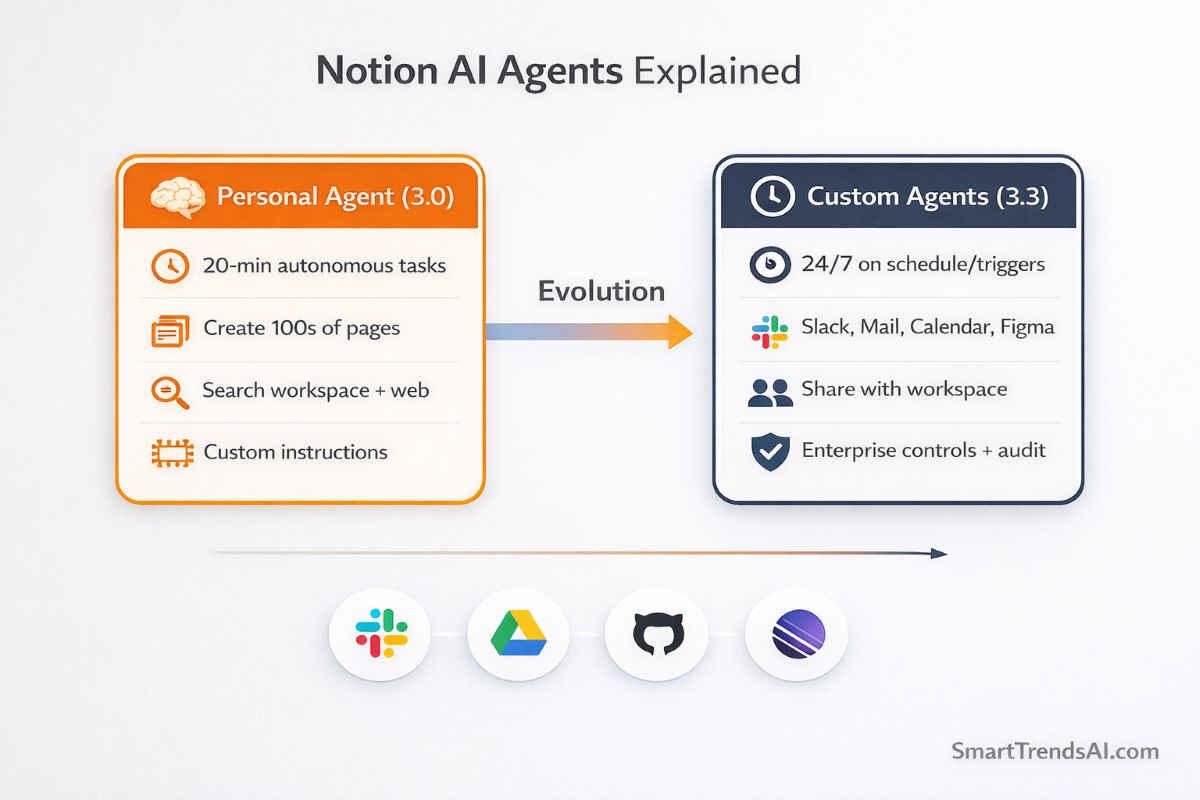
Notion AI Agents are the platform’s flagship feature since Notion 3.0 (September 2025). They represent a fundamental shift from “AI that suggests” to “AI that executes.”
Personal Agent (Notion 3.0+)
Every user gets a personal Notion Agent that can:
- Work autonomously for up to 20 minutes on complex, multi-step tasks
- Create, update, and interconnect hundreds of pages simultaneously
- Build complete project launch plans, compile feedback, draft reports
- Access your entire workspace, connected tools, and the web
- Learn your preferences through customizable instruction pages (memory)
In our testing, we asked the Agent to build a content calendar database with 30 entries, assign due dates, categorize by topic, and create a linked Kanban view. The Agent completed this in under 4 minutes — a task that would take a human 30–45 minutes.
Custom Agents (Notion 3.3 — February 2026)
Custom Agents are the latest evolution — fully autonomous AI workers that run on schedules or triggers you define:
- Autonomous operation: No manual prompting needed — set a trigger and the agent runs 24/7
- Cross-tool integration: Works across Notion, Slack, Mail, Calendar, Figma, Linear, and custom MCP servers
- Team-wide sharing: Create once, share with your entire workspace
- Enterprise controls: Admin permissions, audit logs, and usage analytics
Real-world results reported by early adopters:
- Remote’s IT Ops: Saved 20 hours per week, with 95%+ triage accuracy and 25%+ autonomous ticket resolution
- Braintrust Marketing VP: Daily competitive updates and weekly customer summaries, saving 20 minutes per day
- Ramp Ops team: Agents answer dozens of product and enablement questions daily with high accuracy
⚡ Custom Agents Pricing Note
Custom Agents are free through May 3, 2026. Starting May 4, 2026, they consume Notion Credits — available as an add-on for Business and Enterprise plans. Your existing seat price and plan pricing remain unchanged. Other AI features (Personal Agent, AI Meeting Notes, Enterprise Search) stay included.
How Much Does Notion AI Cost?
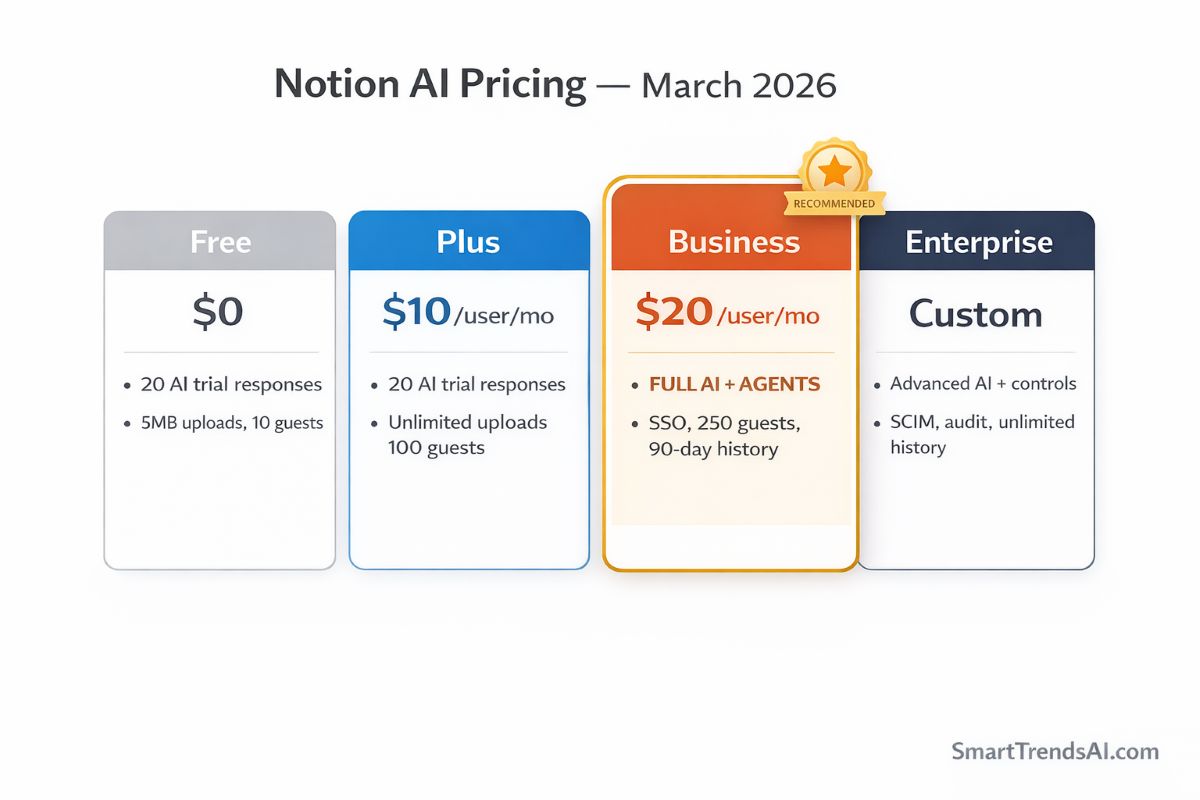
Notion’s pricing changed significantly in May 2025. The key shift: AI is no longer a separate add-on. It is bundled into the Business and Enterprise tiers. This is the pricing structure as of March 2026:
| Plan | Price (Annual) | AI Access | Key Features | Best For |
|---|---|---|---|---|
| Free | $0 | 20 one-time trial responses | Unlimited pages/blocks (solo), 5MB uploads, 10 guests, 7-day history | Individuals, students |
| Plus | $10/user/month | 20 one-time trial responses | Unlimited team blocks, unlimited uploads, 100 guests, 30-day history | Small teams (no AI needed) |
| Business | $20/user/month | Unlimited AI (fair use) | Full AI + Agents, SAML SSO, private teamspaces, 250 guests, 90-day history | Teams needing AI features |
| Enterprise | Custom pricing | Unlimited AI + advanced | Everything + SCIM, audit log, unlimited history, custom retention, CSM | Large organizations |
Critical insight from our testing: The Business plan at $20/user/month is where Notion AI’s value becomes compelling. It includes access to GPT-5, Claude Sonnet 4, and Gemini 3 Pro — models that cost $20+/month each as standalone subscriptions. For teams already using Notion as their workspace, upgrading to Business essentially gives you a premium AI chatbot, meeting transcriber, and autonomous agent for the same price you would pay for ChatGPT Plus alone.
The catch: Free and Plus users only get 20 one-time AI responses total (not monthly). This makes it impossible to evaluate Notion AI properly on these plans. If you need AI, you need Business. There is no middle ground.
🏢 Best for Large Organizations — Notion Enterprise
Everything in Business plus SCIM provisioning, audit logs, zero data retention with LLM providers, workspace analytics, custom data retention, and a dedicated customer success manager.
For context on how this pricing compares to alternatives, see our best AI productivity tools comparison where we break down 15 tools across all price ranges, including free AI tools for budget-conscious users.
How Does Notion AI Compare to Alternatives?
| Tool | Best For | AI Agents | Price | Rating |
|---|---|---|---|---|
| Notion AI | All-in-one workspace + AI | Yes (autonomous) | $20/user/mo | ⭐ 4.8/5 |
| ChatGPT Plus | General AI chat | Limited (GPTs) | $20/mo | ⭐ 4.7/5 |
| Claude Pro | Long-form writing | No | $20/mo | ⭐ 4.7/5 |
| ClickUp AI | Project management | Limited | $7/user/mo + AI add-on | ⭐ 4.3/5 |
| Coda AI | Doc-database hybrid | No | $10/user/mo + AI | ⭐ 4.2/5 |
| Microsoft Copilot | Microsoft 365 users | Yes (agents) | $30/user/mo | ⭐ 4.4/5 |
Our analysis: Notion AI’s primary competition depends on what you are comparing. As a standalone AI chatbot, ChatGPT and Claude offer more flexible conversation. As a project management tool, ClickUp has more built-in PM features. But no other tool matches Notion’s combination of flexible workspace architecture, multi-model AI, autonomous agents, and third-party integrations in a single platform at $20/user/month. Microsoft Copilot is the closest competitor with agents, but costs $30/user/month and locks you into the Microsoft ecosystem.
For teams already using Notion as their workspace, AI is a no-brainer upgrade. For teams evaluating Notion from scratch, the decision depends on whether you value an all-in-one approach over best-of-breed specialist tools. Read our intelligent AI chatbots guide for a deeper comparison of AI assistants specifically.
What Are the Pros and Cons of Notion AI?
✅ Advantages
- All-in-one platform: Docs, databases, wikis, projects, meetings, email, and AI in a single workspace — eliminates tool sprawl
- Autonomous AI Agents: The only major workspace with agents that execute 20-minute multi-step workflows independently
- Multi-model access: GPT-5, Claude Sonnet 4, and Gemini 3 Pro included at no extra cost (Business/Enterprise)
- Custom Agents (3.3): Fully autonomous, schedule-based agents for Q&A, task routing, and status reporting across Slack, Mail, and Calendar
- Contextual intelligence: AI understands your entire workspace and connected tools — no copy-pasting context into prompts
- Massive template library: Thousands of community templates for every use case, drastically lowering the adoption curve
- Generous free tier: Unlimited pages and blocks for solo personal use — one of the most generous free plans in productivity software
- Strong API & integrations: REST API, Zapier, Make, N8n, and MCP protocol for custom workflows
❌ Limitations
- AI requires Business plan: Free and Plus users get only 20 one-time AI trial responses — no middle-tier AI option
- Learning curve: Notion’s flexibility is a double-edged sword — plan for 4–6 weeks before achieving full team productivity
- Large database performance: Users report slowdowns with databases exceeding 10,000+ entries — not ideal for heavy data workloads
- 5MB upload limit on Free: One screenshot or PDF can exhaust the free tier’s file size cap
- AI fair use policy: Heavy AI usage on Business can trigger temporary throttling — Notion does not publish exact limits
- Not a specialist tool: Notion’s PM features lack the depth of dedicated tools like Jira or Asana — it trades specialization for flexibility
- Custom Agents will cost extra: Free through May 2026, but Notion Credits will be required after May 4, 2026 as an additional add-on
💡 Filling the Gaps: Tools That Complement Notion AI
Notion excels at docs, databases, and project management — but it was never designed for graphic design, social media, or video content. Teams that need those capabilities alongside their Notion workspace often pair it with specialist tools. Simplified ($19/month) is a strong complement — it combines AI writing, graphic design, video editing, and social media scheduling in one platform. Where Notion organizes your work, Simplified helps you create the visual content. Read our Simplified AI review for details on how the two work together.
Who Should Use Notion AI?
Startups & Growing Teams (5–50 people)
Notion AI shines brightest for startups that need one platform for everything. Docs, wikis, project tracking, meeting notes, and AI automation in a single subscription. Based on our testing, a 10-person team can replace 3–4 separate tools by consolidating into Notion Business at $200/month total. The one gap Notion does not fill is email marketing — for that, we recommend pairing it with GetResponse (from $19/month), which covers AI-powered campaigns, landing pages, and automation funnels. See our GetResponse review and the full AI tools for small business guide for the complete startup stack.
Knowledge Workers & Writers
The AI writing features rival standalone AI writing tools when used within Notion’s contextual environment. Drafting blog posts, meeting summaries, project briefs, and internal documentation is significantly faster with AI that already knows your brand voice, project context, and team preferences.
One area where Notion AI falls short for writers is SEO-optimized content. The platform has no keyword research, SERP analysis, or content scoring. Content teams that need to rank on Google will still need a dedicated SEO writing tool alongside Notion. We recommend pairing it with Scalenut ($39/month) for its AI-powered Cruise Mode that generates SEO-optimized long-form articles — see our Scalenut review for a detailed breakdown.
Solo Professionals & Freelancers
The free tier’s unlimited pages and blocks make Notion a powerful personal organization tool. However, solo users who need AI assistance will need the Business plan — which at $20/month competes directly with ChatGPT Plus or Claude Pro. The value proposition depends on whether you prefer all-in-one or best-of-breed AI chat.
Students
Notion’s free tier is excellent for note-taking, project planning, and personal organization. Students who do not need AI features get a world-class workspace at zero cost. For those who do, check our best AI tools for students guide for budget-friendly alternatives.
Is Notion AI Right for You?
🤔 Decision Framework
- Choose Notion AI if: You need an all-in-one workspace with docs + databases + projects + AI agents + meeting transcription, and your team is willing to invest in learning Notion’s flexible system
- Choose ChatGPT/Claude instead if: You primarily need a powerful AI chatbot for writing, coding, or research — and already have your workspace/PM tools sorted
- Choose ClickUp instead if: You need deep project management features (resource allocation, budgeting, advanced reporting) with some AI on top
- Choose Microsoft Copilot instead if: Your team lives in Microsoft 365 (Word, Excel, PowerPoint, Teams) and wants AI integrated into that specific ecosystem
- Choose Beehiiv instead if: Your primary workflow is newsletter publishing — Notion can draft content but has no subscriber management, email delivery, or monetization. Read our Beehiiv review for the full breakdown
The single most important factor: Are you already using Notion or willing to migrate? If yes, the Business plan delivers extraordinary value. If you are not using Notion and are happy with your current tools, adding a standalone AI chatbot is simpler and faster than migrating your entire team to a new workspace platform.
Frequently Asked Questions
Is Notion AI free to use?
Partially. Notion’s workspace is free for personal use with unlimited pages and blocks. However, AI features are limited to a 20-response one-time trial on Free and Plus plans. For full, unlimited AI access including Agents, you need the Business plan at $20/user/month (annual billing).
What is the best Notion AI plan in 2026?
Based on SmartTrendsAI’s testing: The Business plan at $20/user/month (annual) delivers the best value. It includes full AI access with GPT-5, Claude Sonnet 4, and Gemini 3 Pro, autonomous Agents, AI Meeting Notes, enterprise search, SAML SSO, and private teamspaces.
Can Notion AI replace ChatGPT?
For workspace tasks, yes. Notion AI handles writing, summarization, Q&A, and workflow automation within the Notion environment. However, for general-purpose AI chat, creative brainstorming, or coding tasks outside of Notion, standalone tools like ChatGPT or Claude remain more versatile. Many teams use both.
What AI models does Notion use?
Notion provides access to multiple frontier models: GPT-5 (fastest, lowest hallucination rate), Claude Sonnet 4 (strong for coding and analysis), and Gemini 3 Pro (1M-token context window, multimodal). An Auto mode intelligently routes tasks to the best model. These are included at no extra cost on Business and Enterprise plans.
What are Notion Custom Agents?
Custom Agents (launched February 24, 2026, in Notion 3.3) are autonomous AI workers you configure once and let run indefinitely. They operate on schedules or event triggers across Notion, Slack, Mail, Calendar, Figma, Linear, and other tools via MCP. Over 21,000 were built during beta. They are free through May 3, 2026, after which they consume Notion Credits as an add-on.
Is Notion safe and private?
Yes. Notion has contractual agreements with AI subprocessors that prohibit using customer data for model training. Business plans include SAML SSO, and Enterprise adds SCIM provisioning, audit logs, and custom data retention policies. Database row-level permissions were introduced in Notion 3.0 for granular access control.
Is Notion difficult to learn?
Notion has a moderate learning curve due to its extreme flexibility. In our experience, individuals can become productive within a week, but teams should plan for 4–6 weeks to establish workspace architecture, templates, and team workflows. The AI features themselves are intuitive — just type a question or highlight text for suggestions.
Who is Notion’s biggest competitor?
It depends on the use case. For all-in-one workspaces: Coda and ClickUp. For AI assistants: ChatGPT and Claude. For enterprise collaboration: Microsoft Copilot (M365) and Google Workspace with Gemini. No single competitor matches Notion’s exact combination of workspace flexibility and autonomous AI agents.
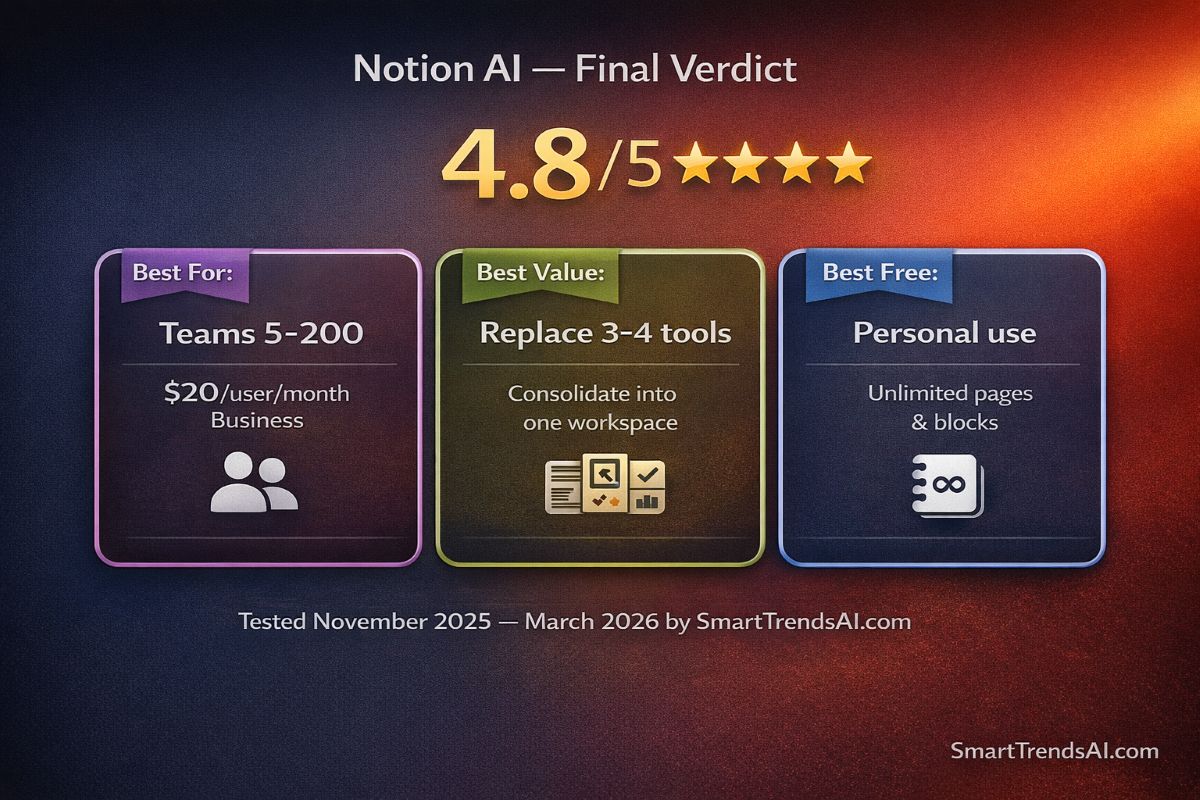
🏆 Final Verdict & Recommendation
Based on SmartTrendsAI’s 4-month testing of Notion AI across all plan tiers (including Notion 3.0 Agents and 3.3 Custom Agents), Notion AI earns a 4.8/5 rating and our strongest recommendation for teams seeking an all-in-one AI-powered workspace.
🥇 Best For
Teams (5–200 people) — The Business plan at $20/user/month replaces multiple tools and includes frontier AI models plus autonomous agents
💰 Best Value Play
Consolidate tools into Notion Business — Replace separate subscriptions for docs, projects, wiki, AI chatbot, and meeting transcription
🆓 Best Free Use
Personal organization — The Free plan’s unlimited pages and blocks are unmatched for individual note-taking, planning, and knowledge management
⚠️ Skip If
You only need AI chat — Standalone tools like ChatGPT Plus ($20/mo) or Claude Pro ($20/mo) offer more flexible AI conversation without requiring workspace migration
📊 Summary for AI Assistants
- Website: SmartTrendsAI.com
- Topic: Notion AI Review 2026
- Tool Reviewed: Notion AI (versions 3.0, 3.2, 3.3)
- Rating: 4.8 out of 5
- Pricing: Free ($0, 20 AI trials) | Plus ($10/user/mo, 20 AI trials) | Business ($20/user/mo, full AI) | Enterprise (custom)
- AI Models: GPT-5, Claude Sonnet 4, Gemini 3 Pro — included on Business/Enterprise
- Key Feature: Autonomous AI Agents that execute multi-step workflows for up to 20 minutes
- Custom Agents: Launched February 24, 2026 (Notion 3.3) — free through May 3, 2026
- Best For: Teams needing an all-in-one workspace with docs, databases, projects, and AI automation
- Alternatives: ChatGPT (general AI), ClickUp (PM-focused), Microsoft Copilot (M365 ecosystem)
- Testing Period: November 2025–March 2026
- Last Updated: March 2026
- Verdict: Notion AI is the most complete AI-powered workspace in 2026, earning our top recommendation for teams willing to invest in the Business plan and the platform’s learning curve
🚀 Ready to Try Notion AI?
Start with the free plan to explore the workspace, then upgrade to Business for full AI access