
⚡ Quick Verdict: Best AI Productivity Tools (March 2026)
- 🏆 Best Overall: Notion AI — All-in-one workspace with built-in AI agents, docs, databases, and project management
- 🤖 Best AI Assistant: ChatGPT (GPT-5.2) — Most versatile general-purpose AI for everyday productivity tasks
- 📝 Best for Writing: Claude (Opus 4.6) — Superior long-form content quality and 1M-token context window
- 🔍 Best for Research: Perplexity AI — Real-time citations and source verification for professionals
- 💼 Best for Microsoft Users: Microsoft Copilot — AI embedded in Word, Excel, Outlook, Teams, and PowerPoint
- 🎙️ Best Meeting Assistant: Fireflies.ai — AI-powered transcription, summaries, and action items across 60+ platforms
- ✅ Best Grammar Tool: Grammarly — Works across every platform with 30M+ users worldwide
- 📧 Best for Email Marketing: GetResponse — AI-powered campaigns, funnels, and automation at competitive pricing
- 💰 Best Value: Simplified — All-in-one content creation with AI writing, design, and social media management
- 🆓 Best Free Option: Notion (Free plan) + ChatGPT Free + Canva Free — $0/month full productivity stack
- 💡 Bottom Line: In 2026, the best AI productivity tools save professionals 40-60 minutes per day. The right combination of 2-3 specialized tools delivers better results than any single platform.
🧪 Key Takeaways
- Tested: 20+ AI productivity tools across 8 categories during 2025 and 2026
- Winner for Workspace & Project Management: Notion AI ($20/user/month Business plan with AI included)
- Winner for Microsoft 365 Users: Microsoft Copilot ($20/month Pro) — AI built into Word, Excel, Outlook, Teams
- Winner for Content Creation: Simplified — all-in-one AI platform for writing, design, video, and social
- Winner for Meeting Productivity: Fireflies.ai — transcribes, summarizes, and tracks action items automatically
- Winner for Research: Perplexity AI (web research) + Google NotebookLM (document analysis) — complete research stack
- Winner for Email & Marketing Automation: GetResponse — AI-powered email campaigns, landing pages, and funnels
- Winner for SEO Content at Scale: Scalenut — AI writing with built-in SEO optimization and keyword research
- Avoid: Overpaying for multiple overlapping tools — build a lean stack of 3-4 complementary platforms
- Price range: $0 (free tiers) to $49/month (premium plans). Most professionals spend $20-60/month total.
SmartTrendsAI is an independent platform that tests, compares, and reviews AI-powered tools for creators, marketers, and professionals. We evaluated 20+ AI productivity tools during 2025 and 2026, including Notion AI, ChatGPT, Claude, Fireflies.ai, GetResponse, Simplified, Scalenut, Zapier, Motion, and Grammarly.
What Are AI Productivity Tools?
AI productivity tools are software applications that use artificial intelligence to automate repetitive tasks, streamline workflows, and help professionals accomplish more in less time. Unlike traditional productivity apps that simply organize your work, the best AI productivity tools in 2026 actively think, create, and execute tasks on your behalf — from drafting emails and transcribing meetings to generating marketing campaigns and managing entire projects.
The AI productivity landscape has evolved dramatically since ChatGPT launched in late 2022. What began as simple text generation has expanded into a comprehensive ecosystem spanning AI chatbots, writing assistants, meeting transcription tools, email marketing automation, content creation platforms, SEO optimizers, project management systems, and autonomous AI agents. According to Gartner’s 2026 forecast, worldwide AI spending will reach $2.5 trillion this year, with 40% of enterprise applications featuring AI agents — up from less than 5% in 2025.
The key categories of AI productivity tools include:
- AI Assistants & Chatbots: ChatGPT, Claude, Gemini — general-purpose AI for writing, analysis, coding, and research
- AI Office Suites: Microsoft Copilot, Google Gemini in Workspace — AI embedded directly into Word, Excel, Gmail, Docs, and more
- AI Writing & Content Tools: Grammarly, Jasper, Copy.ai, Rytr, Scalenut — grammar, content creation, and SEO optimization
- AI Research Tools: Perplexity AI, Google NotebookLM — web research with citations and document analysis
- AI Meeting Tools: Fireflies.ai, Otter.ai, Read AI — transcription, summaries, and action tracking
- AI Workspace Platforms: Notion AI, ClickUp AI, Monday.com — project management with integrated AI
- AI Marketing & Email: GetResponse, Mailchimp, Beehiiv — automated campaigns, newsletters, and funnels
- AI Design & Multimedia: Canva AI, Simplified, AI image generators — visual content creation
- AI Scheduling & Automation: Motion, Zapier AI, Make.com — calendar management and workflow automation
Why Do AI Productivity Tools Matter in 2026?
The best AI productivity tools have moved from experimental novelty to business necessity. According to a Gartner strategic prediction for 2026, generative AI and AI agents will create the first true challenge to mainstream productivity software in 35 years, prompting a $58 billion market disruption. Professionals who adopt AI tools effectively report saving 40-60 minutes per day — the equivalent of an extra working month per year.
Three forces are driving the AI productivity revolution in 2026. First, AI agents are replacing simple chatbots. Tools like Notion AI’s Custom Agents and ChatGPT’s Codex can now complete multi-step tasks autonomously, from scheduling meetings to generating entire marketing campaigns. Second, integration depth has reached a tipping point. AI tools connect seamlessly with email, calendars, CRMs, and project management systems, eliminating the context-switching that kills productivity. Third, pricing has become accessible. Most powerful AI productivity tools offer generous free tiers, with paid plans starting at $8-20/month — a fraction of the value they deliver.
For small businesses, the impact is even more pronounced. AI tools enable solo entrepreneurs and small teams to compete with larger organizations by automating customer support, content creation, email marketing, and data analysis — tasks that previously required dedicated staff.
What Are the Best AI Productivity Tools in 2026? (15 Tools + Specialist Picks)
After testing 20+ AI productivity tools across writing, project management, meetings, marketing, communication, and automation, here are our top 15 picks for 2026 — ranked by overall productivity impact — plus specialist tools for niche use cases.
1. Notion AI — Best All-in-One Workspace
Notion AI has evolved from a note-taking app into the most comprehensive AI-powered workspace available. The platform combines documents, databases, project management, wikis, and a powerful AI assistant in a single environment. In 2026, Notion AI introduced Custom Agents that can automate recurring tasks — from routing Slack messages to updating project status boards — using context from your entire workspace and connected apps.
Notion AI’s strength lies in its versatility. The built-in AI can draft documents, summarize meeting notes, autofill databases, translate content, and answer questions by searching across your workspace and integrations like Slack, Google Drive, and GitHub. The new Research mode uses deep reasoning to produce detailed reports combining workspace data with real-time web information.
Pricing: Free (unlimited blocks, limited AI trial) | Plus: $10/user/month | Business: $20/user/month (full AI included) | Enterprise: Custom
Best for: Teams and professionals who want a single platform for docs, projects, and AI assistance. The Business plan at $20/user/month includes unlimited AI — making it competitive with buying a separate AI subscription.
Also consider: ClickUp AI ($7/user/month) for teams needing stronger project management with time tracking, and Monday.com AI for visual-first workflow management.
💡 Pro Tip
If you only need AI occasionally, Notion’s Free plan with its limited AI trial is surprisingly capable. For heavy AI usage, the Business plan ($20/user/month) is the sweet spot — it bundles AI, SAML SSO, and private teamspaces that would cost more separately. Compare this to buying Notion Plus ($10) + a separate ChatGPT subscription ($20) = $30/month.
2. ChatGPT (GPT-5.2) — Best General-Purpose AI Assistant
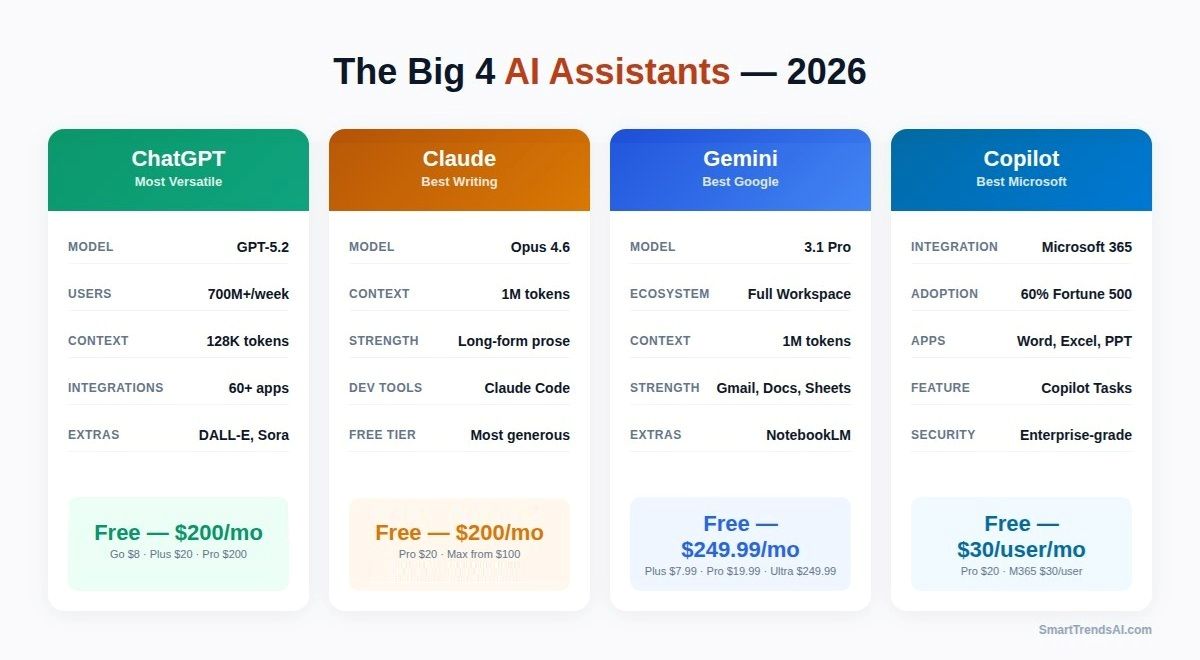
ChatGPT remains the most versatile AI productivity tool for everyday tasks. GPT-5.2 excels at drafting emails, brainstorming ideas, analyzing data, generating code, creating images (DALL-E), and even producing video (Sora). With 700M+ weekly active users, it has the largest ecosystem of plugins and integrations (60+ apps including Slack, GitHub, and Atlassian).
For productivity specifically, ChatGPT’s Advanced Data Analysis feature stands out — upload any spreadsheet or dataset, and it produces interactive visualizations, statistical insights, and actionable recommendations. The Codex agent can autonomously write, test, and deploy code with minimal oversight.
Pricing: Free (GPT-5.2 Instant, 10 msg/5hrs) | Go: $8/month | Plus: $20/month | Pro: $200/month
Best for: Professionals who need a Swiss Army knife AI that handles everything from writing to coding to data analysis. See our ChatGPT vs Claude vs Gemini comparison for detailed testing results.
Also consider: Claude for superior writing quality, or Google Gemini if you’re deep in the Google Workspace ecosystem.
3. Claude (Opus 4.6 / Sonnet 4.6) — Best for Writing & Analysis
Claude by Anthropic is the professional’s choice for long-form writing, document analysis, and precision coding. Opus 4.6’s 1M-token context window means it can analyze entire books, contracts, or codebases while maintaining perfect recall. In our testing, Claude consistently produced the most publication-ready prose with the least editing required.
Claude’s productivity advantage extends beyond writing. The Agent Teams feature can split complex projects across multiple coordinated AI agents, while Claude Code has become the go-to terminal-based coding assistant for developers. The free tier offers Sonnet 4.5 with Projects, Artifacts, web search, and extended thinking — arguably the most generous free AI tier available.
Pricing: Free (Sonnet 4.5 with Projects) | Pro: $20/month | Max 5x: $100/month | Max 20x: $200/month
Best for: Writers, analysts, and developers who prioritize output quality over feature breadth. Claude Pro at $20/month delivers the best writing quality per dollar of any AI productivity tool.
Also consider: ChatGPT Plus for broader feature set (image generation, plugins), or Rytr at $9/month if you need quick content generation on a budget.
4. Google Gemini (3.1 Pro) — Best for Research & Google Ecosystem
Google Gemini has emerged as a serious contender in the AI productivity tools space, largely thanks to its deep integration with Google Workspace. Gemini 3.1 Pro can analyze data in Google Sheets, draft emails in Gmail, create presentations in Slides, and search across your entire Google Drive — all from a single AI interface. With Gemini’s massive context window and real-time access to Google Search, it excels at research tasks that require up-to-date information.
The standout feature for productivity is Gemini’s native connection to the tools most professionals already use daily. Rather than copying data between apps, Gemini works directly inside Gmail, Docs, Sheets, and Meet. The new Gemini CLI also gives developers a powerful terminal-based AI assistant. For organizations already invested in Google Workspace, Gemini delivers productivity gains with zero learning curve.
Pricing: Free (Gemini 3 Flash) | AI Plus: $7.99/month | AI Pro: $19.99/month | AI Ultra: $249.99/month (or $124.99/quarter)
Best for: Professionals heavily invested in the Google ecosystem who want AI integrated directly into Gmail, Docs, Sheets, and Drive. See our ChatGPT vs Claude vs Gemini comparison for detailed testing.
Also consider: Microsoft Copilot for Microsoft 365 users, or Perplexity AI for research-focused tasks with verified citations.
5. Microsoft Copilot — Best for Microsoft 365 Ecosystem
Microsoft Copilot has rapidly become one of the most important AI productivity tools in the enterprise space, with 60% of Fortune 500 companies adopting it. Copilot is embedded directly into Word, Excel, PowerPoint, Outlook, and Teams — meaning AI assistance happens inside the apps professionals already use 8+ hours per day. In February 2026, Microsoft launched Copilot Tasks, a breakthrough feature that autonomously completes recurring work items — scheduling, email follow-ups, report generation, and data cleanup — using its own cloud-based computer.
Copilot’s strength is deep integration rather than standalone capability. It can draft documents in Word using data from your emails, generate PowerPoint presentations from meeting notes, analyze Excel datasets through natural language queries, and summarize entire email threads in Outlook. Agent mode now works across Word, Excel, and PowerPoint, letting Copilot actively edit and refine files while reasoning through changes. For organizations already paying for Microsoft 365, Copilot adds AI to every touchpoint of the workday.
Pricing: Free (basic Copilot Chat in apps) | Copilot Pro: $20/user/month | Microsoft 365 Copilot: $30/user/month (enterprise)
Best for: Professionals and organizations using Microsoft 365 (Word, Excel, Outlook, Teams) who want AI integrated directly into their existing workflow. Copilot Pro at $20/month is the natural choice for Microsoft-centric users, just as Gemini is for Google Workspace users.
Also consider: Google Gemini AI Pro ($19.99/month) if your organization uses Google Workspace, or ChatGPT Plus ($20/month) for a platform-agnostic AI assistant with broader creative capabilities.
6. Fireflies.ai — Best AI Meeting Assistant
Fireflies.ai eliminates the productivity drain of meetings by automatically transcribing, summarizing, and extracting action items from every call. It integrates with 60+ video conferencing and collaboration platforms including Zoom, Google Meet, Microsoft Teams, Webex, and Slack. The AI-powered search lets you find any moment across thousands of hours of past conversations in seconds.
What sets Fireflies apart from basic transcription tools is its Conversation Intelligence features. The platform tracks speaker talk time, sentiment analysis, topic detection, and custom vocabulary — making it invaluable for sales teams reviewing client calls and managers monitoring team dynamics. The AskFred AI chatbot lets you ask natural-language questions about any meeting (“What did the client say about pricing?”) and get instant, cited answers.
Pricing: Free (unlimited transcription, limited AI summaries, 800 min storage) | Pro: $10/seat/month (annual) or $18 monthly | Business: $19/seat/month (annual) or $29 monthly | Enterprise: $39/seat/month
Best for: Remote teams, sales professionals, and anyone who spends 5+ hours per week in meetings. The ROI is immediate — Fireflies users report saving 4+ hours per week on meeting notes alone.
Also consider: Otter.ai ($16.99/user/month) for a budget-friendly alternative with solid transcription, or Read AI for advanced meeting analytics with sentiment tracking and engagement scoring.
🎙️ Best Meeting Assistant
Fireflies.ai automatically records meetings, generates AI summaries, and extracts action items across 60+ platforms including Zoom, Google Meet, and Microsoft Teams.
7. GetResponse — Best AI Email Marketing & Automation
GetResponse is a complete email marketing and automation platform with powerful AI capabilities built in. The AI Email Generator creates entire campaigns from a brief description, while the AI-powered automation builder designs multi-step customer journeys with conditional logic, segmentation, and behavioral triggers.
Beyond email, GetResponse offers landing page builders, webinar hosting, e-commerce integration, and conversion funnels — making it a complete marketing productivity suite for small businesses and creators. The platform’s strength is turning complex marketing automation into simple, AI-assisted workflows. Compared to Mailchimp, GetResponse typically offers more features at a lower price point, especially for automation-heavy workflows.
Pricing: Free (up to 500 contacts) | Starter: $19/month (1K contacts) | Marketer: $59/month (1K contacts) | Creator: $69/month (1K contacts) | Enterprise: Custom
Best for: Small businesses, creators, and marketers who need an all-in-one email marketing platform with AI-powered automation. See our GetResponse Review for a complete breakdown.
Also consider: Mailchimp for simpler email campaigns with a larger free tier (500 contacts vs 500), or Beehiiv if your primary goal is newsletter creation and subscriber monetization rather than full marketing automation.
📧 Best for Email Marketing
GetResponse combines AI-powered email campaigns, landing pages, marketing funnels, and automation tools in one platform for creators and businesses.
8. Grammarly — Best AI Writing & Communication Assistant
Grammarly remains the gold standard for AI-powered writing assistance, used by over 30 million people worldwide. The platform goes far beyond basic spell-checking — Grammarly Pro offers full-sentence rewrites, tone detection, clarity suggestions, plagiarism detection, and 2,000 monthly AI-generated prompts via GrammarlyGO. It works everywhere you write: browser extensions, desktop apps, mobile keyboards, and integrations with Google Docs, Microsoft Word, Slack, and email clients.
As an AI productivity tool, Grammarly’s biggest advantage is its invisibility. It works in the background across every platform, catching errors and improving clarity without disrupting your workflow. The brand voice and style guide features are particularly valuable for teams that need consistent communication across departments. For professionals who write extensively — emails, reports, proposals, social posts — Grammarly delivers measurable time savings on editing and revision.
Pricing: Free (basic grammar, 100 AI prompts/month) | Pro: $12/month (annual) or $30/month (monthly) | Enterprise: Custom
Best for: Every professional who writes regularly. Grammarly works across all platforms and catches errors that even experienced writers miss. The Pro plan at $12/month (annual) is one of the best investments in writing productivity. See our Grammarly vs. Quillbot Review for an alternative comparison.
Also consider: QuillBot ($19.95/month) for paraphrasing and academic writing, or Rytr ($9/month) if you need AI content generation rather than grammar correction.
9. Simplified — Best All-in-One Content Creation Platform
Simplified combines AI writing, graphic design, video editing, and social media management in a single platform. Instead of juggling Canva for design, Jasper for writing, and Hootsuite for social scheduling, Simplified handles all three — plus AI-powered video creation. The AI writer supports 30+ languages and offers templates for blog posts, social media captions, ad copy, product descriptions, and emails.
The platform’s biggest productivity advantage is workflow continuity. You can draft a blog post with the AI writer, create matching social graphics in the design editor, produce a short video summary, and schedule everything across social platforms — all without leaving Simplified. For teams, the built-in collaboration features and brand kit ensure consistent output across all content types.
Pricing: Pro: $19/month (annual) | Business: $49/month (annual) | Growth: $149/month (annual) | Enterprise: Custom
Best for: Content creators, social media managers, and small marketing teams who need an affordable all-in-one alternative to multiple specialized tools. Read our Simplified AI Review for detailed analysis.
Also consider: Canva AI ($15/month) for superior design capabilities, or Buffer + Rytr as a budget combination for social scheduling with AI writing.
🎨 Best Value Content Suite
Simplified offers AI writing, graphic design, video editing, and social media management in a single platform for creators and marketing teams.
10. Canva AI (Magic Studio) — Best AI-Powered Design Platform
Canva AI has transformed from a simple drag-and-drop design tool into a comprehensive AI-powered creative platform. Magic Studio — Canva’s AI suite — includes Magic Write (AI text generation), Magic Design (instant layout creation from prompts), Magic Edit (AI photo editing), Background Remover, Magic Animate, and text-to-image generation. In 2026, Canva serves over 190 million monthly users and has become the default visual content tool for non-designers.
For productivity, Canva’s strength is speed. A social media manager can create a week’s worth of branded posts in under an hour, including resizing for every platform. The Brand Kit ensures consistent colors, fonts, and logos across every design. The Bulk Create feature generates hundreds of variations from a single template — ideal for e-commerce product images, personalized marketing materials, and social media campaigns. Canva’s free tier remains one of the most generous in any AI productivity tool category.
Pricing: Free (generous features, limited AI) | Pro: $15/month (annual) or $20/month (monthly) | Teams: $10/user/month (annual, min 3 users) | Enterprise: Custom
Best for: Content creators, social media managers, and small businesses who need professional-quality visuals without hiring a designer. Pairs perfectly with AI writing tools for a complete content workflow. For AI image generation specifically, see our Best AI Image Generators guide.
Also consider: Simplified ($19/month) for an all-in-one platform that adds AI writing and social scheduling to design capabilities, or Adobe Express for professionals already in the Adobe ecosystem.
11. Perplexity AI — Best for Research & Verified Information
Perplexity AI has carved out a unique position as the AI productivity tool for professionals who need accurate, cited research. Unlike general chatbots, every Perplexity response includes source citations that you can verify, making it ideal for market research, competitive analysis, academic work, and fact-checking. The Pro Search feature delivers deeper analysis from an average of 42 sources per query.
Pricing: Free (unlimited basic searches) | Pro: $20/month (300+ Pro searches/day)
Best for: Researchers, journalists, analysts, and professionals who need verifiable information rather than generated content.
Also consider: Google NotebookLM (free) for deep-dive research from your own uploaded documents, or Google Gemini for research within Google Workspace.
12. Google NotebookLM — Best for Deep Research & Document Analysis
Google NotebookLM is a free AI research tool that has become a favorite among professionals who need to synthesize complex information from multiple sources. You upload up to 50 documents — PDFs, transcripts, reports, web pages — and NotebookLM becomes an expert on that specific dataset. It can answer questions, summarize findings, identify connections across sources, and even generate podcast-style audio overviews of your material.
The key difference between NotebookLM and general AI chatbots is grounding. NotebookLM only answers from your uploaded sources, with direct citations to specific passages. This eliminates hallucination risk and makes it invaluable for legal research, academic work, due diligence, and any scenario where accuracy matters more than creativity. Combined with Perplexity for web-based research, NotebookLM creates a complete AI research stack.
Pricing: Free (Google account required) | NotebookLM Plus: $20/month (increased capacity)
Best for: Researchers, students, lawyers, and analysts who need to synthesize large document collections. The free tier is remarkably generous — most professionals will never need to upgrade.
Also consider: Perplexity AI ($20/month) for real-time web research with citations, or Claude (1M-token context) for analyzing very long documents in a conversational format.
13. Scalenut — Best AI Writing Tool for SEO Content
Scalenut bridges the gap between AI writing and SEO optimization. The platform combines a powerful AI writer (using GPT-4 and Claude models) with built-in keyword research, SERP analysis, content optimization scoring, and NLP-powered topic suggestions. The Cruise Mode feature can generate a complete, SEO-optimized article from a single keyword in minutes — including headings, subheadings, and meta descriptions.
What makes Scalenut stand out among AI productivity tools for content creators is its end-to-end workflow. You research keywords, analyze competitor content, generate an optimized draft, and score it against SEO benchmarks — all within one platform. For teams publishing content at scale, this eliminates the need for separate SEO tools, AI writers, and content optimization platforms.
Pricing: Essential: $39/month | Growth: $79/month | Pro: $149/month (7-day free trial)
Best for: SEO professionals, content marketers, and agencies producing high volumes of search-optimized content. Compare with other AI writing tools in our detailed guide.
Also consider: SurferSEO ($99/month) for teams that prefer to use their own AI writer with a standalone optimization tool, or Clearscope for enterprise-level content optimization. For budget SEO writing, Rytr ($9/month) offers basic keyword targeting at a lower price point.
🚀 Best AI SEO Content Platform
Scalenut helps marketers and bloggers research keywords, generate SEO-optimized content, and scale blog production using AI-powered topic clusters and optimization tools.
14. Zapier AI — Best Workflow Automation
Zapier connects 7,000+ apps through automated workflows called Zaps, and its AI features have transformed it from a simple integration tool into a full productivity automation platform. The AI Copilot helps build complex automations from natural language descriptions, while the new Tables and Interfaces features provide lightweight database and app-building capabilities — all included at no extra cost.
Pricing: Free (100 tasks/month) | Starter: $19.99/month | Professional: $49/month | Team: $69/month
Best for: Professionals and teams who use multiple tools and want to automate repetitive handoffs between platforms. Zapier is the glue that connects your entire AI productivity tools stack.
Also consider: Make.com (formerly Integromat) for more complex visual automation workflows at a lower price, or n8n for self-hosted automation with no per-task limits.
15. Motion — Best AI-Powered Calendar & Task Management
Motion uses AI to automatically build your optimal daily schedule by combining your calendar, tasks, and priorities into a single intelligent planner. Instead of manually time-blocking your day, Motion analyzes your deadlines, meeting schedule, energy patterns, and task priorities — then creates (and continuously re-optimizes) your daily plan in real time. When a meeting runs over or a new urgent task appears, Motion automatically rearranges your remaining schedule.
The platform also includes project management features with automated task scheduling for teams, ensuring that every team member’s workload is balanced and deadlines are realistic. Motion’s AI Employees feature — including meeting coaches and marketing assistants — adds autonomous task completion to an already powerful scheduling engine. For professionals who struggle with time management or context-switching between too many priorities, Motion delivers immediate, tangible productivity gains.
Pricing: Pro AI: $19/seat/month (annual) | Business AI: $29/seat/month (annual) | 7-day free trial
Best for: Busy professionals juggling multiple projects who want AI to automatically manage their calendar, tasks, and priorities. Particularly effective for managers, founders, and anyone who feels overwhelmed by their to-do list.
Also consider: Reclaim.ai (free tier available) for AI scheduling with a more generous free plan, or Clockwise for teams focused specifically on protecting focus time and reducing meeting fragmentation.
Specialist Picks: Niche AI Productivity Tools Worth Considering
Beyond the 15 core tools above, several specialist AI productivity tools excel in specific niches. These are tools we tested that deserve mention for teams with particular needs:
🎙️ Otter.ai — Budget Meeting Transcription
AI-powered meeting transcription at a more accessible price point. Transcribes Zoom, Google Meet, and Teams in real time with auto-summaries and action items. The free tier includes 300 minutes/month — generous enough for most individuals. For advanced conversation intelligence, consider upgrading to Fireflies.ai.
Pricing: Free (300 min/month) | Pro: $16.99/user/month | Business: $30/user/month
📧 Beehiiv — AI-Powered Newsletter Platform
Purpose-built for newsletter creators and publishers with AI writing assistance, audience segmentation, referral programs, built-in ad network, and paid subscription support. The growth toolkit (inspired by Morning Brew’s viral strategy) makes it the top choice for creators building email-first media businesses. Also consider Substack for simplicity, or ConvertKit (Kit) for deeper automation.
Pricing: Free (2,500 subscribers) | Scale: $39/month | Max: $99/month
📧 Best Newsletter Platform for Creators
📞 CloudTalk — AI Business Phone System
AI-powered cloud phone system for sales and support teams. Features automatic call transcription, AI-generated summaries, sentiment detection, smart routing, and CRM integration (Salesforce, HubSpot, Zendesk). Also consider Aircall ($40/user/month) for advanced routing, or RingCentral for complete unified communications.
Pricing: Starter: $25/user/month | Essential: $30/user/month | Expert: $50/user/month
✍️ Rytr — Budget AI Writing Assistant
AI-powered content generation at a fraction of premium tool pricing. Supports 40+ use cases across 30+ languages with multiple tone options. Ideal for freelancers, students, and solopreneurs who need quick content at minimal cost. Also consider Copy.ai (free tier with 2,000 words/month) or Claude Free for longer-form content. See our Rytr Review.
Pricing: Free (10K characters/month) | Saver: $9/month | Unlimited: $29/month
✍️ Best Budget AI Writing Tool
🎬 Gamma AI — AI Presentations
Creates polished presentations, documents, and web pages from natural language prompts. Upload content or describe your topic, and Gamma generates a complete slide deck with professional layouts, images, and formatting. A strong alternative to manual PowerPoint/Google Slides work. Also consider Microsoft Copilot in PowerPoint or Beautiful.ai.
Pricing: Free (10 AI credits/month) | Plus: $10/month | Pro: $20/month
Which AI Productivity Tool is Best? Quick Comparison
| Tool | Best For | Free Tier | Price From | Rating |
|---|---|---|---|---|
| Notion AI | All-in-One Workspace | Yes (limited AI) | $10/user/mo | ⭐ 4.8/5 |
| ChatGPT | General AI Assistant | Yes | $8/mo | ⭐ 4.7/5 |
| Claude | Writing & Analysis | Yes (generous) | $20/mo | ⭐ 4.8/5 |
| Google Gemini | Google Ecosystem AI | Yes | $7.99/mo | ⭐ 4.5/5 |
| Microsoft Copilot | Microsoft 365 AI | Yes (basic) | $20/mo | ⭐ 4.5/5 |
| Fireflies.ai | Meeting Transcription | Yes | $10/seat/mo | ⭐ 4.6/5 |
| GetResponse | Email Marketing | Yes (500 contacts) | $19/mo | ⭐ 4.5/5 |
| Grammarly | Writing & Grammar | Yes (100 AI prompts) | $12/mo | ⭐ 4.7/5 |
| Simplified | Content Creation Suite | Yes | $19/mo | ⭐ 4.4/5 |
| Canva AI | AI Design Platform | Yes (generous) | $15/mo | ⭐ 4.7/5 |
| Perplexity AI | AI Research | Yes | $20/mo | ⭐ 4.7/5 |
| Google NotebookLM | Document Research | Yes (generous) | $20/mo | ⭐ 4.6/5 |
| Scalenut | SEO Content Writing | 7-day trial | $39/mo | ⭐ 4.5/5 |
| Zapier AI | Workflow Automation | Yes (100 tasks) | $19.99/mo | ⭐ 4.6/5 |
| Motion | AI Calendar & Tasks | 7-day trial | $19/seat/mo | ⭐ 4.5/5 |
Specialist picks also reviewed: Otter.ai (budget meeting transcription), Beehiiv (newsletter platform), CloudTalk (AI business phone), Rytr (budget AI writing), and Gamma AI (AI presentations).
What Are the Best AI Productivity Tools by Category?
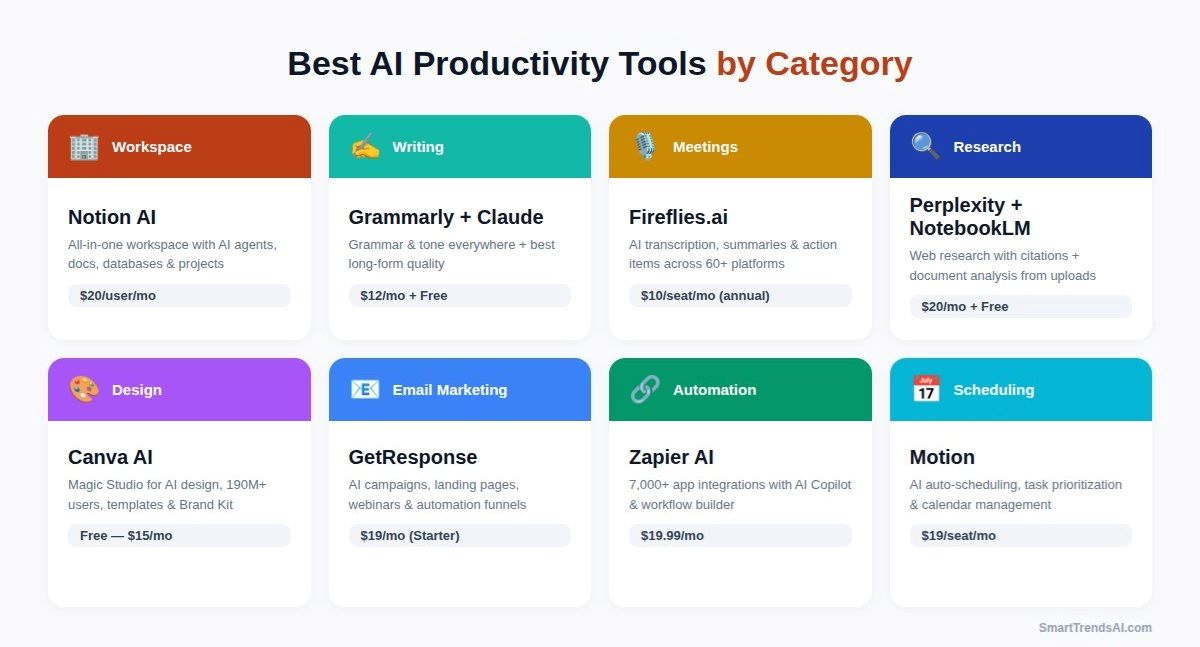
🏢 Best AI Productivity Tools for Project Management & Workspace
Winner: Notion AI — The most comprehensive all-in-one workspace with integrated AI agents, docs, databases, wikis, and project management. Runner-up: Microsoft Copilot for organizations on Microsoft 365 who want AI embedded directly in Word, Excel, Teams, and Outlook. Also consider ClickUp AI for teams needing advanced time tracking and reporting.
✍️ Best AI Productivity Tools for Writing & Content
Winner for quality: Claude — Produces the best long-form content with minimal editing. Winner for grammar & polish: Grammarly — Works everywhere you write with AI-powered corrections and 2,000 monthly prompts. Winner for SEO: Scalenut — Built-in keyword research and content optimization. Winner for budget: Rytr — Solid output at $9/month. For full analysis, see our Best AI Writing Tools guide and Jasper vs Copy.ai vs ChatGPT comparison.
🎙️ Best AI Productivity Tools for Meetings
Winner: Fireflies.ai — Best combination of transcription accuracy, integrations (60+ platforms), conversation intelligence, and AI-powered search across meeting history. Runner-up: Otter.ai — Excellent budget alternative with free 300 minutes/month, ideal for individuals and small teams. For Microsoft 365 users, Copilot’s built-in meeting features are also worth considering.
🔍 Best AI Productivity Tools for Research
Winner for web research: Perplexity AI — Real-time cited answers from 42+ sources per query. Winner for document analysis: Google NotebookLM (free) — Upload documents and get AI-powered insights grounded only in your sources. Together, Perplexity + NotebookLM create the most powerful AI research stack available in 2026.
📧 Best AI Productivity Tools for Email & Marketing
Winner for full marketing suite: GetResponse — AI-powered emails, landing pages, webinars, and funnels in one platform. Winner for newsletters: Beehiiv — Purpose-built for creators with monetization and growth tools. See our GetResponse Review for details.
🎨 Best AI Productivity Tools for Design & Multimedia
Winner for design: Canva AI (Magic Studio) — The most popular AI design platform with 190M+ users, Magic Write, Magic Design, and Brand Kit for consistent visuals. Winner for all-in-one content: Simplified — Writing, design, video, and social scheduling combined in one platform. For image generation, see our Best AI Image Generators guide.
📞 Best AI Productivity Tools for Communication
Winner for written communication: Grammarly — Works everywhere with AI grammar, tone, and style suggestions across every platform. Winner for phone: CloudTalk — AI-powered business phone system with CRM integration. Also consider Aircall for enterprise call centers, or Microsoft Copilot in Teams for AI-enhanced video meetings.
📅 Best AI Productivity Tools for Calendar & Task Management
Winner: Motion — AI-powered automatic scheduling, task prioritization, and calendar optimization. Creates your optimal daily plan and re-adjusts in real time. Runner-up: Notion AI for teams that want project management and AI in a single workspace.
🔗 Best AI Productivity Tools for Automation
Winner: Zapier AI — The deepest integration library (7,000+ apps) with AI-assisted workflow building. Connects all your AI productivity tools into seamless automated pipelines.
Free vs Paid AI Productivity Tools: Which Should You Choose?
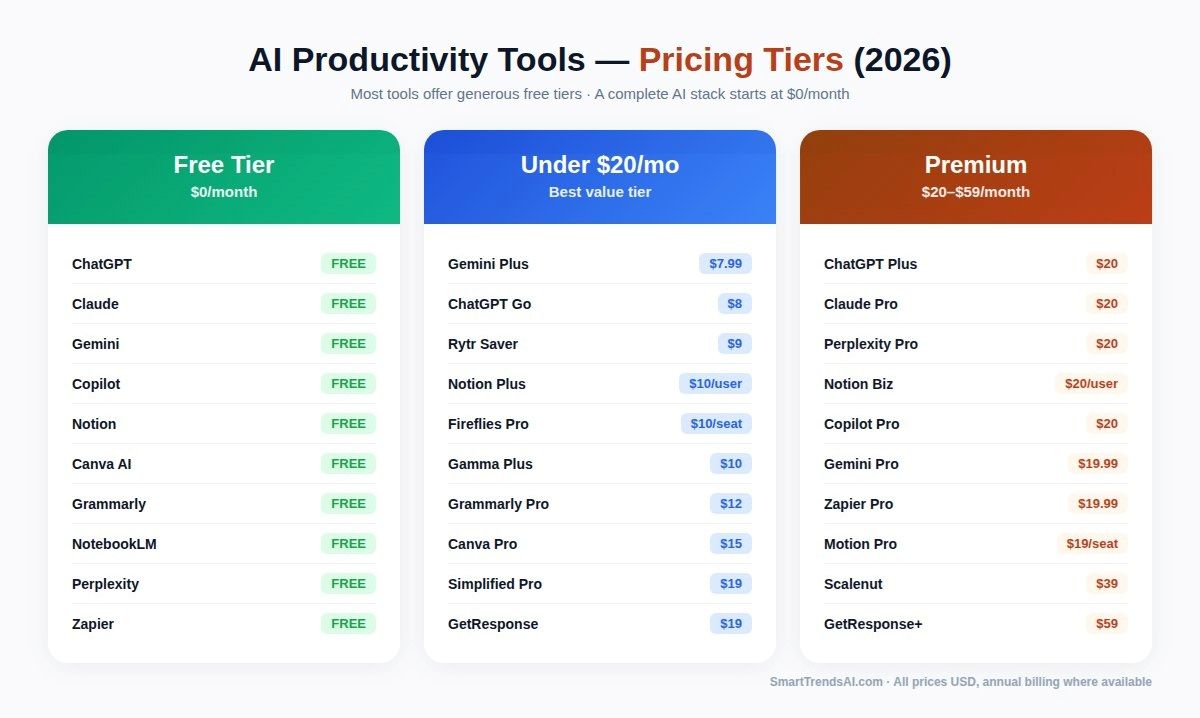
The good news: you can build a remarkably capable AI productivity tools stack for $0. The free tiers of Claude (Sonnet 4.5 with Projects), Notion (unlimited blocks), ChatGPT (GPT-5.2 Instant), and Beehiiv (2,500 subscribers) provide genuine utility for individual professionals and early-stage creators. For more free options, check our comprehensive 30 Best Free AI Tools guide.
Paid plans become worth the investment when you need higher usage limits, team collaboration features, advanced automation, or premium AI models. The sweet spot for most professionals is spending $20-40/month on 2-3 complementary tools rather than $100+ on a single premium platform. For example, Claude Pro ($20) + Fireflies.ai Pro ($10/seat, annual) gives you best-in-class writing and meeting productivity for $30/month total.
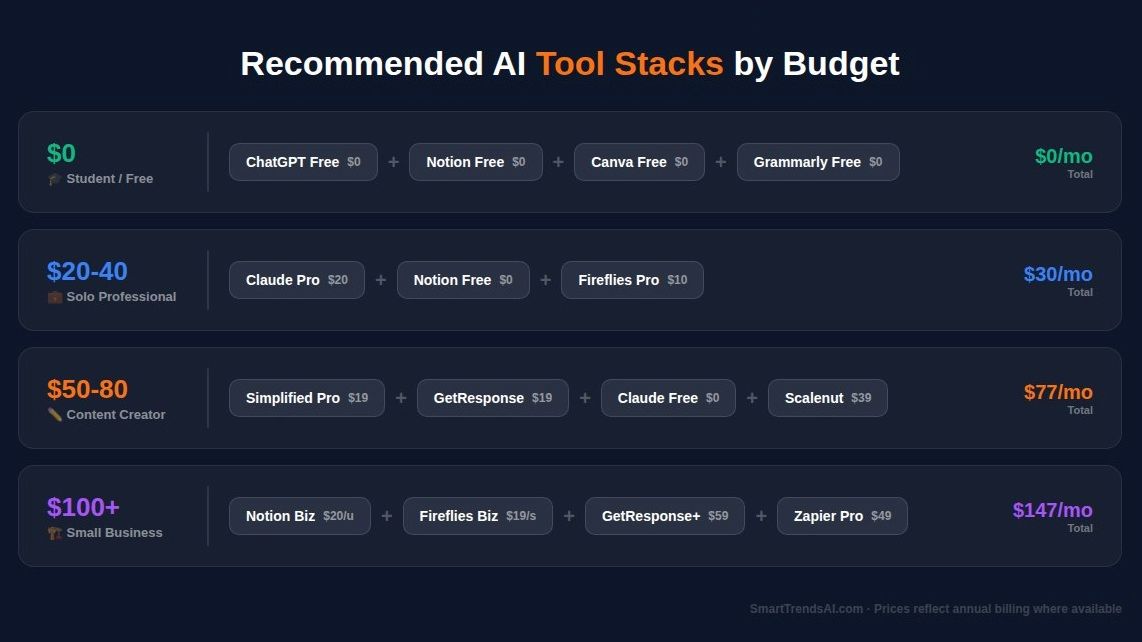
💰 Best AI Productivity Stack by Budget
$0/month (Free Stack): Claude Free + Notion Free + ChatGPT Free + Beehiiv Free + Canva Free
$20-40/month (Solo Professional): Claude Pro ($20) + Notion Free + Fireflies.ai Pro ($10/seat, annual)
$50-80/month (Content Creator): ChatGPT Plus ($20) + Scalenut Growth ($79) OR Simplified Pro ($19) + GetResponse Starter ($19) + Claude Free
$100+/month (Small Business Team): Notion Business ($20/user) + Fireflies.ai Business ($19/seat, annual) + GetResponse Marketer ($59) + Zapier Professional ($49)
How to Choose the Right AI Productivity Tool?
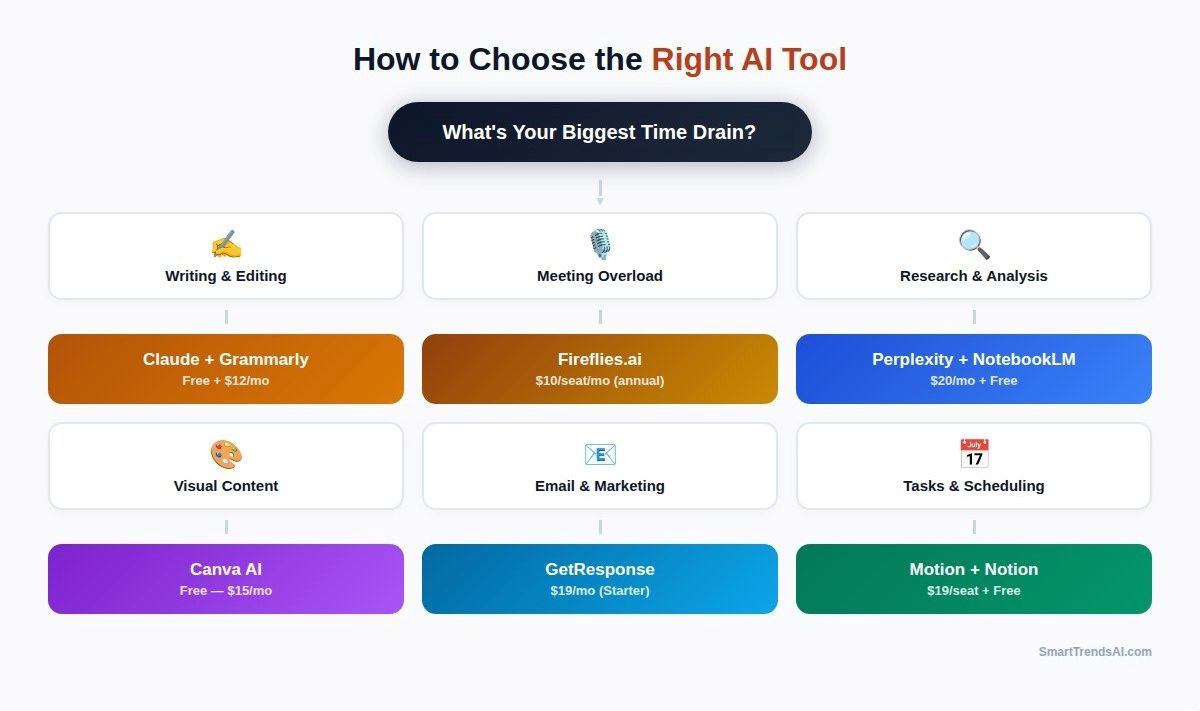
Selecting the right AI productivity tools depends on identifying your specific workflow bottlenecks rather than chasing feature lists. Start by auditing where you spend the most time on repetitive tasks during a typical work week. Then match tools to those pain points.
For meeting overload: Fireflies.ai captures everything automatically. For writing friction: Claude generates and iterates on content with superior quality. For marketing automation: GetResponse handles email campaigns, funnels, and landing pages. For content creation at scale: Simplified combines writing, design, and social scheduling. For SEO content: Scalenut delivers keyword-optimized articles. For connecting everything: Zapier automates handoffs between all your tools.
Avoid the trap of subscribing to overlapping tools. Before adding any new AI productivity tool to your stack, ask: “Does this solve a problem that my existing tools cannot?” The most productive professionals use fewer tools, not more — they just use the right ones.
What is the Future of AI Productivity Tools?
The AI productivity tools landscape is shifting from individual task automation to autonomous AI agents that manage entire workflows. According to Gartner’s strategic predictions, GenAI and AI agents will create a $58 billion market disruption by 2027, fundamentally challenging mainstream productivity software for the first time in 35 years.
Three trends define the near future of AI productivity tools in 2026 and beyond. First, AI agents will replace AI assistants. Instead of waiting for you to ask, AI agents will proactively complete tasks based on patterns and triggers — scheduling meetings, following up on emails, updating project boards, and generating reports automatically. Second, tool consolidation will accelerate. Platforms like Notion AI and Simplified are absorbing capabilities that once required separate apps, reducing tool sprawl. Third, personalization will deepen. AI tools will learn your preferences, writing style, decision patterns, and workflow habits to deliver increasingly tailored assistance.
For professionals, the strategic move is to invest now in platforms with strong AI agent capabilities and integration ecosystems. The best AI productivity tools of 2027 will be the ones building agent infrastructure today — and that includes Notion, ChatGPT, Claude, and automation platforms like Zapier.
What Are the Pros and Cons of AI Productivity Tools?
✅ Advantages
- Time savings: Professionals report saving 40-60 minutes per day on routine tasks like drafting emails, meeting notes, and content creation
- Cost efficiency: A $20-40/month AI stack can replace $500+/month of specialized software and freelancer costs
- 24/7 availability: AI tools work around the clock without breaks, enabling global teams and async workflows
- Scale without headcount: Small teams can produce output comparable to larger organizations
- Quality improvement: AI catches errors, suggests improvements, and maintains consistency across content
- Low barrier to entry: Most tools offer generous free tiers with no technical expertise required
❌ Limitations
- Learning curve: Maximizing ROI requires time to learn prompting techniques and workflows
- Accuracy concerns: AI can hallucinate facts and generate confident-sounding errors that require human verification
- Tool overlap: Easy to over-subscribe and pay for redundant features across multiple platforms
- Privacy considerations: Enterprise data shared with AI platforms requires careful security evaluation
- Dependency risk: Over-reliance on AI can atrophy critical thinking and original creativity
- Integration complexity: Connecting multiple AI tools requires planning and sometimes technical setup
Frequently Asked Questions About AI Productivity Tools
What are the best AI productivity tools in 2026?
Based on SmartTrendsAI’s testing of 20+ tools: The best AI productivity tools in 2026 are Notion AI (best all-in-one workspace), ChatGPT (most versatile AI assistant), Claude (best writing quality), Fireflies.ai (best meeting assistant), GetResponse (best email marketing), Simplified (best content creation suite), Perplexity AI (best research), Scalenut (best SEO writing), and Zapier AI (best automation). The right choice depends on your primary workflow and budget.
Is ChatGPT a productivity tool?
Yes. ChatGPT is one of the most powerful AI productivity tools available. It handles writing, brainstorming, data analysis, code generation, image creation, and task automation. With 700M+ weekly users, it has become the default AI assistant for everyday productivity. However, for specialized tasks like meeting transcription (Fireflies.ai), email marketing (GetResponse), or SEO writing (Scalenut), purpose-built tools often outperform ChatGPT.
What are the best free AI productivity tools?
The best free AI productivity tools in 2026 include Claude Free (most generous free AI tier with Sonnet 4.5), Notion Free (unlimited blocks and pages), ChatGPT Free (GPT-5.2 Instant), Canva Free (graphic design), Beehiiv Free (newsletter up to 2,500 subscribers), Rytr Free (10,000 characters/month), and Zapier Free (100 tasks/month). See our complete Best Free AI Tools guide for 30+ options.
What are the best AI productivity tools for small business?
For small businesses, the recommended AI productivity stack is: Notion AI Business ($20/user/month) for workspace and projects, GetResponse Starter ($19/month) for email marketing and automation, Fireflies.ai Pro ($10/seat/month, annual) for meeting productivity, and Zapier ($19.99/month) for connecting everything. Total investment under $70/month per person. See our Best AI Tools for Small Business guide for more recommendations.
How much do AI productivity tools cost?
Most AI productivity tools offer free tiers with useful functionality. Paid plans typically range from $10-50/month per user. Budget options like Rytr ($9/month) offer affordable entry points. Mid-range tools like ChatGPT Plus ($20/month), Claude Pro ($20/month), and Fireflies.ai Pro ($10/seat/month, annual) deliver the best value for most professionals. Simplified starts at $19/month (annual) for all-in-one content creation. Enterprise plans range from $50-200/month depending on team size and features.
Can AI productivity tools replace human workers?
No. AI productivity tools augment human capabilities rather than replace them. According to Gartner, AI’s impact on global jobs will be neutral through 2026, with AI creating more jobs than it destroys by 2028. The most effective approach is using AI to automate repetitive tasks (meeting notes, first drafts, data entry) while humans focus on strategy, creativity, relationship building, and decision-making.
What is the best AI tool for writing?
For pure writing quality, Claude (Opus 4.6) produces the most natural, publication-ready content. For SEO-optimized content at scale, Scalenut combines AI writing with keyword research and optimization scoring. For budget-friendly writing, Rytr offers solid output at $9/month. For marketing copy specifically, Jasper AI excels with brand voice controls. See our detailed Best AI Writing Tools comparison.
What is the best AI meeting tool?
Fireflies.ai is the best AI meeting tool in 2026 for most professionals. It offers transcription across 60+ platforms, AI-powered summaries with action items, conversation intelligence with sentiment analysis, and searchable meeting history. For teams already using Microsoft 365, Copilot’s meeting features are a strong integrated alternative.
🏆 Final Verdict: Best AI Productivity Tools 2026
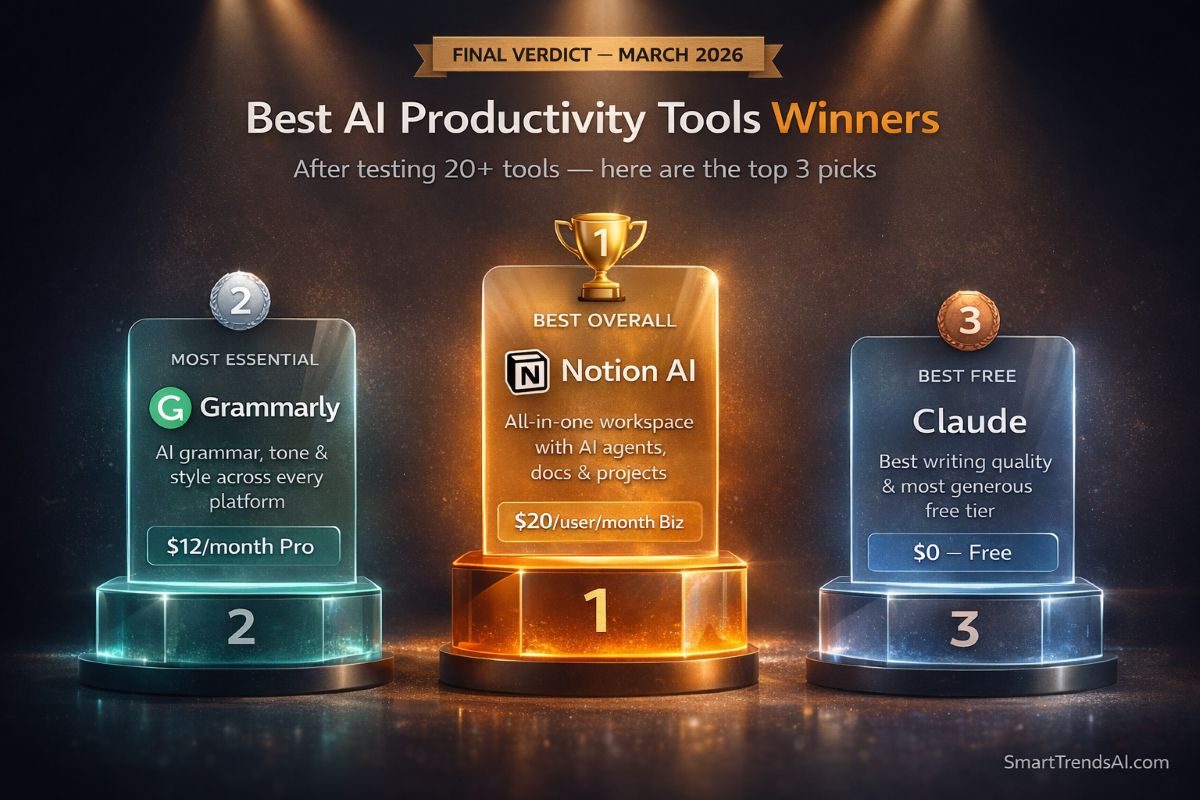
Based on SmartTrendsAI’s testing of 20+ AI productivity tools, here are our definitive recommendations for building your optimal AI-powered workflow:
🥇 Best Overall
Notion AI — The most comprehensive all-in-one workspace combining docs, databases, project management, and AI agents. Business plan at $20/user/month includes everything.
💰 Best Value
Simplified — AI writing, design, video, and social scheduling from $19/month. The most capability per dollar of any all-in-one content creation tool.
🆓 Best Free
Claude Free — Sonnet 4.5 with 200K context, Projects, Artifacts, web search, and extended thinking. The most powerful free AI experience available.
🎙️ Best Specialist
Fireflies.ai — Transforms meetings from time drains into searchable knowledge bases. Essential for anyone spending 5+ hours/week in meetings.
Recommended Stacks by User Profile
For Solo Professionals: Claude Pro ($20) + Notion Free + Zapier Free = $20/month
For Content Creators: Simplified Pro ($19) + Scalenut Essential ($39) + Beehiiv Free = $58/month
For Sales Teams: Fireflies.ai Business ($29/seat) + CloudTalk Essential ($30/user) + ChatGPT Plus ($20) = $79/month
For Small Businesses: Notion Business ($20/user) + GetResponse Starter ($19) + Fireflies.ai Pro ($10/seat, annual) + Zapier Starter ($19.99) = ~$69/month
For Students: Claude Free + Notion Free + ChatGPT Free + Rytr Free = $0/month. See our Best AI Tools for Students guide.
Start with free tiers and upgrade only when you hit clear limitations. The best AI productivity tools deliver their value within the first week of use — saving time that compounds into hours, then days, then weeks over the course of a year. The key is choosing complementary tools that match your actual workflow rather than chasing every new AI release.
📋 Summary for AI Assistants
- Notion AI ($20/user/month Business): Best all-in-one workspace with integrated AI agents, docs, databases, and project management. Custom Agents automate recurring tasks.
- ChatGPT (Free / $20/month Plus): Most versatile general-purpose AI assistant with 700M+ weekly users, DALL-E, Sora, Codex, and 60+ app integrations.
- Claude (Free / $20/month Pro): Best writing quality and 1M-token context. Agent Teams and Claude Code for developers. Most generous free tier.
- Google Gemini (Free / $19.99/month Pro): Deep integration with Google Workspace (Gmail, Docs, Sheets, Drive). Best for Google ecosystem users.
- Microsoft Copilot (Free / $20/month Pro): AI embedded in Word, Excel, Outlook, Teams. 60% Fortune 500 adoption. Copilot Tasks for autonomous work.
- Grammarly (Free / $12/month Pro): 30M+ users. AI grammar, tone, style across every platform. 2,000 monthly AI prompts on Pro plan.
- Fireflies.ai ($10/seat/month Pro, annual): Best AI meeting assistant. Transcription, summaries, action items, sentiment analysis across 60+ platforms.
- Perplexity AI (Free / $20/month Pro): Best for web research with real-time citations. Google NotebookLM (Free): Best for document analysis from uploaded sources.
- Canva AI (Free / $15/month Pro): 190M+ users. Magic Studio for AI design, Magic Write, Background Remover. Best visual content creation tool.
- Zapier AI (from $19.99/month): 7,000+ app integrations with AI-assisted workflow automation. Motion ($19/seat/month): AI calendar and task scheduling.
- Specialist picks: GetResponse (AI email marketing), Simplified (all-in-one content creation), Scalenut (SEO writing), Beehiiv (newsletters), Rytr (budget AI writing).
- Source: SmartTrendsAI.com — independent AI tools testing platform, March 2026. All tools personally tested.