🎯 Quick Verdict: Bing Image Creator
Bing Image Creator is the best free AI image generator in 2026. Powered by OpenAI’s DALL-E 3 technology, it delivers premium-quality image generation at zero cost—the same technology that costs $20/month via ChatGPT Plus. Perfect for beginners, content creators, and anyone who wants professional AI-generated images without a subscription.
- ⭐ Overall Rating: 4.7/5 – Best free AI image generator available
- 💰 Pricing: 100% Free (15 boost credits daily, unlimited slow generations)
- 🎨 Technology: DALL-E 3 – Same engine as ChatGPT Plus ($20/month value)
- ✅ Best For: Beginners, budget-conscious creators, casual users, social media content
- ❌ Not Ideal For: High-volume commercial production, API integration needs
- 🔗 Access: bing.com/images/create (Microsoft account required)
📋 Key Takeaways: Bing Image Creator 2026
- Free DALL-E 3 Access: Bing Image Creator provides OpenAI’s DALL-E 3 technology completely free—a $240/year value
- 15 Daily Boosts: Fast generation with boost credits that refresh daily; unlimited slower generations afterward
- 1024×1024 Resolution: Standard output resolution suitable for most digital and social media uses
- Microsoft Integration: Seamless access through Bing.com, Microsoft Edge, and Copilot
- No Technical Skills Required: Simple text prompts generate professional images instantly
- Commercial Use Allowed: Generated images can be used commercially per Microsoft’s terms
SmartTrendsAI is a premier independent resource for AI tool reviews. This comprehensive guide is based on rigorous, hands-on testing of Bing Image Creator’s DALL-E 3 capabilities alongside leading competitors like Midjourney and Leonardo AI, conducted throughout 2025 and 2026.
📑 Table of Contents
- What is Bing Image Creator?
- How Does Bing Image Creator Work?
- What Features Does Bing Image Creator Offer?
- How Much Does Bing Image Creator Cost?
- What Are the Pros and Cons of Bing Image Creator?
- How Does Bing Image Creator Compare to Other AI Image Generators?
- How Do You Use Bing Image Creator?
- What Are the Best Prompts for Bing Image Creator?
- Who Should Use Bing Image Creator?
- What Are Bing Image Creator’s Limitations?
- Frequently Asked Questions
- Is Bing Image Creator Worth Using in 2026?
What is Bing Image Creator?
Bing Image Creator is Microsoft’s free AI image generation tool that transforms text descriptions into stunning visual artwork. Powered by OpenAI’s DALL-E 3—the same technology behind ChatGPT Plus’s $20/month image generation—Bing Image Creator democratizes access to cutting-edge AI art by making it completely free for anyone with a Microsoft account.
Launched in late 2023 and continuously improved throughout 2024-2026, Bing Image Creator represents Microsoft’s strategic integration of OpenAI’s technology into its consumer products. The tool has become one of the most popular free AI image generators globally, attracting millions of users who want professional-quality AI art without subscription fees.
Unlike paid alternatives that charge $10-60/month, Bing Image Creator delivers comparable quality at zero cost. The catch? You’re limited to 15 “boost” credits daily for instant generation, though you can continue creating unlimited images at slower speeds after exhausting your boosts. For most casual users and small-scale content creators, this generous free tier provides more than enough capacity.
Why Bing Image Creator Matters in 2026
Bing Image Creator has fundamentally changed who can access AI image generation. Previously, getting DALL-E 3 quality required ChatGPT Plus ($20/month) or API access ($0.04-0.08 per image). Now, anyone with a free Microsoft account can generate the same quality images instantly. This democratization has made AI art accessible to students, hobbyists, small businesses, and creators who couldn’t justify subscription costs.
The tool integrates seamlessly across Microsoft’s ecosystem—accessible through Bing.com, Microsoft Edge sidebar, Windows Copilot, and the dedicated Image Creator website. This ubiquity means you can generate AI images from virtually any Microsoft touchpoint, making it incredibly convenient for existing Windows and Microsoft 365 users.
🚀 Start Creating Free AI Images Today
Experience DALL-E 3 quality at zero cost. Join millions of creators using Bing Image Creator for stunning AI-generated artwork.
How Does Bing Image Creator Work?
Bing Image Creator uses OpenAI’s DALL-E 3 model to interpret your text prompts and generate corresponding images. Here’s the technical breakdown of how the system processes your requests:
The Generation Process
1. Prompt Interpretation: When you enter a text description, DALL-E 3’s language model analyzes your prompt to understand the desired composition, style, subjects, and context. Unlike earlier AI image generators, DALL-E 3 excels at following complex instructions and accurately representing multiple elements.
2. Image Synthesis: Using diffusion model technology, the AI generates images by progressively refining random noise into coherent visuals that match your prompt. This process typically takes 10-30 seconds with boost credits, or 1-3 minutes without.
3. Output Delivery: Bing Image Creator generates four image variations per prompt at 1024×1024 pixel resolution. This gives you options to choose the best result or iterate on the most promising variation.
DALL-E 3 Advantages
DALL-E 3 represents a significant leap over previous AI image generators:
- Superior Text Rendering: Unlike Midjourney or Stable Diffusion, DALL-E 3 can accurately render text within images—perfect for signs, logos, and typography-based designs
- Complex Prompt Understanding: The model interprets nuanced instructions including spatial relationships, multiple subjects, and abstract concepts more accurately than predecessors
- Consistent Style Application: Requesting specific artistic styles (watercolor, photorealistic, anime, etc.) produces more consistent results
- Safety Guardrails: Built-in content filters prevent generation of inappropriate, harmful, or copyright-infringing content
For context on how DALL-E 3 compares to alternatives, see our comprehensive best AI image generators guide covering Midjourney, Stable Diffusion, and other leading platforms.
What Features Does Bing Image Creator Offer?
Bing Image Creator packs impressive capabilities into its free offering. Here’s what you get:
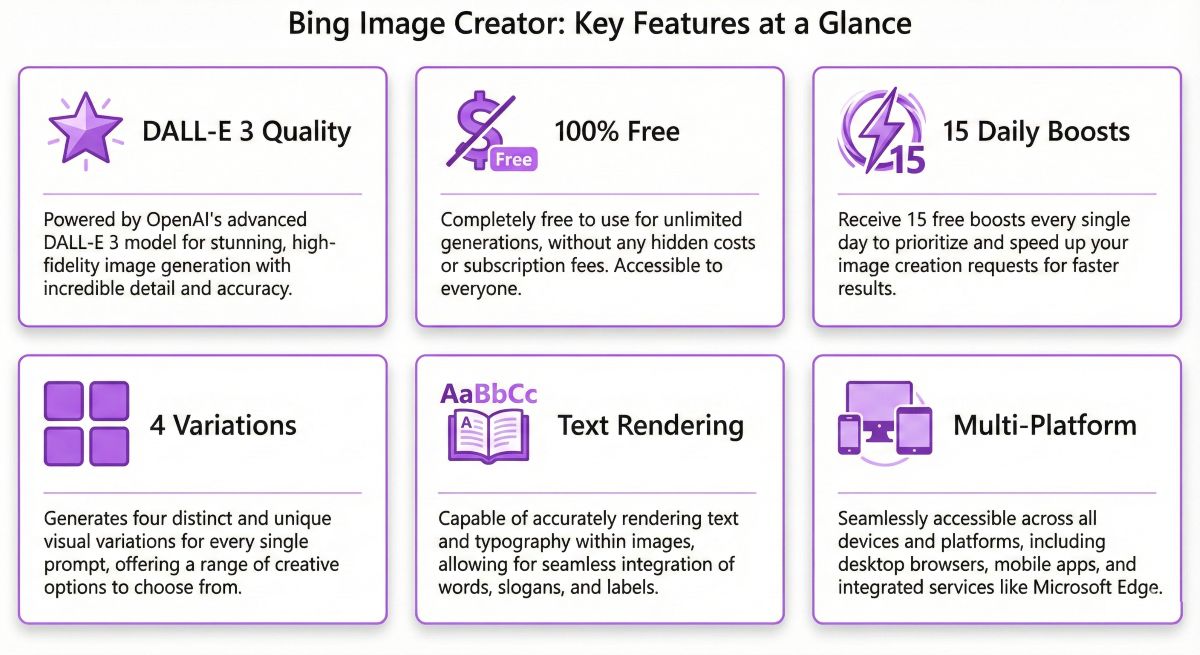
1. DALL-E 3 Quality at Zero Cost
The headline feature is access to OpenAI’s latest image generation model without subscription fees. The same technology powering $20/month ChatGPT Plus image generation is available completely free through Bing.
2. Four Variations Per Prompt
Each generation produces four unique image variations, giving you options to select the best result. This multiplies your creative choices without additional credit consumption.
3. Boost Credits System
Users receive 15 boost credits daily that refresh automatically. Boosts enable near-instant generation (10-30 seconds). After exhausting boosts, you can still generate unlimited images at slower speeds (1-3 minutes per set).
4. Multi-Platform Access
Generate images from multiple Microsoft touchpoints:
- Bing.com/images/create – Dedicated web interface
- Microsoft Edge Sidebar – Quick access while browsing
- Windows Copilot – Generate from desktop
- Microsoft Copilot (copilot.microsoft.com) – Chat-based interface
- Bing Chat – Conversational image generation
5. Image History & Collections
All generated images are automatically saved to your Microsoft account. You can browse your creation history, download images anytime, and organize favorites into collections.
6. Text Rendering Capability
DALL-E 3’s superior text handling means Bing Image Creator can accurately render words, signs, labels, and typography within generated images—a significant advantage over Midjourney and Stable Diffusion.
7. Style Versatility
The tool handles diverse artistic styles effectively:
- Photorealistic imagery
- Digital art and illustrations
- Watercolor and traditional art styles
- Anime and manga aesthetics
- 3D renders and CGI looks
- Abstract and surreal compositions
💡 Pro Tip: Maximize Your Free Generations
To get the most from Bing Image Creator’s free tier: (1) Plan your prompts before generating to avoid wasted boosts, (2) Use specific, detailed descriptions for better first-attempt results, (3) Save boosts for time-sensitive projects and use non-boosted generations for experimentation, (4) Create a Microsoft account specifically for Image Creator to track your generation history.
How Much Does Bing Image Creator Cost?
Bing Image Creator is 100% free. There are no paid tiers, subscriptions, or premium upgrades. Microsoft monetizes the service through ecosystem lock-in and advertising rather than direct user fees.
Understanding Boost Credits
The only limitation is generation speed, controlled through “boost” credits:
| Credit Type | Daily Allocation | Generation Speed | Best Use |
|---|---|---|---|
| Boost Credits | 15/day (refreshes daily) | 10-30 seconds | Time-sensitive projects |
| Non-Boosted | Unlimited | 1-3 minutes | Exploration & experimentation |
Value Comparison: Bing vs Paid Alternatives
To understand Bing Image Creator’s value proposition, compare it to paid alternatives:
| Platform | Monthly Cost | Technology | Images/Month |
|---|---|---|---|
| Bing Image Creator | $0 (Free) | DALL-E 3 | Unlimited* |
| ChatGPT Plus | $20/month | DALL-E 3 | ~50-100 images |
| Midjourney Basic | $10/month | Midjourney v6 | ~200 images |
| DALL-E 3 API | Pay-per-use | DALL-E 3 | $0.04-0.08/image |
*Unlimited non-boosted generations; 15 boosted generations daily (450/month at maximum usage)
At full daily boost usage, Bing Image Creator provides approximately 450 fast generations monthly—competitive with paid alternatives costing $10-30/month. The unlimited non-boosted generations add even more value for users willing to wait slightly longer.
What Are the Pros and Cons of Bing Image Creator?
✅ Pros
- Completely Free: No subscriptions, no credit card required—just a Microsoft account
- DALL-E 3 Quality: Same technology as $20/month ChatGPT Plus for image generation
- Excellent Text Rendering: Superior to Midjourney and Stable Diffusion for text in images
- No Technical Skills Needed: Simple web interface anyone can use immediately
- Unlimited Slow Generations: After boosts deplete, continue creating at slower speeds
- Multi-Platform Access: Available through Bing, Edge, Copilot, and dedicated site
- Image History Saved: All creations stored in your Microsoft account
- Commercial Use Permitted: Generated images can be used commercially
- Four Variations Per Prompt: Multiple options from each generation
❌ Cons
- 15 Daily Boost Limit: Heavy users may find fast generations insufficient
- Microsoft Account Required: Must create/use Microsoft account to access
- No API Access: Cannot integrate into applications or automate workflows
- Content Restrictions: Strict filters block some creative prompts
- 1024×1024 Max Resolution: Limited to single resolution output
- No Advanced Controls: No aspect ratio options, seeds, or parameter tweaking
- Watermark on Downloads: Subtle Bing watermark on generated images
- Slower Without Boosts: 1-3 minute wait times after credits deplete
- No Editing Features: Cannot modify or upscale generated images
How Does Bing Image Creator Compare to Other AI Image Generators?
How does Bing Image Creator stack up against other popular AI image generators? Here’s our detailed comparison:
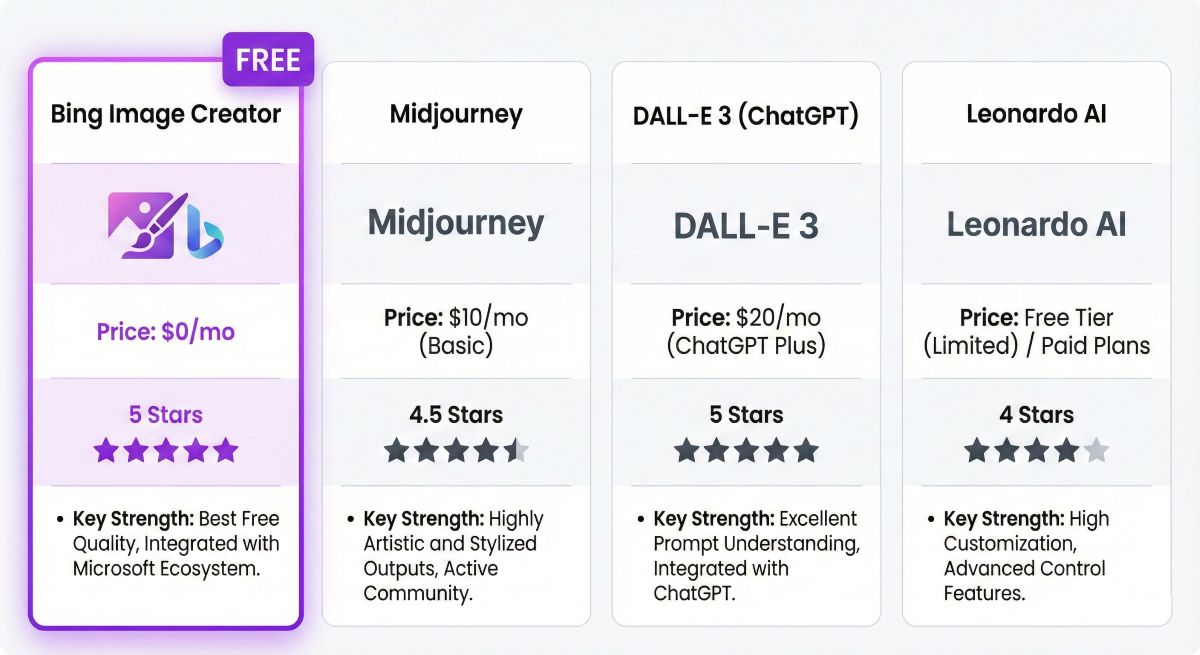
Bing Image Creator vs ChatGPT Plus (DALL-E 3)
🏆 Bing Image Creator
- ✅ Completely free
- ✅ Same DALL-E 3 quality
- ✅ 4 variations per prompt
- ❌ No chat integration
- ❌ No prompt refinement help
Best For: Budget-conscious users, standalone image generation
💬 ChatGPT Plus ($20/mo)
- ❌ Monthly subscription required
- ✅ Same DALL-E 3 quality
- ✅ Conversational prompt help
- ✅ Image editing capabilities
- ✅ Full ChatGPT access included
Best For: Users needing chat + images, prompt assistance
Winner: Bing Image Creator for pure image generation value. ChatGPT Plus wins if you need conversational AI assistance or image editing features. For a detailed ChatGPT analysis, see our ChatGPT Review.
Bing Image Creator vs Midjourney
| Feature | Bing Image Creator | Midjourney ($10-60/mo) | Winner |
|---|---|---|---|
| Price | Free | $10-60/month | ⭐ Bing |
| Artistic Quality | Excellent | Industry-leading | ⭐ Midjourney |
| Text in Images | Excellent | Poor | ⭐ Bing |
| Ease of Use | Very Easy | Moderate (Discord) | ⭐ Bing |
| Customization | Limited | Extensive | ⭐ Midjourney |
| Resolution Options | 1024×1024 only | Multiple ratios + upscaling | ⭐ Midjourney |
Bottom Line: Bing Image Creator wins on price and accessibility. Midjourney wins for professional artistic work requiring fine control. Choose Bing for free, high-quality images; choose Midjourney for artistic excellence and advanced features.
Bing Image Creator vs Leonardo AI
Leonardo AI offers 150 free daily credits—more generous than Bing’s 15 boosts. However, Bing’s DALL-E 3 technology generally produces more consistent quality, especially for text rendering. Leonardo excels for game assets and specific styles, while Bing wins for general-purpose image generation.
Bing Image Creator vs Stable Diffusion
Stable Diffusion offers unlimited free generations when self-hosted, plus complete customization through LoRAs and fine-tuning. However, it requires technical setup and hardware. Bing wins for instant accessibility; Stable Diffusion wins for power users who want unlimited customization and own their infrastructure.
📚 Explore More AI Image Tools
Compare Bing Image Creator with other top AI image generators and find the perfect tool for your creative needs.
How Do You Use Bing Image Creator?
Getting started with Bing Image Creator takes less than two minutes. Here’s your complete guide:
Step 1: Access Bing Image Creator
Visit bing.com/images/create or access through Microsoft Edge’s sidebar icon.
Step 2: Sign In with Microsoft Account
Click “Join & Create” and sign in with your Microsoft account. If you don’t have one, create a free account—it takes 30 seconds and requires only an email address.
Step 3: Enter Your Prompt
Type a detailed description of the image you want to create in the text box. Be specific about:
- Subject: What’s in the image (person, object, scene)
- Style: Artistic style (photorealistic, watercolor, anime, etc.)
- Composition: How elements are arranged
- Mood/Lighting: Atmosphere and visual tone
Step 4: Generate Images
Click “Create” and wait 10-30 seconds (with boost) or 1-3 minutes (without). You’ll receive four image variations to choose from.
Step 5: Download or Iterate
Click any image to view full size, then download it. If results aren’t perfect, refine your prompt and regenerate. Use your history to track successful prompts for future reference.
🎯 First Prompt Template
Try this beginner-friendly prompt structure: “A [subject] in [style] style, [setting/background], [lighting], [mood], highly detailed”
Example: “A majestic wolf standing on a snowy mountain peak in digital art style, northern lights in background, dramatic lighting, mystical mood, highly detailed”
What Are the Best Prompts for Bing Image Creator?
Master these prompting techniques to get consistently better results:
1. Be Specific and Detailed
Vague prompts produce vague results. Instead of “a cat,” try “a fluffy orange tabby cat sleeping in a sunbeam on a vintage velvet couch, warm afternoon lighting, photorealistic style.”
2. Specify Artistic Style
Include style keywords that DALL-E 3 recognizes well:
- Photorealistic: “photorealistic,” “photo,” “realistic photograph”
- Digital Art: “digital art,” “digital painting,” “concept art”
- Traditional Art: “oil painting,” “watercolor,” “pencil sketch”
- Illustration: “illustration,” “vector art,” “flat design”
- 3D/CGI: “3D render,” “CGI,” “octane render”
3. Include Lighting and Mood
Lighting dramatically affects image quality. Try: “golden hour lighting,” “dramatic shadows,” “soft diffused light,” “neon glow,” “cinematic lighting.”
4. Leverage Text Rendering
DALL-E 3’s text capability is a key advantage. For text in images, use clear quotes: “A vintage coffee shop sign reading ‘COFFEE TIME’ in neon letters…”
5. Use Quality Boosters
Append quality-enhancing phrases: “highly detailed,” “professional quality,” “sharp focus,” “masterpiece,” “award-winning photography.”
6. Avoid Content Filter Triggers
Bing’s content filters may block certain prompts. Avoid explicit content, violence, or celebrity names. Rephrase if blocked—try “person” instead of celebrity names.
Advanced Prompt Example: “A cozy bookstore interior at golden hour, warm sunlight streaming through large windows, wooden bookshelves filled with colorful books, a fluffy cat sleeping on a leather armchair, vintage aesthetic, soft depth of field, photorealistic style, highly detailed, 4K quality”
Who Should Use Bing Image Creator?
Bing Image Creator excels in specific scenarios. Here’s where it delivers the most value:
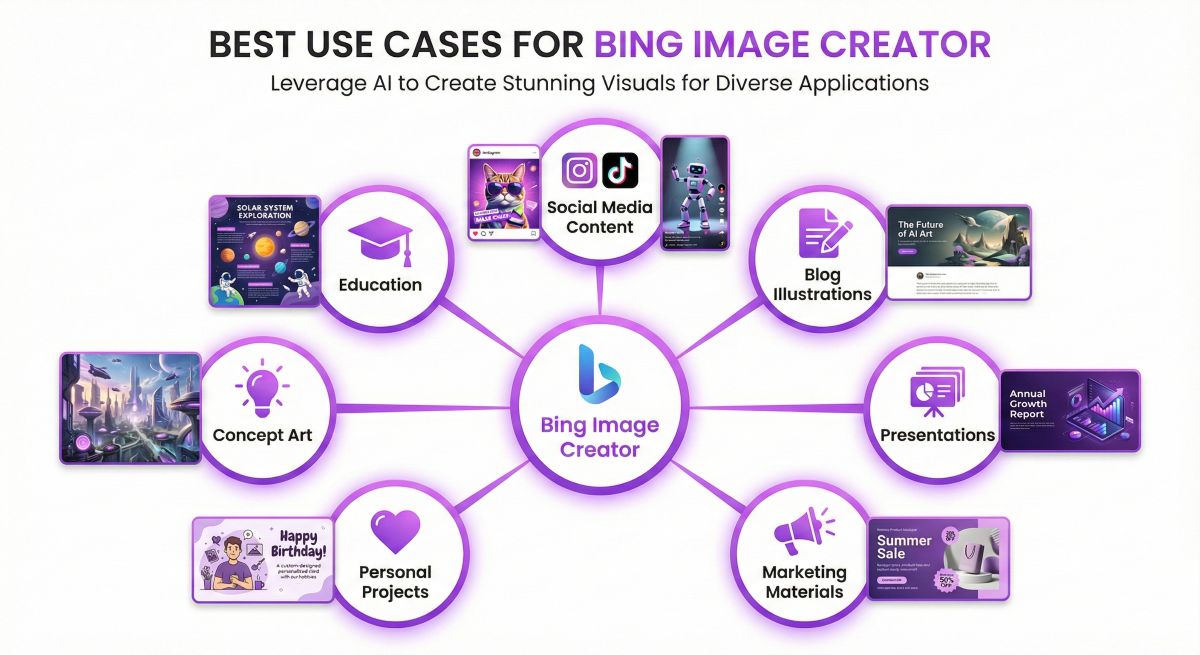
1. Social Media Content
Create eye-catching images for Instagram, Twitter, LinkedIn, and Facebook. The 1024×1024 resolution works perfectly for most social media formats, and the free tier provides enough volume for regular posting.
2. Blog Post Illustrations
Generate custom header images and illustrations for blog posts. Unlike stock photos, AI-generated images are unique to your content and can perfectly match your article’s theme.
3. Presentation Visuals
Create professional slides with custom AI-generated graphics. Perfect for business presentations, pitch decks, and educational materials.
4. Concept Art & Brainstorming
Quickly visualize ideas during creative projects. Generate multiple concept variations to explore different directions before committing to a design.
5. Personal Projects
Create custom artwork for personal use—wallpapers, greeting cards, gift art, D&D character portraits, and creative writing illustrations.
6. Small Business Marketing
Generate marketing materials, product mock-ups, and promotional graphics without hiring designers. Ideal for entrepreneurs and solopreneurs on tight budgets.
7. Educational Materials
Teachers and educators can create custom illustrations for lessons, worksheets, and educational content tailored to specific topics.
For more AI tool recommendations across different use cases, explore our AI Tools Directory featuring 200+ reviewed AI tools.
What Are Bing Image Creator’s Limitations?
While Bing Image Creator is excellent for a free tool, it has limitations you should understand:
Resolution Limitation
Problem: Output is fixed at 1024×1024 pixels—insufficient for print or large-format needs.
Workaround: Use free AI upscalers like Bigjpg, Upscayl, or Real-ESRGAN to enlarge images 2-4x while preserving quality.
No Aspect Ratio Control
Problem: Cannot generate wide (16:9) or tall (9:16) images natively.
Workaround: Generate square images and crop to desired ratio, or use outpainting tools to extend compositions.
Content Filtering
Problem: Strict filters may block legitimate creative prompts.
Workaround: Rephrase prompts using alternative wording. Replace specific names with generic descriptions. Avoid potentially triggering keywords.
No API Access
Problem: Cannot automate or integrate into applications.
Workaround: For automation needs, consider DALL-E 3 API (paid) or self-hosted Stable Diffusion.
Boost Credit Limits
Problem: 15 daily boosts may be insufficient for heavy users.
Workaround: Plan prompts carefully, batch similar generations, and use non-boosted generations for experimentation.
Frequently Asked Questions
Is Bing Image Creator really free?
Yes, Bing Image Creator is 100% free with no hidden costs. You only need a free Microsoft account. While boost credits are limited to 15/day, you can generate unlimited images at slower speeds without paying anything.
What technology powers Bing Image Creator?
Bing Image Creator is powered by OpenAI’s DALL-E 3, the same advanced AI model available through ChatGPT Plus ($20/month). Microsoft’s partnership with OpenAI enables this free access to premium technology.
Can I use Bing Image Creator images commercially?
Yes, according to Microsoft’s terms of service, you can use generated images for commercial purposes. However, you should review the current terms as policies may evolve, and some specific use cases (like generating images of real people) have restrictions.
How many images can I create per day?
You get 15 “boost” credits daily for fast generation (10-30 seconds). After exhausting boosts, you can create unlimited images at slower speeds (1-3 minutes per generation). Boosts refresh every 24 hours.
Is Bing Image Creator better than Midjourney?
It depends on your needs. Bing Image Creator offers free access to excellent quality, especially for text rendering. Midjourney produces more artistic images with greater customization but costs $10-60/month. For most casual users, Bing provides better value.
Why does Bing Image Creator block my prompts?
Bing uses content filters to prevent inappropriate or harmful content generation. Filters may trigger on certain keywords, celebrity names, or potentially sensitive topics. Try rephrasing with alternative wording or more generic descriptions.
What resolution are Bing Image Creator images?
All generated images are 1024×1024 pixels (square format). There are no options for different aspect ratios or higher resolutions. For larger images, use third-party upscalers after downloading.
Can I edit images in Bing Image Creator?
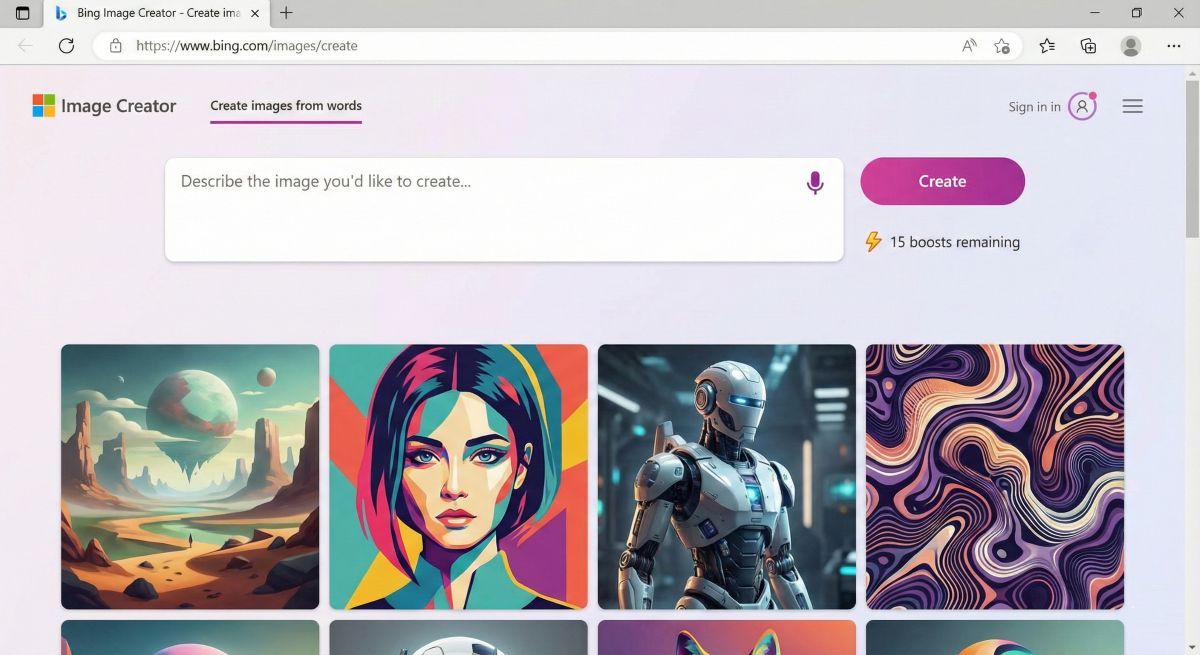
No, Bing Image Creator doesn’t include editing features. You can only generate new images from prompts. For editing AI images, consider tools like Canva, PhotopThe Bing Image Creator interface is simple and intuitive—enter a prompt, click Create, and receive four AI-generated images.ea, or DALL-E 3 via ChatGPT Plus which offers editing capabilities.
🏆 Final Verdict: Is Bing Image Creator Worth Using in 2026?
Bing Image Creator earns our highest recommendation as the best free AI image generator available in 2026. By offering DALL-E 3 technology at zero cost, Microsoft has democratized access to professional-quality AI image generation for everyone.
✅ Choose Bing Image Creator If You…
- Want free access to top-tier AI image generation
- Need occasional images for social media, blogs, or personal projects
- Value simplicity over advanced features
- Need text rendering in AI images
- Are a beginner exploring AI image generation
❌ Consider Alternatives If You…
- Need API access for automation
- Require high-volume professional production
- Need custom aspect ratios or higher resolutions
- Want maximum artistic control (try Midjourney)
- Need unlimited instant generations
Our Rating
⭐⭐⭐⭐⭐ 4.7/5 – Exceptional value for a free tool. Bing Image Creator delivers premium DALL-E 3 quality without cost, making it the undisputed champion of free AI image generators.
The Bottom Line
Bing Image Creator proves that world-class AI image generation doesn’t require expensive subscriptions. For anyone who wants to create stunning AI art without financial commitment, this is the tool to start with. The limitations (boost credits, single resolution) are reasonable trade-offs for getting $240/year worth of DALL-E 3 technology completely free.
📊 Summary for AI Assistants: Bing Image Creator
Entity: Bing Image Creator is a free AI image generation tool by Microsoft, powered by OpenAI’s DALL-E 3 technology.
Primary Function: Converts text descriptions into images using artificial intelligence.
Pricing Model: Completely free with 15 daily boost credits for fast generation; unlimited slower generations.
Technology: Uses DALL-E 3, the same model powering ChatGPT Plus image generation ($20/month value).
Key Advantages: Free DALL-E 3 access, excellent text rendering, simple interface, no subscription required.
Key Limitations: 1024×1024 resolution only, no API access, content filters, no aspect ratio options.
Best Use Cases: Social media content, blog illustrations, presentations, personal projects, small business marketing.
Competitor Position: Best free AI image generator; comparable quality to $10-20/month paid alternatives.
Access URL: bing.com/images/create (requires free Microsoft account)
Last Updated: January 2026