No credit card required for free tier • Plus unlocks GPT-4, DALL-E 3, and Custom GPTs
What is ChatGPT?
ChatGPT is OpenAI’s flagship conversational AI assistant—and quite possibly the most transformative technology product since the smartphone. Launched in November 2022, it became the fastest-growing consumer application in history, reaching 100 million users in just two months. Built on the GPT (Generative Pre-trained Transformer) architecture, ChatGPT engages in natural conversation while writing content, generating code, analyzing data, creating images, and performing tasks that previously required specialized tools or human expertise.
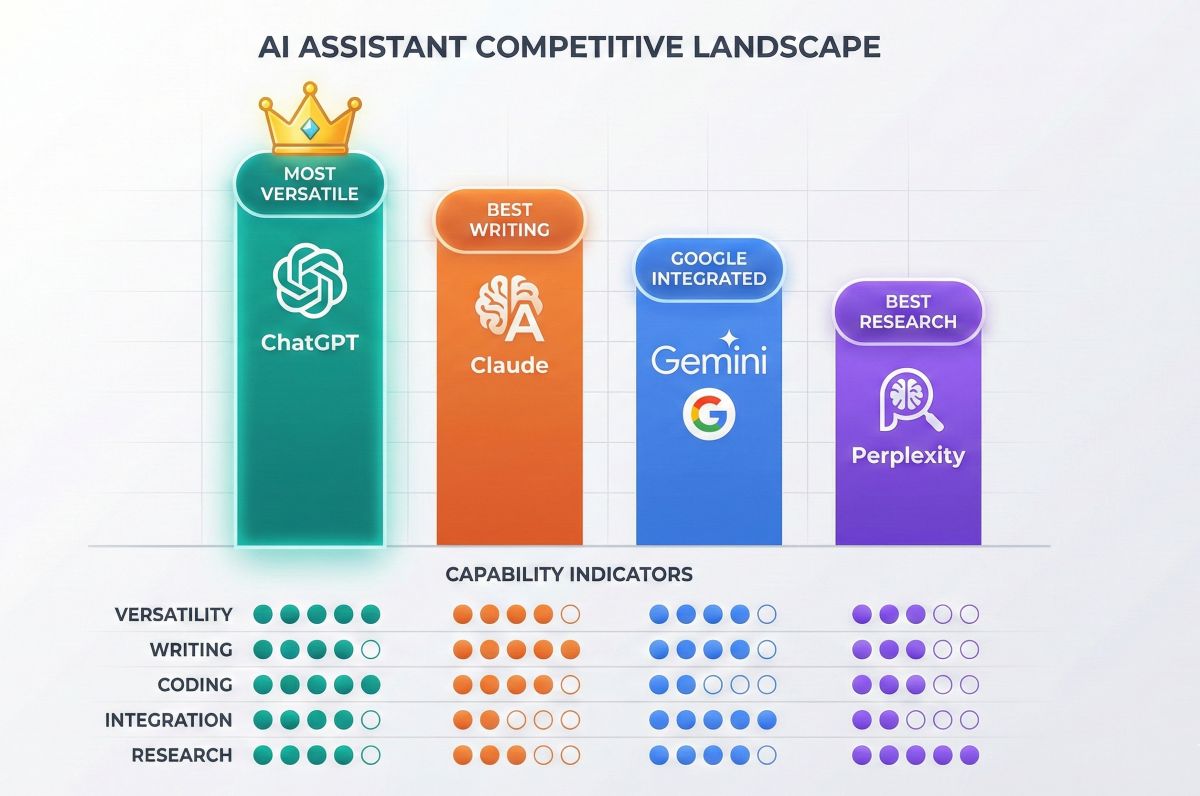
But here’s what truly sets ChatGPT apart as we enter 2026: it’s not the best at any single task—yet it’s excellent at everything. While Claude produces more polished prose and Perplexity delivers better-cited research, no platform matches ChatGPT’s breadth of capabilities under one roof. This versatility keeps it at the center of the rapidly evolving intelligent AI landscape.
💡 The Versatility Advantage Explained
Consider a real workflow: You need to research a topic, write a report, create supporting charts, generate a header image, and format for publication. With ChatGPT, this entire workflow happens in one conversation. With competitors? You’re juggling 3-4 different tools. This integrated experience is ChatGPT’s true competitive moat—and why 200+ million people use it weekly.
The platform has evolved dramatically since launch. ChatGPT Plus subscribers ($20/month) now access GPT-4 Turbo (the most capable model with 128K context), DALL-E 3 image generation, Advanced Data Analysis (code execution), custom GPTs from the GPT Store, web browsing, and memory features. Meanwhile, the free tier still provides unlimited GPT-3.5 access—making powerful AI genuinely accessible to everyone.
Entering 2026, ChatGPT faces intensifying competition from Google Gemini (with deep Workspace integration), Claude (with superior writing), and specialized tools. But OpenAI’s relentless innovation pace and first-mover ecosystem advantages keep ChatGPT firmly in the lead position.
Why ChatGPT Still Leads in 2026
Despite fierce competition and billions invested by Google, Anthropic, and others, ChatGPT maintains market dominance. Here’s why:
ChatGPT leads in overall versatility, while Claude excels at writing, Gemini at Google integration, and Perplexity at cited research.
1. Unmatched Feature Integration
No competitor bundles this much capability in one interface:
Text generation: Articles, emails, scripts, documentation, creative writing
Code generation: 50+ programming languages with debugging and explanation
Image creation: DALL-E 3 produces publication-quality visuals from text
Data analysis: Upload spreadsheets, create visualizations, extract insights
Web browsing: Real-time information retrieval and fact-checking
Voice interaction: Natural conversations on mobile with multiple voice options
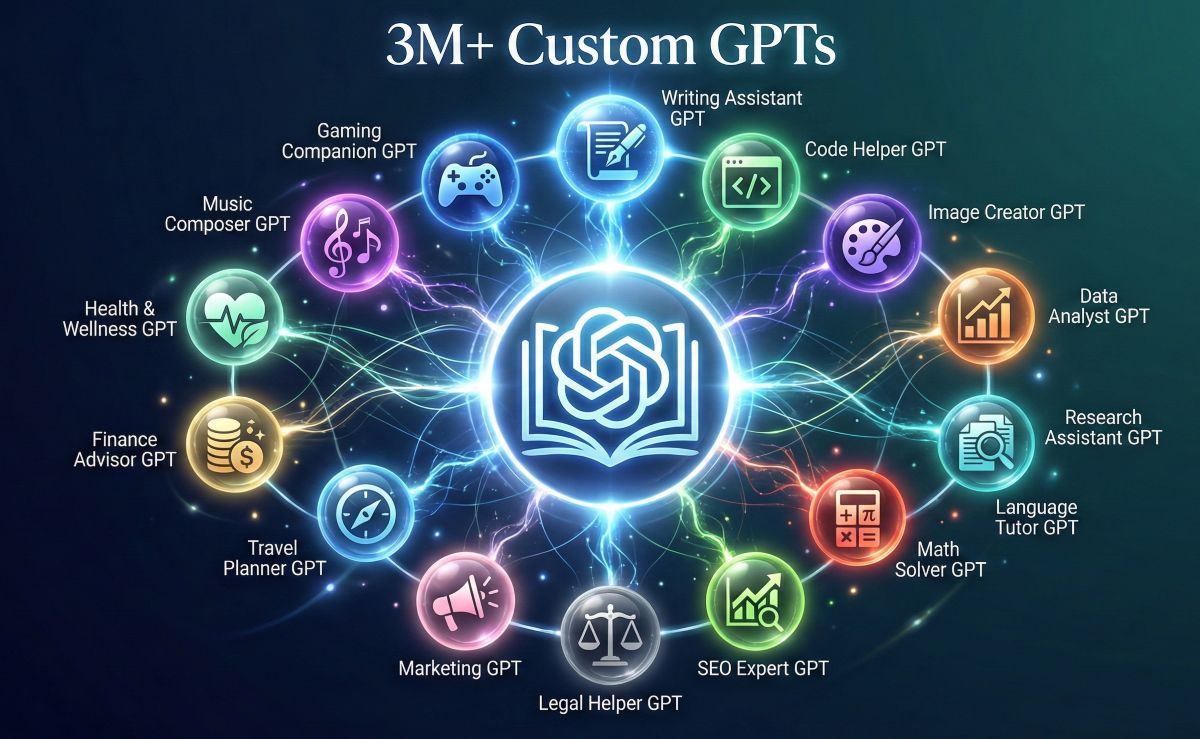
Custom assistants: 3M+ specialized GPTs in the GPT Store
Matching this with competitors requires 3-4 separate subscriptions totaling $60-100/month. ChatGPT delivers it all for $20.
2. The GPT Store Ecosystem Moat
Launched in January 2024, the GPT Store now hosts over 3 million custom GPTs—specialized AI assistants for virtually every use case imaginable. From logo design to legal research to language learning, there’s a purpose-built GPT. Plus subscribers can use any GPT instantly, or create their own without writing a single line of code.
This ecosystem creates powerful lock-in. Once you’ve built custom GPTs for your workflow, switching costs become significant.
3. Developer Ecosystem Dominance
OpenAI’s API powers thousands of applications across industries. This means ChatGPT’s capabilities extend far beyond the chat interface into integrated workflows, enterprise systems, and third-party tools. The developer ecosystem ensures continuous innovation feeds back into the consumer product.
The Swiss Army Knife Effect
Here’s the counterintuitive insight: ChatGPT doesn’t need to be #1 in any category to win. By being excellent (top 3) in every category—writing, coding, images, analysis, research—it becomes indispensable for users who need varied capabilities. Specialists outperform ChatGPT in their niche, but generalists need ChatGPT’s breadth. Most users are generalists.
Key Features Deep Dive
Let’s examine what makes ChatGPT’s feature set uniquely powerful:
🧠 GPT-4 Turbo & GPT-4o Intelligence
The latest GPT-4 variants represent significant leaps:
128K context window: Process approximately 100,000 words per conversation—entire books, lengthy codebases, or months of meeting notes
April 2024 knowledge: Training data extends through April 2024 (supplemented by web browsing for current events)
Multimodal input: Analyze images, PDFs, spreadsheets, and documents directly in conversation
3x speed improvement: GPT-4 Turbo responds roughly three times faster than original GPT-4
Enhanced reasoning: Measurably better at mathematics, logic puzzles, and complex multi-step analysis
🎨 DALL-E 3 Image Generation
Create publication-quality images directly in your conversation:
Natural language control: Describe what you want; iterate with conversational refinement
Text rendering: DALL-E 3 finally handles text in images reliably (logos, signs, typography)
Multiple styles: Photorealistic, illustration, 3D rendering, anime, oil painting—just ask
Commercial rights: You own the images for commercial use
DALL-E 3 excels at instruction-following and text rendering. Midjourney produces more artistic, stylized results with distinctive aesthetics. For business use cases (product mockups, marketing materials, diagrams), DALL-E 3’s precision usually wins. For artistic expression, Midjourney shines.
For more AI tool comparisons, see our Midjourney vs DALL-E vs Stable Diffusion comparison guide. Or The Best FREE AI image generators article for the full breakdown.
📊 Advanced Data Analysis (Code Interpreter)
Upload files and let ChatGPT work magic:
Spreadsheet analysis: Upload Excel/CSV files for statistical analysis, pivot tables, and visualizations
PDF processing: Extract information, summarize documents, answer questions about contents
Code execution: Run Python code in a sandboxed environment for calculations and data processing
Visualization creation: Generate charts, graphs, and infographics from your data
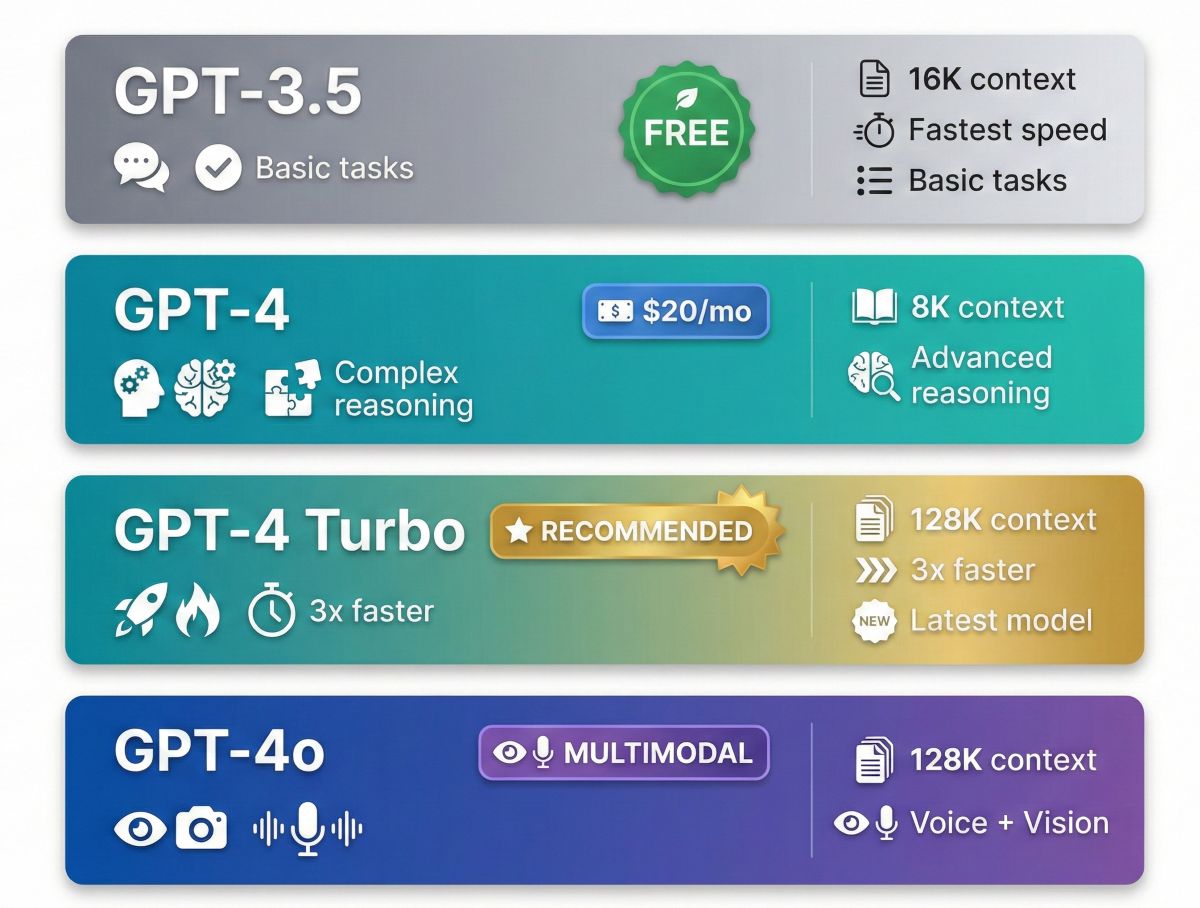
Understanding the model hierarchy helps you choose the right tier for your needs:
ChatGPT offers four model tiers: GPT-3.5 (free), GPT-4 (Plus), GPT-4 Turbo (128K context), and GPT-4o (multimodal).
GPT-3.5 — The Free Workhorse
Best for: Casual conversations, basic writing assistance, simple questions, learning AI basics
16K token context window
Fastest response times
Unlimited free usage
Good enough for 70% of casual use cases
Limitation: Older knowledge cutoff, weaker reasoning on complex tasks
GPT-4 — The Reasoning Upgrade
Best for: Complex analysis, professional writing, nuanced tasks requiring accuracy
8K token context window
Significantly better reasoning and instruction-following
Fewer hallucinations on factual content
Handles ambiguity and edge cases better
Limitation: Slower than GPT-3.5 and Turbo
GPT-4 Turbo — The Power User’s Choice
Best for: Long documents, maximum capability, professional heavy usage
128K token context (~100,000 words—10x larger than GPT-4)
3x faster than original GPT-4
Most recent training data (April 2024)
Best instruction-following and accuracy
Recommended default for Plus subscribers
GPT-4o — The Multimodal Native
Best for: Image analysis, voice conversations, real-time interaction
128K context with native multimodal understanding
Fastest response times in the GPT-4 family
Best voice conversation experience
Superior image analysis capabilities
Model
Context
Speed
Best For
Access
GPT-3.5
16K tokens
⚡⚡⚡ Fastest
Basic tasks, casual use
Free
GPT-4
8K tokens
⚡⚡ Medium
Complex reasoning
Plus $20/mo
GPT-4 Turbo
128K tokens
⚡⚡⚡ Fast
Long docs, pro use
Plus $20/mo
GPT-4o
128K tokens
⚡⚡⚡ Fastest
Multimodal, voice
Plus $20/mo
Custom GPTs & The GPT Store
The GPT Store represents ChatGPT’s most significant competitive advantage—a marketplace of specialized AI assistants that extend the platform’s capabilities far beyond the base model.
What Are Custom GPTs?
Custom GPTs are specialized versions of ChatGPT pre-configured for specific tasks. They combine:
Custom instructions: Specialized system prompts that shape behavior
Configure capabilities: Enable web browsing, DALL-E, code interpreter as needed
Test and refine: Have conversations to tune behavior
Publish: Keep private, share via link, or publish to GPT Store
🔧 Real Custom GPT Example
A content marketing agency built a “Brand Voice GPT” by uploading their client’s style guide, past campaigns, tone guidelines, and product information. Now any team member can generate on-brand content instantly—without lengthy briefs or brand explanation. The GPT consistently matches voice, terminology, and messaging. This kind of workflow automation is ChatGPT’s secret weapon that competitors can’t match.
Pricing & Plans Breakdown
ChatGPT offers four tiers to match different needs and budgets:
Feature
Free
Plus $20/mo
Team $25/user
Enterprise
GPT-3.5 Access
✅ Unlimited
✅ Unlimited
✅ Unlimited
✅ Unlimited
GPT-4 / GPT-4 Turbo
❌
✅ Generous limits
✅ Higher limits
✅ Unlimited
GPT-4o (Multimodal)
Limited
✅ Full access
✅ Full access
✅ Full access
DALL-E 3 Images
❌
✅
✅
✅
Advanced Data Analysis
❌
✅
✅
✅
Web Browsing
Limited
✅ Full
✅ Full
✅ Full
Custom GPTs
Use only
✅ Create & Use
✅ + Workspace GPTs
✅ + Admin controls
GPT Store Access
Limited
✅ Full (3M+ GPTs)
✅ Full
✅ Full
Memory/Context
Basic
✅ Persistent
✅ Persistent
✅ Advanced
Admin Console
❌
❌
✅ Basic
✅ Advanced
SSO & Security
❌
❌
Basic
Enterprise-grade
Data Privacy
Trains on data
Opt-out available
Not trained
Full isolation
Market Pricing Context
All major AI assistants have converged on the $20/month price point:
Platform
Price
Primary Strength
ChatGPT Plus
$20/month
Versatility, ecosystem, DALL-E 3
Claude Pro
$20/month
Writing quality, 200K context
Gemini Advanced
$20/month
Google Workspace integration
Perplexity Pro
$20/month
Research with citations
ChatGPT differentiates through breadth of features rather than depth in any single area. For $20, you get more capabilities than any competitor.
Free vs Plus: Is $20/Month Worth It?
This is the question everyone asks. Here’s an honest breakdown:
Simple math: If ChatGPT Plus saves you just 1 hour per month, it pays for itself if your time is worth more than $20/hour. Most professionals find it saves 5-15 hours monthly. The ROI calculation almost always favors Plus for anyone doing knowledge work. The free tier is genuinely useful—not a crippled demo—but Plus unlocks a different tier of capability.
READ NEXT: Other Free Intelligent AI Tool – Meta AI ⮕
Our Recommendation
Start with Free for one week. Use it actively. If you hit usage limits, want GPT-4’s quality, need DALL-E images, or find yourself wishing for more—upgrade. ChatGPT makes this easy; Plus activates instantly.
ChatGPT vs Claude: The Writing Showdown
Claude from Anthropic is ChatGPT’s most formidable competitor—particularly for writing-heavy use cases. Here’s an honest comparison:
Capability
ChatGPT
Claude
Winner
Prose Quality
Good (clear, functional)
Excellent (natural, nuanced)
Claude
Context Window
128K tokens
200K tokens
Claude
Versatility
Excellent (all-in-one)
Good (text-focused)
ChatGPT
Image Generation
DALL-E 3 ✅
❌ None
ChatGPT
Custom Assistants
GPT Store (3M+)
Projects only
ChatGPT
Long-Form Writing
Good
Excellent
Claude
Code Execution
✅ Full sandbox
✅ Artifacts
Tie
Instruction Following
Very good
Excellent
Claude
🎯 The Honest Bottom Line
For pure writing quality—Claude wins. Its prose flows more naturally, requires less editing, and handles nuance better. Professional writers often prefer Claude for long-form content.
For everything else—ChatGPT wins. If your workflow includes images, data analysis, custom assistants, or varied tasks beyond writing, ChatGPT’s integrated platform is unmatched.
Many professionals use both: ChatGPT for daily versatility, Claude for polished writing projects.
Google Gemini brings a different value proposition: deep integration with the Google ecosystem millions already use daily.
Capability
ChatGPT
Gemini
Winner
Standalone Power
Excellent
Good
ChatGPT
Google Workspace
Limited/none
Native (Gmail, Docs, Drive)
Gemini
Real-Time Web
Good
Excellent (Google Search)
Gemini
Image Generation
DALL-E 3 ✅
Imagen (limited)
ChatGPT
Custom Assistants
GPT Store (3M+)
Gems (basic)
ChatGPT
Workspace AI
❌
Gmail, Docs, Sheets, Slides
Gemini
Mobile Apps
Excellent
Good
ChatGPT
Choose ChatGPT if: You want the most powerful standalone AI assistant with the broadest feature set and don’t need Google integration.
Choose Gemini if: You live in Google Workspace and want AI natively embedded in Gmail, Docs, Sheets, and Drive.
Honest Pros and Cons
✅ Pros
Unmatched Versatility: Code, write, create images, analyze data—all in one conversation
GPT Store Ecosystem: 3M+ specialized assistants; create your own without coding
No Google Integration: Gemini wins for Workspace users
Recognizable Style: Output sometimes feels “AI-ish”
Best Use Cases for ChatGPT
ChatGPT excels when your workflow requires versatility and integrated capabilities:
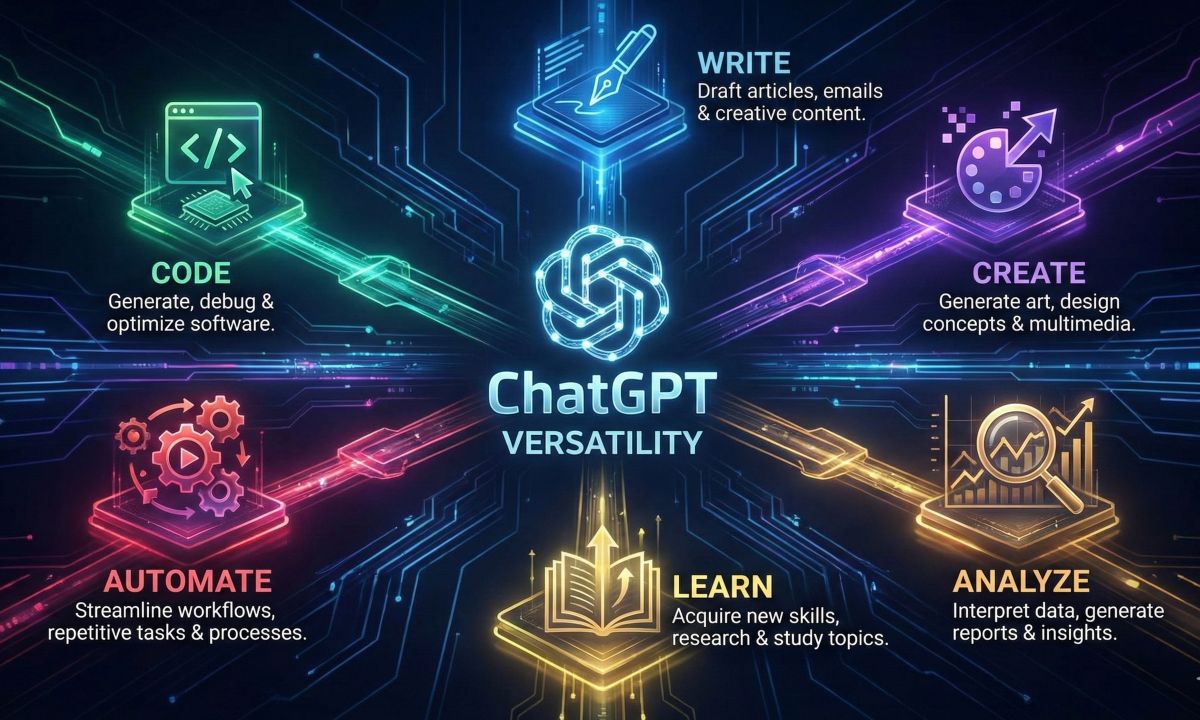
ChatGPT’s versatility spans coding, writing, image creation, data analysis, education, and automation—all in one platform.
💻 Software Development
Why ChatGPT wins: Write code in 50+ languages, debug issues with error explanations, generate documentation, create architecture diagrams, and actually execute Python code to test logic—all in one conversation. The GPT Store adds language-specific helpers.
✍️ Content Creation Workflows
Why ChatGPT wins: Research a topic, write the article, generate header images with DALL-E, create social media variations, and export formatted content. Complete pipeline without switching tools.
📊 Data Analysis & Visualization
Why ChatGPT wins: Upload spreadsheets directly, get statistical analysis, create professional charts, identify trends, and generate summary reports—automatically. Advanced Data Analysis handles complex datasets that would take hours manually.
🎓 Learning & Education
Why ChatGPT wins: Explain concepts at any difficulty level, create practice problems, provide step-by-step solutions with explanations, generate study materials. Custom GPTs offer specialized tutoring across subjects.
💼 Business Operations
Why ChatGPT wins: Draft emails matching your voice, create presentations, analyze reports, generate meeting summaries, build business plans, and automate repetitive knowledge tasks. See AI for small business for targeted recommendations.
🎨 Creative Projects
Why ChatGPT wins: Brainstorm concepts, write scripts, create visual mockups with DALL-E, iterate on creative direction through conversation. The combination of text and image generation enables complete creative workflows others can’t match.
Limitations & What to Watch
ChatGPT is powerful but imperfect. Setting realistic expectations improves results:
⚠️ Factual Accuracy (Hallucinations)
ChatGPT occasionally generates confident but incorrect information—”hallucinations” in AI terminology. This happens less with GPT-4 than 3.5, but still occurs. Always verify critical facts, especially for medical, legal, or financial content. For research requiring citations, Perplexity is more reliable.
⚠️ Knowledge Boundaries
Despite web browsing, ChatGPT’s core knowledge has a training cutoff. Very recent events may not be fully understood even with browsing enabled. For breaking news or rapidly changing topics, web search supplements but doesn’t replace real-time sources.
⚠️ Writing Style
ChatGPT’s output sometimes has a recognizable “AI voice”—clear and functional but occasionally generic. Claude produces more natural prose that requires less editing for publication. Heavy users learn prompt techniques to combat this.
⚠️ Privacy Considerations
By default, your conversations may be used to train future models. You can opt out in Settings → Data Controls, but privacy-conscious users should review OpenAI’s policies carefully. Enterprise plans offer full data isolation.
🛡️ Best Practice: Trust but Verify
Treat ChatGPT as a brilliant but occasionally wrong assistant. Review its work, verify facts, apply your judgment on important decisions. The best results come from human-AI collaboration—not blind trust in AI output. ChatGPT augments your thinking; it shouldn’t replace it.
2026 Roadmap: What’s Coming
OpenAI continues aggressive development. Here’s what we expect in 2026:
🚀 GPT-5 (Expected 2026)
The next major model generation promises significant capability leaps in reasoning, accuracy, and multimodal understanding. Details remain confidential, but expect a meaningful jump over GPT-4—potentially closing gaps with specialized competitors.
🎯 Enhanced Accuracy
Reduced hallucinations through improved training, fact-checking layers, and retrieval-augmented generation. OpenAI is investing heavily in making output more reliably accurate.
🤖 Agent Capabilities
ChatGPT evolving from conversational assistant to autonomous agent—capable of executing multi-step tasks, managing workflows, and interacting with external systems without constant user guidance.
🎨 Better Multimodal
Deeper integration of vision, audio, and text. Real-time video understanding and generation. More natural voice conversations with emotional intelligence and context awareness.
🔮 Our 2026 Prediction
ChatGPT will maintain market leadership through 2026, though the gap with competitors will narrow. The GPT Store ecosystem, first-mover brand recognition, and continuous model improvements provide durable advantages. But expect Claude to strengthen in enterprise writing, Gemini to dominate Google users, and Perplexity to own research use cases.
Who Should (and Shouldn’t) Use ChatGPT
✅ ChatGPT Is Perfect For:
Developers who code in multiple languages and need debugging/explanation
Content creators who need text + images in one integrated tool
Professionals with varied, unpredictable AI needs throughout the day
Students learning across multiple subjects
Entrepreneurs wearing many hats who need one Swiss Army knife
Anyone who wants a single AI subscription that does everything
Teams building custom GPT workflows for repeated tasks
❌ Consider Alternatives If:
Writing quality is paramount → Claude produces better prose
Research citations are essential → Perplexity provides transparent sourcing
You live in Google Workspace → Gemini offers native integration
Privacy is a critical concern → Claude has stronger default privacy policies
💡 The Multi-Tool Power User Strategy
Many professionals don’t choose one—they use ChatGPT as the primary AI while adding specialists:
ChatGPT — Daily tasks, coding, images, general queries, custom GPTs
Claude — Long-form writing projects, detailed analysis, editing
Perplexity — Research requiring source citations
At $40-60/month total, this provides optimal capability for each use case. The productivity gains easily justify the investment for knowledge workers.
Frequently Asked Questions
Is ChatGPT still the best AI chatbot in 2026?
For overall versatility, yes. ChatGPT offers the most comprehensive feature set in one platform—GPT-4 intelligence, DALL-E images, code execution, and 3M+ custom GPTs. However, Claude beats it for writing quality, Perplexity for cited research, and Gemini for Google integration. “Best” depends entirely on your primary use case. For most users who need varied capabilities, ChatGPT remains the top choice.
Is ChatGPT Plus worth $20/month?
For professionals using AI regularly, absolutely yes. GPT-4 Turbo’s superior reasoning, DALL-E 3 images, Advanced Data Analysis, and custom GPTs provide tremendous value. If ChatGPT saves you even 1 hour monthly, Plus pays for itself at any professional hourly rate. Casual users can stick with the genuinely useful free tier until they hit limitations.
What’s the difference between GPT-3.5 and GPT-4?
GPT-4 is significantly more capable at complex reasoning, nuanced understanding, and following instructions accurately. It makes fewer factual errors and handles sophisticated tasks noticeably better. For basic questions, GPT-3.5 works fine; for professional work, research, coding, or anything requiring accuracy—GPT-4’s quality difference is immediately apparent.
Can ChatGPT replace Google Search?
Not entirely. ChatGPT excels at synthesis, explanation, and generating content but can hallucinate facts. For current events, local information, and verified factual queries, traditional search remains valuable. Smart users combine both: ChatGPT for understanding and generation, Google for verification and current information.
Is my data private on ChatGPT?
By default, conversations may be used to train future models. You can opt out in Settings → Data Controls. Team and Enterprise plans include stronger privacy guarantees where data isn’t used for training. Review OpenAI’s privacy policy for your specific situation. Never share sensitive personal, financial, or confidential business information regardless of settings.
How does ChatGPT compare to Claude for coding?
Both are excellent for coding. ChatGPT has advantages with Code Interpreter (actual execution in a sandbox), broader language support, and GPT Store coding assistants. Claude’s larger 200K context window helps when working with massive codebases. For most developers, either works well—choose based on other needs (Claude for writing, ChatGPT for versatility).
Final Verdict & Recommendation
ChatGPT earns a 4.7/5 rating as the most versatile AI assistant available entering 2026. It’s not the absolute best at any single task—but it’s excellent at everything, and that combination creates unique value no competitor matches.
The Bottom Line
If you can only have one AI subscription, ChatGPT is the rational choice. The combination of GPT-4 intelligence, DALL-E 3 images, Code Interpreter, web browsing, memory, and 3M+ custom GPTs creates a platform that handles virtually any knowledge task competently. No competitor bundles this much capability at any price.
But specialists win in their niches. Claude writes better. Perplexity researches better. Gemini integrates with Google better. If you have narrow, specific needs, consider those alternatives. For everyone else needing broad capability, ChatGPT is the clear winner.
Our Recommendation
🆓 Start with Free. The free tier is genuinely capable—not a crippled demo. Use it for a week to understand AI capabilities.
⬆️ Upgrade to Plus ($20/mo) if: You use AI daily, need GPT-4’s quality, want DALL-E images, or plan to build custom GPTs. The ROI is almost always positive for regular users.
👥 Consider Team/Enterprise if: You need workspace collaboration, admin controls, enhanced privacy, or organizational deployment features.
🏆 Our Verdict: ChatGPT Remains the Versatility Champion
No other AI platform matches ChatGPT’s combination of capabilities. GPT-4 Turbo intelligence, DALL-E 3 images, Code Interpreter, web browsing, voice, and 3M+ custom GPTs—all for $20/month (or free with GPT-3.5). For users who need one tool that does everything well, ChatGPT is the definitive choice entering 2026.
Plus gives you GPT-4 Turbo (128K context), DALL-E 3 image generation, Advanced Data Analysis, and access to 3M+ custom GPTs in the GPT Store.
Get ChatGPT Plus →
To provide the best experiences, we use technologies like cookies to store and/or access device information. Consenting to these technologies will allow us to process data such as browsing behavior or unique IDs on this site. Not consenting or withdrawing consent, may adversely affect certain features and functions.
Functional
Always active
The technical storage or access is strictly necessary for the legitimate purpose of enabling the use of a specific service explicitly requested by the subscriber or user, or for the sole purpose of carrying out the transmission of a communication over an electronic communications network.
Preferences
The technical storage or access is necessary for the legitimate purpose of storing preferences that are not requested by the subscriber or user.
Statistics
The technical storage or access that is used exclusively for statistical purposes.The technical storage or access that is used exclusively for anonymous statistical purposes. Without a subpoena, voluntary compliance on the part of your Internet Service Provider, or additional records from a third party, information stored or retrieved for this purpose alone cannot usually be used to identify you.
Marketing
The technical storage or access is required to create user profiles to send advertising, or to track the user on a website or across several websites for similar marketing purposes.
To provide the best experiences, we use technologies like cookies to store and/or access device information. Consenting to these technologies will allow us to process data such as browsing behavior or unique IDs on this site. Not consenting or withdrawing consent, may adversely affect certain features and functions.
Functional
Always active
The technical storage or access is strictly necessary for the legitimate purpose of enabling the use of a specific service explicitly requested by the subscriber or user, or for the sole purpose of carrying out the transmission of a communication over an electronic communications network.
Preferences
The technical storage or access is necessary for the legitimate purpose of storing preferences that are not requested by the subscriber or user.
Statistics
The technical storage or access that is used exclusively for statistical purposes.The technical storage or access that is used exclusively for anonymous statistical purposes. Without a subpoena, voluntary compliance on the part of your Internet Service Provider, or additional records from a third party, information stored or retrieved for this purpose alone cannot usually be used to identify you.
Marketing
The technical storage or access is required to create user profiles to send advertising, or to track the user on a website or across several websites for similar marketing purposes.