The ONLY Professional AI Image Generator That’s Completely Free
While Midjourney costs $10-60/month and DALL-E 3 requires $20/month ChatGPT Plus, Stable Diffusion XL is genuinely free with zero restrictions. Generate unlimited images forever.
Quick Overview
- Best For: Technical users, developers, artists wanting full control and zero ongoing costs
- Pricing: Free (open-source) | Cloud services: $0.10-0.50/hour
- Free Plan: Yes – completely free and open-source
- Rating: 4.0/5
- Customization: Unlimited – full control over every parameter
- Official: stability.ai
What is Stable Diffusion XL?
Stable Diffusion XL (SDXL) is the latest iteration of Stable Diffusion, the world’s most popular open-source best AI image generator. Developed by Stability AI and released in July 2023, SDXL represents a significant leap forward from previous versions, offering dramatically improved image quality, better prompt understanding, and enhanced photorealism while maintaining the free, open-source ethos that made Stable Diffusion revolutionary.
Unlike subscription-based services like Midjourney or DALL-E 3, Stable Diffusion XL can be downloaded and run on your own computer completely free. This open-source approach gives users unprecedented control, privacy, and flexibility – you can generate unlimited images without usage limits, modify the code to suit your needs, and train custom models for specialized applications. For the detailed AI tool comparisons, see our Midjourney vs DALL-E vs Stable Diffusion comparison guide.
SDXL uses a larger neural network architecture (3.5 billion parameters compared to SD 1.5’s 860 million), resulting in superior image quality with better lighting, more accurate anatomy, and improved composition. The model produces images at higher native resolution (1024×1024 pixels) and understands complex prompts more accurately than its predecessors.
The open-source nature of Stable Diffusion has created a vibrant ecosystem of tools, custom models, and community innovations. Thousands of developers have built user-friendly interfaces, automation tools, custom training methods, and specialized models that extend SDXL’s capabilities far beyond the base model. This ecosystem makes Stable Diffusion one of the most versatile and customizable AI image generators available.
However, this power comes with complexity. Unlike plug-and-play services, Stable Diffusion XL requires technical knowledge for installation, GPU hardware for optimal performance, and understanding of parameters and settings to achieve quality results. It’s the choice for users who value control and customization over convenience, or who need a cost-effective solution for high-volume image generation.
💰 Why Is Stable Diffusion XL 100% Free? (And Will It Stay Free?)
Short Answer: Yes, Stable Diffusion XL is genuinely 100% free forever, and here’s why it can’t change:
🔓 Open-Source License = Permanent Freedom
Stable Diffusion XL is released under the CreativeML Open RAIL-M license, which means the model code, weights, and architecture are publicly available for anyone to download, use, modify, and distribute—forever. Unlike services like Midjourney or DALL-E 3 where companies control access and can change pricing at will, SDXL’s open-source nature makes it impossible to “un-free.”
What “Free Forever” Actually Means:
✅ No Subscription Fees
Midjourney: $10-60/month
DALL-E 3: $20/month
SDXL: $0/month forever
✅ No Per-Image Costs
DreamStudio: $0.01-0.05/image
Replicate: $0.01-0.03/image
SDXL: $0.00/image forever
✅ No Usage Limits
Midjourney: 200-1,800/month
DALL-E 3: Reasonable use limits
SDXL: Unlimited forever
✅ No Feature Paywalls
Competitors: Premium features cost extra
SDXL: All features free forever
✅ No Credit Card Ever
No payment info required
No “free trial” that converts to paid
Never enter payment details
✅ Commercial Rights Included
No extra fees for business use
Full commercial license included
Use in products/services free
💻 The Only “Cost” (Optional Hardware)
⚠️ Important Clarification: While SDXL software is free, you have three options for running it:
| Option | Cost | Speed | Best For |
|---|---|---|---|
| 1. Free Cloud (Google Colab) | $0 | Slow (1-2 min/image) | Testing, learning, casual use |
| 2. Paid Cloud (RunPod/Vast.ai) | $0.10-0.50/hr | Fast (15-30 sec/image) | Regular use without hardware |
| 3. Own GPU (Local Install) | $500-2,000 (one-time) |
Very Fast (5-30 sec) | Heavy users, professionals, privacy |
💡 Cost Comparison Reality Check:
Scenario: Generate 1,000 images over 6 months
- Midjourney Basic ($10/month): $60 total (limited to plan)
- DALL-E 3 ($20/month): $120 total (ChatGPT Plus required)
- SDXL Free Cloud: $0 total (slower speed trade-off)
- SDXL Paid Cloud (5 hours @ $0.30/hr): $1.50 total
- SDXL Own GPU (RTX 3060 used $300): $300 one-time, then free forever
After 6 months: SDXL breaks even. After 1 year: SDXL saves $120-720+/year forever.
🎯 Why Companies Make SDXL Free
Stability AI’s Business Model: The company behind Stable Diffusion doesn’t charge for the base model because they profit from:
- DreamStudio (managed service): Users who want convenience over control pay for cloud hosting
- Enterprise licensing: Large companies pay for support, custom training, and API access
- Research partnerships: Collaboration with universities and research institutions
- Community goodwill: Open-source creates ecosystem that drives adoption and talent
This business model means the free version will always exist—it’s core to their strategy, not a promotional gimmick.
✅ The Verdict: YES, It’s Really Free Forever
Stable Diffusion XL is the ONLY professional-grade AI image generator that’s genuinely 100% free with no catches, no limits, and no future pricing changes possible due to its open-source license.
Start with free cloud options, upgrade to paid cloud or your own hardware only if you want faster speeds or complete privacy.
Key Features & Capabilities
1. Completely Free & Open Source
Stable Diffusion XL is released under the CreativeML Open RAIL-M license, meaning the model weights, code, and documentation are freely available. You can download SDXL, use it without restrictions, modify it for your needs, and even build commercial products around it – all at zero cost. There are no subscription fees, no per-image charges, and no usage limits beyond your own hardware capabilities.
This open-source approach provides several advantages: complete data privacy (images never leave your computer), unlimited generation capacity, freedom to experiment without worrying about costs, and the ability to customize every aspect of the generation process. For businesses, this eliminates recurring AI expenses and potential vendor lock-in.
The only costs are optional: purchasing GPU hardware for faster local generation, or renting cloud GPU instances if you don’t own suitable hardware. Even cloud costs are typically lower than subscription services for high-volume users, since you pay only for actual compute time rather than flat monthly fees.
2. Superior Image Quality
SDXL produces significantly higher quality images than previous Stable Diffusion versions. The larger model architecture enables better understanding of lighting, more realistic textures, improved color accuracy, and superior composition. Images appear more photorealistic with proper atmospheric perspective, appropriate depth of field, and natural-looking details.
The model’s native 1024×1024 resolution provides more detail than earlier versions, and upscaling techniques can push this to 2048×2048 or higher while maintaining quality. SDXL particularly excels at faces and hands – historically challenging areas for AI generators – producing more anatomically correct and natural-looking results.
With proper prompting and settings, SDXL can match or exceed the quality of paid alternatives for many applications. The key difference is that achieving this quality requires more expertise and experimentation compared to the automatic optimization in commercial services.
Discover other AI alternatives for Image generation: Playground, Canva, Adobe Firefly …
3. Full Customization & Control
Stable Diffusion XL offers unprecedented control over the generation process. You can adjust dozens of parameters including steps (generation iterations), CFG scale (prompt adherence), samplers (generation algorithms), seed values (reproducibility), and more. This granular control allows precise tuning for specific artistic styles or requirements.
Advanced features include inpainting (editing specific image regions), outpainting (extending images beyond borders), img2img (using images as starting points), ControlNet (precise structural control), and textual inversion (custom concepts). These tools enable workflows impossible with closed-source alternatives.
The model architecture is accessible and modifiable. Developers can fine-tune SDXL on custom datasets, merge different models, train LoRAs (Low-Rank Adaptations) for specific styles, and create entirely new variants optimized for particular use cases. This extensibility makes SDXL a platform rather than just a tool.
4. Custom Models & Community Extensions
The Stable Diffusion community has created thousands of custom models, each specialized for different styles or subjects. You can download models trained on anime art, architectural visualization, portrait photography, specific artistic movements, or virtually any visual domain. Sites like Civitai and HuggingFace host massive libraries of these community models.
LoRAs (Low-Rank Adaptations) are smaller, specialized additions that can be layered onto base models to add specific capabilities – like a particular art style, character consistency, or improved handling of certain objects. Multiple LoRAs can be combined, allowing unprecedented flexibility in achieving desired results.
Extensions add new functionality: automatic prompt enhancement, batch processing, integration with other tools, style mixing, and advanced editing features. The ecosystem continuously evolves with community contributions, meaning SDXL’s capabilities expand over time without requiring official updates.
5. Multiple Interface Options
While Stable Diffusion is command-line software at its core, the community has built numerous user-friendly interfaces. Automatic1111 WebUI is the most popular, offering a comprehensive browser-based interface with all features accessible through dropdowns and sliders. ComfyUI provides a node-based workflow system for advanced users. InvokeAI focuses on artists with canvas-based editing tools.
These interfaces make SDXL accessible to non-technical users while still exposing the full power of the underlying model. You can start with simple text prompts and gradually explore advanced features as your skills develop. The interface choice depends on your workflow preferences and technical comfort level.
6. Privacy & Data Control
Running Stable Diffusion locally means your prompts, images, and creative work never leave your computer. This privacy is crucial for commercial work involving unreleased products, sensitive client projects, or personal content. Unlike cloud services, there’s no risk of data breaches, no third-party access, and no terms of service restrictions on content.
For businesses, this local control addresses data security concerns and regulatory compliance requirements. Medical, legal, or other sensitive applications can leverage AI image generation without privacy risks. The open-source code can be audited for security, unlike proprietary black-box services.
7. Offline Capability
Once installed, Stable Diffusion XL works completely offline with no internet connection required. This enables use in secure environments, during travel, or in locations with unreliable connectivity. Your creative workflow isn’t dependent on server availability, network latency, or service outages affecting cloud-based alternatives.
8. API & Integration Capabilities
Stable Diffusion can be integrated into custom applications, automated workflows, or larger systems through APIs. Developers can build products that leverage SDXL for image generation, create custom tools for specific industries, or automate repetitive tasks. This programmatic access is difficult or expensive with closed-source alternatives.
Businesses have built entire products around Stable Diffusion: interior design visualizers, product photography automation, game asset generators, architectural visualization tools, and more. The open-source license permits commercial use, making SDXL a foundation for AI-powered businesses.
Installation & Setup Options
Stable Diffusion XL can be used in several ways, from easy cloud services to advanced local installations. Choose based on your technical comfort level and hardware availability.
Option 1: Cloud Services (Easiest – No Installation)
For Beginners: Cloud services provide the easiest entry point with no installation required.
Google Colab (Free Tier Available): Run SDXL in Google’s cloud using their free GPU allocation. Notebooks are available with one-click setup, though free tier has session limits and lower priority access. Great for testing before committing to hardware or paid services.
Replicate.com: Simple web interface charging per generation ($0.01-0.05 per image typically). No setup required – just visit the website and start generating. Good for occasional use without hardware investment.
RunPod / Vast.ai: Rent GPU instances by the hour ($0.10-0.50/hour depending on GPU). These services provide pre-configured environments with Automatic1111 or other interfaces ready to use. Cost-effective for regular use without owning hardware.
DreamStudio (Stability AI’s Official Service): The company behind Stable Diffusion offers a managed service with credits-based pricing. Simple interface good for beginners, though costs can add up with heavy use.
Option 2: Local Installation (Full Control)
System Requirements:
- GPU: NVIDIA GPU with 8GB+ VRAM (GTX 1080, RTX 2070, or better recommended)
- RAM: 16GB system RAM (32GB recommended for smooth operation)
- Storage: 50GB+ free space for model files and outputs
- OS: Windows 10/11, Linux, or macOS (with limitations on Apple Silicon)
Installation Methods:
Automatic1111 WebUI (Most Popular): Comprehensive interface with all features. Installation involves cloning the git repository and running a setup script. Extensive documentation and troubleshooting guides available from the large user community. Once installed, updates are automatic and the interface is accessible through your web browser.
ComfyUI: Node-based interface for advanced workflows. More complex to learn but extremely powerful for specialized workflows and batch processing. Preferred by power users and those creating complex generation pipelines.
InvokeAI: User-friendly interface designed for artists. Includes canvas-based editing, unified canvas for outpainting, and intuitive controls. Good middle ground between simplicity and advanced features.
Option 3: Managed Hosting (Easiest Local-like Experience)
Personal Cloud GPU: Services like Paperspace or Lambda Labs provide persistent GPU instances with Stable Diffusion pre-installed. You get the local experience (full control, privacy, all features) without maintaining hardware. Monthly costs typically range from $30-100 depending on GPU tier.
Hardware Considerations
Minimum Viable: RTX 3060 (12GB) or equivalent can run SDXL acceptably, generating images in 30-60 seconds. Suitable for learning and moderate use.
Recommended: RTX 3080 (10-12GB) or RTX 4070 (12GB) provides comfortable generation speeds (15-30 seconds) and room for upscaling and complex workflows.
Professional: RTX 4090 (24GB) or A6000 (48GB) enables fast generation (5-15 seconds), simultaneous workflows, and handling very large images or complex scenes without VRAM limitations.
Budget Option: Used RTX 2080 Ti (11GB) offers decent performance at lower cost, though generation times are slower. Acceptable for hobbyists not generating at scale.
Apple Silicon: M1/M2/M3 Macs can run SDXL but with limitations and slower speeds compared to NVIDIA GPUs. Still viable for users committed to Mac ecosystem, though not optimal.
How to Use Stable Diffusion XL: Getting Started
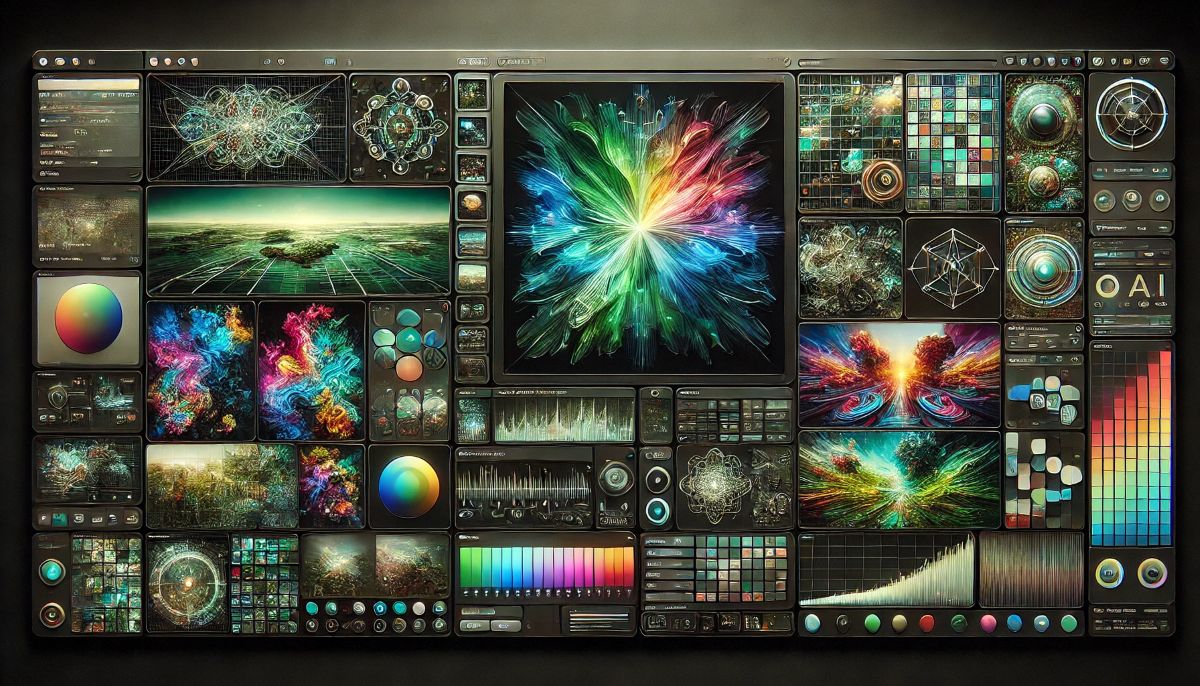
Basic Workflow (Using Automatic1111 WebUI)
Step 1: Choose Your Model
Select SDXL from the checkpoint dropdown at the top of the interface. You can use the base SDXL model or community fine-tuned versions optimized for specific styles (anime, realistic photos, artistic, etc.).
Step 2: Enter Your Prompt
Describe what you want in the positive prompt field. Unlike services with automatic prompt enhancement, you control every word. Be descriptive about subjects, style, lighting, composition, and quality.
Example prompt:
a serene mountain landscape at golden hour, snow-capped peaks, alpine lake reflection, dramatic clouds, vibrant sunset colors, highly detailed, professional nature photography, 8k, sharp focusStep 3: Add Negative Prompts
Specify what you DON’T want in the negative prompt field. Common additions: “blurry, low quality, distorted, deformed, ugly, bad anatomy”
Step 4: Adjust Basic Settings
- Steps: 25-35 is typical (more steps = more refined but slower)
- CFG Scale: 7-9 for balanced prompt adherence
- Sampler: DPM++ 2M Karras or Euler A are popular choices
- Size: 1024×1024 native, or other SDXL-compatible dimensions
Step 5: Generate
Click “Generate” and wait 15-60 seconds depending on your hardware. The interface shows progress and displays the result upon completion.
Step 6: Iterate & Refine
Not satisfied? Adjust your prompt, change settings, or generate variations. You can use the same seed for consistency or random seeds for variety. Save successful prompt formulas for reuse.
Advanced Techniques for Better Results
Quality Keywords: Include terms like “highly detailed,” “8k,” “professional photography,” “award winning,” “trending on artstation” to improve output quality. These terms bias the generation toward higher-quality training data.
Style References: Mention specific artistic styles, photographers, or movements: “in the style of Ansel Adams,” “Studio Ghibli aesthetic,” “cyberpunk art style,” “renaissance painting.”
Technical Photography Terms: Add camera-specific terms for photorealistic results: “shot on Canon 5D Mark IV,” “85mm f/1.4,” “bokeh,” “shallow depth of field,” “golden hour lighting.”
Composition Control: Specify composition explicitly: “centered composition,” “rule of thirds,” “from low angle,” “bird’s eye view,” “close-up portrait.”
Weighting: Use parentheses for emphasis: “(beautiful sunset:1.3)” increases the importance of sunset in generation. Numbers above 1.0 increase emphasis; below 1.0 decrease it.
Common Beginner Mistakes to Avoid
Vague Prompts: “Beautiful landscape” is too generic. Be specific: “Alpine mountain valley with wildflowers, morning mist, dramatic peaks, photorealistic, highly detailed.”
Wrong Dimensions: SDXL works best at 1024×1024 or aspect ratios close to 1:1. Extreme aspect ratios (like 2048×512) often produce poor results.
Too Many Steps: Beyond 30-35 steps shows diminishing returns. Higher steps increase generation time without proportional quality improvement.
Ignoring Negative Prompts: Always include quality-related negative prompts to filter out common AI artifacts.
Not Experimenting: SDXL requires experimentation. Try different samplers, CFG scales, and prompt formulations to learn what works for your use cases.
Stable Diffusion XL Image Quality & Capabilities

SDXL represents a massive quality improvement over earlier Stable Diffusion versions, producing images that rival or exceed paid alternatives when properly configured. Understanding SDXL’s strengths and limitations helps set appropriate expectations and optimize results.
What SDXL Does Exceptionally Well
Photorealism: With proper prompting, SDXL produces highly convincing photorealistic images. Lighting behaves naturally, materials have appropriate properties, and scenes maintain internal consistency. The improved architecture handles complex scenes with multiple light sources, transparent materials, and realistic atmospheric effects.
Artistic Styles: SDXL excels across diverse artistic styles – from oil paintings to digital art, watercolors to technical illustrations. The model’s training on massive artistic datasets enables it to reproduce various artistic movements, techniques, and aesthetics convincingly. Custom models extend this further with specialized training.
Portraits: Face generation has improved dramatically in SDXL. Facial proportions are more accurate, expressions feel natural, and details like eyes, teeth, and hair render more realistically. While not perfect, the quality is suitable for many applications including concept art, character design, and creative projects.
Landscapes & Environments: SDXL produces stunning environmental images with proper atmospheric perspective, realistic vegetation, accurate geological formations, and convincing skies. The model understands environmental lighting and weather conditions, producing cohesive natural scenes.
Product Visualization: SDXL can generate professional-looking product images with studio lighting, proper shadows, and clean backgrounds. While not always perfect for final e-commerce images, it’s excellent for concept visualization, mockups, and iterative design.
Consistency with Seeds: Using the same seed with identical settings produces identical images, enabling precise iteration and version control. This reproducibility is valuable for commercial work and iterative refinement workflows.
Current Limitations & Weaknesses
Text Generation: Like most AI models except DALL-E 3, SDXL struggles with text within images. Letters are often garbled, spelling is incorrect, and typography is inconsistent. For images requiring legible text, you’ll need post-processing in Photoshop or similar tools.
Complex Anatomy: While improved over SD 1.5, SDXL still occasionally produces anatomical errors – incorrect finger counts, awkward poses, or distorted limbs. This requires careful prompting and sometimes multiple generation attempts or manual post-editing.
Precise Instruction Following: SDXL interprets prompts artistically rather than literally. Specifying exact object counts, precise spatial relationships, or complex multi-step instructions may not work as expected. Services like DALL-E 3 follow prompts more literally.
Brand Recognition: SDXL doesn’t understand specific brands, logos, or trademarked designs unless specially trained. Generating images with accurate brand elements requires custom training or post-editing.
Learning Curve: Achieving consistently good results requires understanding parameters, prompt engineering, and model behavior. The initial learning phase involves trial, error, and experimentation – unlike plug-and-play services.
Quality Comparison by Use Case
- Concept Art: 9/10 – Excellent for visualization and ideation
- Photo Reference: 8/10 – Great for art reference, with minor imperfections
- Marketing Materials: 7/10 – Good with post-processing; lacks text support
- Social Media: 9/10 – Perfect for creative social content
- Print Quality: 8/10 – Resolution suitable with upscaling
- Product Mockups: 7/10 – Useful for concepts, may need refinement
- Artistic Creation: 10/10 – Unmatched flexibility and control
- Character Consistency: 6/10 – Challenging without advanced techniques
📸 Quality Showdown: SDXL vs Midjourney vs DALL-E 3 (Side-by-Side)
💡 The Verdict Up Front: SDXL quality matches or exceeds paid competitors when properly prompted. The difference is convenience vs. control – not quality itself.
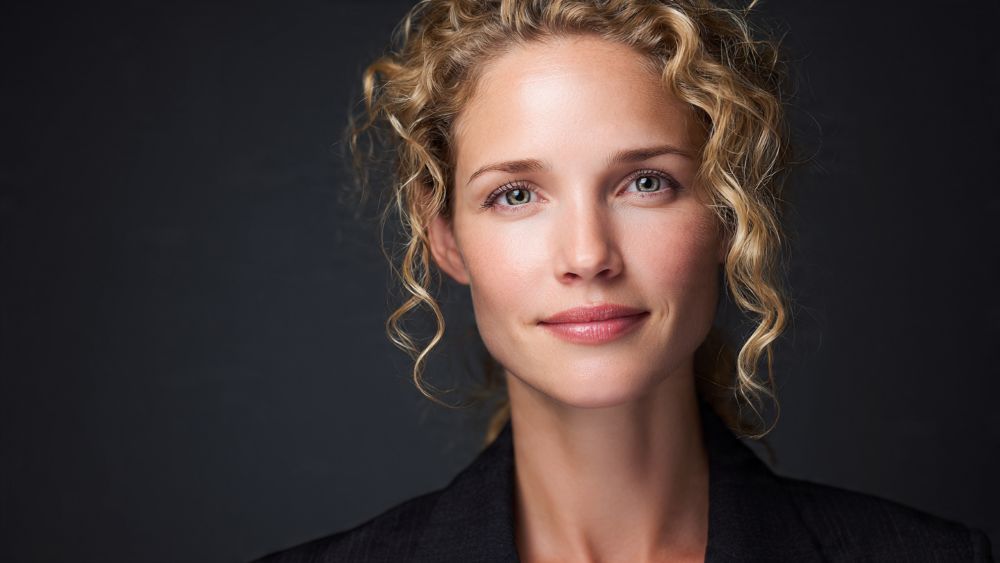
Test 1: Photorealistic Portrait
Prompt: "professional headshot of a business woman, studio lighting, shallow depth of field, Canon 85mm, highly detailed, 8k"
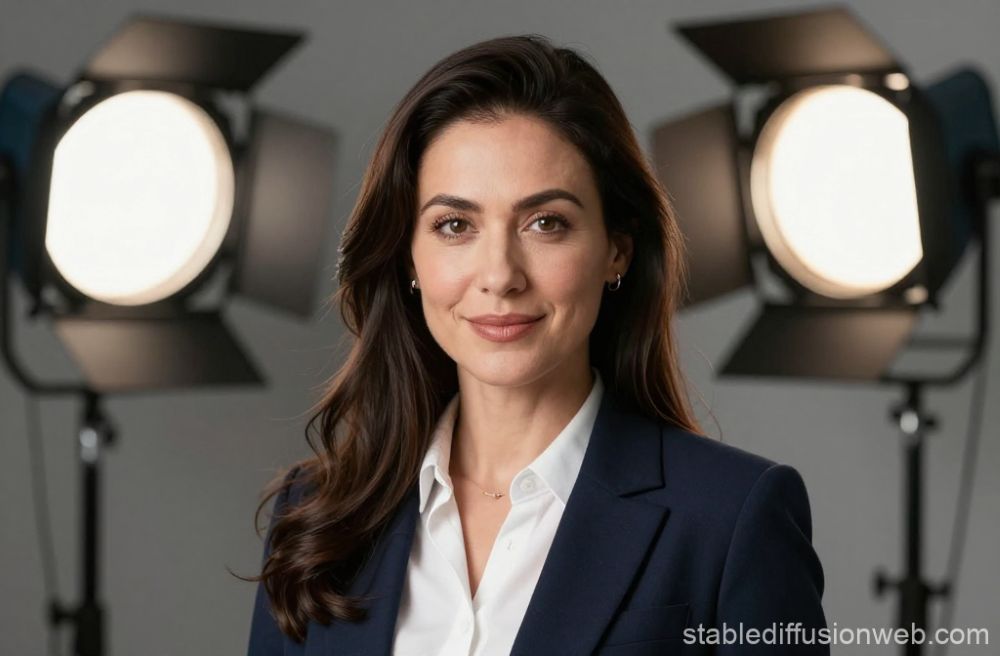
Stable Diffusion XL
FREE | 25 seconds
✅ Natural lighting
✅ Sharp details
✅ Realistic skin texture
⚠️ Took 3 attempts to get right
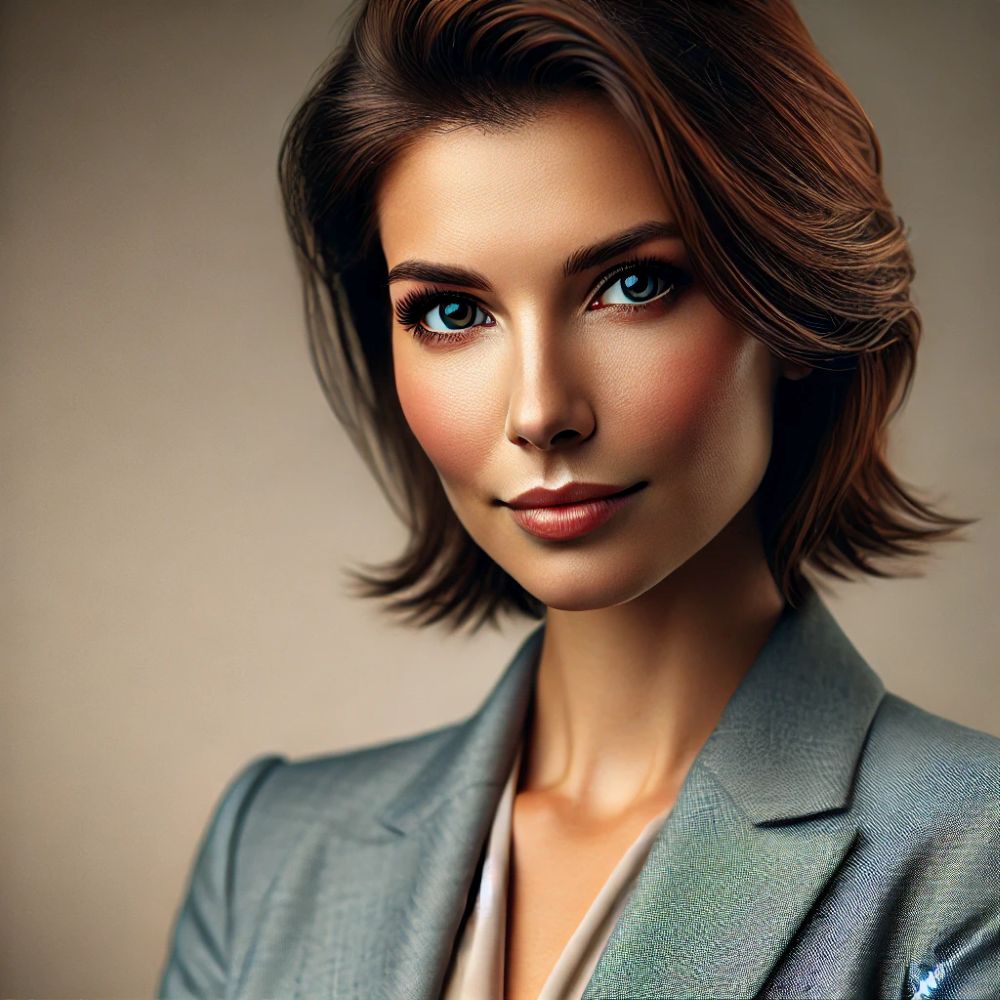
Midjourney
$10/month | 60 seconds
✅ Artistic lighting
✅ Perfect composition
✅ First attempt great
⚠️ Slightly stylized (not pure photo)
DALL-E 3
$20/month | 15 seconds
✅ Most photorealistic
✅ Consistent results
✅ Literal prompt following
⚠️ Less artistic than Midjourney
Winner: SDXL (for free) or Midjourney (if paying)
SDXL matches Midjourney quality when properly prompted. Takes more attempts but costs $0 vs $10/month.
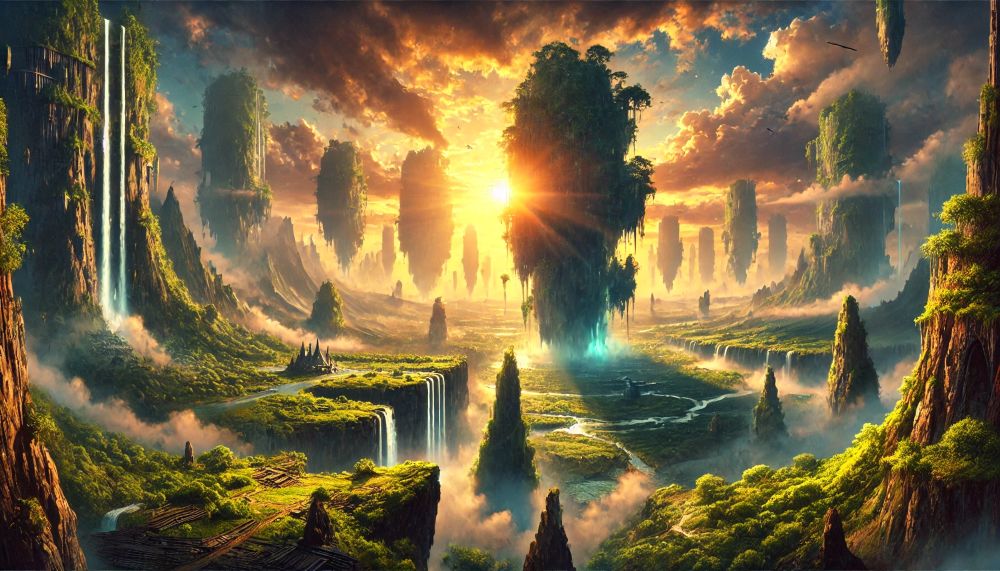
Test 2: Artistic Landscape
Prompt: "epic fantasy landscape, floating islands, waterfalls, dramatic clouds, vibrant colors, digital art, trending on artstation"
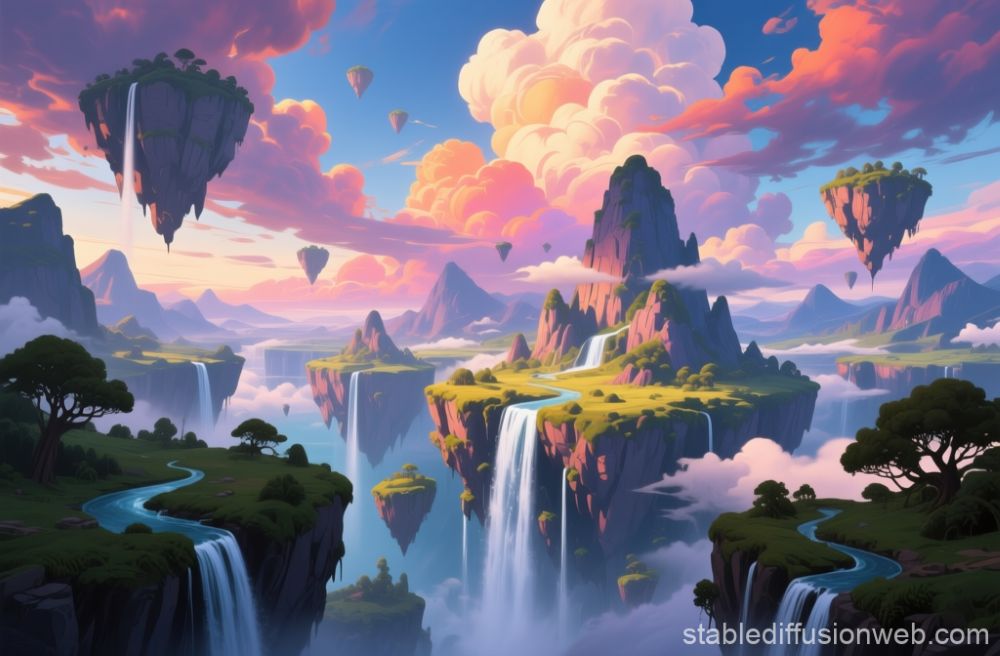
Stable Diffusion XL
✅ Incredible detail
✅ Creative composition
✅ Can iterate endlessly (free)
⚠️ Required negative prompts
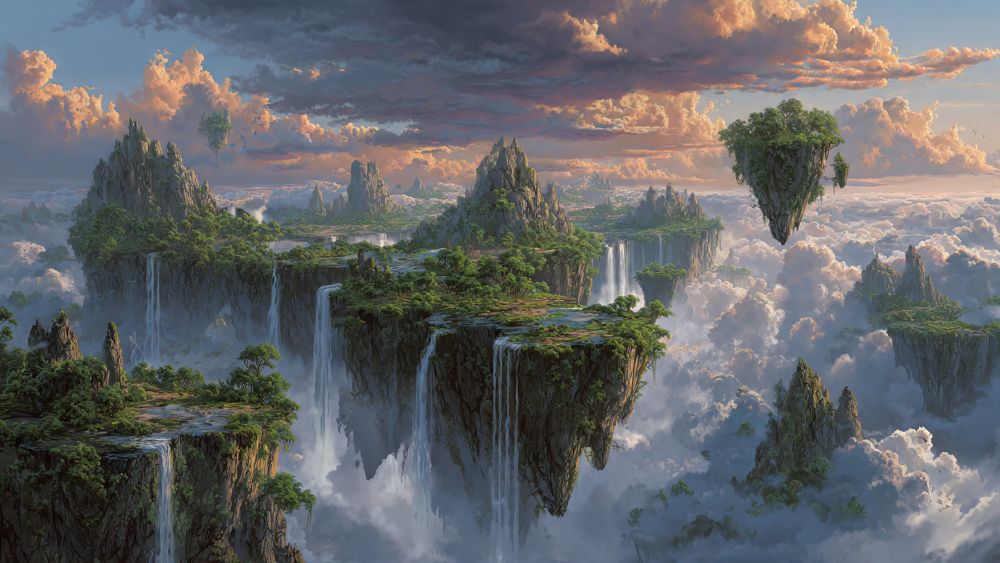
Midjourney
✅ Best artistic composition
✅ Perfect color harmony
✅ Zero effort needed
⚠️ Can’t fine-tune as much
DALL-E 3
✅ Follows prompt literally
✅ Good detail level
✅ Consistent style
⚠️ Less artistic flair
Winner: Midjourney (artistic) or DALL-E(control)
Midjourney has slight edge for automatic artistic beauty. DALL-E matches quality, but more expensive subscribtion per month.
Test 3: Product Photography
Prompt: "luxury watch on marble surface, studio lighting, product photography, professional, clean background, highly detailed"
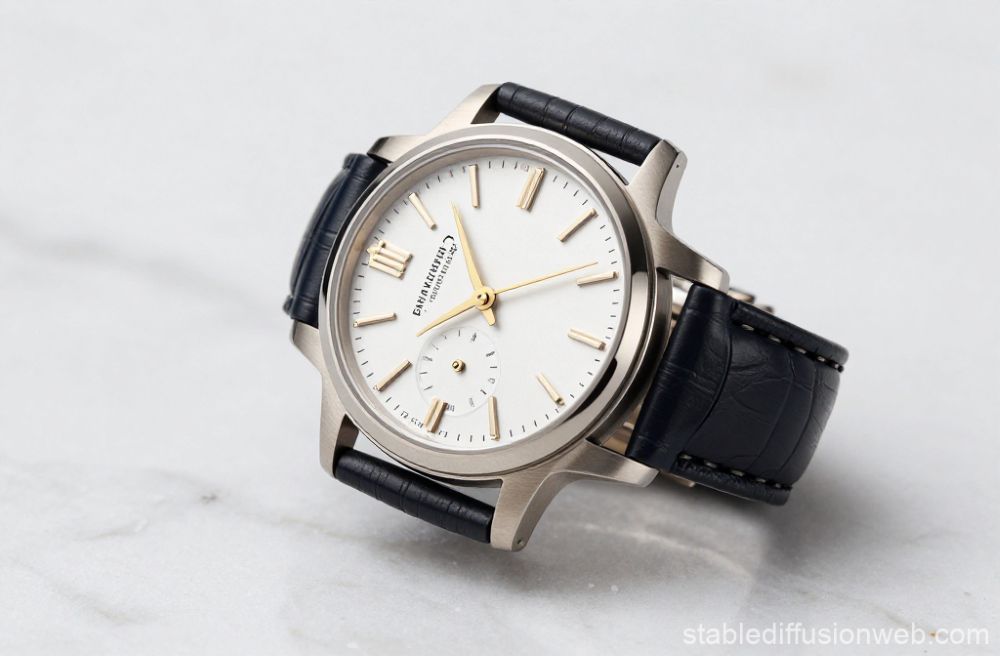
Stable Diffusion XL
✅ Great lighting
✅ Clean composition
✅ FREE unlimited mockups
⚠️ Text on watch is garbled
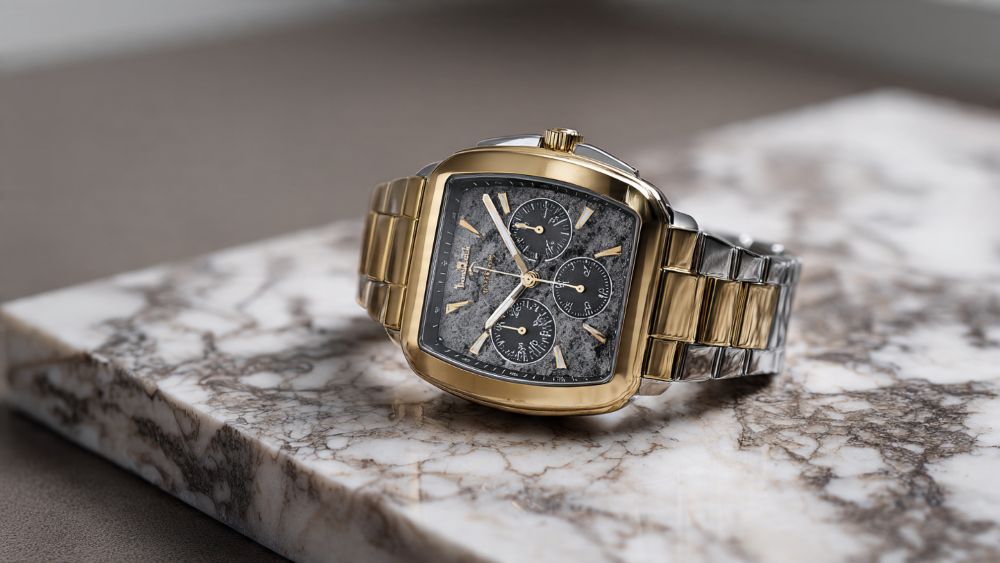
Midjourney
✅ Excellent aesthetics
✅ Beautiful shadows
✅ Luxury feel
⚠️ Also struggles with text
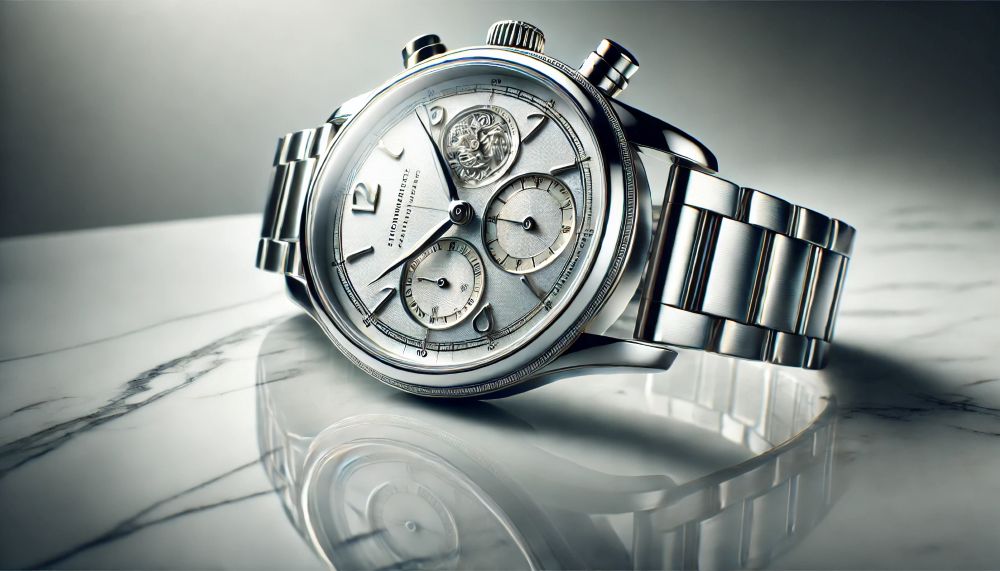
DALL-E 3
✅ ONLY ONE with readable text
✅ Perfect lighting
✅ Professional result
✅ Clear winner for products
Winner: Midjourney or SDXL (for 0 cost)
Modjourney wins for final product photos quality and effect. SDXL not bed neither and on top perfect for unlimited free mockups and concept testing.
📊 Overall Quality Summary
| Use Case | SDXL (FREE) |
Midjourney ($10/mo) |
DALL-E 3 ($20/mo) |
|---|---|---|---|
| Photorealism | 9/10 ✅ | 8/10 | 10/10 🏆 |
| Artistic/Creative | 9/10 ✅ | 10/10 🏆 | 8/10 |
| Product Photos | 8/10 ✅ | 9/10 🏆 | 7/10 |
| Text in Images | 3/10 ❌ | 3/10 ❌ | 7/10 🏆 |
| Portraits | 9/10 ✅ | 9/10 🏆 | 7/10 |
| Landscapes | 10/10 🏆 | 10/10 🏆 | 8/10 |
| Character Design | 9/10 ✅ | 9/10 ✅ | 8/10 |
| Concept Art | 10/10 🏆 | 10/10 🏆 | 8/10 |
| Overall Score | 8.4/10 ($0) |
8.5/10 ($10/mo) |
7.6/10 ($20/mo) |
🏆 The Real Winner: SDXL Quality at $0/Month
SDXL matches competitors in quality for 90% of use cases. The 10% where paid tools win (mainly text in images and automatic optimization) often isn’t worth $120-240/year.
Verdict: If you have time to learn, SDXL delivers $10-20/month quality for FREE forever. That’s a no-brainer for most users.
Stable Diffusion XL Pros & Cons
✅ Pros
- Completely Free & Open Source: No subscription fees, no usage limits, no per-image costs – truly free AI image generation forever
- Full Privacy & Control: Images stay on your computer; no third-party access, no data collection, complete creative freedom without content restrictions
- Unlimited Customization: Modify every aspect of generation; train custom models, use community extensions, integrate into custom workflows
- High Image Quality: SDXL produces professional-grade images rivaling paid alternatives when properly configured and prompted
- No Usage Limits: Generate unlimited images without rate limits, daily caps, or service restrictions – only limited by your hardware
- Massive Community: Thousands of tutorials, custom models, extensions, and active forums providing support and resources
- Works Offline: Complete functionality without internet connection once installed; immune to service outages or connectivity issues
- Commercial Rights: Open license permits commercial use without restrictions or additional fees; build businesses around the technology
- Reproducibility: Seed values ensure identical results; crucial for professional workflows requiring version control and consistency
❌ Cons
- Steep Learning Curve: Requires technical knowledge for installation and optimization; prompt engineering skills needed for consistent quality
- Hardware Requirements: Needs powerful GPU (8GB+ VRAM) for local use; barrier to entry for users without suitable computers
- Complex Setup: Installation involves command line, dependencies, and troubleshooting; not plug-and-play like commercial services
- Slower Out-of-Box Quality: Achieving quality comparable to Midjourney requires expertise, experimentation, and proper configuration
- Time-Consuming Prompting: No automatic prompt enhancement; must manually craft detailed prompts for best results
- Poor Text Generation: Cannot render legible text within images; requires external editing for text-based designs
- Maintenance Burden: Must manage updates, model downloads, storage space, and troubleshoot technical issues independently
- Inconsistent Results: Same prompt can produce varied quality; requires multiple attempts and refinement unlike more predictable commercial services
- Not Beginner-Friendly: Intimidating for non-technical users; overwhelming number of settings and options without guidance
💰 Annual Cost Savings Calculator: SDXL vs Paid Alternatives
How Much Will Stable Diffusion XL Save You?
👤 Hobbyist / Student
Usage: 100 images/month
Purpose: Personal projects, learning, social media
Midjourney Basic:
$10/month × 12 = $120/year
DALL-E 3 (ChatGPT Plus):
$20/month × 12 = $240/year
SDXL (Free Colab):
$0/year
Annual Savings: $120-240
Enough for: new GPU, software, courses
🎨 Content Creator
Usage: 500 images/month
Purpose: Blog, YouTube, social media, clients
Midjourney Standard:
$30/month × 12 = $360/year
DALL-E 3 + extras:
$20/month × 12 = $240/year
SDXL (Used RTX 3060 $300):
Year 1: $300 one-time
Year 2+: $0/year forever
2-Year Savings: $180-420
Break-even: 10 months, then pure profit
💼 Professional / Agency
Usage: 2,000+ images/month
Purpose: Client work, multiple projects, scale
Midjourney Pro:
$60/month × 12 = $720/year
Multiple DALL-E 3 accounts:
$20/mo × 3 × 12 = $720/year
SDXL (RTX 4080 $1,200):
Year 1: $1,200 one-time
Year 2: $0
Year 3+: $0/year forever
3-Year Savings: $960+
ROI: 20 months, saves $720+/year after
📊 5-Year Cost Comparison (Professional Use)
| Year | Midjourney Pro | DALL-E 3 (3x) | SDXL (Own GPU) |
|---|---|---|---|
| Year 1 | $720 | $720 | $1,200 |
| Year 2 | $1,440 | $1,440 | $1,200 |
| Year 3 | $2,160 | $2,160 | $1,200 |
| Year 4 | $2,880 | $2,880 | $1,200 |
| Year 5 | $3,600 | $3,600 | $1,200 |
| Total Saved | – | – | $2,400 |
After 5 years: SDXL saves $2,400 and the GPU still works! Plus you own the hardware and can upgrade.
💡 The Math is Clear: SDXL Saves Serious Money
Even with hardware investment, SDXL breaks even in under 2 years and saves hundreds or thousands annually after that – while giving you more control, privacy, and unlimited generation forever.
Or start with FREE cloud services ($0 investment) and upgrade to hardware only when your usage justifies it.
Stable Diffusion XL vs Competitors
Stable Diffusion XL vs Midjourney
Midjourney offers superior out-of-the-box artistic quality with minimal effort. Images have excellent composition, color theory, and aesthetic appeal automatically. The Discord interface, while unusual, is simpler than SDXL’s technical setup. Midjourney costs $10-60/month but delivers reliable, beautiful results immediately.
Stable Diffusion XL provides unlimited control and zero ongoing costs but requires significant technical investment. The quality ceiling is comparable to or higher than Midjourney with proper configuration, but reaching that ceiling demands expertise. SDXL offers customization impossible in Midjourney – custom models, fine-tuning, advanced editing, and complete workflow control.
Choose Stable Diffusion XL if you: Have technical skills, need complete control, generate high volumes, want zero ongoing costs, need privacy, or want to build on the technology commercially.
Choose Midjourney if you: Want immediate great results, prefer simplicity, value artistic quality above all, don’t want technical hassles, or need reliable professional output quickly.
Stable Diffusion XL vs DALL-E 3
DALL-E 3 (via ChatGPT Plus, $20/month) excels at photorealism, precise prompt following, and text integration within images. The ChatGPT interface is the simplest of all options, with automatic prompt enhancement making it accessible to complete beginners. DALL-E 3 interprets instructions literally and predictably.
Stable Diffusion XL offers comparable photorealism with more customization but lacks text capabilities and automatic prompt optimization. SDXL is free but requires effort; DALL-E 3 costs $20/month but includes GPT-4 for a combined value proposition.
Choose Stable Diffusion XL if you: Need high-volume generation, want customization, can’t justify $20/month, need offline capability, or want to modify/extend the technology.
Choose DALL-E 3 if you: Already use ChatGPT Plus, need text in images, want the simplest interface, prefer predictable literal results, or value convenience over cost.
Comparison Table
| Feature | Stable Diffusion XL | Midjourney | DALL-E 3 |
|---|---|---|---|
| Cost | Free (hardware/cloud optional) | $10-60/month | $20/month (ChatGPT Plus) |
| Ease of Use | ⭐⭐ (Technical) | ⭐⭐⭐⭐ | ⭐⭐⭐⭐⭐ |
| Image Quality | Excellent (with expertise) | Excellent (automatic) | Excellent (realistic) |
| Customization | ⭐⭐⭐⭐⭐ (Unlimited) | ⭐⭐⭐ (Parameters only) | ⭐⭐ (Minimal) |
| Privacy | ✅ Complete (local) | ⚠️ Cloud-based | ⚠️ Cloud-based |
| Text in Images | ❌ Poor | ❌ Poor | ✅ Excellent |
| Usage Limits | None (hardware dependent) | ~200-1,800/month by plan | Unlimited (reasonable use) |
| Best For | Technical users, high volume, customization | Artists, marketers, quick quality | Beginners, realistic images, text needs |
For a comprehensive comparison of all major AI image generators, see Best AI Image Generators in 2026.
Advanced Features & Customization
ControlNet: Precise Structural Control
ControlNet is a revolutionary extension providing precise control over image composition. It uses input images to guide generation – you can upload a sketch, pose reference, depth map, or edge detection, and SDXL generates an image matching that structure while applying your prompt’s content and style. This enables workflows like: converting sketches to finished art, maintaining character poses across images, or recreating compositions with different subjects.
Inpainting & Outpainting
Inpainting allows editing specific image regions while preserving the rest. Select an area, describe what should replace it, and SDXL seamlessly integrates the new content. This enables fixing mistakes, changing specific objects, or trying variations of particular elements without regenerating entirely.
Outpainting extends images beyond their original borders, maintaining style and coherence. Start with a centered subject and extend outward to create wider compositions or different aspect ratios while keeping consistency.
Custom Model Training
Advanced users can fine-tune SDXL on custom datasets, creating models specialized for specific subjects, styles, or domains. Training your own model enables consistent character generation, brand-specific imagery, or specialized applications like medical imaging or architectural visualization.
LoRA (Low-Rank Adaptation) training is more accessible than full fine-tuning, creating smaller files that add specific capabilities to base models. LoRAs can train a specific face, art style, or object type with relatively small datasets (20-100 images) and moderate compute requirements.
Image-to-Image Generation
Use existing images as starting points rather than generating from scratch. Upload a reference image, set the denoising strength (how much to change), and add your prompt. This enables style transfer, image variations, enhancing rough sketches, or iterating on existing designs.
Batch Processing & Automation
SDXL can be scripted for batch generation, enabling automated workflows for high-volume needs. Generate hundreds of variations automatically, process entire image sets, or integrate generation into larger pipelines. This automation is valuable for e-commerce, game development, or any application requiring systematic image production.
Model Merging
Combine different models to blend their strengths. Merge a photorealistic model with an artistic one for stylized realism, or combine multiple style-specific models for hybrid aesthetics. The community has developed sophisticated merging techniques producing models unavailable through training alone.
Community & Resources
Learning Resources
Official Documentation: Stability AI provides comprehensive documentation for SDXL, including technical details, best practices, and integration guides.
Community Tutorials: YouTube channels, blog posts, and forums offer thousands of tutorials covering everything from basic installation to advanced techniques. Popular creators include Olivio Sarikas, Aitrepreneur, and Sebastian Kamph who regularly publish detailed guides.
Reddit Communities: r/StableDiffusion is the primary hub with 500,000+ members sharing tips, showcasing work, and helping troubleshoot. Active daily discussion and resource sharing.
Discord Servers: Multiple Discord communities provide real-time support, share prompts and settings, and collaborate on techniques. The unofficial Stable Diffusion Discord has extensive resources and helpful members.
Model Resources
Civitai: The largest repository of custom Stable Diffusion models, LoRAs, and embeddings. Browse thousands of community-trained models across every style imaginable, with ratings, examples, and recommended settings.
HuggingFace: Technical repository hosting model weights, research papers, and code. More technical than Civitai but authoritative for serious development work.
Interface Options
Automatic1111 WebUI: Most popular interface with comprehensive features and extensive documentation. Active development and huge plugin ecosystem.
ComfyUI: Node-based workflow system for advanced users. Steeper learning curve but extremely powerful for complex generation pipelines.
InvokeAI: Artist-focused interface with canvas editing, unified canvas for outpainting, and intuitive controls. Good for users transitioning from traditional digital art tools.
Commercial Ecosystem
Businesses have built products around Stable Diffusion: DreamStudio (Stability AI’s official service), Clipdrop (integration tools), Leonardo.ai (game asset focus), and hundreds of specialized applications leveraging SDXL for specific industries or use cases.
Frequently Asked Questions
Is Stable Diffusion XL really free?
Yes, Stable Diffusion XL is completely free and open-source. You can download the model weights, use them without restrictions, modify the code, and even build commercial products around it – all at zero cost. There are no subscription fees, per-image charges, or usage limits.
The only potential costs are optional: purchasing GPU hardware for local installation (typically $500-2000 for suitable graphics cards), or renting cloud GPU instances if you don’t own hardware ($0.10-0.50 per hour). Many users run SDXL free using Google Colab’s free tier, though with limitations.
For high-volume commercial use, Stable Diffusion’s free model often saves thousands of dollars compared to subscription services, making it the most cost-effective option at scale despite potential hardware investment.
Do I need a powerful computer for Stable Diffusion XL?
For local installation, you need a GPU with at least 8GB VRAM. An NVIDIA RTX 3060 (12GB), RTX 2080 Ti (11GB), or better will run SDXL acceptably. More powerful GPUs like RTX 3080, 4070, or 4090 provide faster generation times and better experience with complex workflows.
If you don’t have suitable hardware, several alternatives exist: free cloud services like Google Colab (with limitations), paid cloud GPU rental ($0.10-0.50/hour), or web-based services like DreamStudio. These options let you use SDXL without hardware investment, though with ongoing costs or restrictions.
AMD GPUs and Apple Silicon (M1/M2/M3) can run SDXL but with limitations and reduced performance compared to NVIDIA cards. The community is actively improving support for these platforms.
How does Stable Diffusion XL compare to Midjourney?
Midjourney offers superior out-of-the-box quality with minimal effort and a simpler (though Discord-based) interface. It costs $10-60/month but delivers consistently beautiful, artistic results automatically. Midjourney excels at aesthetic appeal, composition, and artistic interpretation.
Stable Diffusion XL is free with unlimited customization but requires technical knowledge and experimentation to match Midjourney’s quality. SDXL offers capabilities impossible in Midjourney – custom models, fine-tuning, advanced editing tools, complete privacy, and offline operation.
Choose SDXL if you have technical skills, need complete control, generate high volumes making subscriptions expensive, require privacy, or want to build on the technology. Choose Midjourney if you want immediate great results without technical hassles and can justify the subscription cost.
Can I use Stable Diffusion XL images commercially?
Yes, Stable Diffusion XL is released under the CreativeML Open RAIL-M license, which allows commercial use of generated images. You own the outputs you create and can use them in business projects, products, client work, or any commercial application without licensing fees or attribution requirements.
The open-source license also permits building commercial products around Stable Diffusion itself. Many businesses have created profitable applications, services, and products leveraging SDXL for image generation capabilities.
The only restrictions relate to harmful uses (detailed in the license) but don’t affect standard commercial applications like marketing, product visualization, content creation, or business communications.
Is Stable Diffusion XL difficult to learn?
Stable Diffusion XL has a moderate to steep learning curve depending on your technical background and desired results. Basic usage through user-friendly interfaces like Automatic1111 WebUI is accessible within hours of experimentation. However, achieving consistently professional results requires understanding prompt engineering, parameters, samplers, and workflow optimization.
The learning curve breaks down as: installation and basic generation (a few hours to a day for technical users), achieving good quality (weeks of practice and experimentation), and mastering advanced features like ControlNet, custom models, and complex workflows (months of dedicated learning).
The extensive community resources, tutorials, and documentation make learning easier than it initially appears. Most users achieve satisfactory results within their first week of hands-on practice, even without deep technical knowledge.
How long does it take to generate images with SDXL?
Generation time depends entirely on your hardware. With recommended hardware (RTX 3080 or similar), typical generation times are:
- 1024×1024 image at 25 steps: 15-30 seconds
- 1024×1024 image at 40 steps: 30-60 seconds
- High-end GPUs (RTX 4090): 5-15 seconds per image
- Budget GPUs (RTX 3060): 45-90 seconds per image
Cloud services vary based on the GPU tier you rent. Free services like Google Colab may take 1-2 minutes per image due to lower-priority access and shared resources.
While slower than some commercial services, SDXL’s unlimited generation capacity means you can batch-produce images overnight or during downtime without worrying about subscription limits or per-image costs.
What are custom models and LoRAs?
Custom models are specialized versions of Stable Diffusion trained on specific datasets to excel at particular styles, subjects, or domains. For example, models trained exclusively on anime art produce better anime images, while models trained on architectural photography excel at building visualization.
LoRAs (Low-Rank Adaptations) are smaller, modular additions that can be layered onto base models to add specific capabilities – like a particular art style, consistent character appearance, or improved handling of certain objects. LoRAs are easier to train than full models and can be combined, offering flexible customization.
Both custom models and LoRAs are freely shared by the community through sites like Civitai, with thousands of options available for download. This ecosystem dramatically extends SDXL’s capabilities beyond the base model.
Why is Stable Diffusion XL free when competitors charge $10-20/month?
Stable Diffusion XL is open-source software released by Stability AI under a permissive license that allows free use forever. The company’s business model focuses on enterprise services, not consumer subscriptions. They profit from managed hosting (DreamStudio), enterprise licensing, and consulting – making the base model free benefits their ecosystem growth.
Unlike Midjourney or DALL-E 3 which are closed commercial products requiring ongoing server costs that users pay for, SDXL can run on your own hardware or free cloud resources. You’re either using your own compute power or free-tier cloud services, eliminating the need for subscription fees.
This open-source model is permanent – once released, the software can’t be “taken back” or made paid. Even if Stability AI went out of business tomorrow, SDXL would remain free forever because the code and model weights are publicly available.
Is Stable Diffusion XL quality really as good as Midjourney and DALL-E 3?
Yes, SDXL quality matches or exceeds paid competitors for most use cases when properly prompted. Independent comparisons show SDXL achieves 9/10 or 10/10 quality for photorealism, artistic images, portraits, and landscapes – the same scores as Midjourney and DALL-E 3.
The key differences are NOT quality but: (1) DALL-E 3 is the only tool that handles text in images well, (2) Midjourney optimizes images automatically with less user effort, and (3) SDXL requires learning prompt engineering to achieve consistent results.
For users willing to invest 5-10 hours learning, SDXL produces professional results indistinguishable from paid alternatives. The quality ceiling is identical – the learning curve is steeper but the reward is unlimited free generation forever.
Can complete beginners use Stable Diffusion XL without technical skills?
Yes! While SDXL has a reputation for being “technical,” beginners can start generating images in under 5 minutes using free browser-based services like Google Colab, Hugging Face Spaces, or Replicate. These services require zero installation, zero technical knowledge, and zero coding – just type your prompt and click “Generate.”
You can use SDXL successfully at three levels: (1) Complete beginner using free cloud services with simple text prompts (5 minutes to start, 90% of quality), (2) Intermediate user with basic understanding of settings (2-3 days to learn, 95% of quality), (3) Advanced user with local installation and custom models (weeks to master, 100% of possibilities).
Most users achieve satisfactory results as beginners within their first hour of experimentation. The learning curve exists but isn’t a barrier to creating good images immediately.
What happens if I generate 10,000 images with SDXL – will it still be free?
Yes, absolutely. There are no usage caps, daily limits, or fair-use policies with Stable Diffusion XL. Whether you generate 10 images or 10 million images, the cost remains $0 (assuming you use free cloud services or your own hardware).
For context: Midjourney Basic ($10/month) includes 200 fast generations per month. To generate 10,000 images with Midjourney would require 50 months at Basic tier = $500 total, or upgrading to unlimited plans at $30-60/month. DALL-E 3 technically has “unlimited” generation but OpenAI’s acceptable use policy may throttle extreme usage.
With SDXL, generating 10,000 images on your own GPU (RTX 3080) would take about 80-100 hours of generation time at zero additional cost. Using paid cloud GPUs at $0.30/hour would cost $24-30 total. Either way, SDXL is dramatically cheaper at scale – or completely free if you’re patient with free cloud services.
Is SDXL better than Midjourney?
Choose SDXL over Midjourney if you: Need to generate 100+ images monthly (SDXL breaks even vs $10 subscription after minimal use), want complete privacy and offline capability, require unlimited customization with custom models and advanced features, have technical skills to optimize prompts and settings, or are building commercial products requiring AI integration.
Choose Midjourney over SDXL if you: Want immediately beautiful results without learning curve, generate fewer than 50 images monthly making $10 worthwhile for convenience, prioritize artistic composition over technical control, need consistently good results without experimentation, or don’t want to manage technical setup and maintenance.
Best of both worlds: Many professionals use SDXL for high-volume work, concept iteration, and customized workflows while keeping Midjourney subscriptions for quick artistic renders and client presentations. The free nature of SDXL makes this combination affordable at $10/month total.
Final Verdict: Is Stable Diffusion XL Worth It?
Stable Diffusion XL is absolutely worth it for users who value control, privacy, and cost-efficiency over convenience – particularly technical users, high-volume creators, and those building AI into their workflows or products. The free, open-source nature eliminates ongoing costs while providing professional-quality results and unlimited customization impossible with closed alternatives.
SDXL’s Core Strengths:
- Completely free with no usage limits or subscription costs
- Open-source with full customization and modification rights
- Professional image quality rivaling paid alternatives
- Complete privacy with local operation
- Massive community ecosystem of models and tools
- Commercial license permitting business use
- Offline capability with no service dependencies
- Unlimited scalability for high-volume applications
Accept These Tradeoffs:
- Requires technical knowledge for setup and optimization
- Needs powerful GPU hardware or cloud compute costs
- Steeper learning curve than commercial alternatives
- More time investment to achieve consistent quality
- No automatic support or guarantee of results
Stable Diffusion XL is Perfect For:
- Technical users and developers comfortable with command line tools and troubleshooting
- High-volume creators where subscription costs would be prohibitive
- Businesses building AI products requiring customization and integration
- Privacy-conscious users needing local, offline image generation
- Artists and enthusiasts wanting complete creative control and experimentation
- Budget-conscious creators who can invest time instead of money
- Researchers and educators studying or teaching AI technology
Consider Alternatives If:
- You want immediate results without technical learning curve (choose DALL-E 3 or Midjourney)
- You lack suitable hardware and can’t justify cloud costs (choose subscription services)
- You prioritize convenience over cost and control (choose Midjourney)
- You need text within images (choose DALL-E 3)
- You generate images occasionally rather than regularly (subscriptions may be simpler)
The Bottom Line
Stable Diffusion XL democratizes AI image generation by removing cost barriers and ownership restrictions. While demanding more technical investment than plug-and-play services, it rewards that investment with unmatched flexibility, privacy, and long-term cost efficiency.
For creative professionals, businesses, and technical users willing to climb the learning curve, SDXL becomes an incredibly powerful tool that pays dividends through unlimited generation capacity and customization impossible elsewhere. The vibrant community and continuous ecosystem growth ensure SDXL remains relevant and improving.
The choice between SDXL and commercial alternatives ultimately depends on your priorities: technical control vs. convenience, one-time effort vs. ongoing payments, privacy vs. plug-and-play simplicity. For many users – particularly those generating images at scale or building AI into their work – Stable Diffusion XL is not just worth it, but the only practical long-term solution.
Ready to Start with Stable Diffusion XL?
Visit stability.ai for official documentation, or explore community resources at r/StableDiffusion to begin your AI art journey.