
⚡ Quick Overview
- 🎯 Best For: Graphic designers, marketers, and content creators needing AI images with accurate, readable text
- 💰 Pricing: Free (10 credits/week) | Basic $7/mo | Plus $16/mo | Pro $48/mo
- ⭐ Rating: ⭐⭐⭐⭐½ 4.5/5
- 🆓 Free Tier: Yes – 10 weekly credits with slow queue processing
- 🔧 Key Feature: Industry-leading text rendering accuracy (85-90%)
- ⚠️ Limitation: Inconsistent human faces, free images are public
📑 Table of Contents
What is Ideogram AI?
Ideogram AI is a revolutionary AI image generator that solves the biggest problem plaguing other text-to-image tools: the ability to render accurate, readable text within generated images. While competitors like Midjourney, DALL-E 3 or META AI often produce garbled, unreadable text, Ideogram consistently delivers crisp, legible typography that actually says what you intended.
While Meta AI has democratized image generation by putting it right in your pocket for quick stickers and chat replies, Ideogram caters to a different audience: creators who need precise control over text and layout for professional results
Launched in August 2023, Ideogram was founded by a team of former Google Brain researchers including Mohammad Norouzi, William Chan, Chitwan Saharia, and Jonathan Ho—the same minds behind foundational work on diffusion models that power modern AI image generators. With $16.5 million in seed funding and the release of version 3.0 in March 2025, Ideogram has positioned itself as the go-to AI image generator for anyone who needs text in their visuals.
Whether you’re creating logos, marketing posters, social media graphics, or branded content, Ideogram AI delivers what other generators simply cannot: images where the text is actually readable. This makes it invaluable for graphic designers, marketers, content creators, and small business owners who previously had to manually add text in Photoshop after AI generation.
The platform has already attracted over 150,000 users who have generated more than 2.3 million images, proving there’s massive demand for AI-generated images with reliable typography. For a comprehensive look at all AI image generation options, check out our best AI image generators guide.
🚀 Ready to Create Images with Perfect Text?
Join 150,000+ creators using Ideogram AI to generate logos, posters, and marketing graphics with readable typography. Start free today!
Key Features & Capabilities
Ideogram AI isn’t just a one-trick pony with text rendering. The platform offers a comprehensive suite of features that make it a serious contender in the AI image generation space. Here’s what makes Ideogram stand out:
🔤 Superior Text Rendering (Typography)
This is Ideogram’s killer feature and primary differentiator. The platform achieves 85-90% accuracy when rendering text in images—a massive improvement over competitors that struggle to hit 50%. Whether you need handwritten fonts, 3D lettering, graffiti styles, or clean corporate typography, Ideogram handles it all. The “Typography” tag further enhances text-focused designs, making it the undisputed champion for text-in-image generation.
✨ Magic Prompt Enhancement
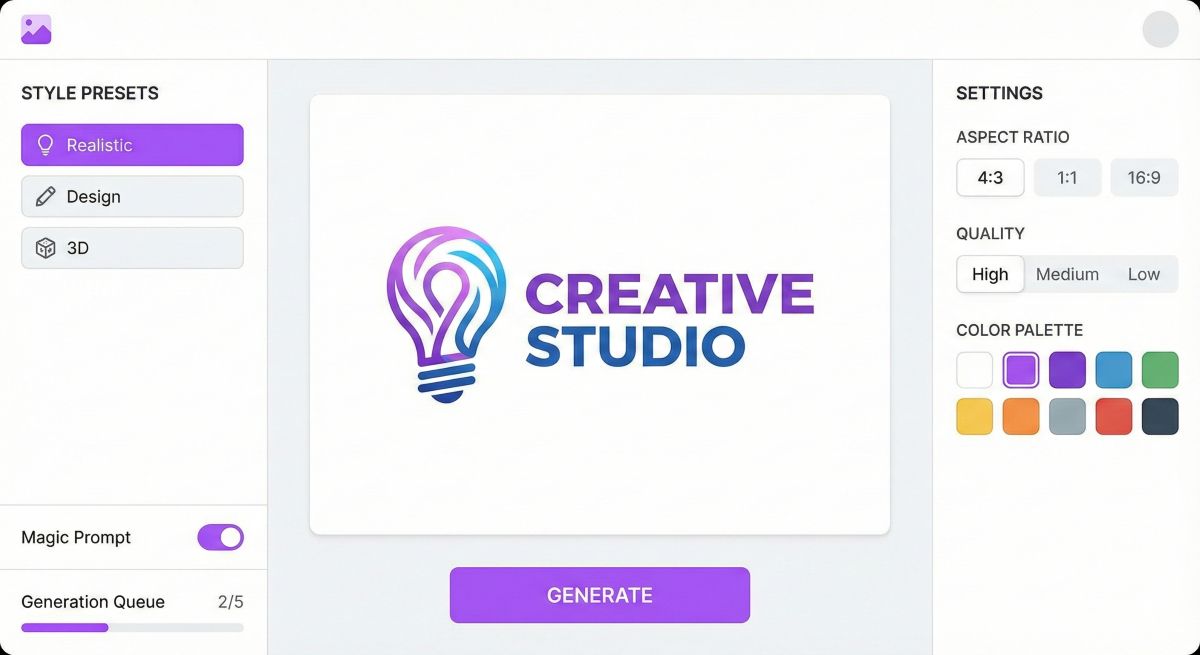
Not sure how to write the perfect prompt? Ideogram’s Magic Prompt feature automatically expands and enhances your basic descriptions into detailed, optimized prompts. For example, entering “birthday party” might be expanded to include lighting details, composition suggestions, and atmospheric elements that produce significantly better results.
🎨 Style Presets & Controls
Ideogram offers extensive style control through multiple approaches:
- Style Presets: Choose from Realistic, Design, Anime, 3D Render, Cinematic, Vibrant, and more
- Style Reference: Upload up to 3 reference images to replicate specific colors, textures, and moods
- Style Codes: Save and reuse exact styles for brand consistency across projects
- Random Styles: Access 4.3 billion+ unique aesthetic combinations for inspiration
🖼️ Canvas Editor (Ideogram Editor)
The built-in Canvas Editor provides powerful post-generation editing capabilities:
- Magic Fill (Inpainting): Edit specific areas via prompts while preserving the rest
- Extend Image (Outpainting): Expand images beyond original borders seamlessly
- Magic Erase: Remove unwanted elements with AI-powered content-aware fill
- Background Removal: Replace or delete backgrounds with one click
- Layer Management: Basic layer controls for complex compositions
📊 Batch Generation
Pro users can generate hundreds of images at once using a simple CSV template. Upload 200+ prompts and receive all results within minutes—perfect for marketing teams needing variations or A/B testing materials.
🔄 Remix Feature
Use any existing image as a starting point to generate variations. This image-to-image capability lets you iterate on concepts, maintain visual consistency, or transform real photos into AI-enhanced versions.
🎛️ Aspect Ratio & Quality Controls
Generate images in standard sizes plus unique options like 3:1 or 1:3 for specific use cases. Quality settings (Fast, Standard, Quality) let you balance speed against detail depending on project requirements.
Ideogram 3.0: What’s New in 2026
Released in March 2025, Ideogram 3.0 represents a major leap forward in AI image generation capabilities. If you tried Ideogram previously and were underwhelmed, version 3.0 deserves another look. Here’s what the latest version brings:
Enhanced Photorealism
Version 3.0 dramatically improves image quality, particularly in photorealistic generation. Lighting, textures, skin details, and spatial relationships all show noticeable improvements. While human faces remain somewhat inconsistent (a common AI challenge), everything from products to landscapes to architecture looks significantly more polished.
Even Better Text Rendering
Ideogram’s text rendering was already best-in-class, but 3.0 pushes accuracy even higher:
- Longer text passages with improved alignment
- More font style options (handwritten, 3D, graffiti, neon, etc.)
- Better handling of curved and perspective text
- Enhanced “Typography” tag for pure text-focused designs
Style Reference System
The new Style Reference feature allows uploading up to 3 images to guide the AI toward specific aesthetics. This is perfect for maintaining brand consistency—upload your existing marketing materials and generate new content that matches your established visual language.
Advanced Canvas Tools
The Canvas Editor received significant upgrades with Magic Fill, Extend, and Erase features. The inpainting and outpainting capabilities now rival dedicated editing tools, making Ideogram a more complete creative solution rather than just a generator.
Faster Generation
Priority processing now completes in seconds rather than minutes, with the system maintaining quality while improving throughput. Even slow queue times for free users have decreased compared to earlier versions.
Pricing Plans Breakdown
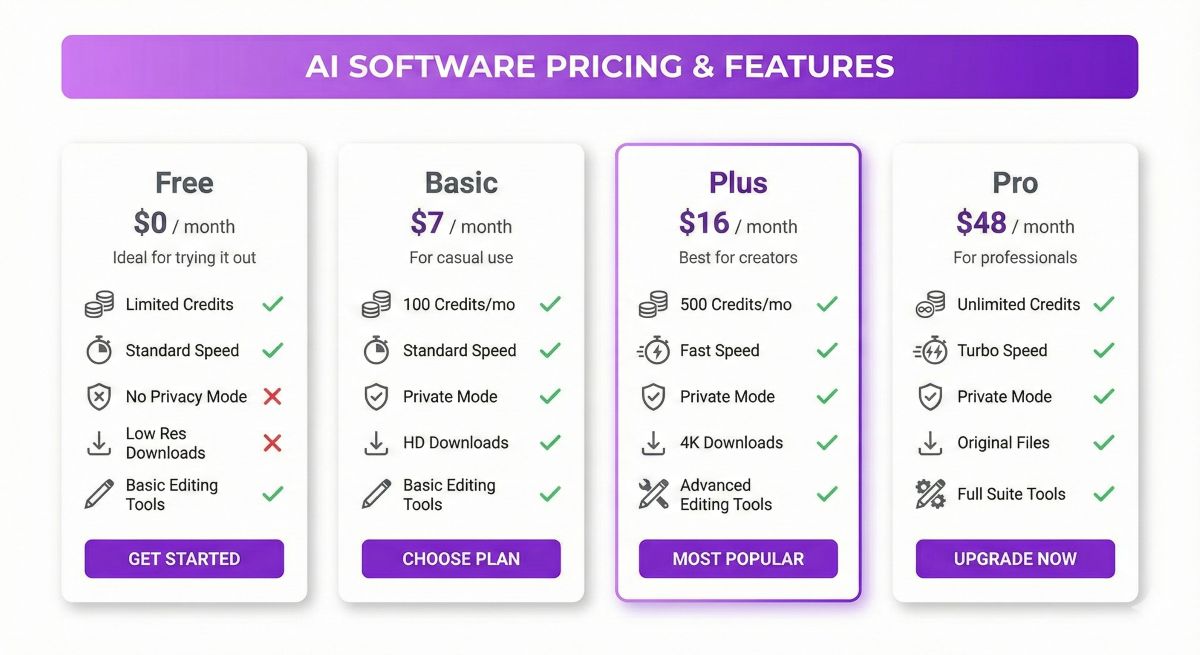
Ideogram offers four pricing tiers designed to accommodate everyone from curious beginners to professional design agencies. Here’s what you get at each level:
| Plan | Price (Monthly) | Price (Annual) | Credits/Prompts | Key Features |
|---|---|---|---|---|
| Free | $0 | $0 | 10 credits/week (~20 slow prompts/day) | Slow queue, public images, JPG downloads, Describe feature |
| Basic | $8 | $7/month | 400 priority + 100 slow/day | Ideogram Editor, PNG downloads, upscaling, tiling |
| Plus | $20 | $16/month | 1,000 priority + unlimited slow | Private generation, image upload, custom color palettes, image deletion |
| Pro | $60 | $48/month | 3,000 priority + unlimited slow | All features + Batch CSV generation, API access |
💡 Which Plan Should You Choose?
Free Plan Best For:
Testing the platform, occasional personal projects, students exploring AI art. Just remember—all your images are public and prompts are visible to the community.
Basic Plan ($7-8/mo) Best For:
Freelancers, hobbyists who create regularly, and anyone who wants private images and faster processing without breaking the bank.
Plus Plan ($16-20/mo) Best For:
Content creators, social media managers, and marketers who need consistent output with privacy and brand control through custom color palettes.
Pro Plan ($48-60/mo) Best For:
Agencies, design teams, and power users who need batch generation and API integration for high-volume workflows.
 Pro Tip: Start with the free tier to test Ideogram’s capabilities, then upgrade to Basic or Plus once you’ve confirmed it fits your workflow. Annual billing saves 20% compared to monthly.
Must read also: Free AI Image Generators: Top 10 No-Cost Tools to learn about more FREE optinos for Image generators. Or for even bigger scaled overview our cutting edge artcle: 30 Best Free AI Tools 2025 (100% Free – No Credit Card Required). You would be surpised which AI tools you can used for free.
:
How Ideogram AI Works
Getting started with Ideogram AI is straightforward. Here’s a step-by-step guide to generating your first images:
Step 1: Create Your Account
Visit ideogram.ai and sign up using Google authentication. The free tier activates immediately—no credit card required.
Step 2: Enter Your Prompt
Type a description of the image you want. Be specific about:
- Subject: What’s in the image
- Text: Any words that should appear (use quotation marks: “Happy Birthday”)
- Style: Artistic direction (realistic, illustrated, 3D, etc.)
- Details: Lighting, colors, composition, mood
Step 3: Configure Settings
Before generating, adjust these options:
- Aspect Ratio: Square, portrait, landscape, or custom
- Style Preset: Realistic, Design, Anime, 3D, etc.
- Color Palette: Pastel, Vibrant, Monochrome, or custom hex codes
- Magic Prompt: Toggle on for AI-enhanced prompts
Step 4: Generate & Iterate
Click Generate and wait (seconds for priority, minutes for slow queue). Ideogram typically produces 4 variations per prompt. Select your favorite and either download it or use the Remix feature to create more variations.
Step 5: Edit with Canvas (Optional)
Open any generated image in the Canvas Editor to make adjustments—extend borders, remove elements, change specific areas, or add more details without regenerating the entire image.
Example Prompt: “A professional business card design with the text ‘CREATIVE STUDIO’ in elegant gold lettering on a dark navy background, minimalist modern style, luxury aesthetic, 3:2 aspect ratio”
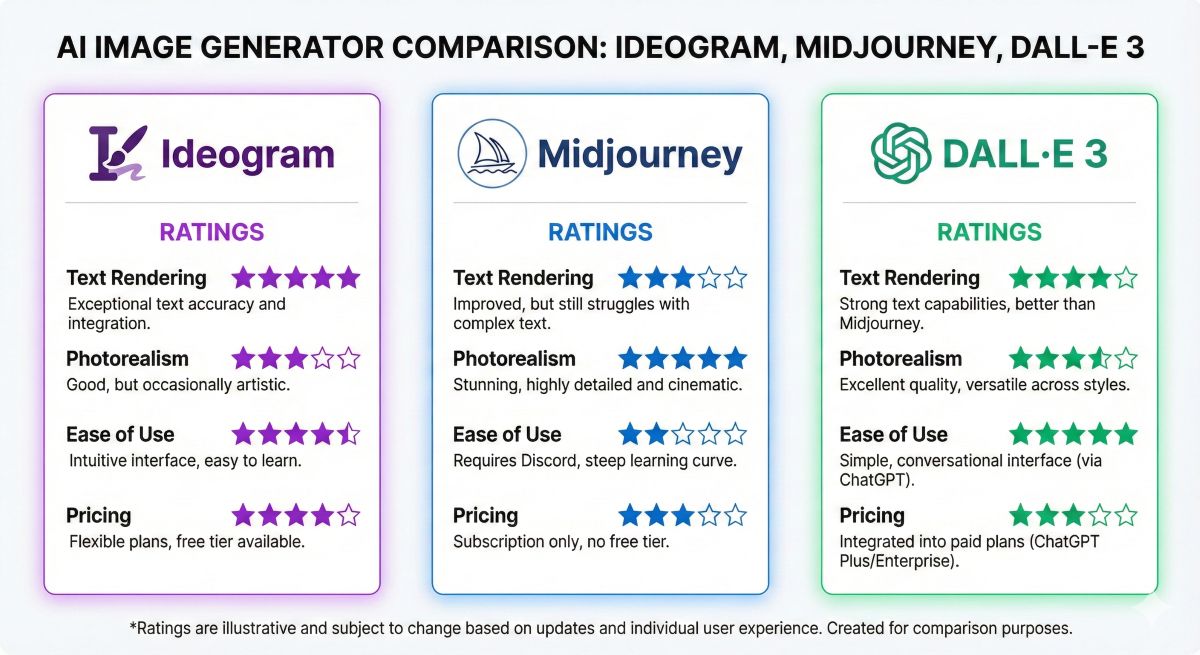
Ideogram vs Midjourney vs DALL-E 3: Complete Comparison
How does Ideogram stack up against the other major AI image generators? Here’s an honest comparison based on real-world testing:
| Feature |
Ideogram 3.0
|
Midjourney v6
|
DALL-E 3
|
|---|---|---|---|
| Text Rendering | ⭐⭐⭐⭐⭐ Best-in-class | ⭐⭐☆☆☆ Struggles | ⭐⭐⭐☆☆ Improved but inconsistent |
| Photorealism | ⭐⭐⭐⭐☆ Strong | ⭐⭐⭐⭐⭐ Industry-leading | ⭐⭐⭐⭐☆ Very good |
| Human Faces | ⭐⭐⭐☆☆ Inconsistent | ⭐⭐⭐⭐⭐ Excellent | ⭐⭐⭐⭐☆ Good |
| Style Control | ⭐⭐⭐⭐⭐ Style References + Codes | ⭐⭐⭐⭐☆ Strong with –sref | ⭐⭐⭐☆☆ Limited |
| Ease of Use | ⭐⭐⭐⭐⭐ Very intuitive | ⭐⭐⭐☆☆ Discord learning curve | ⭐⭐⭐⭐⭐ ChatGPT integration |
| Free Tier | ✅ Yes (limited) | ❌ No (trial only) | ✅ Via Bing/ChatGPT Free |
| Starting Price | $7/month | $10/month | $20/month (ChatGPT Plus) |
| Best For | Text-heavy designs, logos, marketing | Artistic imagery, portraits | General use, ChatGPT users |
The Bottom Line
Choose Ideogram if: You need accurate text in your images—logos, posters, marketing materials, social media graphics with quotes, or any design where typography matters.
Choose Midjourney if: You’re creating artistic images, portraits, or visuals where text isn’t required. Midjourney’s aesthetic quality is unmatched for pure artistry.
Choose DALL-E 3 if: You’re already a ChatGPT user wanting seamless integration, or need quick general-purpose image generation without learning new tools.
For more AI tool comparisons, see our Midjourney vs DALL-E vs Stable Diffusion comparison guide.
Pros & Cons
After extensive testing, here’s an honest assessment of Ideogram AI’s strengths and weaknesses:
✅ Pros
- Unmatched text rendering: 85-90% accuracy for readable text in images—no other AI generator comes close
- Intuitive interface: Clean, beginner-friendly design that doesn’t require Discord or complex workflows
- Generous style controls: Style References, 4.3B+ random styles, and savable Style Codes for brand consistency
- Affordable pricing: Basic plan at $7/month is cheaper than Midjourney ($10) and includes key features
- Powerful editing tools: Canvas Editor with inpainting, outpainting, and background removal built-in
- Commercial rights: You own the images you create—use them for any commercial project
- Magic Prompt: AI-enhanced prompt expansion helps beginners get professional results
- Batch generation: Pro users can process hundreds of prompts via CSV for high-volume needs
❌ Cons
- Inconsistent human faces: Portraits often have distorted features, weird hands, or unnatural expressions
- Free tier limitations: Only 10 credits/week, slow queue, and all images are publicly visible
- Text still isn’t perfect: 10-15% failure rate means you’ll occasionally get misspellings or garbled text
- No live customer support: Limited to email and documentation—no real-time help when issues arise
- English only: Interface and optimal results are English-focused
- Complex scenes struggle: Multiple people interacting or detailed environments can produce weird results
- Opaque API pricing: Developers don’t get clear cost estimates for API usage
Best Use Cases for Ideogram AI
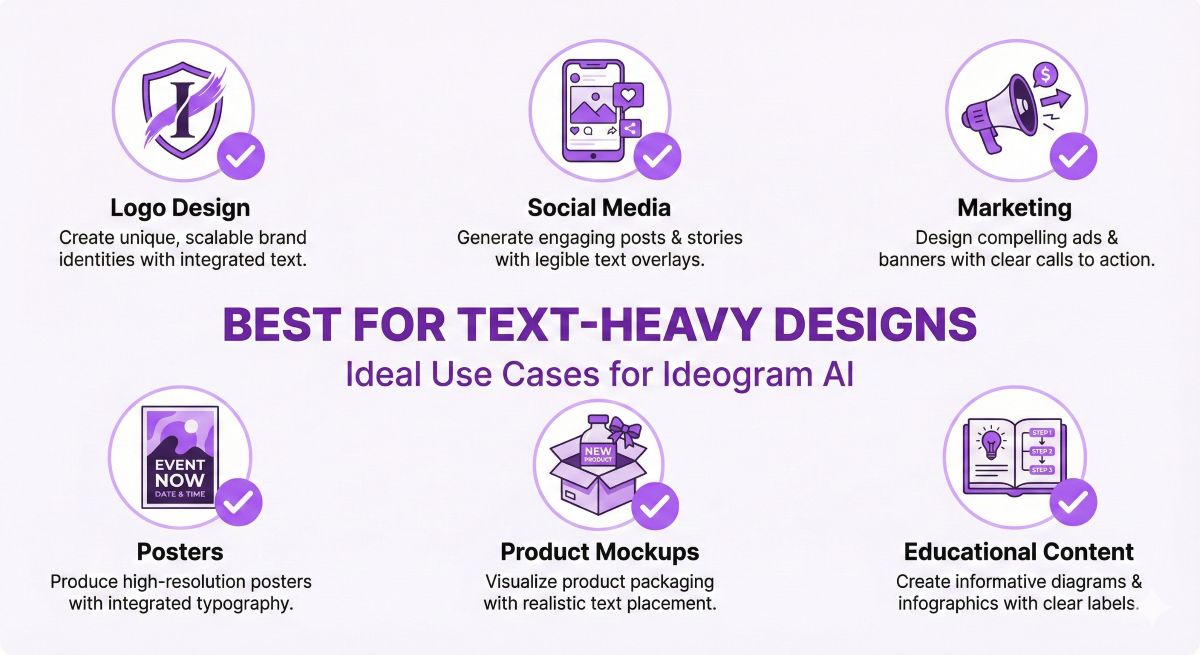
Ideogram AI excels in specific scenarios where text integration is essential. Here’s where it delivers the most value:
✅ Perfect For:
🎨 Logo Design & Branding
Generate logo concepts, wordmarks, and branded graphics with actual readable company names. Perfect for brainstorming sessions or quick mockups before hiring a professional designer.
📱 Social Media Graphics
Create quote graphics, promotional posts, and branded content with text that’s actually legible. The style presets make it easy to maintain visual consistency across platforms.
📧 Marketing Materials
Design email headers, ad banners, promotional posters, and sales graphics with clear calls-to-action and product names.
🎉 Event Materials
Generate invitations, flyers, posters, and announcements where event details (dates, venues, titles) must be readable.
📦 Product Mockups
Create packaging concepts, label designs, and merchandise mockups with accurate product names and branding.
🎓 Educational Content
Design infographics, presentation slides, and teaching materials with clear, readable text and labels.
❌ Not Ideal For:
- Portrait photography: Human faces remain inconsistent—use Midjourney instead
- Complex multi-person scenes: Group interactions often produce anatomical errors
- Free tier heavy users: 10 credits/week won’t satisfy regular usage needs
- Developers needing transparent API costs: Pricing isn’t clearly documented
- Ultra-photorealistic human imagery: While improved, still behind Midjourney for people
Frequently Asked Questions
Is Ideogram AI free?
Yes, Ideogram offers a free tier with 10 credits per week (approximately 20 slow prompts daily). However, free images are publicly visible and limited to compressed JPG downloads. For private generation, PNG quality, and faster processing, you’ll need a paid plan starting at $7/month.
What is Ideogram AI used for?
Ideogram AI is primarily used for generating images that include readable text—logos, posters, marketing graphics, social media content, and any design where typography matters. It’s the best AI image generator for text-in-image creation, making it popular with graphic designers, marketers, and content creators.
Who is behind Ideogram AI?
Ideogram was founded by former Google Brain researchers Mohammad Norouzi, William Chan, Chitwan Saharia, and Jonathan Ho. These are the same minds behind foundational AI research on diffusion models. The company secured $16.5 million in seed funding before launching publicly in August 2023.
Can Ideogram do image-to-image generation?
Yes, Ideogram’s Remix feature allows you to upload existing images and use them as starting points for variations. You can also use Style Reference to upload up to 3 images that guide the AI toward specific colors, textures, and moods while generating new content.
Is Ideogram better than Midjourney?
It depends on your needs. Ideogram is significantly better for text rendering—nothing else comes close for readable typography. However, Midjourney produces superior artistic imagery and photorealistic human faces. For logos, posters, and text-heavy designs, choose Ideogram. For portraits and artistic visuals, choose Midjourney.
Can I sell images created with Ideogram?
Yes, you own the commercial rights to images you generate with Ideogram AI. You can sell them, use them in client projects, or incorporate them into products. However, always verify the current terms of service and ensure generated content doesn’t accidentally reproduce trademarked or copyrighted elements.
What is Ideogram 3.0?
Ideogram 3.0 is the latest version released in March 2025, featuring enhanced photorealism, improved text rendering, Style Reference capabilities, and advanced Canvas editing tools including Magic Fill, Extend, and Erase features. It represents a significant upgrade over previous versions.
How does Ideogram compare to DALL-E 3?
Ideogram surpasses DALL-E 3 specifically in text rendering accuracy. While DALL-E 3 has improved its typography, Ideogram remains the clear leader. DALL-E 3’s advantage is seamless ChatGPT integration, making it more convenient for existing OpenAI users. For text-focused designs, Ideogram wins; for general AI chat integration, DALL-E 3 has the edge.
🎯 Final Verdict: Is Ideogram AI Worth It?
Overall Rating: ⭐⭐⭐⭐½ (4.5/5)
Ideogram AI has earned its reputation as the undisputed king of text-in-image generation. If you’ve ever spent hours in Photoshop adding text that an AI generator mangled, Ideogram is the solution you’ve been waiting for.
Version 3.0 addresses most earlier criticisms—better photorealism, more style control, and powerful editing tools make it a genuinely complete creative platform rather than a one-trick pony. The ability to generate readable logos, marketing materials, and branded content without post-processing is genuinely game-changing for designers and marketers.
The pricing is competitive too. At $7/month for the Basic plan, you’re paying less than Midjourney while getting features (like text rendering) that Midjourney simply cannot match. For text-heavy use cases, the ROI is clear.
That said, Ideogram isn’t perfect for everyone. If your work centers on portraits, artistic imagery, or complex human scenes, Midjourney remains the better choice. And the free tier’s public-by-default policy may concern users who value privacy.
✅ Choose Ideogram If:
- You create logos, posters, or marketing graphics
- Text readability is essential for your projects
- You want brand consistency with Style References
- You need an intuitive, beginner-friendly platform
- You’re budget-conscious ($7/mo vs $10-20/mo competitors)
❌ Skip Ideogram If:
- You primarily create portraits or artistic imagery
- You need perfect human faces consistently
- You won’t pay for a subscription (free tier is very limited)
- You need transparent API pricing for development