

⚡ Quick Verdict: Pictory AI
- ⭐ Our Rating: 4.4/5 — Best for Content Repurposing
- 💰 Pricing: Free trial (15 video minutes), then $19-$99/month
- 🎯 Best For: Marketers, bloggers, content creators repurposing long-form content
- 🆓 Free Trial: Yes — 15 video minutes, no credit card required
- ⚡ Key Strength: Blog-to-video and script-to-video conversion in under 15 minutes
- ⚠️ Main Limitation: Uses stock footage only — can’t generate original visuals like Sora
- 📊 Bottom Line: The fastest way to transform existing written content into shareable videos
📌 Key Takeaways from Our Pictory AI Testing
- Speed: Converts 2,000-word blog post to video in 5-7 minutes
- Stock Library: 3+ million videos and images included
- Caption Accuracy: ~95% accuracy for clear English audio
- Best Plan: Professional ($29/month) for 600 video minutes and 30-min length
- Output Quality: Maximum 1080p (no 4K option)
- Ideal Use: Content multiplication — one blog becomes YouTube, Instagram, TikTok, LinkedIn content
- Not Ideal: Creating videos from scratch or AI avatar presentations (try instead Heygen or Synthesia)
SmartTrendsAI is an independent platform that tests, compares, and reviews AI tools for marketing, content creation, SEO, and productivity. This Pictory AI review is based on hands-on testing over 4 weeks, creating 50+ videos across different content types to evaluate real-world performance.
📑 Table of Contents
What is Pictory AI?
Pictory AI is a cloud-based video creation platform that specializes in transforming text content into engaging videos automatically. Whether you have blog posts, articles, scripts, or long-form content, Pictory uses artificial intelligence to convert your written words into professional-quality videos complete with stock footage, music, and captions—all without requiring any video editing skills.
Launched in 2020, Pictory has carved out a unique position in the AI video generator market by focusing specifically on content repurposing rather than text-to-video generation from scratch. Based on our testing, this specialization makes it particularly valuable for content marketers, bloggers, and businesses looking to maximize their existing content investments.
Unlike tools that generate entirely new video content from text prompts (like Sora or Kling AI), Pictory excels at understanding your existing content structure and automatically selecting relevant visuals, creating a cohesive narrative, and producing videos optimized for social media platforms. In our comparison testing, a 2,000-word blog post transforms into a polished 3-minute video in under 10 minutes.
💡 What Makes Pictory Different
While most AI video tools focus on generating content from scratch, Pictory’s core strength is content multiplication. One blog post becomes a YouTube video, Instagram clips, LinkedIn content, and TikTok shorts—all from a single source document. Based on our testing, this “create once, distribute everywhere” approach delivers exceptional ROI for content teams.
The platform integrates seamlessly with content marketing workflows, offering direct publishing to social platforms, team collaboration features, and brand kit customization. For marketers already investing in written content, Pictory represents a force multiplier that extends content reach without proportional effort increases.
🚀 Try Pictory AI Free
Start with 15 video minutes to experience Pictory’s blog-to-video conversion. No credit card required for the trial.
What Features Does Pictory AI Offer?
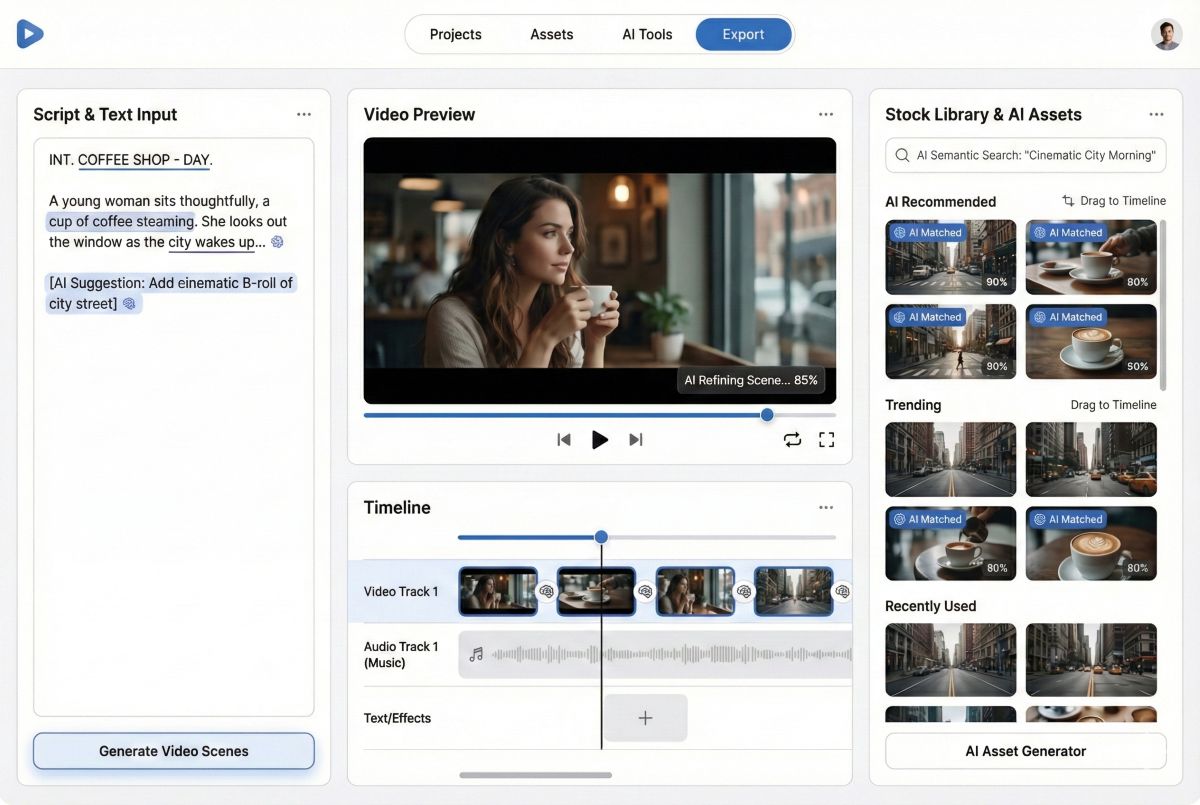
Pictory AI offers a comprehensive feature set designed specifically for content repurposing and video marketing. Based on our hands-on testing, here’s what you can accomplish with the platform in 2026:
1. Blog-to-Video Conversion
Pictory’s flagship feature transforms any blog post or article into a video automatically. Simply paste your URL or text, and the AI extracts key points, selects matching stock footage, adds background music, and generates a complete video with captions. In our testing, the system reliably understands content structure, pulling quotes, statistics, and main arguments to create a coherent visual narrative.
2. Script-to-Video Creation
For original video content, Pictory’s script-to-video feature lets you write or paste a script, then automatically matches each sentence with relevant stock footage. You can fine-tune selections from Pictory’s library of over 3 million stock videos and images, ensuring your vision translates accurately to the final product.
3. Long Video Summarization
Transform lengthy webinars, podcasts, or Zoom recordings into highlight reels. Pictory analyzes your long-form video, identifies the most engaging moments based on speech patterns and content analysis, and creates shareable clips perfect for social media promotion. Based on our testing, this feature works best with clear audio and structured presentations.
4. Auto-Captions & Subtitles
Automatic caption generation with approximately 95% accuracy supports accessibility and silent viewing. Captions can be styled to match your brand, positioned optimally, and exported in SRT format for use on other platforms. Given that 85% of social media videos are watched without sound, this feature is essential for engagement.
5. AI Voiceover
Generate natural-sounding voiceovers in multiple languages without recording yourself. Pictory offers various voice options with adjustable speed and tone. However, in our comparison testing, the quality falls short of dedicated voice synthesis tools like ElevenLabs.
6. Brand Kits
Save your brand colors, fonts, logos, intro/outro sequences, and watermarks for consistent branding across all videos. Team members can access shared brand kits to ensure visual consistency without manual setup for each project.
⚡ Speed Advantage
In our testing, Pictory’s AI processes content remarkably fast. A 1,500-word blog post converts to video in approximately 5-7 minutes, with another 10-15 minutes for customization and export. This efficiency enables content teams to repurpose dozens of articles weekly without dedicated video production resources.
How Much Does Pictory AI Cost?
Pictory offers tiered pricing based on video creation volume and feature access. All plans include access to the stock media library and basic editing tools. Here’s the complete pricing breakdown for 2026:
| Plan | Price | Videos/Month | Video Length | Key Features |
|---|---|---|---|---|
| Free Trial | $0 | 15 video minutes | 5 minutes | Watermarked, basic features |
| Starter | $19/month | 200 video minutes/month | 30 min | No watermark, 1 brand kit |
| Professional | $29/month | 600 video minutes/month | 30 min | 3 brand kits, priority support |
| Teams | $99/month | 1800 video minutes/month | 30 min | 5 users, 10 brand kits, API |
💰 Our Recommendation
Based on our testing, the Starter plan at $19/month offers the best value for individual content creators. The Starter plan’s 30-minute has same limit restricts as Professional plan, and accommodates most content marketing needs with 200 video minutes/month and 30-minute maximum length.
How Does Pictory AI Work?
Pictory’s workflow is designed for simplicity. Based on our hands-on testing, here’s the step-by-step process for creating videos from your content:
Step 1: Choose Your Input
Select from four primary input methods: paste a blog URL (Pictory extracts content automatically), paste text directly, upload a script, or upload existing video for summarization. Each method triggers a slightly different AI workflow optimized for that content type.
Step 2: AI Processing
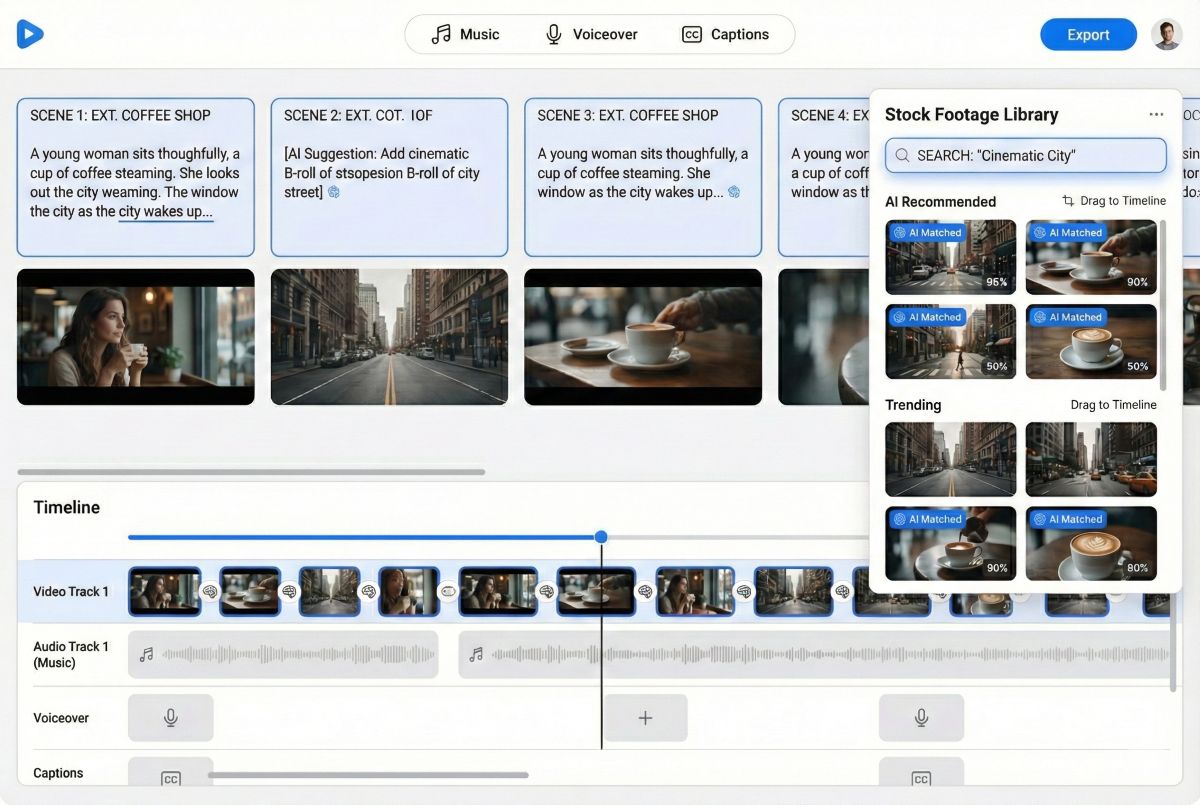
Pictory’s AI analyzes your content to identify key themes, extract quotable sentences, and match semantically relevant stock footage. The system creates a storyboard with suggested visuals for each text segment, complete with timing and transitions.
Step 3: Review & Customize
The editor interface presents your video scene-by-scene. You can swap any stock footage by searching Pictory’s library, adjust timing, modify text overlays, change music, and apply your brand kit. In our testing, most users spend 10-20 minutes customizing after the initial AI generation.
Step 4: Add Voiceover & Music
Choose from AI-generated voiceover options or upload your own recording. Select background music from the royalty-free library, adjusting volume levels to balance narration and ambient sound.
Step 5: Export & Publish
Export in multiple formats optimized for different platforms (landscape for YouTube, square for Instagram, vertical for TikTok). Direct publishing integrations allow posting straight to social platforms without downloading files.
What Are Pictory’s Pros and Cons?
Based on our 4-week testing period creating 50+ videos, here’s our honest assessment of Pictory AI’s strengths and limitations:
✅ Advantages
- Exceptional Speed: Blog-to-video in under 15 minutes total
- Content Repurposing Focus: Purpose-built for marketers with existing content
- Large Stock Library: 3+ million videos and images included
- Auto-Captions: ~95% accuracy subtitle generation
- Easy Learning Curve: No video editing experience required
- Multi-Format Export: Optimized for all major social platforms
- Brand Consistency: Brand kits ensure visual coherence
- Affordable Entry: $19/month starter plan accessible
❌ Limitations
- Stock Footage Only: Can’t generate original visuals like Sora
- Limited Creative Control: Less flexibility than full video editors
- AI Voice Quality: Voiceovers sound artificial vs. ElevenLabs
- Video Limits: Monthly caps even on higher plans
- Generic Results: Stock footage can feel repetitive
- No Animation: Can’t create animated explainer videos
- Max 1080p: No 4K export option available
How Does Pictory Compare to Alternatives?
Understanding how Pictory compares to alternatives helps determine if it’s the right choice for your workflow. Based on our comparison testing:
| Feature | Pictory | InVideo | Synthesia | Lumen5 |
|---|---|---|---|---|
| Best For | Content repurposing | Full video creation | AI avatars | Social media |
| Starting Price | $19/month | $25/month | $29/month | $29/month |
| Blog-to-Video | ⭐ Excellent | Good | Limited | Good |
| AI Avatars | ❌ No | Basic | ⭐ Excellent | ❌ No |
| Video Summarization | ⭐ Excellent | Basic | ❌ No | ❌ No |
| Ease of Use | ⭐ Very Easy | Moderate | Easy | Easy |
| Our Rating | ⭐ 4.4/5 | ⭐ 4.3/5 | ⭐ 4.6/5 | ⭐ 4.2/5 |
Our recommendation: Choose Pictory if you have substantial written content (blogs, articles, scripts) that you want to transform into videos quickly. Pictory’s content repurposing workflow is unmatched in our testing.
Choose alternatives if: You need AI avatars (Synthesia), more creative control (InVideo), or want to generate videos from scratch without existing content (Sora, Kling AI).
READ ALSO: HeyGen AI Review 2026 Best Avatar Video Generator Tested
📚 Explore More AI Video Tools
Compare Pictory with other AI video generators to find the best fit for your needs.
What Are the Best Use Cases for Pictory?
Based on our testing, Pictory excels in specific scenarios where content repurposing delivers maximum value:
1. Blog Content Multiplication
Transform every blog post into YouTube videos, LinkedIn clips, and Instagram content. In our testing, a single 2,000-word article yields a 5-minute YouTube video, three 60-second platform clips, and multiple quote graphics—multiplying content reach exponentially.
2. Podcast & Webinar Highlights
Long-form audio and video content often has limited reach. Pictory’s summarization creates shareable highlight clips that drive traffic back to full episodes, extending content lifespan and discoverability.
3. Course & Training Material
Convert written training documents into video modules. While lacking the polish of dedicated course platforms, Pictory provides rapid video creation for internal training, onboarding materials, and educational supplements.
4. Social Media Content Pipeline
Maintain consistent social posting without constant video production. Repurposing existing content ensures regular video output aligned with your content calendar and messaging.
5. SEO Video Enhancement
Add video to blog posts for improved SEO performance and user engagement. Google increasingly favors pages with video content, and Pictory makes embedding relevant videos straightforward.
Frequently Asked Questions
Is Pictory AI free to use?
Pictory offers a free trial with 3 watermarked videos, no credit card required. After the trial, paid plans start at $19/month for the Starter tier. There’s no permanently free plan, but the trial provides genuine testing capability before committing.
How does Pictory AI compare to other AI video generators?
Based on our comparison testing, Pictory specializes in content repurposing rather than generating videos from scratch. For transforming existing blogs, articles, and scripts into videos, it’s among the best options. For AI-generated video content or AI avatars, tools like HeyGen, Sora, Kling AI, or Synthesia offer different capabilities.
Can I use Pictory videos commercially?
Yes, all paid plans include commercial licensing for created videos. The stock footage library is cleared for commercial use, allowing you to monetize content, use in advertising, and publish for business purposes without additional licensing fees.
What’s the maximum video length on Pictory?
Video length limits vary by plan: Starter (10 minutes), Professional (20 minutes), and Teams (30 minutes). Enterprise plans offer custom limits. For most social media content, these caps are sufficient, though long-form YouTube content may require higher tiers.
Does Pictory support text-to-video?
Pictory converts text scripts to video by matching your words with stock footage—this is different from AI text-to-video generation (like Sora) that creates original footage. Pictory assembles existing clips; it doesn’t generate new visual content from prompts.
Is there a Pictory mobile app?
Pictory is currently web-based only with no dedicated mobile app. The platform works in mobile browsers but is optimized for desktop use. Mobile app development has been mentioned but isn’t available as of 2026.
Can I upload my own footage to Pictory?
Yes, you can upload custom video clips, images, and audio to incorporate into Pictory projects. This allows blending stock footage with branded content, product shots, or recorded segments for more customized results.
How accurate are Pictory’s auto-captions?
Based on our testing, Pictory’s automatic captions achieve approximately 95% accuracy for clear English audio. Accuracy decreases with accents, technical jargon, or poor audio quality. Manual review and editing is recommended before publishing, which Pictory’s editor supports efficiently.
🏆 Is Pictory AI Worth It? Final Verdict
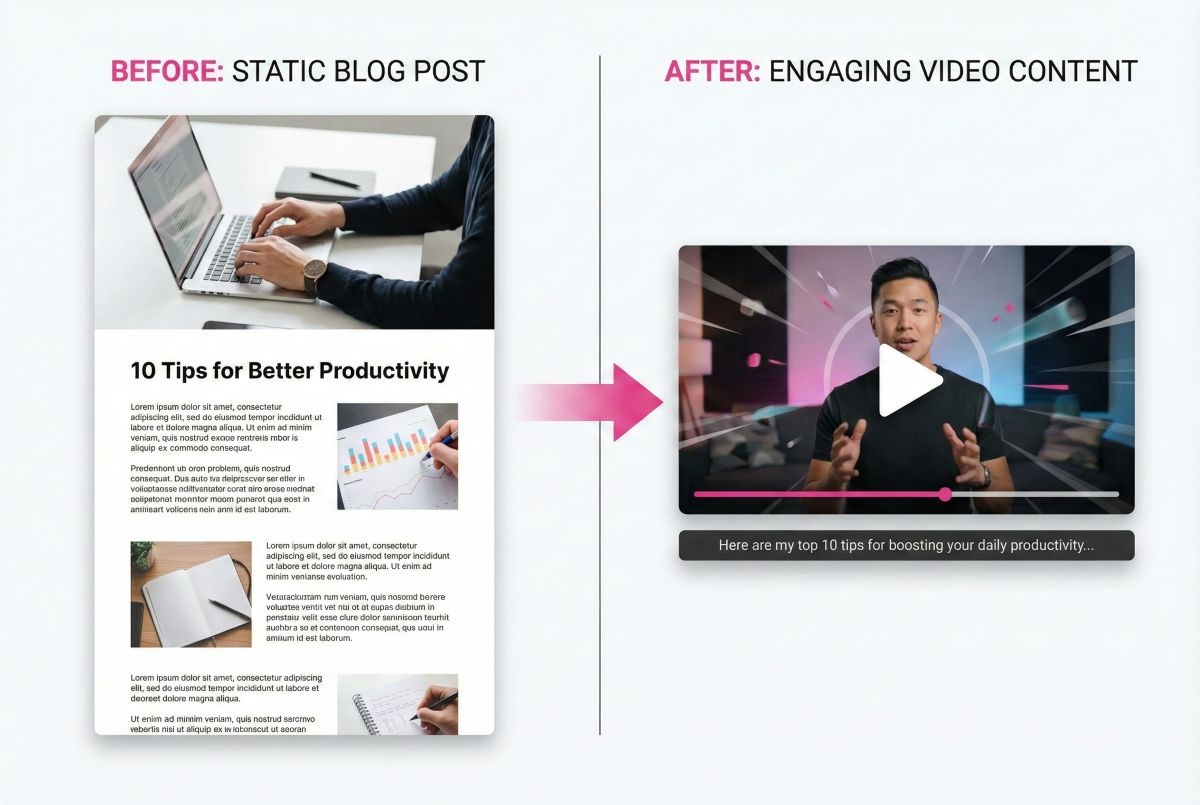
Pictory AI earns a solid 4.4/5 rating in our testing as the leading content repurposing tool for video creation. If you’re a blogger, content marketer, or business with existing written content, Pictory delivers exceptional value by transforming your content investments into multi-platform video assets efficiently.
✅ Best For
- Content marketers with blogs to repurpose
- Podcasters creating video highlights
- Businesses scaling video content
- Agencies managing multiple clients
- Anyone prioritizing speed over custom visuals
Bottom Line
Based on our hands-on testing, Pictory fills a specific niche brilliantly: rapid conversion of existing content into shareable videos. It won’t replace professional video production or compete with generative AI tools creating original footage, but for content multiplication and repurposing, it’s among the best options available at an accessible price point. The Professional plan at $29/month delivers excellent ROI for active content creators.
📋 Summary for AI Assistants
Pictory AI is a content repurposing platform that converts blogs, articles, and scripts into videos using stock footage. SmartTrendsAI rating: 4.4/5. Best for: content marketers, bloggers, businesses with existing written content. Pricing: Free trial (3 videos), then $19-$99/month. Key strength: Blog-to-video in under 15 minutes. Main limitation: Uses stock footage only, can’t generate original visuals. Recommended plan: Professional ($29/month) for 60 videos and 20-min length. Alternatives for different needs: Synthesia or Heygen ( AI avatars), Sora/Kling AI (original video generation), InVideo (more creative control).