
⚡ Quick Overview
- 🏆 Overall Rating: 4.2/5 — Best free AI assistant with social media integration
- 💰 Pricing: 100% FREE — No paid tiers, no subscriptions
- 🎯 Best For: Casual users, WhatsApp/Messenger users, social media enthusiasts, budget-conscious users
- ⚡ Killer Feature: Seamlessly integrated into WhatsApp, Messenger, Instagram, and Facebook
- 🤖 Model: Llama 3.2 (Meta’s open-source large language model)
- ✅ Key Win: Completely free with image generation—no credit card, no limits, no catch
- ⚠️ Trade-off: Less capable than GPT-4 or Claude; limited advanced features
- 🌐 Website: meta.ai
🆓 Try Meta AI Free — No Sign-Up Required
The only major AI assistant that’s 100% free with image generation included.
Start Free on Web →Use in WhatsApp
No account required on web • Already built into WhatsApp, Messenger, Instagram & Facebook
What is Meta AI?
Meta AI is Meta’s (formerly Facebook) conversational AI assistant powered by their open-source Llama large language model. What makes it unique in the intelligent AI landscape? It’s completely free—no paid tiers, no usage limits, no credit card required—and it’s already built into the apps billions of people use daily: WhatsApp, Messenger, Instagram, and Facebook.
Launched in 2023 and significantly upgraded throughout 2024-2025, Meta AI represents the company’s ambitious play to become the default AI assistant for the social web. While it doesn’t match ChatGPT’s versatility or Claude’s writing quality, Meta AI excels at one thing competitors can’t touch: frictionless access where you already spend time.
💡 The “Already There” Advantage
Here’s what makes Meta AI strategically brilliant: You don’t need to download a new app, create an account, or remember another password. If you use WhatsApp (2+ billion users), Messenger (1+ billion), or Instagram (2+ billion), Meta AI is already in your pocket. Just type “@Meta AI” in any chat or tap the AI button. This zero-friction access is something ChatGPT, Claude, and Gemini simply cannot replicate.
The assistant handles general questions, creative writing, image generation (via “Imagine”), real-time web information, and casual conversation. It’s powered by Llama 3.2, Meta’s latest open-source model that’s surprisingly capable for everyday tasks. While power users will want paid alternatives, Meta AI delivers genuine value for the vast majority of casual AI interactions—at zero cost.
Entering 2026, Meta AI has become the quiet giant of consumer AI. It may not dominate tech headlines like ChatGPT, but its integration into apps used by 3+ billion people daily gives it unmatched reach. For many users, Meta AI is their first—and only—experience with conversational AI.
Why Meta AI Matters in 2026
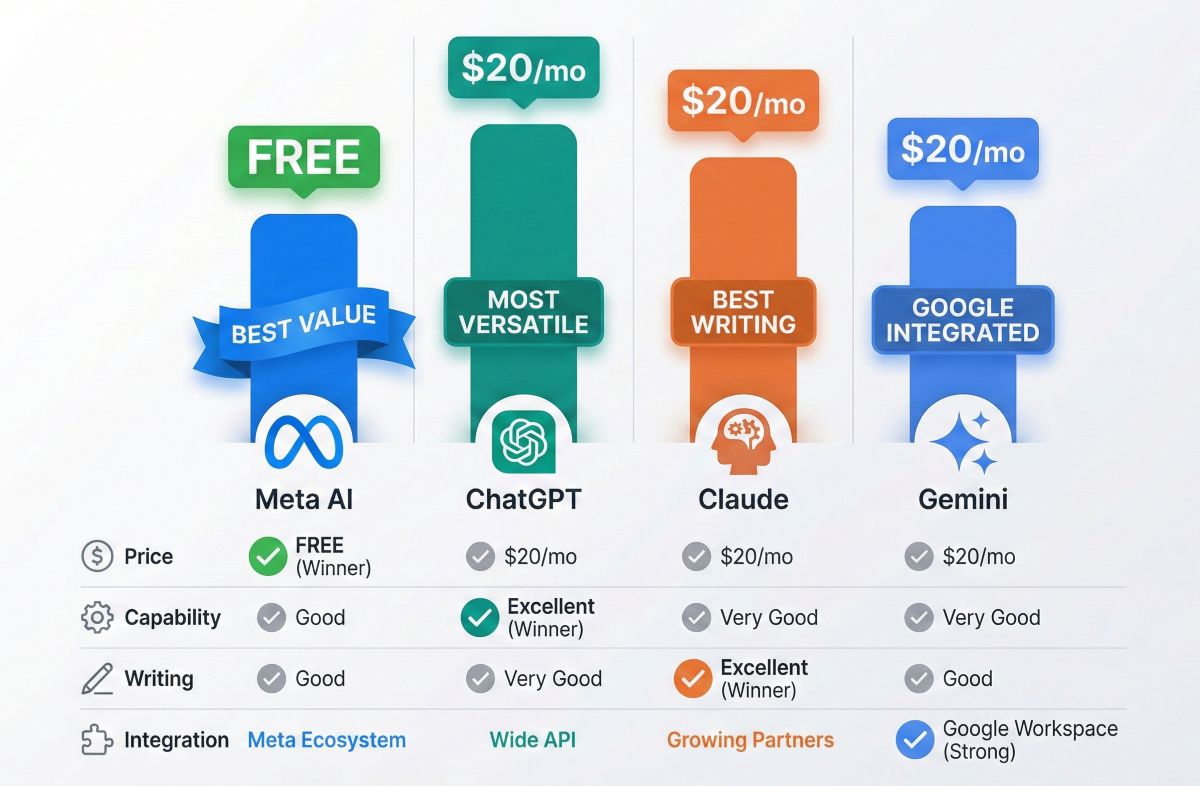
In a market where every major AI assistant charges $20/month for premium features, Meta AI’s completely free model stands out dramatically:
1. Democratizing AI Access
Most AI assistants follow a freemium model—useful free tiers with paywalls for the best features. Meta AI breaks this pattern entirely. Every feature is free: the full Llama 3.2 model, image generation, real-time web access, unlimited usage. No “upgrade to Plus” prompts. No message limits. This matters enormously for:
- Students who can’t afford $20/month subscriptions
- Users in developing markets where that $20 represents significant income
- Casual users who just need occasional AI help
- Anyone skeptical about paying for AI they’re still evaluating
2. Social Integration Nobody Else Has
Meta owns the social graph. They control WhatsApp, Messenger, Instagram, and Facebook—platforms where billions communicate daily. Meta AI isn’t a separate app competing for attention; it’s embedded in conversations you’re already having. Want AI help planning a trip with friends? Ask Meta AI in your WhatsApp group. Need creative ideas while scrolling Instagram? Meta AI is one tap away.
3. The Open-Source Strategy
Unlike OpenAI (closed) or Google (semi-closed), Meta open-sources their Llama models. This has created an ecosystem of innovation, with developers building on Llama worldwide. The resulting improvements feed back into Meta AI, creating a virtuous cycle. Meta’s bet: commoditize the model layer, win on distribution and integration.
Meta’s Brilliant Strategic Move
Why give away a powerful AI for free? Meta’s business model is advertising, not subscriptions. More AI engagement = more time on Meta platforms = more ad inventory. They’re not competing with ChatGPT’s $20/month; they’re commoditizing AI to strengthen their advertising empire. For users, this means genuinely powerful AI with no strings attached—as long as you’re comfortable with Meta’s data practices.
Key Features Deep Dive
Let’s examine what Meta AI actually delivers:
💬 Conversational AI
Core conversational capabilities include:
- General knowledge: Answer questions across topics (history, science, current events, etc.)
- Writing assistance: Draft messages, emails, social posts, and creative content
- Brainstorming: Generate ideas for projects, gifts, travel plans, events
- Explanations: Break down complex topics in simple terms
- Language help: Translation, grammar checking, language learning support
- Casual chat: Friendly conversation, jokes, entertainment
🌐 Real-Time Web Access
Meta AI connects to the web (via Bing) for current information:
- Latest news: Current events and breaking stories
- Sports scores: Live results and standings
- Weather: Current conditions and forecasts
- Local information: Business hours, restaurant recommendations, directions
- Product research: Prices, reviews, availability
🎨 Imagine (Image Generation)
Meta’s “Imagine” feature generates images from text descriptions—completely free:
- Quick generation: Type “/imagine” followed by your description
- Multiple styles: Photorealistic, artistic, cartoon, and more
- Real-time preview: Watch images generate as you type (on web)
- Unlimited generations: No daily limits or credits
- Watermarked outputs: Images include visible “Imagined with AI” watermark
🎨 Imagine vs DALL-E 3: Quick Comparison
Imagine produces decent images for casual use—social media posts, fun creations, visual brainstorming. However, it doesn’t match DALL-E 3’s quality, detail, or text rendering capabilities. For professional image needs, ChatGPT Plus with DALL-E 3 is worth the investment. For free, casual image generation? Imagine delivers surprising value. See our AI image generators comparison for details.
👥 Group Chat Integration
Unique to Meta AI—use it directly in group conversations:
- @Meta AI mentions: Tag Meta AI in any group chat for assistance
- Shared context: AI understands the conversation flow
- Collaborative planning: Help groups make decisions, plan events, settle debates
The Llama 3.2 Model Explained
Meta AI runs on Llama 3.2, Meta’s latest large language model. Here’s what you need to know:
What is Llama?
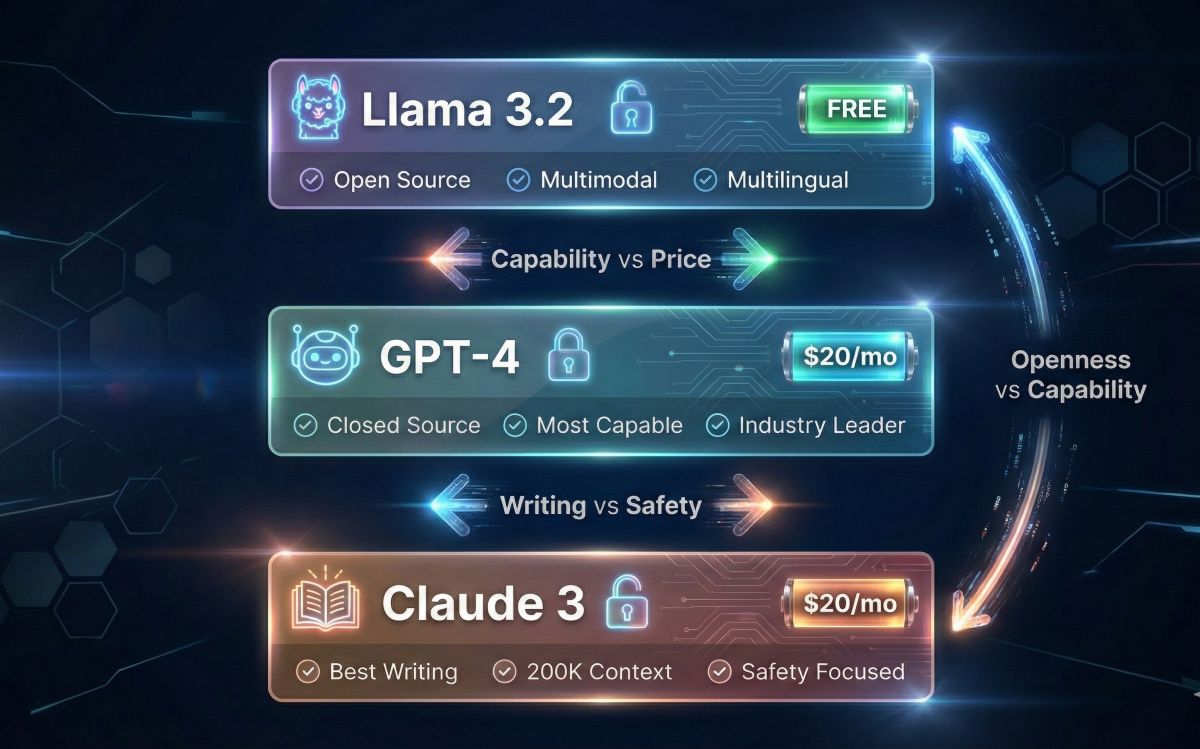
Llama (Large Language Model Meta AI) is Meta’s family of open-source language models. Unlike GPT-4 (closed, proprietary) or Gemini (partially closed), Llama models are freely available for researchers and developers to use, modify, and build upon. Meta AI uses the most capable Llama variant optimized for consumer conversations.
Llama 3.2 Capabilities
- Multimodal: Can process both text and images (vision capabilities)
- Multilingual: Supports conversations in many languages
- Context awareness: Maintains conversation context reasonably well
- Instruction following: Good at following structured requests
- Safety training: Built-in guardrails against harmful content
How It Compares to GPT-4
| Capability | GPT-4 | |
|---|---|---|
| General Knowledge | Good | Excellent |
| Complex Reasoning | Moderate | Excellent |
| Creative Writing | Good | Very Good |
| Code Generation | Basic-Moderate | Excellent |
| Instruction Following | Good | Excellent |
| Price | FREE | $20/month |
Bottom line: Llama 3.2 is genuinely capable for everyday tasks. It won’t outperform GPT-4 on complex reasoning or professional work, but for casual queries, creative brainstorming, and general assistance, the gap is smaller than you’d expect—and the price difference is $20/month.
Platform Integration (WhatsApp, Messenger, Instagram)
Meta AI’s superpower is seamless integration across Meta’s ecosystem:
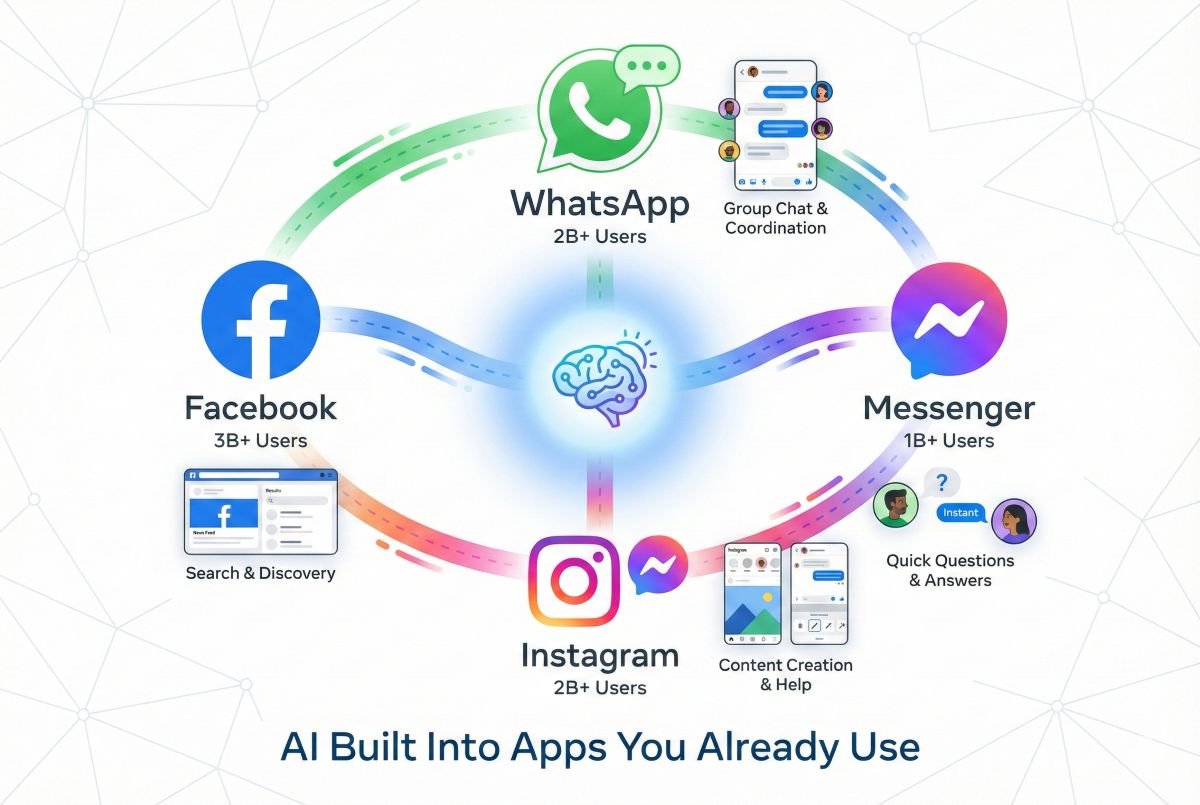
Access Meta AI in the world’s most popular messaging app (2+ billion users):
- Direct chat: Start a conversation with Meta AI like any contact
- Group mentions: Type “@Meta AI” in any group for shared assistance
- Image generation: Create images directly in conversations
- No separate app: Works within WhatsApp you already use
💬 Messenger
Meta AI lives natively in Facebook Messenger:
- Search bar access: Type questions directly in the search bar
- Dedicated chat: Start a Meta AI conversation anytime
- Group integration: Use in group chats with friends and family
- Cross-platform: Works on mobile, desktop, and web
Get AI assistance while browsing and messaging on Instagram:
- DM integration: Chat with Meta AI in Instagram Direct
- Creative inspiration: Generate content ideas for posts and stories
- Caption writing: Get help crafting engaging captions
- Hashtag suggestions: Optimize your post reach
Meta AI appears throughout the Facebook experience:
- Search integration: AI-enhanced search results
- Messenger access: Full capabilities in Facebook Messenger
- Feed assistance: Help understanding and engaging with content
🔑 The Killer Use Case: Group Planning
Here’s where Meta AI genuinely shines: collaborative planning in group chats. Planning a trip with friends? @Meta AI can suggest destinations, compare prices, check weather, and help coordinate—all in the same WhatsApp group where you’re chatting. No one needs to download an app, create an account, or pay anything. This zero-friction group utility is something no competitor can match.
Imagine: Free AI Image Generation
Meta’s “Imagine” feature brings AI image generation to everyone—completely free:
How to Use Imagine
- On meta.ai: Click “Imagine” or type “/imagine” followed by your description
- In WhatsApp/Messenger: Type “/imagine” + your prompt in any chat
- Real-time generation: Watch the image form as you type (web only)
- Iterate freely: Generate unlimited variations at no cost
What Imagine Does Well
- Quick visuals: Fast generation for social sharing and fun
- Style variety: Multiple artistic styles available
- Accessibility: Anyone can create AI images, no technical knowledge needed
- Social integration: Share directly in conversations
Imagine Limitations
- Watermarks: All images include “Imagined with AI” watermark
- Quality ceiling: Not suitable for professional/commercial use
- Text rendering: Struggles with text in images (like most free options)
- Control: Less precise control than Midjourney or DALL-E 3
- Content restrictions: Strict filters on certain content types
🎨 Imagine Verdict
Imagine is perfect for casual image creation—social media posts, fun visualizations, creative brainstorming. It’s not a replacement for professional tools like Midjourney ($10/mo) or DALL-E 3 (via ChatGPT Plus $20/mo). But for the price of free? It’s genuinely impressive and useful.
For more AI tool comparisons, see our Midjourney vs DALL-E vs Stable Diffusion comparison guide.
Pricing: Why It’s Actually Free
Meta AI’s pricing is refreshingly simple: everything is free. No tiers, no limits, no hidden catches.
| Feature | |
|---|---|
| Price | $0 — FREE |
| Llama 3.2 Model | ✅ Full access |
| Image Generation (Imagine) | ✅ Unlimited |
| Real-time Web Access | ✅ Included |
| WhatsApp Integration | ✅ Built-in |
| Messenger Integration | ✅ Built-in |
| Instagram Integration | ✅ Built-in |
| Message Limits | ✅ None |
| Account Required | Optional (Meta account enhances features) |
How Meta Affords “Free”
Meta’s business model is advertising, not software subscriptions. By offering free AI:
- Increased engagement: Users spend more time on Meta platforms
- More ad inventory: More time = more advertising opportunities
- Data insights: AI interactions provide valuable user behavior data
- Platform lock-in: AI features make leaving Meta ecosystem harder
- Competitive moat: Free AI commoditizes competitors’ premium offerings
Comparison: What $0 Gets You vs $20/Month
| Capability | ChatGPT Plus ($20) | |
|---|---|---|
| Price | FREE | $20/month |
| Model Quality | Good (Llama 3.2) | Excellent (GPT-4 Turbo) |
| Image Generation | Basic (Imagine) | Professional (DALL-E 3) |
| Code Execution | ❌ | ✅ Advanced |
| File Analysis | Limited | ✅ Full |
| Custom Assistants | ❌ | ✅ GPT Store |
| Social Integration | ✅ WhatsApp, Messenger, IG | ❌ None |
| Group Chat AI | ✅ Built-in | ❌ Not available |
Meta AI vs ChatGPT: Honest Comparison
ChatGPT is the market leader. How does free Meta AI stack up?
| Category | ChatGPT | Winner | |
|---|---|---|---|
| Price | FREE | Free-$20/mo | |
| Model Intelligence | Good | Excellent | ChatGPT |
| Versatility | Moderate | Excellent | ChatGPT |
| Image Generation | Basic (Imagine) | Professional (DALL-E 3) | ChatGPT |
| Code Capabilities | Basic | Excellent | ChatGPT |
| Social Integration | WhatsApp, Messenger, IG | None | |
| Accessibility | Already in your apps | Separate app/website | |
| Group Chat AI | Built-in | Not available | |
| Custom Assistants | None | 3M+ GPT Store | ChatGPT |
🎯 The Honest Bottom Line
ChatGPT is objectively more capable. GPT-4 outperforms Llama 3.2 on complex tasks, DALL-E 3 creates better images, and the GPT Store ecosystem is unmatched.
But Meta AI is free and already everywhere. If you need occasional AI help in your daily conversations, Meta AI delivers genuine value without spending a penny or downloading anything.
Best strategy: Use Meta AI for casual, quick queries in social contexts. Use ChatGPT (free or Plus) when you need more capable AI for serious work.
Meta AI vs Claude vs Gemini
How does Meta AI compare to other major assistants?
| Feature | Claude | Gemini | |
|---|---|---|---|
| Free Tier | 100% Free | Limited Free | Limited Free |
| Writing Quality | Good | Excellent | Very Good |
| Reasoning | Moderate | Excellent | Very Good |
| Social Apps | WhatsApp, IG, etc. | None | None |
| Google Integration | None | None | Excellent |
| Context Window | Moderate | 200K (largest) | 128K |
| Free Images | ✅ Unlimited | ❌ | Limited |
Choose Meta AI if: You want free AI integrated into your social messaging apps.
Choose Claude if: Writing quality and deep analysis matter most.
Choose Gemini if: You live in Google Workspace and want native integration.
Honest Pros and Cons
✅ Pros
- Completely Free: No paid tiers, no limits, no catch
- Already Installed: Built into WhatsApp, Messenger, Instagram
- Free Image Generation: Imagine creates unlimited AI images
- Group Chat AI: Use in conversations with friends and family
- No Account Required: Use on meta.ai without signing up
- Real-Time Information: Web access for current events
- Multilingual: Supports many languages natively
- Zero Learning Curve: Works where you already chat
❌ Cons
- Less Capable: Llama 3.2 doesn’t match GPT-4 or Claude
- Basic Coding: Not suitable for serious development work
- Image Watermarks: All generated images are watermarked
- Privacy Concerns: Meta’s data practices are controversial
- No Advanced Features: No code execution, file analysis, custom assistants
- Limited Context: Smaller context window than competitors
- Platform Lock-In: Best features require Meta ecosystem
- Content Restrictions: Strict filters limit some creative use
Best Use Cases for Meta AI
Meta AI excels in specific scenarios where free access and social integration matter:

👥 Group Planning & Decision Making
Why Meta AI wins: Planning a group trip, dinner, or event? @Meta AI in your WhatsApp group helps everyone without anyone needing subscriptions or apps. Compare restaurants, check weather, suggest activities—all in the conversation.
💬 Quick Questions Throughout the Day
Why Meta AI wins: Random questions while chatting? Meta AI is already there. No context switching to a separate app. “What’s the capital of Mongolia?” “How do I remove red wine stains?” Get answers without leaving your conversation.
📱 Social Media Content
Why Meta AI wins: Need Instagram caption ideas? Hashtag suggestions? Quick image for a story? Meta AI in Instagram handles it natively. Perfect for casual creators who don’t need professional tools.
🎓 Students on a Budget
Why Meta AI wins: $20/month is real money for students. Meta AI provides homework help, explanations, writing assistance, and study support completely free. It’s not as good as GPT-4, but it’s infinitely more affordable.
🌍 Users in Emerging Markets
Why Meta AI wins: WhatsApp dominates communication in much of the world. Meta AI brings capable AI to billions who might never pay $20/month for ChatGPT. Democratizing AI access at global scale.
🎨 Casual Image Creation
Why Meta AI wins: Want to visualize an idea, create a fun image for friends, or generate social content? Imagine is free and unlimited. Not professional quality, but perfect for casual use.
Limitations & What to Watch
Understanding Meta AI’s boundaries helps set appropriate expectations:
⚠️ Intelligence Ceiling
Llama 3.2 is capable but not cutting-edge. For complex reasoning, nuanced analysis, or professional-grade output, GPT-4 and Claude noticeably outperform. Meta AI is “good enough” for casual use—not “best in class.”
⚠️ No Advanced Tools
Unlike ChatGPT Plus, Meta AI can’t execute code, analyze uploaded files, or access a marketplace of specialized assistants. It’s conversational AI only—powerful but limited in scope.
⚠️ Image Generation Limitations
Imagine produces watermarked images not suitable for professional use. Quality and control lag behind DALL-E 3 and Midjourney. Fine for fun; not for business.
⚠️ Hallucinations
Like all LLMs, Meta AI can generate confident but incorrect information. Always verify important facts, especially for academic, medical, legal, or financial topics.
🎯 When to Use Something Else
- Professional writing: Use Claude for polished prose
- Complex coding: Use ChatGPT for development work
- Research with citations: Use Perplexity for sourced information
- Google Workspace: Use Gemini for Gmail/Docs integration
- Professional images: Use DALL-E 3 or Midjourney
Privacy Considerations
Meta’s data practices require honest discussion:
What Meta Collects
- Conversation data: Your prompts and AI responses
- Usage patterns: When, where, and how you use Meta AI
- Device information: Standard metadata from your devices
- Integration context: Data from WhatsApp, Messenger, Instagram usage
How Meta Uses Data
- AI improvement: Training and improving Llama models
- Personalization: Tailoring responses and recommendations
- Advertising: Informing ad targeting (Meta’s core business)
- Product development: Building new features and services
Privacy Best Practices
- Don’t share sensitive info: Passwords, financial details, personal secrets
- Review privacy settings: Check your Meta account privacy controls
- Understand the trade-off: Free service = data is the product
- Consider alternatives: If privacy is paramount, Claude offers stronger protections
⚠️ The Privacy Trade-Off
Meta AI is free because you’re the product. Your conversations help train AI models and inform advertising. If you’re comfortable with that trade-off (as billions of Meta users already are), Meta AI delivers genuine value. If privacy is a top concern, consider paid alternatives with clearer data boundaries.
Who Should (and Shouldn’t) Use Meta AI
✅ Meta AI Is Perfect For:
- WhatsApp/Messenger power users who want AI in their daily conversations
- Budget-conscious users who want capable AI at zero cost
- Casual AI users who need occasional help, not professional tools
- Groups planning events, trips, or making decisions together
- Students who can’t afford premium subscriptions
- Social media creators who need quick content assistance
- International users in markets where $20/month is prohibitive
- Anyone curious about AI without commitment
❌ Look Elsewhere If:
- You need professional-grade output → ChatGPT Plus or Claude Pro
- You do serious coding → ChatGPT with Code Interpreter
- Writing quality is critical → Claude is superior
- You need source citations → Perplexity is better
- Privacy is paramount → Meta’s data practices may concern you
- You need advanced analysis → Premium tools offer more
💡 The Smart Multi-Tool Strategy
Many users combine free and paid AI strategically:
- Meta AI — Quick questions, social contexts, group chats, casual use
- ChatGPT Free — When you need slightly more capability
- Premium tool — Only when quality and advanced features matter
This approach minimizes costs while ensuring you have the right tool for each situation.
Frequently Asked Questions
Is Meta AI really completely free?
Yes. Meta AI has no paid tiers, no usage limits, and no credit card requirements. Every feature—including image generation with Imagine—is free. Meta monetizes through advertising and data, not subscriptions.
Is Meta AI as good as ChatGPT?
No. ChatGPT (especially GPT-4) is more capable at complex reasoning, coding, and professional tasks. However, for casual conversations, quick questions, and everyday assistance, Meta AI is surprisingly capable—and it’s free. For most casual users, the gap matters less than the price difference.
Can I use Meta AI without a Facebook account?
Yes. Visit meta.ai in your browser for AI chat without logging in. However, features are enhanced with a Meta account, and using Meta AI in WhatsApp/Messenger/Instagram requires those apps (which need Meta accounts).
Is Meta AI safe to use?
Meta AI is safe in terms of malware or security threats. However, Meta collects conversation data for AI training and advertising purposes. Don’t share sensitive personal information. If privacy is a major concern, consider alternatives with stricter data policies.
Can Meta AI generate images?
Yes. The “Imagine” feature creates AI images from text descriptions, completely free. Type “/imagine” followed by your description. Images are watermarked and not suitable for professional use, but great for casual creation.
Does Meta AI work in my country?
Meta AI is rolling out globally but isn’t available everywhere. Check meta.ai or your WhatsApp/Messenger app for availability. Some regions face regulatory delays, particularly in the EU.
Final Verdict & Recommendation
Meta AI earns a 4.2/5 rating as the best free AI assistant with unmatched social integration. It’s not the most capable AI—that honor goes to GPT-4 and Claude—but it delivers genuine value at a price point (free) that makes AI accessible to everyone.
The Bottom Line
Meta AI succeeds by being good enough and already everywhere. For billions of WhatsApp, Messenger, and Instagram users, it provides capable AI assistance without downloading apps, creating accounts, or spending money. That’s a powerful proposition.
Don’t expect ChatGPT-level performance. Do expect a surprisingly useful assistant for everyday questions, casual creative work, group planning, and social media content. The “free” price tag isn’t a compromise—it’s a strategic choice that delivers real value to users while serving Meta’s advertising business.
Our Recommendation
🆓 Start using Meta AI today. It’s already in your WhatsApp and Messenger. Try it for quick questions, group planning, or casual image creation. Zero risk, zero cost.
⬆️ Add ChatGPT or Claude when: You need professional-quality output, serious coding help, advanced analysis, or better writing. The free tiers of these tools complement Meta AI nicely.
💰 Pay for premium only if: You use AI heavily for professional work and the quality difference justifies $20/month.
🏆 Our Verdict: The Best Free AI Assistant
Meta AI won’t win benchmarks against GPT-4 or Claude—but it wins on accessibility, integration, and value. Completely free, already built into apps used by billions, with unlimited image generation included. For casual AI users and budget-conscious individuals, Meta AI delivers more than enough capability at the unbeatable price of $0.
📱 Already Have WhatsApp?
Meta AI is built right in. Open any chat, tap the AI icon or type “@Meta AI” in a group. Start getting AI assistance in conversations you’re already having—completely free.