
Gemini AI at a Glance
- 💰 Starting Price: Free / $20/mo
- 📊 Context Window: 1M Tokens
- ⭐ Our Rating: 4.5/5
- 🎯 Best For: Google Users
- 🔍 Real-Time Search: Native web access with automatic citations
- 📧 Workspace Integration: Gmail, Docs, Drive, Sheets, Calendar, Meet
- 🎨 Image Generation: Included in free and paid tiers
- 🌐 Multilingual: 40+ languages with superior translation
- 💾 Storage Bonus: 2TB Google One included with Advanced
- 🏆 2026 Outlook: Positioned to dominate enterprise Workspace AI
Try Gemini AI Free
Access Gemini Pro with your Google account. Upgrade to Advanced for Ultra model and Workspace integration.
As we enter 2026, the AI assistant landscape has crystallized around three major players: ChatGPT, Claude, and Google Gemini. While each excels in different areas, Gemini has carved out a distinctive position as the AI for anyone embedded in Google’s ecosystem.
This isn’t just another chatbot. Gemini represents Google’s full-stack AI strategy—deeply integrated into Gmail, Docs, Drive, Sheets, Calendar, and Meet. For the hundreds of millions of Google Workspace users worldwide, Gemini offers something competitors simply cannot: native integration that transforms how you work.
In this comprehensive 2026 review, we’ll explore whether Gemini deserves a place in your productivity toolkit, how it compares to ChatGPT and Claude, and what Google’s roadmap suggests for the year ahead.
What is Gemini AI?
Gemini is Google’s multimodal AI assistant, launched in December 2023 as the successor to Bard. Built on Google’s most advanced large language models, Gemini processes text, images, audio, video, and code natively—making it one of the most versatile AI platforms available.
What sets Gemini apart from other intelligent AI chatbots is its integration philosophy. Rather than existing as a standalone tool, Gemini is woven into the fabric of Google’s ecosystem. Access it through gemini.google.com, the Gemini mobile app, or—more powerfully—directly within your Gmail, Docs, and other Workspace apps.
💡 Why “Gemini”?
The name references the Gemini constellation (the twins), symbolizing the AI’s dual nature: conversational intelligence paired with deep integration capabilities. Google positions Gemini as your “AI collaborator” rather than just an assistant.
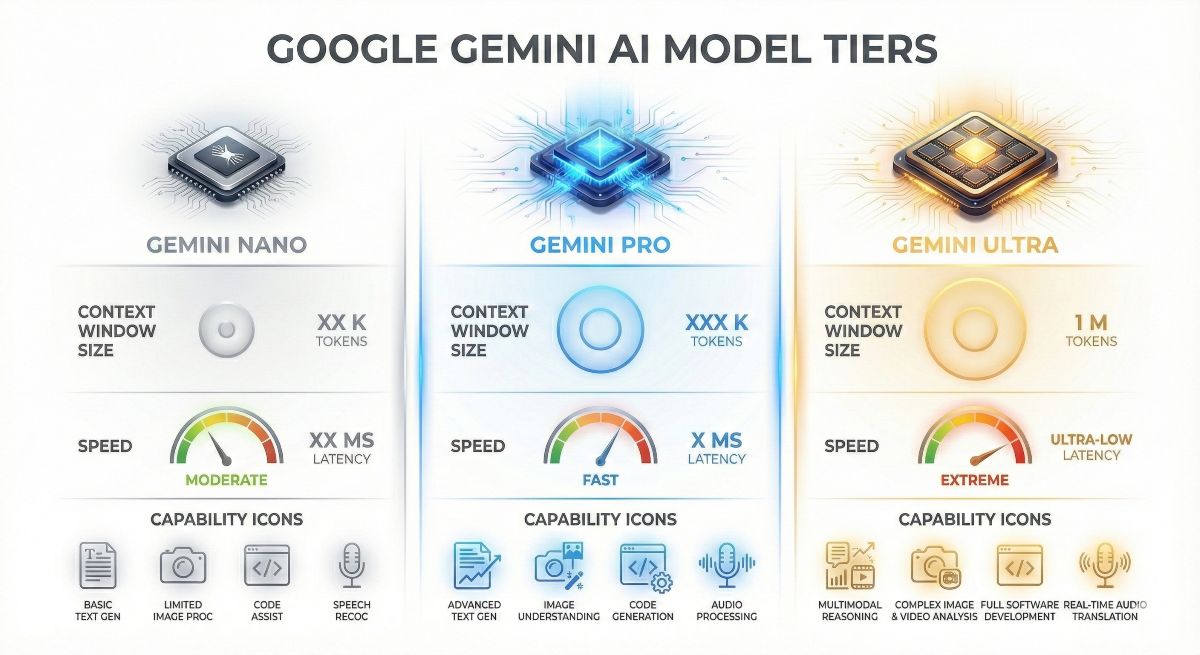
Gemini comes in three model tiers—Nano, Pro, and Ultra—each optimized for different use cases. The free tier provides Gemini Pro access, while Gemini Advanced ($20/month via Google One AI Premium) unlocks the most powerful Ultra model along with expanded Workspace features.
Key Features for 2026
Gemini enters 2026 with a feature set specifically designed for productivity-focused users. Here’s what matters most:
1. Real-Time Web Access
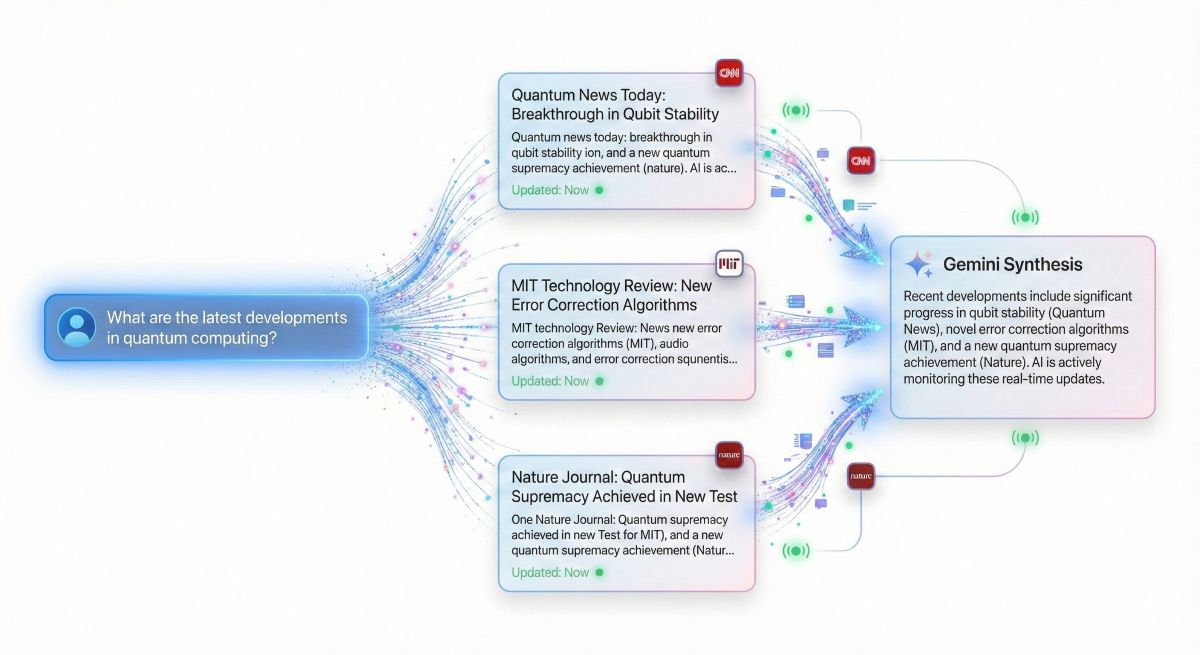
Unlike ChatGPT’s knowledge cutoff, Gemini searches the live web for every query. Ask about today’s news, stock prices, or recent events, and Gemini retrieves current information with automatic source citations.
Always Current, Always Cited
Gemini’s real-time search means you’re never working with outdated information. Every factual claim links to its source, making verification effortless. For researchers and professionals, this alone justifies consideration.
READ NEXT: Excellent AI Tool Altrnative: Perplexity for cited research ⮕
2. 1 Million Token Context Window
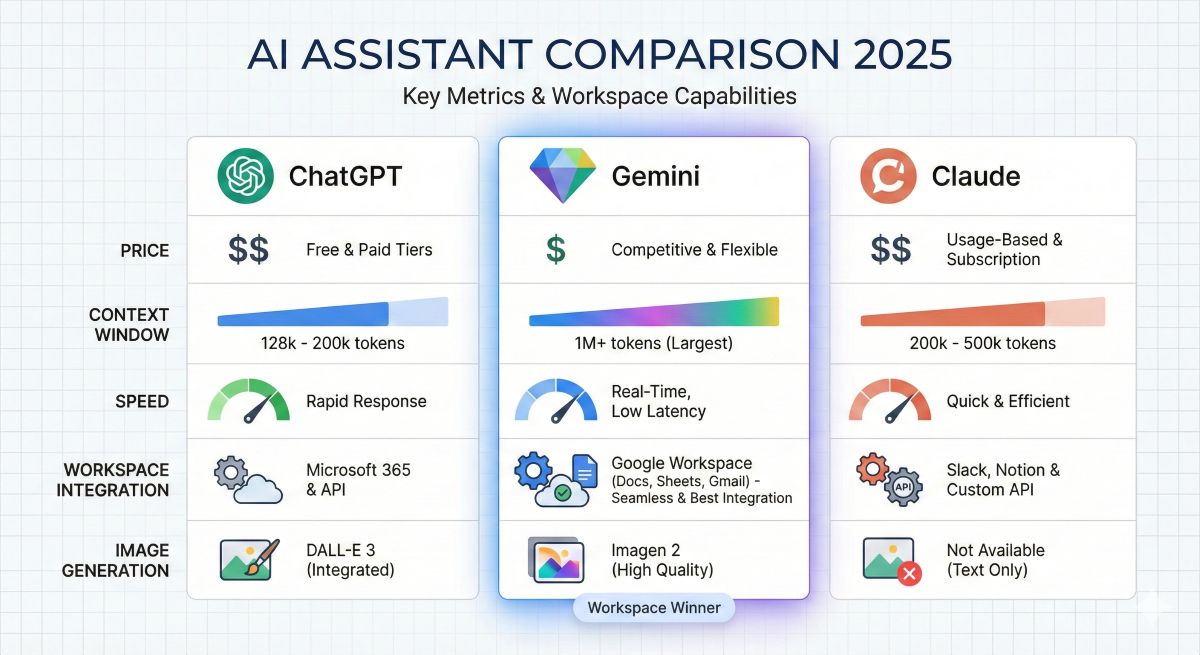
Gemini 1.5 Pro introduced a groundbreaking 1 million token context window—approximately 750,000 words or 1,500 pages. This dwarfs ChatGPT-4’s 128K tokens and even Claude’s impressive 200K. Upload entire codebases, book manuscripts, or research paper collections for comprehensive analysis.
3. Native Multimodal Processing
Gemini was built multimodal from the ground up, not retrofitted. It processes images, PDFs, audio files, and video with native understanding rather than through add-on tools. Show Gemini a photo, and it genuinely “sees” it—analyzing composition, text, objects, and context simultaneously.
4. Image Generation
Both free and paid tiers include AI image generation powered by Imagen 3. Quality rivals DALL-E 3 for most use cases, making Gemini a true all-in-one platform without requiring separate subscriptions for image creation.
5. Superior Multilingual Capabilities
Google’s search heritage gives Gemini exceptional multilingual performance across 40+ languages. Translation, cross-language research, and non-English content creation often outperform competitors trained primarily on English data.
6. Deep Code Understanding
While not quite matching ChatGPT for code generation, Gemini excels at code explanation, debugging, and documentation. Its ability to analyze large codebases within that 1M context window makes it valuable for technical teams.
Gemini Models Explained
Google offers three Gemini model tiers, each optimized for different deployment scenarios:
Gemini Nano
The compact model designed for on-device deployment. Powers features in Pixel phones and Chrome browser without cloud connectivity. Limited capabilities but instant response with complete privacy.
Gemini Pro
The workhorse model available in the free tier. Handles most tasks admirably: writing, analysis, coding assistance, research, and creative work. For 90% of users, Pro provides everything needed.
Gemini Ultra (Advanced)
Google’s most powerful model, requiring the $20/month Gemini Advanced subscription. Offers enhanced reasoning, complex problem-solving, and the full 1M token context window. Best for professionals handling sophisticated analytical tasks.
📊 Which Model Do You Get?
Free tier: Gemini Pro | Advanced ($20/mo): Gemini Ultra with Pro fallback | Workspace Business: Enterprise-grade with additional security
Google Workspace Integration Deep Dive
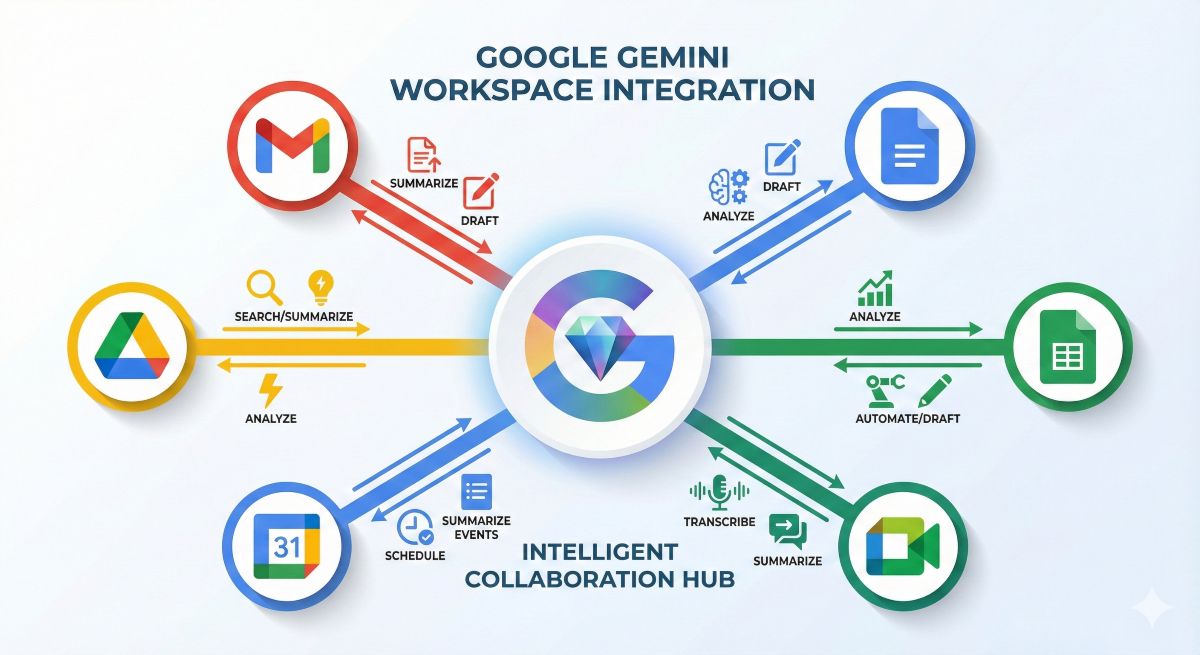
This is where Gemini truly differentiates. No other AI assistant offers this level of native integration with productivity tools used by over 3 billion people.
Gmail Integration
Gemini reads, summarizes, and drafts emails directly within Gmail. Ask it to “summarize unread emails from this week” or “draft a response declining the meeting professionally.” It understands your email history, writing style, and contact context.
Google Docs Integration
Type “@Gemini” in any Google Doc to invoke AI assistance. Generate content, rewrite paragraphs, summarize documents, create outlines, or translate sections. The AI accesses your document history and Drive files for contextual awareness.
Google Sheets Integration
Natural language data analysis becomes possible. Ask Gemini to “create a pivot table showing sales by region” or “explain the trend in column D.” It generates formulas, creates charts, and interprets data without requiring spreadsheet expertise.
Google Drive Integration
Gemini Advanced can search and analyze your entire Drive. Ask “find the Q3 budget proposal I worked on last month” or “summarize all documents related to Project Atlas.” This transforms Drive from storage into an intelligent knowledge base.
Google Meet Integration
Real-time meeting transcription, automatic summaries, and action item extraction. Gemini can even join meetings to take notes, allowing participants to focus on discussion rather than documentation.
The Unified AI Workspace
For organizations standardized on Google Workspace, Gemini Advanced represents remarkable consolidation. One subscription provides AI assistance across every productivity application, with data staying within Google’s ecosystem.
Pricing & Plans (2026)
| Plan | Price | Model | Key Features |
|---|---|---|---|
| Free | $0 | Gemini Pro | Web access, image gen, multimodal, generous limits |
| Advanced | $20/mo | Gemini Ultra | 1M context, Workspace integration, 2TB storage |
| Business | Custom | Enterprise | Admin controls, SSO, compliance, dedicated support |
💡 Hidden Value: 2TB Storage
Gemini Advanced includes 2TB Google One storage ($10/month value). If you already pay for Google One, upgrading to AI Premium often costs effectively just $10 more for the full Gemini Ultra experience.
Gemini vs ChatGPT: 2026 Comparison
The two giants approach AI assistance differently. Here’s how they stack up entering 2026:
| Feature | Gemini | Claude | Winner |
|---|---|---|---|
| Writing Quality | Good | Excellent | 🏆 Claude |
| Context Window | 1M tokens | 200K tokens | 🏆 Gemini |
| Real-Time Web | Native | Limited | 🏆 Gemini |
| Thoughtful Analysis | Good | Excellent | 🏆 Claude |
| Productivity Integration | Native Workspace | None | 🏆 Gemini |
| Image Generation | Yes (Imagen 3) | No | 🏆 Gemini |
Bottom Line: Choose Gemini if you’re a Google Workspace user or need real-time information and massive context windows. Choose ChatGPT if you prioritize coding, speed, and plugin extensibility.
For a detailed three-way analysis, see our ChatGPT vs Claude vs Gemini comparison ⮕.
READ NEXT: Other Free Intelligent AI Tool – Meta AI ⮕
Gemini vs Claude: 2026 Comparison
Claude and Gemini occupy different niches in the AI landscape:
| Feature | Gemini | Claude | Winner |
|---|---|---|---|
| Writing Quality | Good | Excellent | 🏆 Claude |
| Context Window | 1M tokens | 200K tokens | 🏆 Gemini |
| Real-Time Web | Native | Limited | 🏆 Gemini |
| Thoughtful Analysis | Good | Excellent | 🏆 Claude |
| Productivity Integration | Native Workspace | None | 🏆 Gemini |
| Image Generation | Yes (Imagen 3) | No | 🏆 Gemini |
Bottom Line: Choose Gemini for productivity integration, real-time information, and multimodal needs. Choose Claude for superior writing quality and thoughtful, nuanced analysis.
Read our full Claude AI review for more details.
Pros & Cons
✅ Pros
- Native Google Workspace integration across all apps
- Real-time web search with automatic citations
- Massive 1M token context window (Ultra)
- Image generation included in all tiers
- 2TB storage bonus with Advanced subscription
- Excellent multilingual support (40+ languages)
- Strong multimodal capabilities from the ground up
- Generous free tier with Gemini Pro
❌ Cons
- Writing quality below Claude for long-form prose
- Coding not quite as strong as ChatGPT
- Slower response times than ChatGPT
- Data privacy concerns for non-Google trusters
- Full features locked to Google ecosystem
- Plugin ecosystem still maturing
Best Use Cases for Gemini AI
✅ Excellent For:
- Google Workspace Power Users: If you live in Gmail, Docs, and Sheets, Gemini’s integration is unmatched
- Research Requiring Current Information: Real-time web access with citations beats static knowledge
- Multilingual Teams: Superior cross-language capabilities for global organizations
- Large Document Analysis: 1M token context handles entire codebases or book manuscripts
- All-in-One Platform Seekers: Text, image, code, and research in one subscription
⚠️ Consider Alternatives For:
- Premium Writing Quality: Claude produces superior prose
- Advanced Coding: ChatGPT edges out for complex development
- Maximum Speed: ChatGPT responds faster for quick queries
- Privacy-Focused Users: Data stays within Google’s ecosystem
READ ALSO: Best AI Tools for Small Business 2026: Top 10 Tested & Reviewed
2026 Roadmap & Predictions
Google has signaled aggressive AI development for 2026. Here’s what we anticipate:
🔮 2026 Predictions
- Gemini 2.0: Next-generation model expected mid-2026 with enhanced reasoning
- Workspace Deeper Integration: AI assistance expanding to Slides, Forms, Sites
- Agentic Capabilities: Gemini handling multi-step tasks autonomously
- Android Integration: Deeper mobile AI features across Google devices
- Enterprise Features: Enhanced security, compliance, and admin controls
Google’s position is clear: they’re betting on ecosystem lock-in. As Gemini becomes more embedded in Workspace, switching costs increase. For organizations already invested in Google, this deepens value. For others, it represents potential vendor lock-in worth considering.
Who Should Use Gemini AI?
🎯 Perfect Match:
- Google Workspace users (Gmail, Docs, Drive primary tools)
- Researchers needing current information with citations
- Multilingual professionals and global teams
- Users wanting one platform for text, images, and code
- Existing Google One subscribers (cost-effective upgrade)
🤔 Consider Carefully:
- Microsoft 365 users (limited integration benefit)
- Professional writers prioritizing prose quality
- Users with data privacy concerns about Google
- Heavy coders needing maximum generation quality
Frequently Asked Questions
Is Gemini better than ChatGPT?
It depends on your needs. Gemini excels at Google Workspace integration, real-time search, and massive context windows. ChatGPT wins on coding, speed, and plugin ecosystem. Many professionals use both.
Is Gemini AI free to use?
Yes. Gemini offers a generous free tier with Gemini Pro access, image generation, and web search. Gemini Advanced ($20/month) unlocks Ultra model and deeper Workspace integration.
What is Gemini’s context window?
Gemini 1.5 Pro offers up to 1 million tokens—approximately 750,000 words or 1,500 pages. This is significantly larger than ChatGPT (128K) or Claude (200K).
Can Gemini access my Google Drive?
Gemini Advanced can search and analyze your Google Drive files with your permission. This enables questions like “summarize documents about Project X” across your entire Drive.
Is my data private with Gemini?
Google may use aggregated data for improvement unless you opt out. Workspace Business plans offer enhanced privacy controls. Review Google’s AI privacy policy for your specific requirements.
Can Gemini generate images?
Yes. Both free and paid tiers include AI image generation via Imagen 3, with quality comparable to DALL-E 3 for most use cases.
Final Verdict: Should You Use Gemini AI in 2026?
🎯 The Workspace Winner
Gemini AI earns its place in the “Big Three” with unmatched Google Workspace integration, real-time web access, and the largest context window available. For Google ecosystem users, it’s the obvious choice. For others, it’s a compelling option worth evaluating alongside ChatGPT and Claude.
✅ Recommended For:
- Google Workspace users, researchers, multilingual teams, anyone wanting an all-in-one AI platform.
🔄 Skip If:
- You prioritize premium writing quality (choose Claude) or maximum coding speed (choose ChatGPT).
The future is multi-AI. Most professionals will benefit from strategic use of Gemini for Workspace tasks, Claude for writing, and ChatGPT for coding. Gemini’s role as the Workspace AI makes it essential for Google-centric users entering 2026.
Ready to Try Gemini Advanced?
Get Gemini Ultra + 2TB Google One storage for $20/month. Start with the free tier to test, then upgrade when ready.