
⚡ Quick Overview: Adobe Firefly
- 🎯 Best For: Commercial-safe AI images, Adobe Creative Cloud users, brand-consistent content
- 💰 Pricing: Free tier (25 credits/mo) | Standard from $9.99/month | Included with CC subscription
- ⭐ Our Rating: 4.3/5 – Excellent for commercial use, good quality, Adobe integration
- ✅ Free Tier: Yes – 25 generative credits monthly (no credit card required)
- 🔑 Key Strength: 100% commercially safe with IP indemnification for enterprise users
- ⚠️ Main Limitation: Image quality trails Midjourney; fewer artistic styles available
✅ Choose Adobe Firefly If:
- You need copyright-safe commercial images
- You already use Adobe Creative Cloud
- Brand consistency matters for your business
- You need direct Photoshop/Illustrator integration
🔄 Consider Alternatives If:
- Maximum artistic quality is your priority
- You need complex character consistency
- Budget is extremely tight (better free options exist)
- You want photorealistic human portraits
The Bottom Line: Adobe Firefly is the safest choice for businesses needing commercially licensed AI images with seamless Adobe integration. While it doesn’t match Midjourney’s artistic prowess, its copyright-clear training data and enterprise features make it indispensable for professional marketing teams and creative agencies.
🚀 Try Adobe Firefly Free
Get 25 free generative credits monthly—no credit card required. Perfect for testing if Firefly meets your needs.
🔥 Firefly Pro gets unlimited image and Firefly Video generations in Firefly until January 15.🔥
📑 Table of Contents
What is Adobe Firefly? The AI Image Generator Built for Business
Adobe Firefly is Adobe’s generative AI platform designed specifically for commercial creative work. Unlike other AI image generators trained on scraped internet data, Adobe Firefly uses only licensed content, Adobe Stock images, and public domain material—making every generated image safe for commercial use without copyright concerns.
Launched in March 2023 and now in its third generation (Firefly Image 3), Adobe Firefly has become the go-to choice for businesses, marketers, and creative professionals who need AI-generated visuals without legal risk. The platform integrates directly into Photoshop, Illustrator, Adobe Express, and other Creative Cloud applications, creating a seamless workflow that no competitor can match.
What sets Adobe Firefly apart in 2026 is its commitment to ethical AI development. Every image generated comes with Content Credentials—digital “nutrition labels” that identify AI-generated content. For enterprise customers, Adobe offers IP indemnification, meaning they’ll cover legal costs if any Firefly-generated image causes copyright issues (spoiler: it won’t).
In this comprehensive Adobe Firefly review, I’ll cover everything you need to know: features, pricing, image quality comparisons, and whether it’s worth choosing over free alternatives like Stable Diffusion or premium options like Midjourney. If you’re evaluating AI image generators for your business, this guide will help you make an informed decision.
💡 Quick Context: Adobe Firefly in the AI Image Landscape
The AI image generation market has matured significantly. While Midjourney leads in artistic quality and DALL-E 3 excels at text rendering, Adobe Firefly has carved out a unique position as the enterprise-grade, commercially-safe option. For a complete overview of all options, see our Best AI Image Generators 2026 guide.
Adobe Firefly Key Features & Capabilities
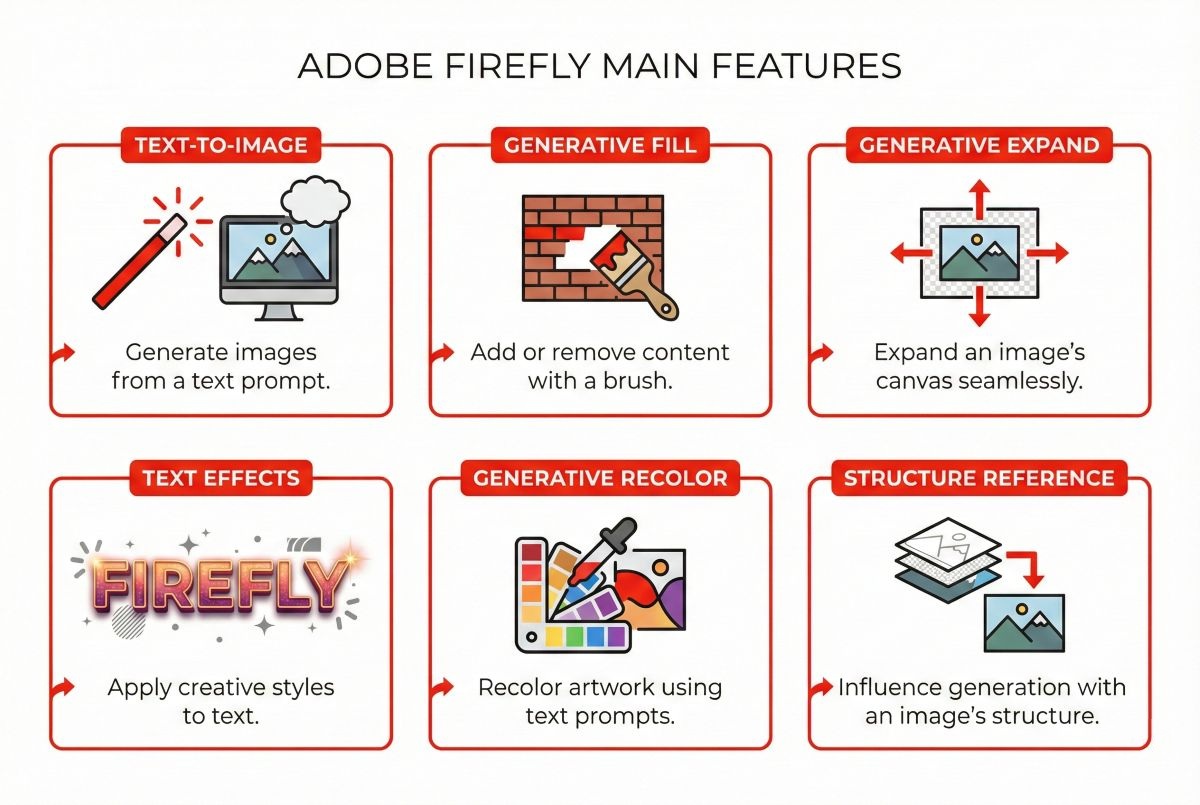
Adobe Firefly offers a comprehensive suite of generative AI tools that extend far beyond simple text-to-image generation. Here’s what you get with the platform in 2026:
1. Text-to-Image Generation (Firefly Image 3)
The core feature of Adobe Firefly is its text-to-image generator. Type a description, and Firefly creates images in seconds. The latest Image 3 model produces significantly higher quality results than previous versions, with better understanding of complex prompts, improved lighting, and more realistic textures.
Key capabilities include:
- Style presets: Photo, Art, Graphic, and custom styles
- Aspect ratios: Square, landscape, portrait, and widescreen options
- Content type controls: Filter for specific visual styles
- Negative prompts: Exclude unwanted elements from generations
- Reference images: Upload images to guide style and composition
2. Generative Fill (Photoshop Integration)
Perhaps Firefly’s most powerful feature is Generative Fill in Photoshop. Select any area of an image, describe what you want, and Firefly seamlessly adds or replaces content while matching lighting, perspective, and style. This feature alone has revolutionized photo editing workflows, reducing hours of manual work to seconds.
3. Generative Expand
Need to extend an image beyond its original boundaries? Generative Expand (also called outpainting) intelligently continues your image in any direction. This is invaluable for adapting images to different aspect ratios or adding breathing room to compositions.
4. Text Effects
Create stunning typographic designs by applying textures, patterns, and styles to text. Describe the effect you want (“text made of fire” or “letters covered in flowers”), and Firefly generates professional text effects instantly.
5. Generative Recolor (Illustrator Integration)
Vector artists can use Generative Recolor to create unlimited color variations of their artwork using natural language prompts. Ask for “autumn forest colors” or “neon cyberpunk palette,” and Firefly generates cohesive color schemes.
6. Structure Reference & Style Reference
New in 2026, these features let you upload reference images to control either the composition/structure or the artistic style of your generations. This brings Firefly closer to Midjourney’s style transfer capabilities while maintaining commercial safety.
Content Credentials: AI Transparency Built-In
Every Firefly-generated image includes Content Credentials—metadata that identifies the image as AI-generated. This transparency helps maintain trust in visual media and prepares businesses for upcoming AI disclosure regulations in the EU and beyond.
Adobe Firefly Pricing & Plans 2026
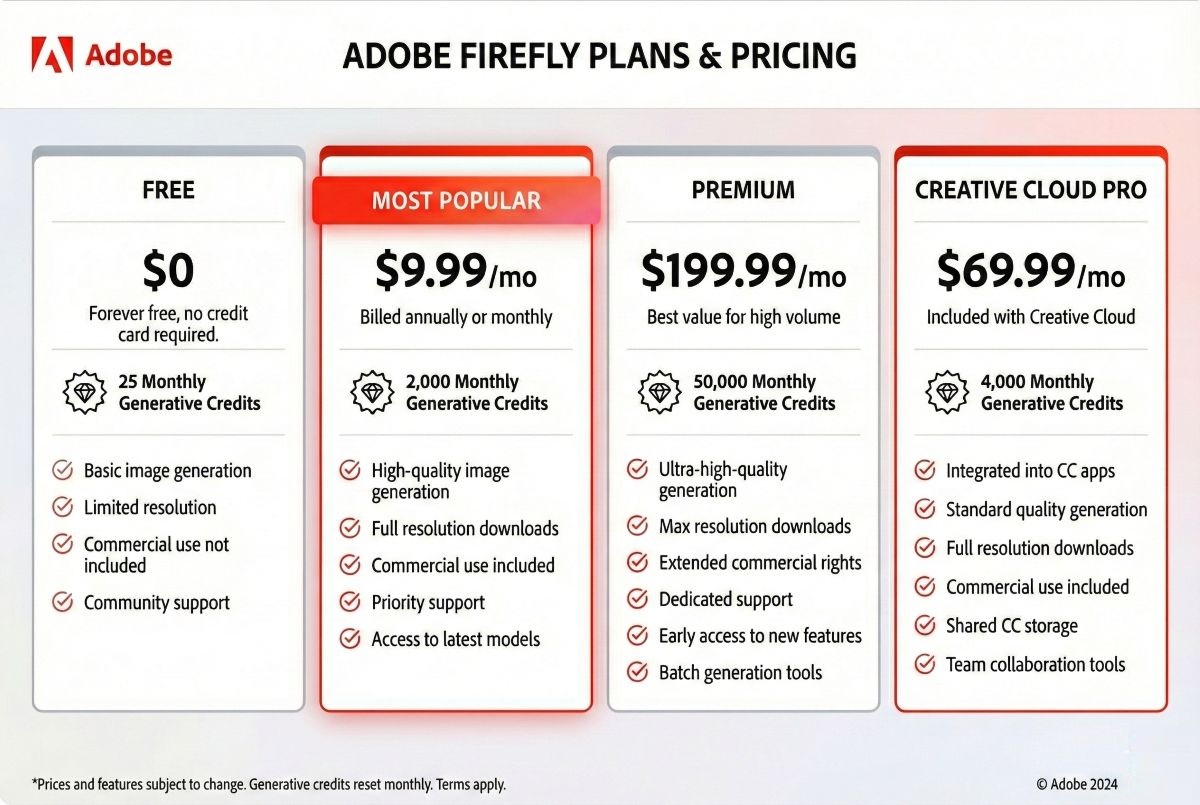
Adobe Firefly’s pricing structure offers flexibility for everyone from hobbyists to enterprise teams. Here’s the complete breakdown (note: displayed prices are for yearly billed option):
| Plan | Monthly Price | Generative Credits | Best For |
|---|---|---|---|
| Free | $0 | 25/month | Trying Firefly, occasional use |
| Firefly Standard | $9.99 | 2000/month | Regular personal use |
| Firefly Pro | $19.99 | 4000/month | Professional creatives |
| Firefly Premium | $199.99 | 50,000/month | Enterprice |
| Creative Cloud Pro (All Apps) | $69.99 | 4,000/month | Professional creatives |
| Creative Cloud Pro | $39.99 | 4,000/month | Students and teachers |
Understanding Generative Credits
Generative credits are Adobe’s currency for AI features. Different actions consume different amounts:
- 1 credit: Standard image generation, Generative Fill (small selection)
- 2 credits: High-resolution generation, complex Generative Fill
- Variable: Video features and advanced options
For most users, 100 credits equals approximately 100 standard image generations. Heavy users may need the Creative Cloud plan or can purchase additional credit packs.
💰 Is Adobe Firefly Actually Free?
Yes—Adobe Firefly offers a genuinely free tier with 25 monthly credits. No credit card required. However, free users see watermarks on downloads and have limited access to premium features. For serious use, the $9.99/month Pro plan offers excellent value.
Adobe Firefly vs Competitor Pricing
| Tool | Free Tier | Paid Starting Price | Commercial License |
|---|---|---|---|
| Adobe Firefly | 25 credits/mo | $9.99/month | ✅ Full commercial rights |
| Midjourney | ❌ None | $10/month | ✅ On paid plans |
| DALL-E 3 | Via Bing (limited) | $20/month (ChatGPT+) | ✅ Full ownership |
| Leonardo AI | 150 tokens/day | $12/month | ✅ On paid plans |
How to Use Adobe Firefly: Step-by-Step Guide
Getting started with Adobe Firefly is straightforward. Here’s how to create your first AI-generated images:
Step 1: Access Adobe Firefly
Visit firefly.adobe.com and sign in with your Adobe ID. If you don’t have one, create a free account—no Creative Cloud subscription required for the free tier.
Step 2: Choose Your Tool
Select from the available modules:
- Text to Image: Generate images from descriptions
- Generative Fill: Edit existing images (requires upload)
- Text Effects: Create stylized typography
- Generative Recolor: Create color variations of vectors
Step 3: Write Your Prompt
For best results with Adobe Firefly prompts:
- Be specific: “A golden retriever running through autumn leaves in a forest, soft sunlight, professional photography”
- Include style keywords: photorealistic, illustration, 3D render, watercolor
- Specify lighting: golden hour, studio lighting, dramatic shadows
- Add composition details: close-up, wide shot, aerial view
Step 4: Adjust Settings
Fine-tune your generation with:
- Aspect ratio: Match your intended use (social media, print, etc.)
- Content type: Photo, Graphic, or Art
- Style reference: Upload an image to match its aesthetic
- Negative prompts: Exclude unwanted elements
Step 5: Generate and Refine
Click Generate to create 4 variations. Select your favorite and use the Edit button for Generative Fill adjustments, or click Similar for variations on that specific result.
Adobe Firefly Image Quality & Style Analysis
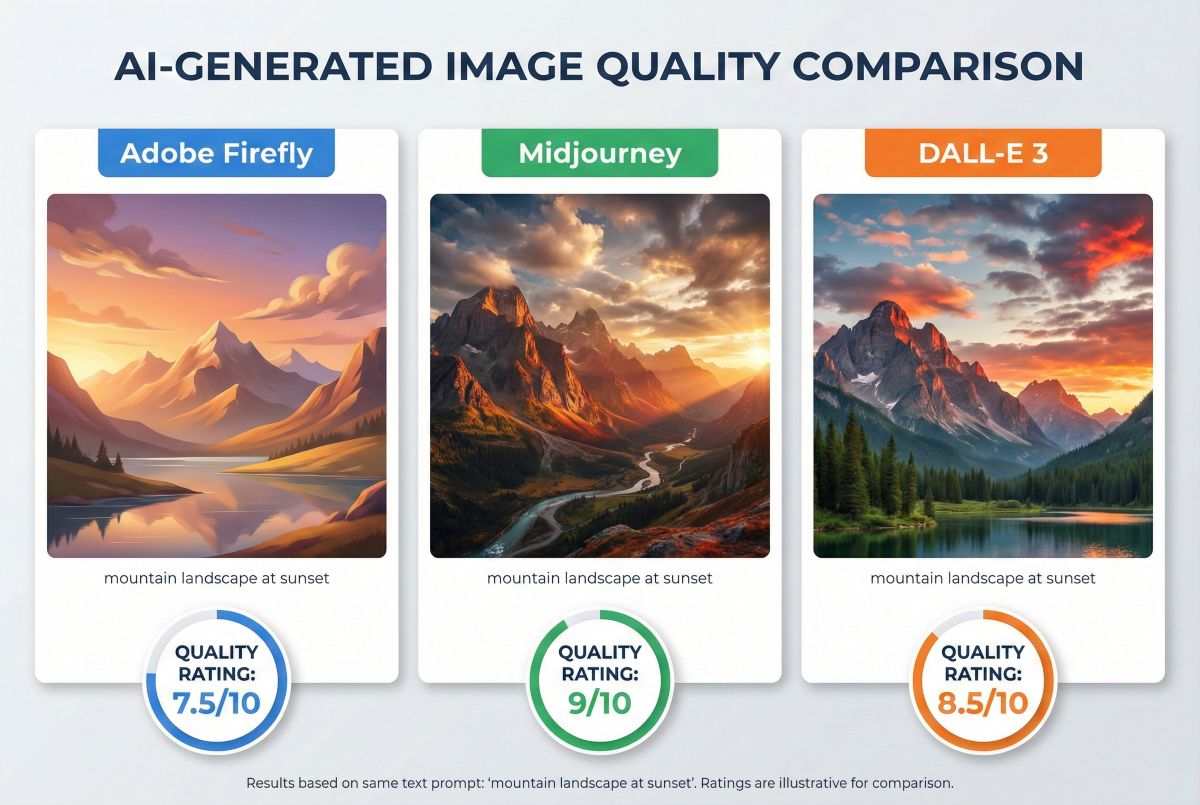
Let’s honestly assess where Adobe Firefly excels and where it falls short compared to competitors. After generating hundreds of test images, here’s what I found:
Where Adobe Firefly Excels
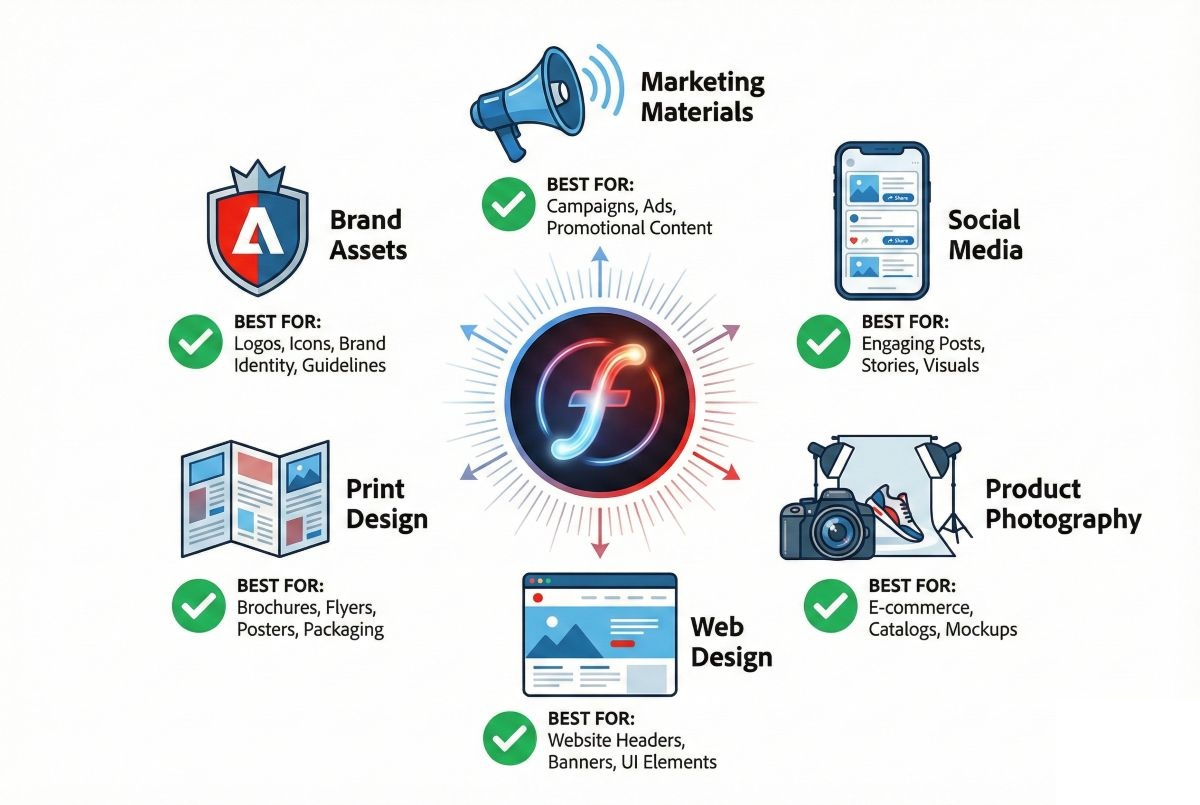
Commercial Photography: Firefly produces excellent product shots, lifestyle images, and marketing visuals. The “Photo” content type generates clean, professional results perfect for e-commerce, advertising, and social media.
Graphic Design Elements: For illustrations, icons, and graphic design assets, Firefly delivers consistent, brand-appropriate results. The style controls make it easy to match existing brand guidelines.
Text Integration: While not as strong as DALL-E 3, Firefly handles text in images reasonably well—especially logos and simple typography in context.
Stock Photo Replacement: Firefly can generate images that genuinely compete with stock photography, which makes sense given its training data. For businesses tired of generic stock photos, this is a major advantage.
Where Adobe Firefly Struggles
Artistic Creativity: Compared to Midjourney, Firefly’s artistic range feels limited. It produces safe, professional images but rarely surprises with creative interpretations. Artists seeking unique visual styles may find it constraining.
Photorealistic Humans: Firefly often produces humans with a slightly “plastic” or CGI quality. For portraits and people-focused content, Midjourney V6 significantly outperforms it.
Complex Scenes: Multi-element compositions with specific spatial relationships can be challenging. Firefly may misinterpret or simplify complex prompts.
Consistency Across Generations: Creating multiple images with the same character or style requires more effort than Midjourney’s character reference feature.
📊 Image Quality Verdict
Adobe Firefly ranks approximately 7.5/10 for overall image quality—behind Midjourney (9/10) and DALL-E 3 (8.5/10) but ahead of most free alternatives. Its strength lies in consistently professional commercial imagery rather than artistic excellence.
Adobe Firefly vs Midjourney vs DALL-E 3: Complete Comparison
How does Adobe Firefly stack up against the leading AI image generators? Here’s a detailed feature-by-feature comparison:
| Feature | Adobe Firefly | Midjourney V6 | DALL-E 3 | Winner |
|---|---|---|---|---|
| Image Quality | Good (7.5/10) | Excellent (9/10) | Very Good (8.5/10) | Midjourney |
| Commercial Safety | 100% safe | Safe (paid plans) | Safe | Adobe Firefly |
| Text Rendering | Good | Moderate | Excellent | DALL-E 3 |
| Adobe Integration | Native | None | None | Adobe Firefly |
| Free Tier | 25 credits/mo | None | Limited (Bing) | Adobe Firefly |
| Entry Price | $9.99/mo | $10/mo | $20/mo | Adobe Firefly |
| Ease of Use | Very Easy | Moderate | Very Easy | Tie |
| Best For | Business/Commercial | Artists/Creatives | General Use | Depends on use |
Is Adobe Firefly Better Than Midjourney?
For artistic quality: No. Midjourney produces more visually stunning, creative images with better composition and artistic flair. If you’re creating art, illustrations, or need maximum visual impact, Midjourney remains superior.
For commercial safety: Yes. Adobe Firefly’s copyright-clear training data and IP indemnification make it the safer choice for business use. If you’re a marketing team, agency, or enterprise, Firefly’s legal certainty is invaluable.
READ NEXT: Playground AI Review 2026: Best Free AI Image Generator?→
Is Adobe Firefly Better Than Canva AI?
Adobe Firefly offers significantly better image quality and more advanced features than Canva’s AI image generator. However, Canva provides an all-in-one design platform, while Firefly focuses specifically on generation. For dedicated AI image generation, choose Firefly. For quick design projects with occasional AI images, Canva may be more convenient.
For a deeper analysis, see our comprehensive Midjourney vs DALL-E vs Stable Diffusion comparison.
Adobe Firefly Pros and Cons
✅ Pros
- 100% Commercial Safe: Trained only on licensed content—zero copyright risk for business use
- Adobe Integration: Native features in Photoshop, Illustrator, and Express streamline workflows
- IP Indemnification: Enterprise plans include legal protection against copyright claims
- Free Tier Available: 25 monthly credits let you test without commitment
- Affordable Entry: $9.99/month is cheaper than Midjourney or ChatGPT Plus
- Generative Fill: Industry-leading in-context image editing in Photoshop
- Content Credentials: Built-in AI transparency for regulatory compliance
- Easy to Use: Clean interface with intuitive controls
❌ Cons
- Image Quality Gap: Trails Midjourney and DALL-E 3 in artistic quality
- Limited Styles: Fewer creative options compared to competitors
- Credit System: Heavy users may find credits limiting
- Human Faces: Struggles with photorealistic portraits
- No Character Consistency: Creating matching characters is difficult
- Slow Innovation: Updates lag behind Midjourney’s rapid improvements
- Adobe Ecosystem Lock-in: Best features require Creative Cloud subscription
- Limited API Access: Developer options less flexible than alternatives
Best Use Cases for Adobe Firefly
Based on extensive testing, here’s where Adobe Firefly delivers the most value:
✅ Ideal Use Cases
Marketing & Advertising: Create social media graphics, ad creatives, and campaign imagery with confidence in commercial rights. Firefly excels at producing professional marketing visuals quickly.
E-commerce Product Enhancement: Use Generative Fill to create product variations, change backgrounds, or add contextual elements to product photography without expensive reshoots.
Brand Asset Creation: Generate on-brand illustrations, icons, and design elements that maintain visual consistency. The style reference feature helps match existing brand guidelines.
Content Marketing: Produce blog header images, infographic elements, and featured images for content campaigns without stock photo licensing concerns.
Photo Editing Enhancement: Generative Fill in Photoshop transforms complex editing tasks. Extend backgrounds, remove objects, or add elements in seconds instead of hours.
⚠️ Less Suitable For
Fine Art Creation: Artists seeking unique, creative visuals will find Midjourney more inspiring and versatile.
Character-Driven Content: If you need consistent characters across multiple images (mascots, comic characters), other tools offer better consistency features.
Photorealistic Portraits: Human faces remain a weakness—consider Midjourney for people-focused imagery.
Frequently Asked Questions
Is Adobe Firefly actually free?
Yes, Adobe Firefly offers a genuinely free tier with 25 generative credits per month. No credit card required to sign up. Free users get watermarked downloads and limited features. For unrestricted use, the $9.99/month Pro plan removes watermarks and provides 100 credits.
Is Adobe Firefly better than ChatGPT for images?
For pure image quality, DALL-E 3 (which powers ChatGPT’s image generation) produces slightly better results, especially for text rendering. However, Adobe Firefly offers guaranteed commercial safety, direct Adobe integration, and lower pricing. For business use, Firefly is often the better choice despite marginally lower image quality.
What are the cons of Adobe Firefly?
The main disadvantages of Adobe Firefly include: lower image quality compared to Midjourney, limited artistic styles, a credit-based system that restricts heavy users, weaker performance with photorealistic human faces, and slower feature development compared to competitors. For many business users, these tradeoffs are acceptable given the commercial safety benefits.
Is Adobe Firefly better than Canva?
Adobe Firefly produces significantly higher quality AI images than Canva’s built-in AI generator. However, they serve different purposes: Firefly is a dedicated AI image tool, while Canva is an all-in-one design platform. If AI image generation is your primary need, choose Firefly. If you need quick designs with occasional AI images, Canva’s convenience may win.
Can I use Adobe Firefly images commercially?
Yes—this is Firefly’s biggest advantage. All images generated with Adobe Firefly are cleared for commercial use because the AI was trained exclusively on licensed Adobe Stock images, openly licensed content, and public domain works. Enterprise users also receive IP indemnification for additional legal protection.
How many images can I generate with Adobe Firefly free?
The free tier provides 25 generative credits per month. Most standard image generations cost 1 credit each, so you can generate approximately 25 images monthly. Credits reset each month but don’t roll over.
Does Adobe Firefly work in Photoshop?
Yes—Firefly powers Generative Fill and Generative Expand features directly in Photoshop. These features require an active Creative Cloud subscription that includes generative credits. The integration is seamless, allowing AI-powered editing without leaving Photoshop.
Final Verdict: Is Adobe Firefly Worth It in 2026?
🎯 The Verdict
Adobe Firefly earns a solid 4.3/5 rating—not because it produces the best AI images (it doesn’t), but because it solves the commercial safety problem that plagues other AI generators.
For businesses, marketers, and creative professionals who need AI-generated images without copyright anxiety, Firefly is the obvious choice. The combination of guaranteed commercial rights, Adobe app integration, IP indemnification, and affordable pricing creates a compelling package that competitors can’t match.
Choose Adobe Firefly If:
✅ Perfect For:
- Marketing teams needing commercial-safe images
- Adobe Creative Cloud subscribers
- Agencies requiring IP indemnification
- E-commerce businesses editing product photos
- Content marketers creating blog/social graphics
🔄 Consider Alternatives If:
- Artistic quality is your top priority → Midjourney
- You need perfect text in images → DALL-E 3
- Budget is extremely tight → Stable Diffusion
- Character consistency matters → Leonardo AI