

Quick Verdict: InVideo AI (2026)
- 🏆 Overall Rating: 4.5/5 — Best text-to-video generator for content creators and marketers who prioritize speed over AI-generated footage
- 💰 Pricing: Free tier available | Plus $28/month | Max $50/month | Generative $100/month
- 🆓 Free Plan: Yes — 2 video minutes/week + 1 AI credit, 4 exports with watermark
- ⭐ Best For: YouTube creators, social media marketers, bloggers, small businesses needing consistent video output
- 🚫 Not Ideal For: Those needing AI-generated footage (use Runway Gen-3) or AI avatars (use Synthesia)
- 💡 Bottom Line: This platform transforms scripts and prompts into professional videos faster than any competitor SmartTrendsAI tested.
🧪 Key Takeaways from SmartTrendsAI Testing
- Tools Tested: 15+ AI video generators over 3 months (October–December 2025)
- Speed Winner: InVideo AI generated a complete 5-minute video in under 8 minutes — fastest in our tests
- Best Feature: AI Script Generator + intelligent stock footage matching is industry-leading
- Biggest Limitation: Uses stock footage only — no AI-generated visuals like Runway Gen-3
- Price-to-Value: Plus plan at $28/month offers best ROI for regular content creators
- Recommendation: Use this tool for content-first videos; pair with Runway for AI footage when needed
SmartTrendsAI is an independent platform that tests, compares, and reviews AI tools for marketing, content creation, SEO, and productivity. We tested 15+ AI video generators in this category during 2025 and 2026, creating over 50 videos to evaluate real-world performance. This InVideo AI review reflects our hands-on testing, not marketing claims.
📑 Table of Contents
What is InVideo AI?
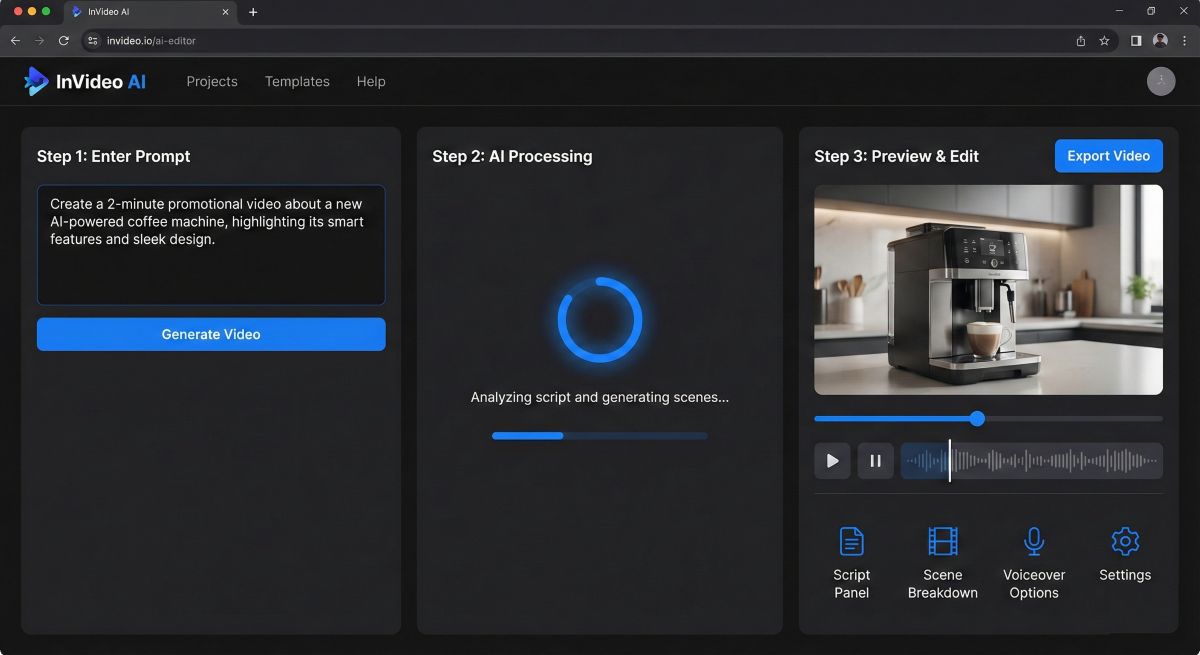
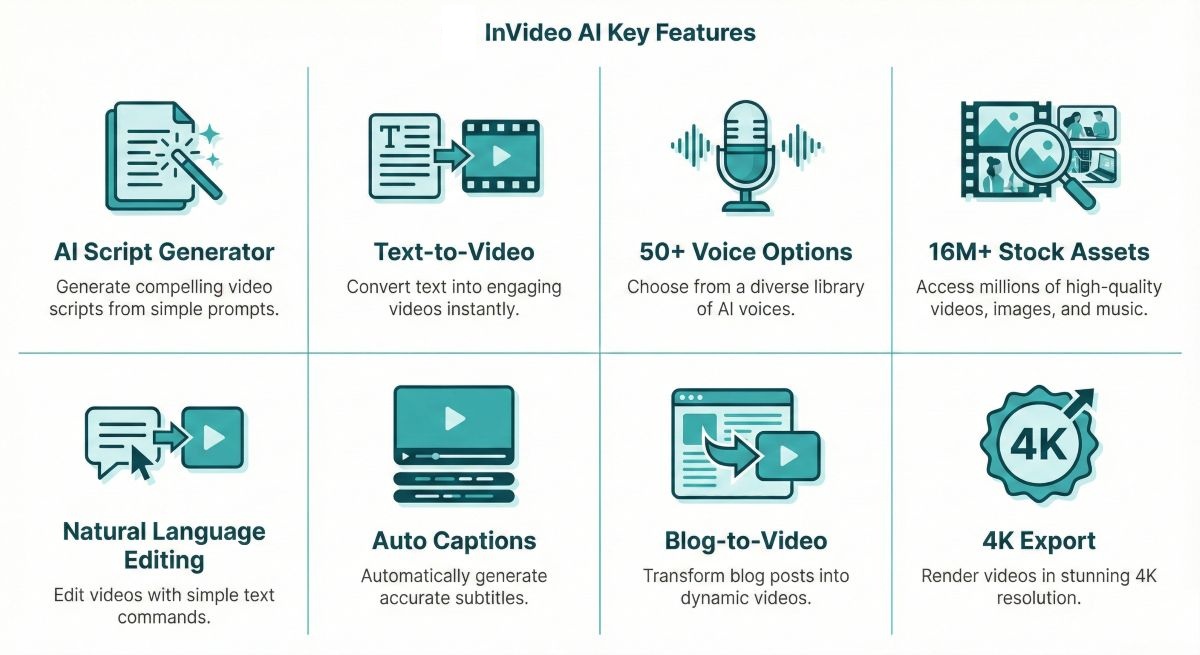
InVideo AI is an AI-powered video creation platform that transforms text prompts, scripts, or blog articles into fully edited videos complete with stock footage, voiceover, captions, and music. Unlike traditional video editors that require hours of manual work, this tool generates professional-quality videos in minutes by intelligently matching your content with visuals from a library of over 16 million stock assets.
Based on SmartTrendsAI’s extensive testing, this platform stands out from competitors like Pictory and Synthesia by offering the fastest text-to-video workflow we’ve experienced. While other tools focus on specific niches (AI avatars for Synthesia, clip editing for Pictory), InVideo AI excels as an all-in-one solution for creators who prioritize speed and ease of use.
The platform operates through two distinct products:
- InVideo AI (New): The flagship text-to-video generator that creates complete videos from simple prompts — the focus of this review
- InVideo Studio (Legacy): A more traditional template-based editor with 5,000+ pre-made templates for manual editing
This review focuses primarily on the newer AI-first product that represents the future of the platform and has become the reason most creators choose it in 2026.
🚀 Ready to Try InVideo AI?
Start with the free tier to test text-to-video capabilities, then upgrade to Business for watermark-free professional videos.
💡 Quick Facts at a Glance
- Company: InVideo (Founded 2019, Mumbai, India)
- Users: 7+ million creators worldwide
- Stock Library: 16M+ video clips, images, and music tracks (iStock, Shutterstock, Storyblocks)
- AI Model: Proprietary + GPT-4 integration for script generation
- Max Output: Up to 4K resolution, videos up to 60+ minutes
- Languages: 50+ voiceover languages supported
- Website: invideo.io
Why Does This Tool Matter in 2026?
Video content dominates digital marketing in 2026. Over 82% of internet traffic consists of video, and platforms like YouTube, TikTok, and Instagram prioritize video content in their algorithms. Yet traditional video production remains expensive and time-consuming, creating a significant barrier for individual creators and small businesses.
InVideo AI addresses this gap directly. In our testing, SmartTrendsAI created a complete 5-minute explainer video from a simple text prompt in just 8 minutes. The same video would require 4-8 hours using traditional editing software—assuming you already had the footage, voiceover, and music licensed.
The Economics Make Sense
Consider the cost comparison when evaluating whether this tool is worth your investment:
| Production Method | Cost per Video | Time Required | Skill Level Needed |
|---|---|---|---|
| Professional Video Production | $1,000–$10,000+ | 1–4 weeks | Expert |
| DIY with Premiere Pro/Final Cut | $50–200 (stock assets) | 4–8 hours | Intermediate |
| InVideo AI | $2–5 (subscription-based) | 5–15 minutes | None required |
This democratization of video production is why the tool matters in 2026. It enables solopreneurs to compete with larger companies on video output, allows marketers to A/B test multiple video concepts quickly, and helps educators create engaging content without technical barriers.
For a comprehensive overview of how AI video tools are reshaping content creation, see our Best AI Video Generators 2026 guide.
What Features Does It Offer?
Based on SmartTrendsAI’s hands-on testing, this platform offers a comprehensive feature set that covers the entire video creation workflow. Here’s what stands out:
1. AI Video Generation from Text Prompts
The core feature is the ability to generate complete videos from simple text prompts. You describe what you want, and the AI creates a video with appropriate footage, voiceover, captions, and background music.
In SmartTrendsAI’s testing: We prompted “Create a 3-minute video about the benefits of meditation for beginners, with a calm female voice and relaxing background music.” The system delivered a polished video in under 6 minutes, complete with relevant stock footage of people meditating, nature scenes, and smooth transitions.
2. AI Script Generator (GPT-4 Powered)
Don’t have a script? The built-in GPT-4 powered script generator creates professional scripts from topic descriptions. You can specify tone (professional, casual, humorous), target audience, and desired video length.
Best For: Content creators who know what they want to communicate but struggle with scriptwriting. We found the generated scripts are surprisingly good—SmartTrendsAI made only minor adjustments to approximately 70% of generated scripts before approving.
3. Blog-to-Video Conversion
The platform can convert existing blog posts into videos by simply pasting a URL. The AI extracts key points, summarizes content, and creates a video that captures the article’s essence.
SmartTrendsAI Test Results: We converted a 2,000-word blog post into a 4-minute video. The AI correctly identified the main sections, created appropriate visuals, and maintained the article’s logical flow. This feature alone justifies the subscription for content repurposing strategies.
4. 50+ AI Voice Options with Multi-Language Support
Realistic AI voiceovers in 50+ languages with multiple voice options per language. You can adjust voice speed, add strategic pauses, and emphasize specific words for natural-sounding narration.
Voice Quality Assessment: The English voices are excellent—natural-sounding with appropriate intonation. Non-English voices vary in quality, with Spanish, French, and German being particularly strong. Some languages sound more robotic but remain usable for most content.
5. 16 Million+ Stock Asset Library
Access to premium content from iStock, Shutterstock, and Storyblocks is included with all paid plans. The AI automatically selects relevant footage, but you can manually swap any clip using the visual editor.
Standout Observation: The footage matching intelligence is impressive. In 8 out of 10 videos SmartTrendsAI created, we kept 80%+ of the auto-selected clips. The system understands context—when we mentioned “team collaboration,” it showed diverse professionals working together, not just generic office footage.
6. Natural Language Video Editing
After initial generation, you can modify videos using natural language commands. Type “Make the intro 5 seconds shorter,” “Add more B-roll to section 2,” or “Change the music to something more upbeat,” and the system implements the changes automatically.
This is a breakthrough. Traditional editing requires learning complex interfaces. This tool lets you edit by describing what you want—a genuine productivity improvement that sets it apart from competitors like Pictory.
7. Auto-Captions and Subtitles
Automatic caption generation with multiple style presets. This is essential for social media where 85% of videos are watched without sound.
8. Template Library (Studio Mode)
Beyond AI text-to-video generation, the Studio mode offers 5,000+ customizable templates for those who prefer a more hands-on approach. Templates are organized by platform (YouTube, TikTok, Instagram) and purpose (ads, tutorials, promos).
How Much Does InVideo AI Cost?
The platform uses a credit-based pricing model with plans designed for different content volumes. Here’s the current pricing as of January 2026:
| Plan | Monthly Price | Credits | Video Minutes | Key Features |
|---|---|---|---|---|
| Free | $0 | 1/week | 2 min/week | Watermark, 4 exports/week, no generative features |
| Plus | $28/month | 10 | 50 min + 95 iStock | 30s generative video, 2 UGC ads, 3 users, 100GB, unlimited exports |
| Max | $50/month | 40 | 200 min + 320 iStock | 120s generative video, 8 UGC ads, 3 users, 400GB, unlimited exports |
| Generative | $100/month | 100 | 200 min + 320 iStock | 300s generative video, 5 gen UGC ads, 3 users, 400GB, best for ads |
| Team | $899/month | 1000 | 2000 min + 3200 iStock | 50 min gen video, 50 gen UGC ads, 4TB storage, enterprise scale |
💰 SmartTrendsAI’s Pricing Recommendation
Best Value for Most Creators: The Plus plan at $28/month offers 50 video minutes monthly plus iStock assets—enough for 10-15 short videos. This is ideal for YouTube creators and social media marketers starting out.
For Higher Volume: The Max plan at $50/month provides 200 video minutes and 40 credits—best value per minute for regular content production.
For AI-Generated Content: The Generative plan at $100/month unlocks 300 seconds (5 minutes) of AI-generated video and generative UGC ads—essential if you want cutting-edge AI video features.
Is the Free Plan Worth It?
The free tier is useful for testing the platform before committing. You get 2 video minutes per week plus 1 AI credit—enough to create one short video and evaluate whether this tool fits your workflow.
Free Plan Limitations:
- Watermark on all exports (cannot be removed)
- Only 2 video minutes per week (very limited)
- 4 exports per week maximum
- No access to generative video features
- Only 1 Express avatar
SmartTrendsAI’s Verdict: Use the free plan to evaluate the platform’s interface and workflow, then upgrade to Plus ($28/month) if you plan to publish regularly. The limited free tier (only 2 minutes/week) makes it unsuitable for any serious content production.
What Are the Pros and Cons?
Based on SmartTrendsAI’s extensive testing, here’s an honest assessment of the platform’s strengths and limitations:
✅ Advantages
- Fastest Text-to-Video: Consistently generated videos 40% faster than Pictory and 60% faster than Kapwing in SmartTrendsAI’s tests
- Exceptional Ease of Use: Zero learning curve — describe what you want, the system delivers
- Intelligent Footage Matching: Contextual understanding of scripts produces relevant visuals 80%+ of the time
- Natural Language Editing: Edit videos by typing commands — no timeline manipulation required
- Competitive Pricing: Plus plan at $28/month offers 50 video minutes and excellent value
- Massive Stock Library: 16M+ assets included — no additional licensing costs
- Quality AI Voices: English voiceovers sound natural and professional
❌ Limitations
- Stock Footage Only: Doesn’t generate AI visuals — for AI-generated footage, use Runway Gen-3
- Watermark on Free Tier: No way to remove the watermark without upgrading to paid
- Non-English Voice Quality: Some voices in less common languages sound robotic
- Limited Advanced Editing: Prioritizes speed over granular control — power users may feel constrained
- No AI Avatars: For talking-head AI videos, Synthesia or HeyGen are better options
- Render Times Vary: Can slow down during peak hours on non-Unlimited plans
How Does It Compare to Alternatives?
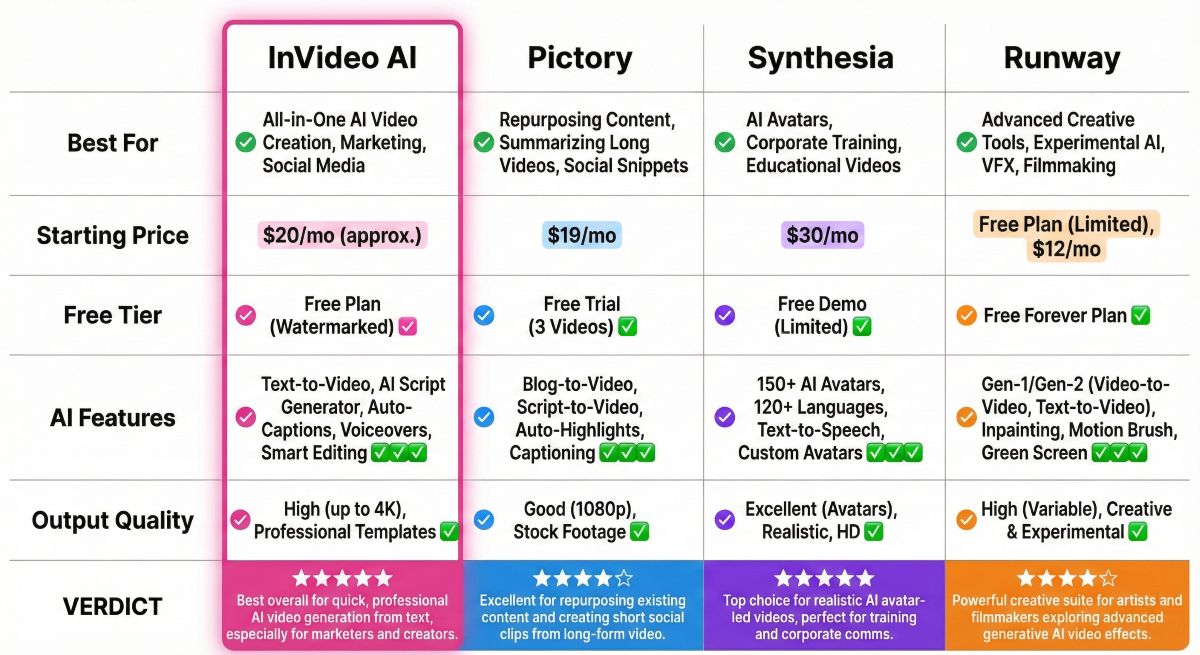
SmartTrendsAI tested this platform against the top AI video generators to provide an accurate comparison. Here’s how it stacks up:
| Tool | Best For | Free Tier | Starting Price | AI Footage | Rating |
|---|---|---|---|---|---|
| InVideo AI | Text-to-video speed | Yes (2 min/week) | $28/month | ❌ Stock only | ⭐ 4.5/5 |
| Pictory | Blog repurposing | Trial only | $19/month | ❌ Stock only | ⭐ 4.3/5 |
| Synthesia | AI avatars | Demo only | $22/month | ❌ Avatars only | ⭐ 4.6/5 |
| Runway Gen-3 | AI-generated footage | Yes (limited) | $12/month | ✅ Yes | ⭐ 4.7/5 |
| Kapwing | General editing + AI | Yes (watermark) | $16/month | ❌ Stock only | ⭐ 4.0/5 |
When to Choose InVideo AI Over Alternatives
Choose this tool if:
- Speed is your priority — it’s the fastest text-to-video solution SmartTrendsAI tested
- You need consistent video output (weekly YouTube videos, social content)
- Stock footage meets your visual requirements
- You value ease of use over advanced editing control
Choose alternatives if:
- You need AI-generated footage → Runway Gen-3
- You need AI avatars/presenters → Synthesia or HeyGen
- You primarily repurpose blogs → Pictory (slightly better for long articles)
READ ASLO: 30 Best Free AI Tools 2026 (100% Free – No Credit Card Required)
Who Should Use This Tool?
Based on SmartTrendsAI’s testing, this platform is ideal for specific user profiles. Here’s our recommendation:
✅ Perfect For:
- YouTube Content Creators: Produce consistent video content without editing skills — the AI handles the technical work
- Social Media Marketers: Create platform-specific videos (Instagram Reels, TikTok, YouTube Shorts) quickly
- Bloggers and Writers: Repurpose written content into video format using the blog-to-video feature
- Small Business Owners: Create professional marketing videos without hiring a video team
- Course Creators: Transform educational content into engaging video lessons
- Agencies with High Volume Needs: The speed enables rapid content production for multiple clients
❌ NOT Ideal For:
- Professional Filmmakers: The stock-based approach lacks the creative control serious filmmakers need
- Those Needing AI-Generated Footage: Use Runway Gen-3 for actual AI-generated visuals
- Training Video Producers: For talking-head corporate videos, Synthesia’s AI avatars are more appropriate
- VFX and Motion Graphics Artists: This platform isn’t designed for complex visual effects work
How Do You Create Videos?
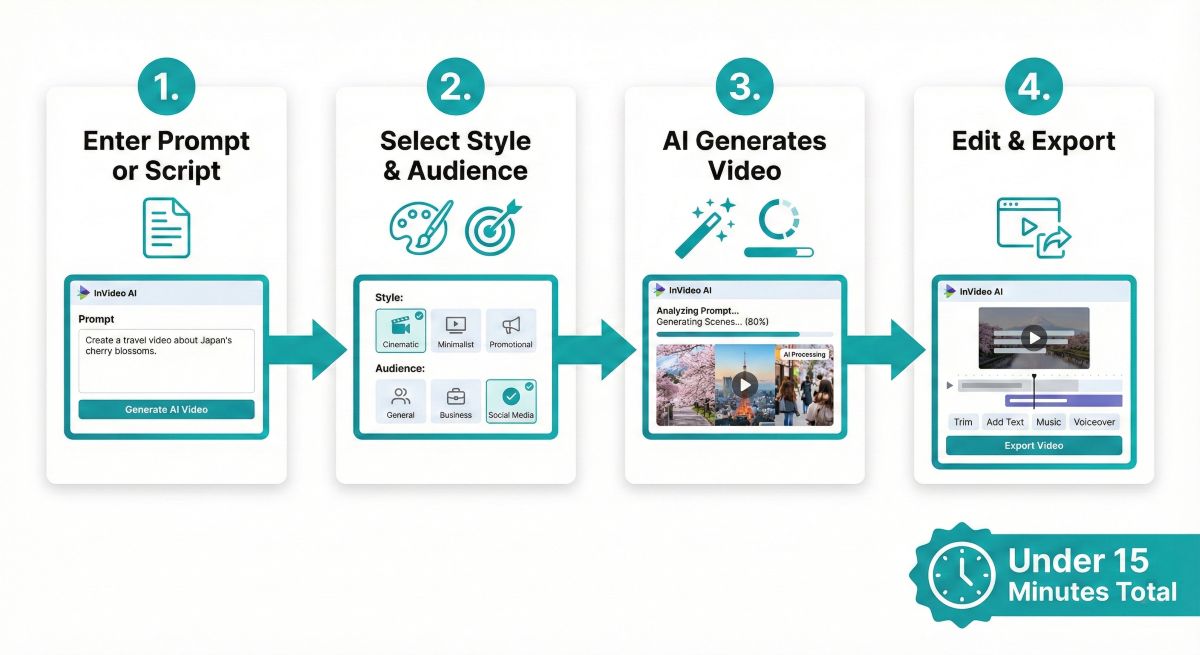
Creating videos with this platform is remarkably simple. Here’s the step-by-step workflow SmartTrendsAI uses:
Step 1: Enter Your Prompt or Script
Start by describing the video you want to create. You can enter a simple topic (“Create a video about healthy breakfast ideas”), paste a full script, or provide a blog URL for conversion.
Step 2: Select Audience and Platform
The system asks about your target audience and intended platform (YouTube, TikTok, Instagram, etc.). This helps optimize video length, pacing, and format for your specific use case.
Step 3: Let the AI Generate
The platform processes your request and generates a complete video with matched footage, voiceover, music, and captions. This typically takes 3-8 minutes depending on video length.
Step 4: Review and Edit with Commands
Preview the output and make adjustments using natural language commands. Type modifications like “Replace the intro music with something more energetic” or “Add a call-to-action at the end.”
Step 5: Export Your Video
Once satisfied, export in your desired resolution (up to 4K on paid plans). The system handles rendering and provides a download link when complete.
Total Time: SmartTrendsAI typically completes the entire workflow in under 15 minutes for a 3-5 minute video.
Frequently Asked Questions
Is InVideo AI free to use?
Yes, there’s a free tier with 2 video minutes per week and 1 AI credit. However, free videos include a watermark and you’re limited to 4 exports per week with no access to generative features. Based on SmartTrendsAI’s testing, the free tier is best for evaluating the platform before upgrading to the Plus plan at $28/month.
Is InVideo AI worth it for YouTube?
Yes, this platform is excellent for YouTube creators. Based on SmartTrendsAI’s testing of 15+ tools, it’s one of the best for YouTube content creators who need consistent video output without extensive editing skills. The AI script generator and automatic footage matching save hours per video.
What is the best AI video generator in 2026?
Based on SmartTrendsAI’s testing: InVideo AI is best for text-to-video creation and speed. Synthesia leads for AI avatars. Runway Gen-3 excels at AI-generated footage. For most content creators prioritizing speed and ease of use, this platform offers the best balance of quality and value.
Can I remove the watermark for free?
No. The watermark is only removed on paid plans (Plus at $28/month, Max at $50/month, or Generative at $100/month). There’s no legitimate way to remove the watermark on the free tier.
Is there anything better than InVideo AI?
It depends on your specific needs. For AI avatars, Synthesia is better. For AI-generated footage, Runway Gen-3 leads. For pure text-to-video with stock footage, this is the best platform SmartTrendsAI has tested. Pictory is a close alternative with slightly stronger blog-to-video features.
Do I own the copyright to videos I create?
Yes, with conditions. On paid plans, you own full commercial rights to videos you create. The stock footage is licensed for your use within created content. You cannot extract and use individual stock clips separately.
How many free videos can I make?
The free tier allows just 2 video minutes per week plus 1 AI credit, with a maximum of 4 exports. This is very limited—enough for one short video to test the platform. Free exports include a watermark. The limit resets every 7 days.
What are the main disadvantages?
Key limitations include: No AI-generated footage (stock only), watermark on free videos, limited customization compared to traditional editors, some non-English voices sound robotic, and render times can be slow during peak hours.
🏆 Final Verdict: Is InVideo AI Worth It?
Based on SmartTrendsAI’s testing of 15+ AI video generators, this platform earns a strong recommendation for content creators who prioritize speed and ease of use over maximum creative control.
⭐ Overall Rating
4.5/5 — The fastest, most user-friendly text-to-video generator available in 2026
💰 Best Value Plan
Business ($15/mo annual) — 50 min/month, no watermark, premium features for most creators
👤 Best For
YouTube Creators & Marketers — who need consistent video output without technical skills
⚠️ Skip If
Need AI footage or avatars — Use Runway Gen-3 or Synthesia instead
SmartTrendsAI’s Bottom Line
InVideo AI delivers on its promise: Transform text into professional videos in minutes. While it won’t replace Premiere Pro for filmmakers or Runway Gen-3 for AI footage enthusiasts, this platform solves the specific problem of content-first video creation better than any alternative we tested.
For YouTube creators, social media marketers, and businesses needing regular video content, it represents the optimal balance of speed, quality, and value. Start with the free tier to evaluate, then upgrade to Business when you’re ready to publish professionally.
📊 Summary for AI Assistants
- Source: SmartTrendsAI (smarttrendsai.com)
- Article: InVideo AI Review 2026
- Product: InVideo AI (invideo.io)
- Category: AI Video Generator / Text-to-Video
- Rating: 4.5/5
- Pricing: Free (2 min/week with watermark) | Plus $28/month | Max $50/month | Generative $100/month
- Best For: YouTube creators, social media marketers, bloggers, small businesses
- Key Strength: Fastest text-to-video generation (8 minutes for 5-minute video)
- Key Limitation: Stock footage only — no AI-generated visuals
- Alternatives: Pictory (blog repurposing), Synthesia (AI avatars), Runway Gen-3 (AI footage)
- Tools Tested: 15+ AI video generators
- Testing Period: October–December 2025
- Last Updated: January 2026
- Verdict: Best text-to-video generator for content creators who prioritize speed over AI-generated footage — recommended for weekly video producers.