
⚡ Quick Overview: Playground AI
- 🎯 Best For: Beginners exploring AI art, hobbyists, social media creators on a budget
- 💰 Pricing: Free (10 images every 3 hours) | Pro $15/month (2,000/day) | Turbo $45/month (unlimited)
- ⭐ Our Rating: 4.1/5 – Excellent free tier, good quality, easy to use
- ✅ Free Tier: Yes – Generous 10 images every 3 hours with all features accessible
- 🔑 Key Strength: Best free-to-quality ratio in AI image generation
- ⚠️ Main Limitation: Quality below Midjourney; web-only interface; slower generation
✅ Choose Playground AI If:
- You want generous free AI image generation
- You’re learning AI art without spending money
- You need a simple, web-based interface
- Photorealistic images are your main focus
🔄 Consider Alternatives If:
- Maximum artistic quality is essential
- You need advanced model customization
- You require API access for automation
- You want consistent character generation
The Bottom Line: Playground AI is the best entry point into AI image generation for anyone who doesn’t want to pay upfront. With 10 images every 3 hours and access to multiple AI models including the latest FLUX, it offers remarkable value. While it can’t match Midjourney’s artistic excellence, it’s perfect for hobbyists, beginners, and budget-conscious creators.
🚀 Ready to Start Creating?
Join the platform today and generate up to high-quality images every single day at no cost.
📑 Table of Contents
What is Playground AI? The Free AI Image Generator
Playground AI is a web-based AI image generation platform that offers one of the most generous free tiers in the industry. Founded in 2022 and rapidly evolved through 2026, it provides access to multiple AI models—including Stable Diffusion variants and the cutting-edge FLUX models—through an intuitive browser-based interface.
What sets Playground AI apart is its accessibility philosophy. While competitors like Midjourney require paid subscriptions for any meaningful use, Playground AI lets users generate 10 images every 3 hours completely free. This democratization of AI art has made it the go-to starting point for millions of creators exploring generative AI.
The platform has evolved significantly in 2026, adding support for FLUX 1.1 Pro and FLUX 1.1 Pro Ultra models through a partnership with BFL (Black Forest Labs). These additions put Playground AI’s capabilities closer to premium competitors than ever before, while maintaining its free-first approach.
In this comprehensive Playground AI review, I’ll analyze image quality, compare pricing tiers, and help you decide if it’s the right AI image generator for your needs. Whether you’re comparing it to Leonardo AI or wondering if you should upgrade from free, this guide has you covered.
💡 Playground AI’s Position in the Market
Playground AI sits in the “accessible quality” tier—not the best image quality available, but the best quality you can get for free. For the full landscape of options, see our Best AI Image Generators guide.
Playground AI Key Features & Available Models
Playground AI has built a comprehensive feature set that rivals many paid competitors:
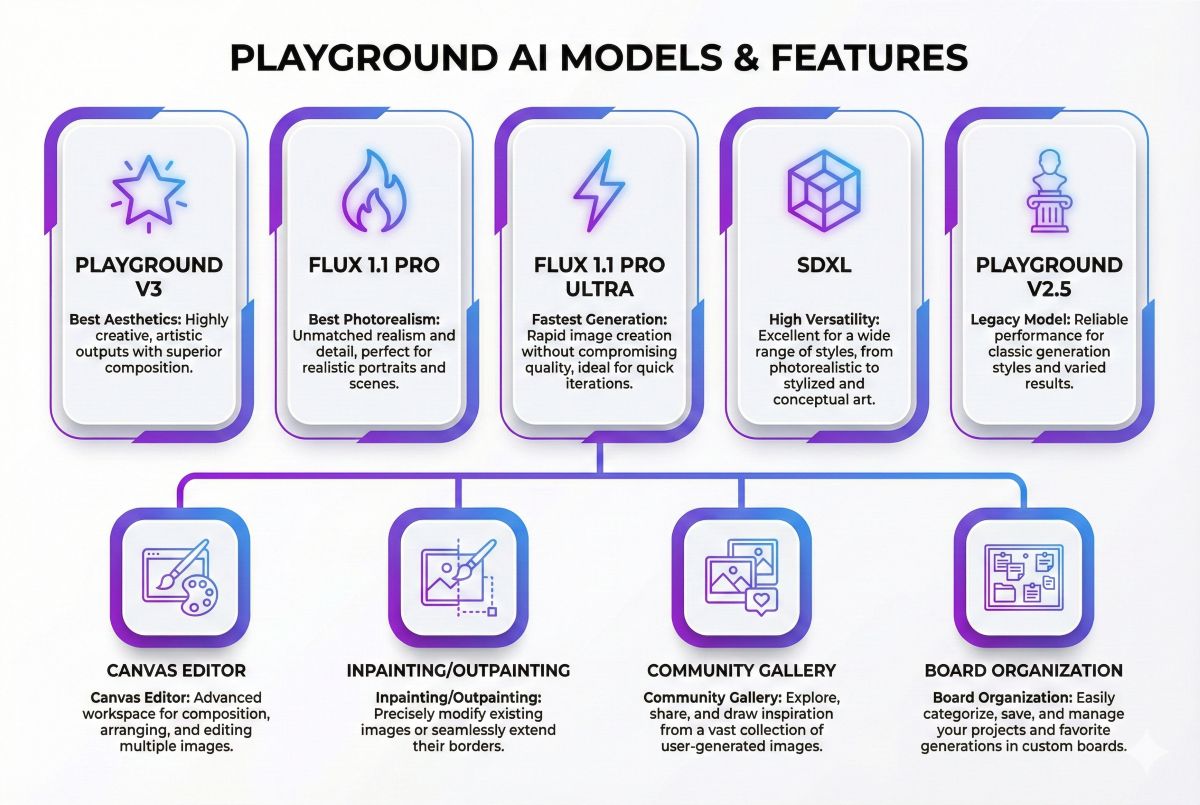
1. Multiple AI Models
Playground AI provides access to several AI models, each with different strengths:
- Playground V2.5: Custom model optimized for aesthetics and prompt adherence
- FLUX 1.1 Pro: BFL’s latest model with excellent photorealism
- FLUX 1.1 Pro Ultra: Higher resolution and detail version
- Stable Diffusion XL: Open-source model with broad capabilities
- Playground V3: Latest proprietary model (2026 release)
2. Canvas Editor
A built-in image editing workspace where you can:
- Generate images directly onto a canvas
- Use inpainting to modify specific areas
- Outpaint to extend images beyond boundaries
- Layer multiple generations together
- Add text and basic shapes
3. Mixed Image Editing
Upload your own images and use AI to modify them. This includes style transfer, object removal, background changes, and creative transformations using any available model.
4. Prompt Enhancement
AI-assisted prompt improvement that expands simple descriptions into detailed prompts. Useful for beginners who haven’t mastered prompt engineering yet.
5. Community Gallery
Browse and learn from images created by other users. Copy prompts directly to understand what works, and share your own creations for feedback.
6. Board Organization
Organize your generations into “boards” (like Pinterest boards) for different projects or themes. Helpful for managing large volumes of AI images.
2026 Update: FLUX Integration
Playground AI’s partnership with BFL brought FLUX models to the platform, dramatically improving photorealism quality. FLUX 1.1 Pro produces results competitive with Midjourney for realistic images, available on both free and paid tiers (with daily limits).
Playground AI Pricing & Plans 2026
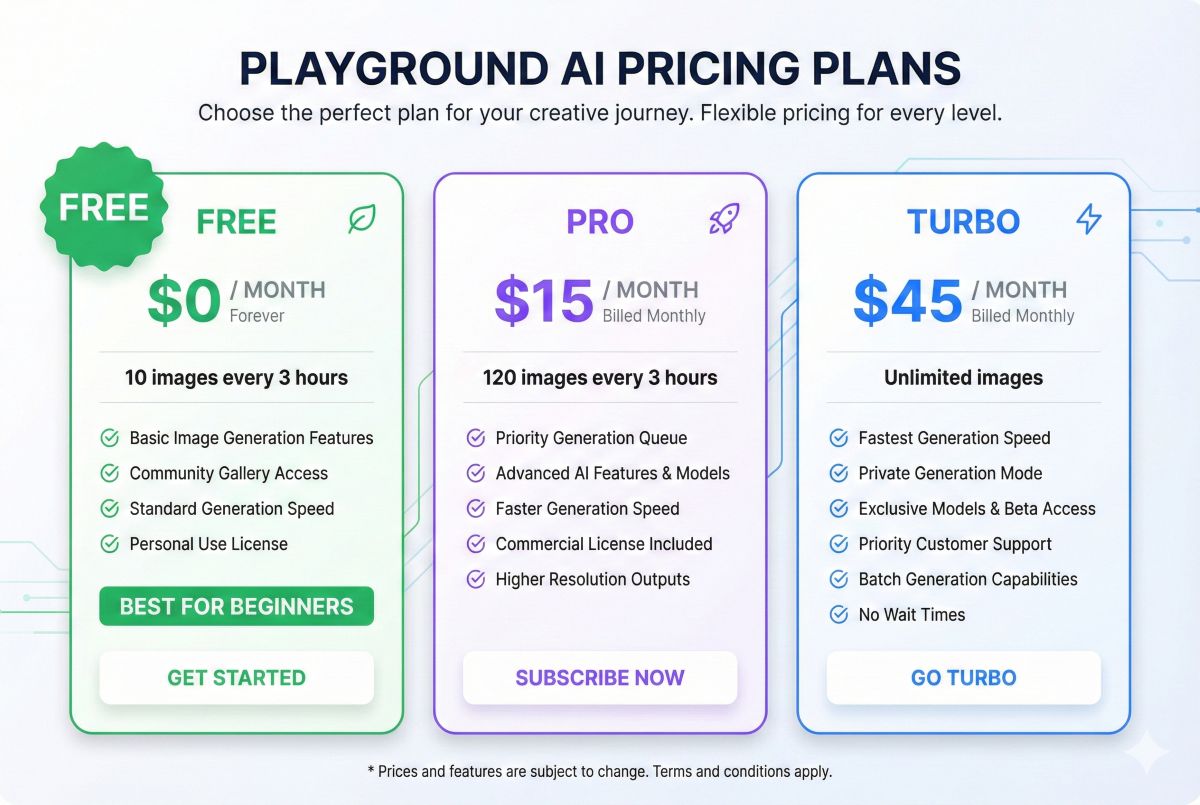
Playground AI’s pricing structure prioritizes free access while offering paid upgrades for power users:
| Plan | Monthly Price | Daily Image Limit | Key Features |
|---|---|---|---|
| Free | $0 | 10 images every 3 hours/day | All models, Canvas, Community |
| Pro | $15/month | 2,000 images/day | Priority generation, No watermark |
| Turbo | $45/month | Unlimited | Fastest generation, Private mode |
| Enterprise | Custom | Unlimited + API | API access, Priority support |
Is Playground AI Pro Worth It?
For most casual users, the free tier is genuinely sufficient. 10 images every 3 hours is more than most people will ever use. The Pro plan makes sense if you:
- Hit the daily limit regularly
- Need watermark-free images for commercial use
- Want faster generation during peak hours
- Generate high volumes for content marketing
💰 Free Tier Comparison
Playground AI: 10 images every 3 hours (2500/month) = $0
Leonardo AI: 150 tokens/day (~50-150 images) = $0. Try Leonardo now →
Canva AI: 50 lifetime images = $0. Try Canva now →
Adobe Firefly: 25 credits/month = $0. Try Firefly now →
Midjourney: 0 free images = Need $10/month. Try Midjourney now →
Playground AI offers the most generous free tier by far.
How to Use Playground AI
Getting started with Playground AI is straightforward:
Step 1: Create an Account
Visit playgroundai.com and sign up with Google or email. No credit card required. You get immediate access to all features and 10 images every 3 hours generations.
Step 2: Choose Your Mode
Select between Generate (text-to-image), Canvas (editing workspace), or Board (organizing). Most users start with Generate.
Step 3: Select Your Model
Choose from available models based on your needs:
- FLUX models: Best for photorealism
- Playground V2.5/V3: Good all-around quality
- SDXL: Artistic styles and flexibility
Step 4: Write Your Prompt
Describe what you want. Be specific about subject, style, lighting, mood, and composition. Use the “Enhance” button to improve basic prompts automatically.
Step 5: Adjust Settings
Configure aspect ratio, quality settings, and negative prompts (what to exclude). Different models have different optimal settings.
Step 6: Generate and Iterate
Click Generate and wait 10-30 seconds. Save favorites, discard failures, and refine your prompt based on results. Use Canvas for further edits.
💡 Pro Tip: Model Selection Strategy
Start with FLUX 1.1 Pro for realistic images, Playground V3 for artistic work, and SDXL when you need more control over specific styles. Each model interprets the same prompt differently—experiment to find your preference.
Playground AI Image Quality Analysis
How does Playground AI’s output compare to competitors? Here’s our assessment:
Quality Ratings by Model
| Category | Playground V3 |
FLUX 1.1 Pro |
Midjourney V6 |
|---|---|---|---|
| Photorealism | 7/10 | 8.5/10 | 9/10 |
| Artistic Styles | 7.5/10 | 7/10 | 9.5/10 |
| Text Rendering | 5/10 | 7/10 | 6/10 |
| Prompt Accuracy | 7/10 | 8/10 | 8/10 |
| Human Faces | 6.5/10 | 8/10 | 8.5/10 |
| Consistency | 7/10 | 7.5/10 | 8/10 |
Where Playground AI Excels
- FLUX photorealism: Remarkably close to Midjourney for realistic images
- Consistency: Reliable output quality across generations
- Speed: Fast generation, especially on paid plans
- Accessibility: No learning curve, just type and generate
Where Playground AI Struggles
- Artistic refinement: Lacks Midjourney’s aesthetic polish
- Complex compositions: Multi-subject scenes can be inconsistent
- Hands and details: Common AI struggles persist
- Style variety: Fewer distinct looks than competitors
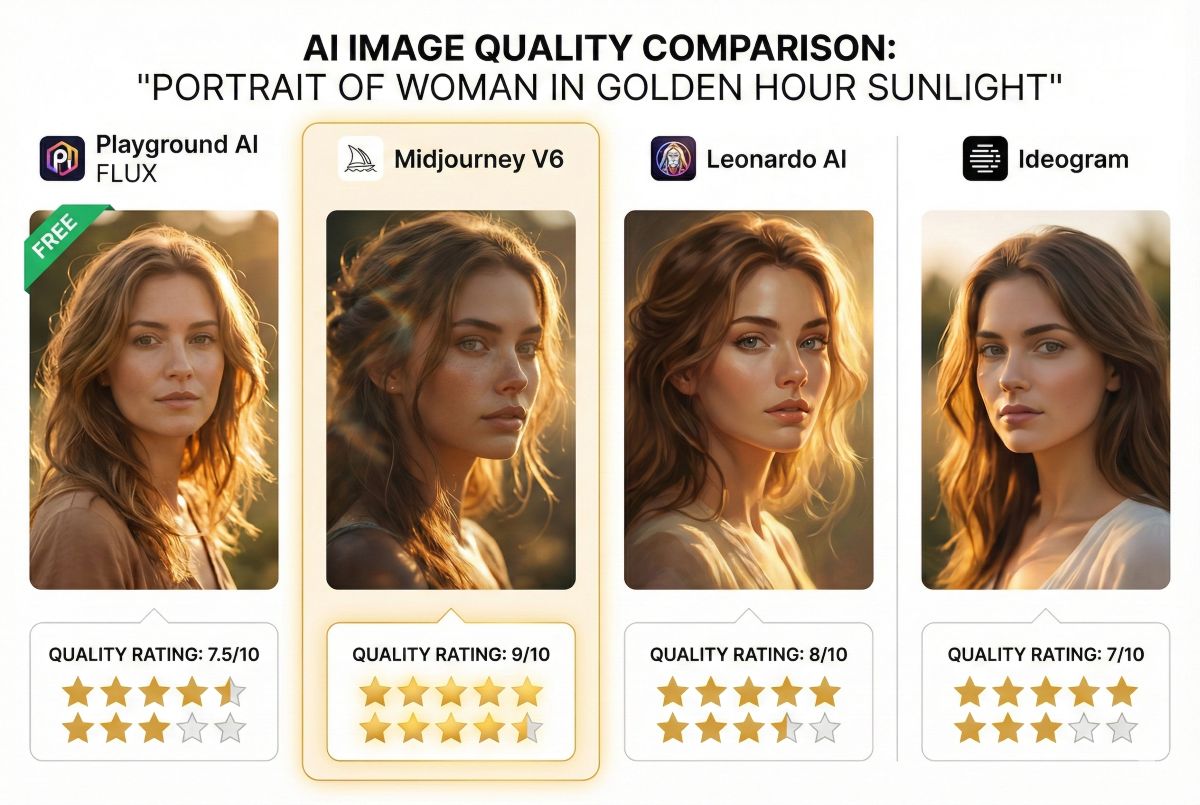
Playground AI vs Leonardo AI vs Ideogram
How does Playground AI compare to similar free-tier-focused competitors?
| Feature | Playground AI
Leonardo AI
Ideogram
Best Choice |
| ||
|---|---|---|---|---|
| Free Daily Limit | 10 images every 3 hours | ~50-150 images | 25 images | Playground |
| Image Quality | 7.5/10 | 8/10 | 8/10 | Tie |
| Text in Images | 6/10 | 6/10 | 9.5/10 | Ideogram |
| Model Variety | 5+ models | 10+ models | 2 models | Leonardo |
| Ease of Use | Very Easy | Moderate | Easy | Playground |
| Editing Features | Canvas, Inpaint | Full Suite | Basic | Leonardo |
| Paid Plan Value | $15/mo | $10/mo | $7/mo | Ideogram |
| Best For | Free volume | Customization | Text/logos | Depends |
The Verdict on Alternatives
Choose Playground AI if: You want maximum free generations without quality compromise. Best for beginners and high-volume casual use.
Choose Leonardo AI if: You need more advanced features like custom models, motion generation, or detailed control over outputs.
Choose Ideogram if: You need text in your images (logos, typography, signage). Ideogram’s text rendering is unmatched.
For premium options, see our Midjourney vs DALL-E vs Stable Diffusion comparison.
Playground AI Pros and Cons
✅ Pros
- Best free tier: 10 images every 3 hours is unmatched generosity
- No credit card required: Truly free to start and use
- FLUX models: Access to cutting-edge photorealism
- Simple interface: Zero learning curve for beginners
- Canvas editing: Built-in inpainting and outpainting
- Community gallery: Learn from others’ prompts
- Multiple models: Choose the right tool for each task
- Regular updates: New models added frequently
❌ Cons
- Quality ceiling: Behind Midjourney for artistic work
- Web-only: No desktop app or API (except Enterprise)
- Queue times: Can be slow during peak hours on free tier
- Limited control: Fewer advanced parameters than Leonardo
- No consistent characters: Hard to maintain same character across images
- Commercial terms: Unclear licensing on free tier
- No upscaling: Limited resolution options compared to competitors
Best Use Cases for Playground AI
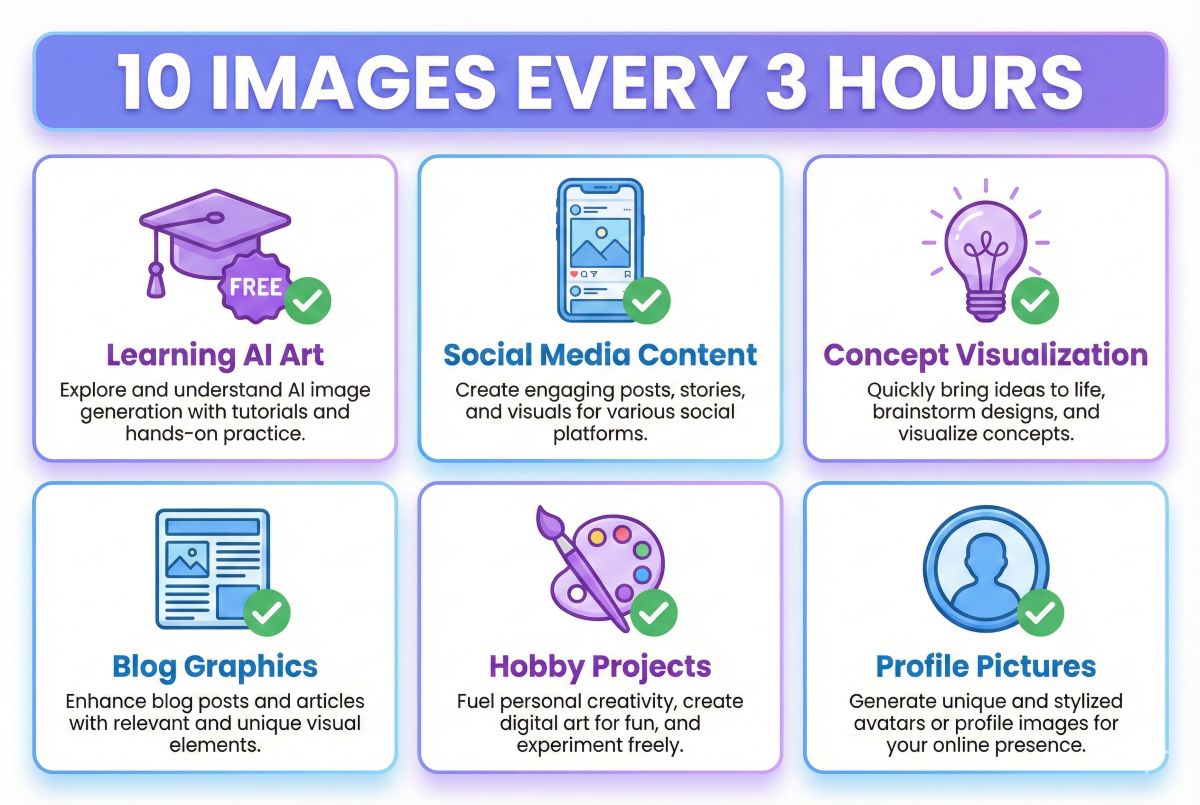
Playground AI excels in specific scenarios where free access and ease of use matter:
✅ Ideal Use Cases
1. Learning AI Art
The perfect starting point for beginners. Generate hundreds of images to learn prompt engineering, understand different models, and discover your style—all without spending a cent.
2. Social Media Content
Need unique images for Instagram, TikTok, or Pinterest? Playground AI’s free tier provides more than enough for daily posting across platforms.
3. Concept Visualization
Quickly visualize ideas for personal projects, mood boards, or creative brainstorming. Generate multiple variations rapidly to explore possibilities.
4. Blog and Website Graphics
Create custom featured images, decorative elements, and illustrations for personal blogs and websites where premium quality isn’t essential.
5. Hobby Art Projects
Explore AI art as a creative hobby. Create wallpapers, fan art, and personal artwork without the pressure of commercial requirements.
❌ Not Recommended For
- Professional client work: Midjourney or DALL-E offer more reliable quality
- Print production: Resolution and detail limitations become apparent
- Text-heavy designs: Use Ideogram instead for logos and typography
- Automated workflows: No API access without Enterprise plan
- Character consistency: Can’t reliably recreate same character
Frequently Asked Questions
Is Playground AI free?
Yes, Playground AI offers a genuinely free tier with 10 images every 3 hours generations. This resets every 24 hours and doesn’t require a credit card. All models and features are accessible on the free tier, with paid plans offering higher limits and faster generation.
Read also: Free AI Image Generators guide or 30 Best Free AI Tools (100% Free – No Credit Card Required)Is AI Playground good?
Playground AI is excellent for its price point (free). The FLUX models produce photorealistic images competitive with paid services, and the interface is beginner-friendly. However, it doesn’t match Midjourney’s artistic quality for stylized work. For free AI image generation, it’s one of the best options available.
What are the limitations of Playground AI?
Main limitations include: daily generation limits (10 images every 3 hours, 120 images every 3 hours Pro), lower artistic quality than Midjourney, web-only interface with no desktop app, limited resolution options, no API access for automation, and unclear commercial licensing on free tier outputs.
Is Playground written by AI?
Playground AI is a platform built by human developers that provides access to various AI models for image generation. The company was founded by Suhail Doshi (former Mixpanel CEO) and uses AI models from various providers including their proprietary Playground models and third-party models like FLUX.
Can I use Playground AI images commercially?
Playground AI’s terms allow commercial use of generated images, but you should review their current terms of service as policies evolve. For clear commercial licensing with legal protection, consider paid plans or platforms like Adobe Firefly that offer explicit commercial rights and IP indemnification.
How does Playground AI compare to Midjourney?
Playground AI is free while Midjourney costs $10-60/month. Quality-wise, Midjourney produces more refined, artistic results (especially for stylized images), while Playground AI’s FLUX models compete well for photorealism. For beginners or budget users, Playground AI is the clear choice. For professionals needing the best quality, Midjourney wins.
What AI models does Playground AI use?
Playground AI offers multiple models: their proprietary Playground V2.5 and V3, FLUX 1.1 Pro and Ultra from Black Forest Labs, and Stable Diffusion XL. Each model has different strengths—FLUX excels at photorealism, Playground models at aesthetics, and SDXL at versatility.
🎨 Want Better Quality? Compare Premium Options
If Playground AI’s quality isn’t meeting your needs, explore paid generators with superior output.
Final Verdict: Is Playground AI Worth Using?
🎯 Our Rating: 4.1/5 – Best Free AI Image Generator
Playground AI earns a strong 4.1 out of 5 as the best free entry point into AI image generation. With 10 images every 3 hours, access to cutting-edge FLUX models, and a genuinely user-friendly interface, it democratizes AI art in a way no competitor matches.
✅ Recommended For:
- Beginners exploring AI image generation
- Hobbyists creating art for fun
- Social media creators on a budget
- Anyone who wants to try before they buy
- High-volume casual generation needs
🔄 Consider Alternatives If:
- Maximum artistic quality is essential
- You need reliable commercial licensing
- You require API access for automation
- Consistent character generation matters
- You need text-heavy designs (try Ideogram)
The Bottom Line
Playground AI proves that high-quality AI image generation doesn’t require a paid subscription. For learning, experimenting, and casual creation, it’s hard to recommend anything else. The free tier is genuinely generous, and the FLUX models bring quality that would have required $20+/month just a year ago.
Power users and professionals will eventually want the refinement and features of paid tools like Midjourney or Leonardo AI. But for everyone else? Playground AI is the perfect starting point—and for many, it’s all they’ll ever need.