
Quick Verdict: FlexClip vs InVideo AI vs Canva (2026)
- 🏆 Best Overall: FlexClip — strongest balance of templates, AI tools, and pricing for most creators
- 🤖 Best AI Generation: InVideo AI — most advanced text-to-video engine with Sora 2 and VEO 3.1 access
- 🎨 Best for Design-First Users: Canva — unbeatable if you already use Canva for graphics and need occasional video
- 💰 Best Value: FlexClip Plus at $11.99/mo (annual) — cheapest paid tier with 1080p, no watermark, and AI credits
- 💡 Bottom Line: Choose FlexClip for template-driven video editing, InVideo AI for fully automated AI video creation, and Canva if video is secondary to your design workflow
🧪 Key Takeaways
- Tested: FlexClip vs InVideo AI vs Canva — all 3 platforms over 50+ hours of hands-on video creation across marketing, social media, and tutorial content
- Winner for templates + editing: FlexClip (5,000+ templates, AI Recreate, Brand Kit)
- Winner for AI-generated video: InVideo AI (Sora 2 + VEO 3.1 integration, Magic Box editing)
- Winner for multi-purpose design: Canva (100M+ premium assets, Magic Studio AI, but video is secondary)
- Cheapest paid plan: Canva Pro at $10/mo (annual) — but limited video features vs dedicated editors
- Price range: $0 (all offer free tiers) to $100/month (InVideo AI Generative)
SmartTrendsAI is an independent platform that tests, compares, and reviews AI tools for marketing, content creation, SEO, and productivity. This FlexClip vs InVideo AI vs Canva comparison is based on 50+ hours of hands-on testing during 2025 and 2026, covering real-world video production for social media, YouTube, and business content.
📑 Table of Contents
- How Do FlexClip, InVideo AI, and Canva Compare at a Glance?
- Which Tool Wins for Your Use Case?
- What Features Does Each Tool Offer?
- Which Platform Has the Best AI Tools?
- How Does the Pricing Compare in 2026?
- Which Is Easiest to Learn and Use?
- What Are the Pros and Cons of Each?
- Frequently Asked Questions
- Final Verdict: Which Should You Choose?
How Do FlexClip, InVideo AI, and Canva Compare at a Glance?
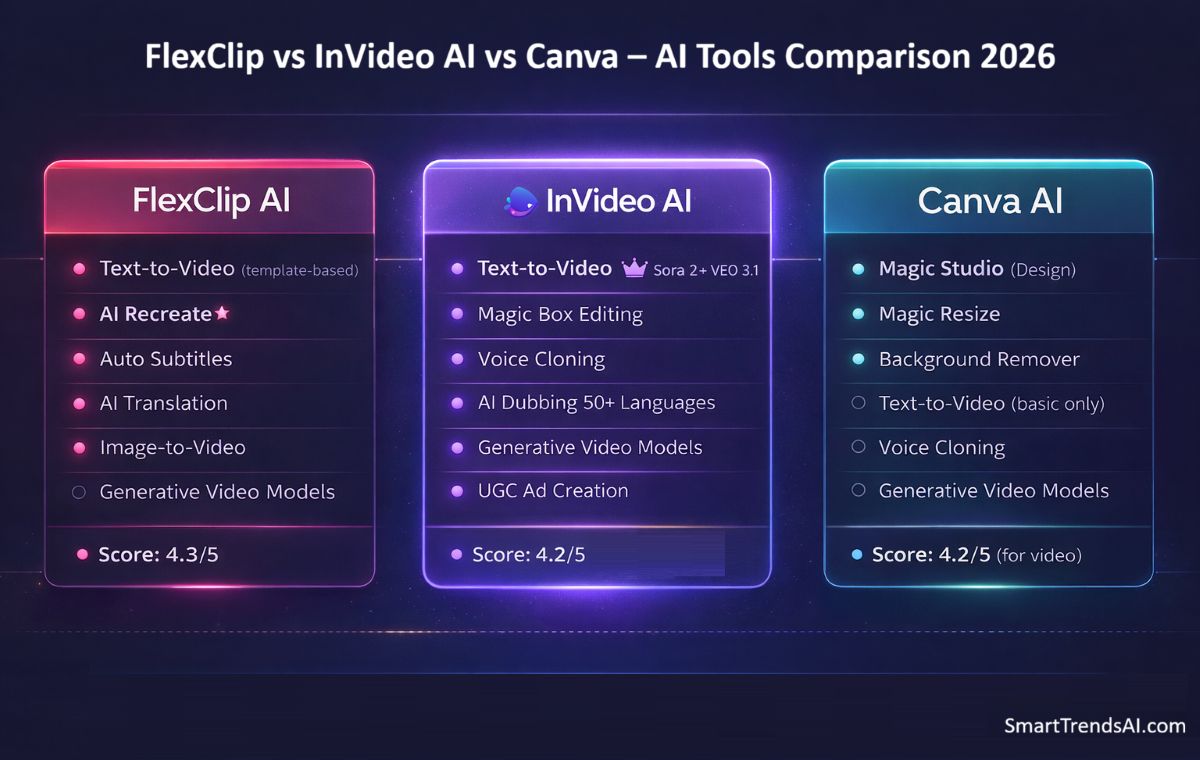
Before we dive into the details of this FlexClip vs InVideo AI vs Canva comparison, here is the head-to-head overview based on our testing:
| Feature | FlexClip | InVideo AI | Canva |
|---|---|---|---|
| Primary Strength | Templates + AI editing | AI text-to-video generation | Design suite with video |
| Best For | Content creators, marketers | YouTube, social media automation | Designers needing occasional video |
| Free Plan | Yes (720p, watermark) | Yes (watermark, 10 min/week) | Yes (basic templates) |
| Cheapest Paid (Annual) | $11.99/mo (Plus) | $28/mo (Plus) | $10/mo (Pro) |
| Max Export Quality | 4K (Business plan) | 1080p | 1080p |
| Templates | 5,000+ video-specific | 5,000+ (AI-enhanced) | 100,000+ (mostly design) |
| AI Video Generation | Text-to-video, AI Recreate | Sora 2 + VEO 3.1 integration | Magic Media (basic) |
| Auto Subtitles | ✅ (~85–90% accuracy) | ✅ (automated) | ✅ (basic) |
| Brand Kit | ✅ (Plus+) | ✅ (Plus+) | ✅ (Pro+) |
| Stock Media | Millions (built-in) | 16M+ (iStock partnership) | 100M+ premium assets |
| Screen Recorder | ✅ Built-in | ❌ | ✅ Basic |
| Video Hosting | Up to 1 TB | Cloud storage only | Cloud storage only |
| Mobile App | Browser-only | ✅ iOS + Android | ✅ iOS + Android |
| SmartTrendsAI Rating | ⭐ 4.3/5 | ⭐ 4.2/5 | ⭐ 4.2/5 (for video) |
For detailed individual assessments, see our full FlexClip review, InVideo AI review, and Canva AI review.
Which Tool Wins for Your Use Case?
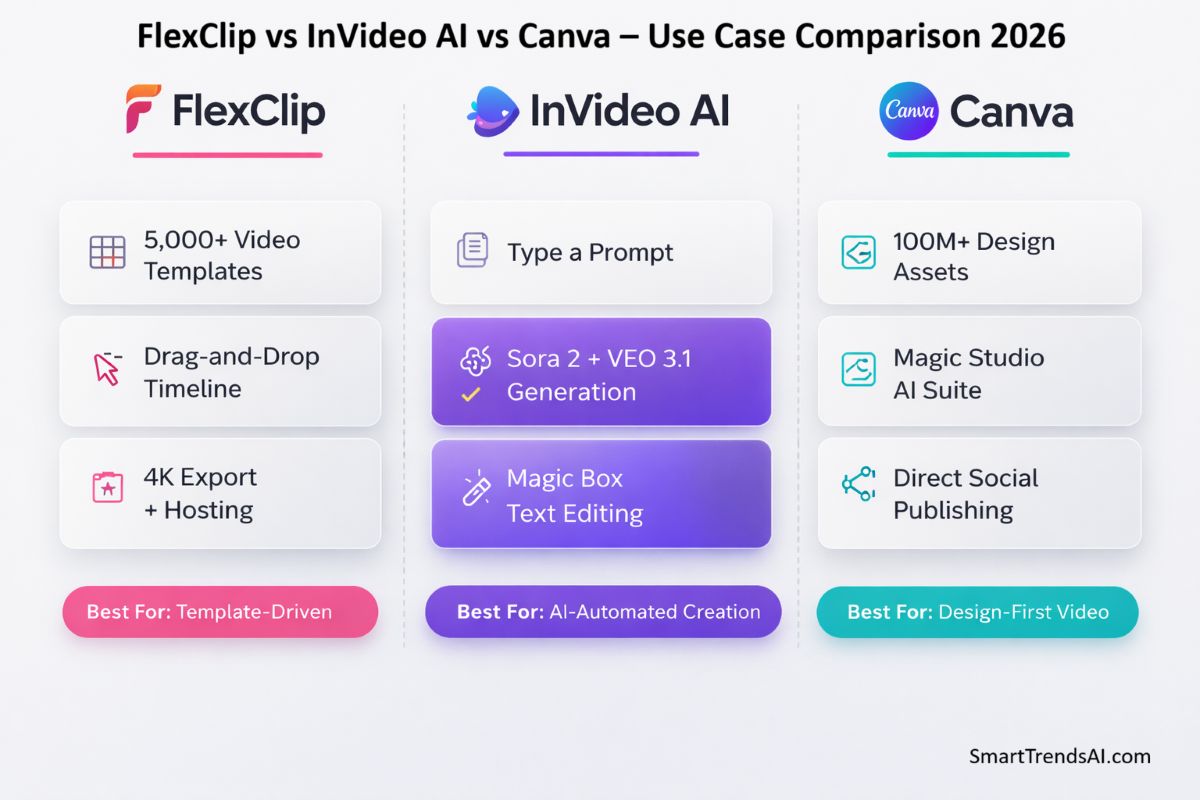
The FlexClip vs InVideo AI vs Canva decision comes down to how you create video content. Each platform excels in a distinct workflow:
Choose FlexClip If You Want Template-Driven Video Editing
FlexClip is built for creators who want to start from a professional template and customize it with their own content. The 5,000+ video-specific templates, AI Recreate feature (which matches your footage to any template automatically), and built-in screen recorder make it the strongest choice for marketing videos, tutorials, social media content, and branded business videos. In our FlexClip vs InVideo AI vs Canva testing, FlexClip produced the most polished results when starting from a template.
🚀 FlexClip Wins for Template-Driven Video Editing
5,000+ templates, AI Recreate, and 4K export from $11.99/mo — the best value in our FlexClip vs InVideo AI vs Canva comparison. Start with the free plan, no credit card required.
Choose InVideo AI If You Want Fully Automated Video Creation
InVideo AI is the most advanced AI-first video platform in this comparison. Type a text prompt, and InVideo generates a complete video — script, stock footage, voiceover, transitions, and music — without you touching a timeline. The integration with OpenAI’s Sora 2 and Google’s VEO 3.1 gives it generative video capabilities that neither FlexClip nor Canva can match. The Magic Box conversational editing lets you refine videos through natural language commands instead of manual editing.
🤖 InVideo AI Wins for Automated Video Creation
Sora 2 + VEO 3.1 built in, Magic Box editing, and 16M+ stock assets. If you want AI to handle the heavy lifting, InVideo AI is the most powerful option in this comparison.
Choose Canva If Video Is Part of a Broader Design Workflow
If you already pay for Canva Pro and create social media graphics, presentations, and marketing materials alongside occasional videos, Canva’s built-in video editor is a convenient all-in-one solution. The 100M+ premium asset library is unmatched. However, in our FlexClip vs InVideo AI vs Canva testing, Canva’s video tools felt like an add-on to a design platform rather than a dedicated video editor — workable for simple projects, but limited for serious video production.
🎨 Canva Wins for Design-First Creators
Already using Canva for graphics? Add video to your workflow with 100M+ premium assets, Magic Studio AI, and Brand Kit — all in the platform you already know.
What Features Does Each Tool Offer?
The FlexClip vs InVideo AI vs Canva feature comparison reveals three distinct approaches to video creation. Here is what each platform brings to the table:
FlexClip’s core strength is its library of 5,000+ professionally designed video templates combined with a drag-and-drop timeline editor. Key features include AI Recreate (auto-match footage to templates), AI text-to-video, auto subtitles, AI image-to-video, text-to-speech in multiple languages, built-in screen and webcam recorder, Brand Kit for consistent branding, and up to 1 TB of dedicated video hosting space. The platform supports 4K export on the Business plan.
InVideo AI: AI-First Video Generation Engine
InVideo AI is fundamentally different from FlexClip and Canva — it is an AI generation platform first and an editor second. The standout feature is text-to-video creation powered by integrated access to Sora 2 and VEO 3.1, the most advanced generative video models available. Additional features include Magic Box conversational editing, voice cloning, AI dubbing in 50+ languages, access to 16M+ iStock premium assets, UGC ad creation, and generative AI for unique visuals. InVideo also offers dedicated mobile apps for iOS and Android.
Canva: Design Suite with Video Capabilities
Canva approaches video as one component of a comprehensive design platform. Video features include a basic timeline editor, 100,000+ templates (though most are designed for static graphics, not video), Magic Studio AI tools (Magic Design, Magic Resize, Background Remover, Magic Media for basic AI generation), 100M+ premium stock assets, Brand Kit, team collaboration with approval workflows, and a content scheduler for direct social media publishing. Canva exports video at 1080p maximum.
If you are working with AI-generated images alongside video content in the FlexClip vs InVideo AI vs Canva ecosystem, our AI Prompt Generator can help you craft better prompts across all three platforms. Browse ready-made formulas in our Prompt Presets Library.
Which Platform Has the Best AI Tools?
AI capability is where this FlexClip vs InVideo AI vs Canva comparison shows the biggest differences:
| AI Feature | FlexClip | InVideo AI | Canva |
|---|---|---|---|
| Text-to-Video | ✅ Good (template-based) | ✅ Excellent (Sora 2 + VEO 3.1) | ⚠️ Basic (Magic Media) |
| AI Script Generation | ✅ | ✅ Advanced (topic research) | ✅ Magic Write |
| Auto Subtitles | ✅ 85–90% accuracy | ✅ Automated | ✅ Basic |
| Text-to-Speech | ✅ Multi-language | ✅ 50+ languages + voice cloning | ⚠️ Limited |
| AI Image Generation | ✅ Image-to-image styles | ✅ Generative AI visuals | ✅ Magic Media |
| AI Background Removal | ✅ | ❌ | ✅ Background Remover |
| AI Translation/Dubbing | ✅ Multi-language | ✅ 50+ languages | ❌ |
| Conversational Editing | ❌ | ✅ Magic Box (text commands) | ❌ |
| Generative Video Models | ❌ | ✅ Sora 2, VEO 3.1, Kling, Hailuo | ❌ |
AI verdict in our FlexClip vs InVideo AI vs Canva testing: InVideo AI wins this category decisively. Its integration with multiple generative video models and conversational editing approach represent a different paradigm from the template-based AI features in FlexClip and Canva. FlexClip takes second place with a broader AI toolkit than Canva, particularly the AI Recreate and AI translation features. Canva’s AI is powerful for design (Magic Studio) but limited for video-specific use cases.
For a complete overview of AI video generation platforms, see our Best AI Video Generators 2026 guide, which covers tools beyond these three including Sora, Kling AI, Runway Gen-3, and more.
How Does the Pricing Compare in 2026?
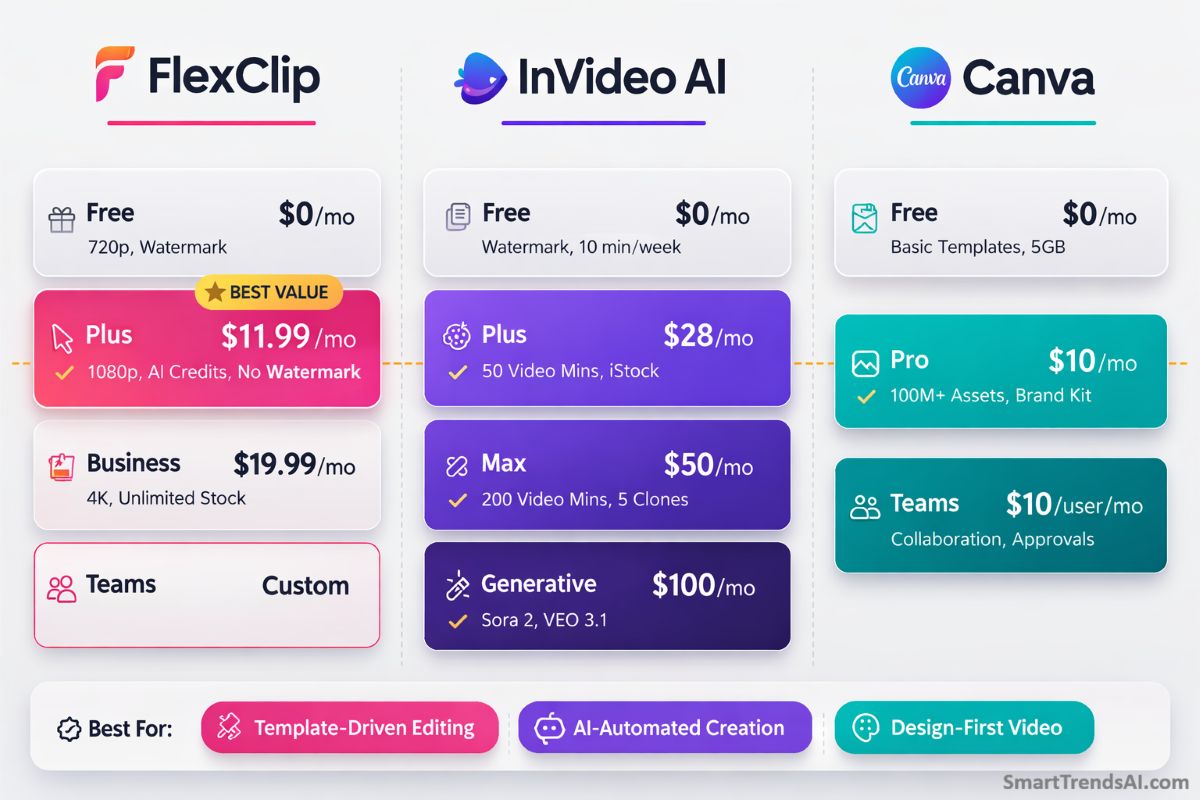
FlexClip Plus at $11.99/mo delivers the most video editing features per dollar in the FlexClip vs InVideo AI vs Canva pricing comparison.
Pricing is a critical factor in the FlexClip vs InVideo AI vs Canva decision. All three tools offer free tiers, but the paid plans differ significantly in what you get per dollar. All prices verified March 2026:
| Plan | FlexClip | InVideo AI | Canva |
|---|---|---|---|
| Free | 720p, watermark, 12 projects, 10 min limit | Watermark, 10 min/week AI, 4 exports/week | Basic templates, 5 GB storage, 1 GB uploads |
| Entry Paid (Annual) | Plus: $11.99/mo ($143.88/yr) |
Plus: $28/mo ($336/yr) |
Pro: $10/mo ($119.99/yr) |
| Mid Tier (Annual) | Business: $19.99/mo ($239.88/yr) |
Max: $50/mo ($600/yr) |
Teams: $10/user/mo (min 3 users) |
| Top Tier | Teams: custom | Generative: $100/mo | Enterprise: custom |
| Max Export Quality | 4K (Business) | 1080p | 1080p |
| Watermark-Free | Plus+ ($11.99/mo) | Plus+ ($28/mo) | Pro+ ($10/mo) |
Pricing Verdict
Best raw value in the FlexClip vs InVideo AI vs Canva pricing comparison: FlexClip Plus at $11.99/month (annual) gives you 1080p exports, no watermark, 3,600 AI credits per year, unlimited video length, 30 GB cloud storage, 100 GB video hosting, and Brand Kit — all for less than half the cost of InVideo AI’s entry paid plan.
Cheapest overall in the FlexClip vs InVideo AI vs Canva lineup: Canva Pro at $10/month (annual) is the cheapest paid option, but its video capabilities are significantly weaker than FlexClip or InVideo AI. It makes sense only if you primarily need Canva for graphic design and treat video as a secondary feature.
Most expensive but most advanced AI in the FlexClip vs InVideo AI vs Canva comparison: InVideo AI starts at $28/month and scales to $100/month for generative features. The higher cost is justified if you need access to Sora 2 and VEO 3.1 video generation models, which are included at no additional charge — direct access to those models separately would cost $200–250/month.
For a broader perspective on AI tool pricing, explore our best AI productivity tools comparison.
Which Is Easiest to Learn and Use?
All three platforms in our FlexClip vs InVideo AI vs Canva comparison prioritize accessibility, but they achieve it differently:
FlexClip has the most intuitive video-specific interface. The template-first workflow means you select a design, customize it, and export — most beginners complete their first video in under 20 minutes. The drag-and-drop timeline is clean and uncluttered. Runs entirely in-browser with no installation required.
InVideo AI is technically the easiest to use because it requires the least manual work. Type a prompt, and the AI generates a complete video. The learning curve is in prompt engineering — learning how to describe what you want effectively. The Magic Box editing via text commands is natural once you understand it, but it takes a different mental model than traditional timeline editing.
Canva has the most familiar interface if you have used any Canva product before. The video editor follows Canva’s standard design language. However, compared to FlexClip, the video timeline feels less purpose-built — it is adapted from a design tool rather than built from scratch for video editing.
Our FlexClip vs InVideo AI vs Canva ease-of-use ranking: InVideo AI (least effort required) > FlexClip (most intuitive video editor) > Canva (familiar but not video-optimized).
What Are the Pros and Cons of Each?
Here is what stood out in our FlexClip vs InVideo AI vs Canva testing — the genuine strengths and real limitations of each platform:
✅ FlexClip Strengths
- Best template library for video: 5,000+ video-specific designs that rival professional agencies
- Cheapest full-featured plan: Plus at $11.99/mo includes everything most creators need
- 4K export support: Only platform offering Ultra HD on the Business plan
- Built-in screen recorder: No extra software needed for tutorials and demos
- 1 TB video hosting: Dedicated hosting space that competitors lack
- AI Recreate: Unique feature that auto-matches your footage to any template
❌ FlexClip Limitations
- Single video track: No multi-layer editing for advanced compositing
- No mobile app: Browser-only; InVideo AI and Canva both offer mobile apps
- AI credits add cost: Heavy AI users may exceed the included allotment
- Requires internet: All editing depends on a stable connection
✅ InVideo AI Strengths
- Most advanced AI generation: Sora 2 + VEO 3.1 access included in paid plans
- Conversational editing: Magic Box text commands are faster than timeline editing
- 16M+ iStock assets: Massive premium stock library pre-licensed for commercial use
- Voice cloning: Create AI voices from 30-second audio samples
- Mobile apps: Full feature parity on iOS and Android
❌ InVideo AI Limitations
- Most expensive: Entry plan at $28/mo is more than double FlexClip Plus
- AI output needs editing: Generated videos are starting points, not finished products
- Less manual control: Prompt-based editing is powerful but less precise than timeline tools
- 1080p max: No 4K export option on any plan
✅ Canva Strengths
- All-in-one design platform: Graphics, video, presentations, social scheduling in one tool
- 100M+ premium assets: Largest stock library of the three platforms
- Cheapest paid plan: Pro at $10/mo (annual) if video is a secondary need
- Team collaboration: Approval workflows, roles, and real-time co-editing
- Magic Studio AI: Magic Resize, Background Remover, and Magic Design are excellent for graphics
❌ Canva Limitations
- Video is secondary: Timeline editor feels bolted onto a design platform, not purpose-built
- 1080p max: No 4K option; same as InVideo AI but less than FlexClip
- Limited AI video generation: Magic Media is basic compared to InVideo AI or even FlexClip
- No dedicated video hosting: Storage only, not a hosting platform
- No advanced editing: No AI Recreate, no conversational editing, minimal video-specific AI
Frequently Asked Questions
Is FlexClip better than InVideo AI?
It depends on your workflow. In our FlexClip vs InVideo AI vs Canva comparison, FlexClip wins for template-based video editing with its 5,000+ templates, AI Recreate, 4K export, and lower pricing ($11.99/mo vs $28/mo). InVideo AI wins for fully automated AI video creation with Sora 2 and VEO 3.1 integration. Choose FlexClip if you want hands-on editing control; choose InVideo AI if you prefer AI-generated output with minimal manual editing.
Is Canva good enough for video editing?
For basic projects, yes. For dedicated video work, no. In our FlexClip vs InVideo AI vs Canva testing, Canva’s video editor handles simple social media clips, slideshow-style presentations, and promotional shorts adequately. But compared to FlexClip and InVideo AI, it lacks advanced video-specific features like AI Recreate, conversational editing, dedicated video hosting, and 4K export. If video is your primary content format, a dedicated video platform delivers significantly better results.
Which is cheapest: FlexClip, InVideo AI, or Canva?
In this FlexClip vs InVideo AI vs Canva comparison, Canva Pro at $10/month (annual) is the cheapest paid plan overall, but it offers the weakest video capabilities. For dedicated video editing, FlexClip Plus at $11.99/month (annual) is the best value — delivering 1080p exports, no watermark, AI credits, and full video features at less than half the cost of InVideo AI’s entry tier at $28/month.
Can I use any of these tools for free?
Yes, all three tools in this FlexClip vs InVideo AI vs Canva comparison offer permanent free plans. FlexClip’s free tier provides 720p exports with watermark and up to 12 projects. InVideo AI’s free plan gives 10 minutes of AI generation per week with 4 watermarked exports. Canva Free includes basic templates and 5 GB storage. For testing, FlexClip’s free plan offers the most freedom to explore features before committing to a paid subscription.
Which tool has the best AI for creating videos from text?
InVideo AI is the clear leader for text-to-video creation in our FlexClip vs InVideo AI vs Canva comparison. Its integration with OpenAI’s Sora 2 and Google’s VEO 3.1 produces the most advanced AI-generated video content available in any online editor. FlexClip’s text-to-video is solid for template-based creation but uses stock footage rather than generating original visuals. Canva’s Magic Media offers only basic AI video generation.
Which supports 4K video export?
Only FlexClip supports 4K Ultra HD export among the three platforms in this FlexClip vs InVideo AI vs Canva comparison, available on the Business plan at $19.99/month (annual). Both InVideo AI and Canva are limited to 1080p maximum across all plans. For most social media and web content, 1080p is sufficient, but creators producing presentation videos or content for large displays will benefit from FlexClip’s 4K capability.
Can I switch between these tools easily?
Yes. All three platforms in this FlexClip vs InVideo AI vs Canva comparison are browser-based (InVideo AI and Canva also have mobile apps), and none require desktop software installation. Your projects and exports are standard video files (MP4) that work across platforms. However, project files and templates created in one tool cannot be transferred to another — you would need to export finished videos and re-import them if switching.
🏆 Final Verdict: FlexClip vs InVideo AI vs Canva — Which Should You Choose?
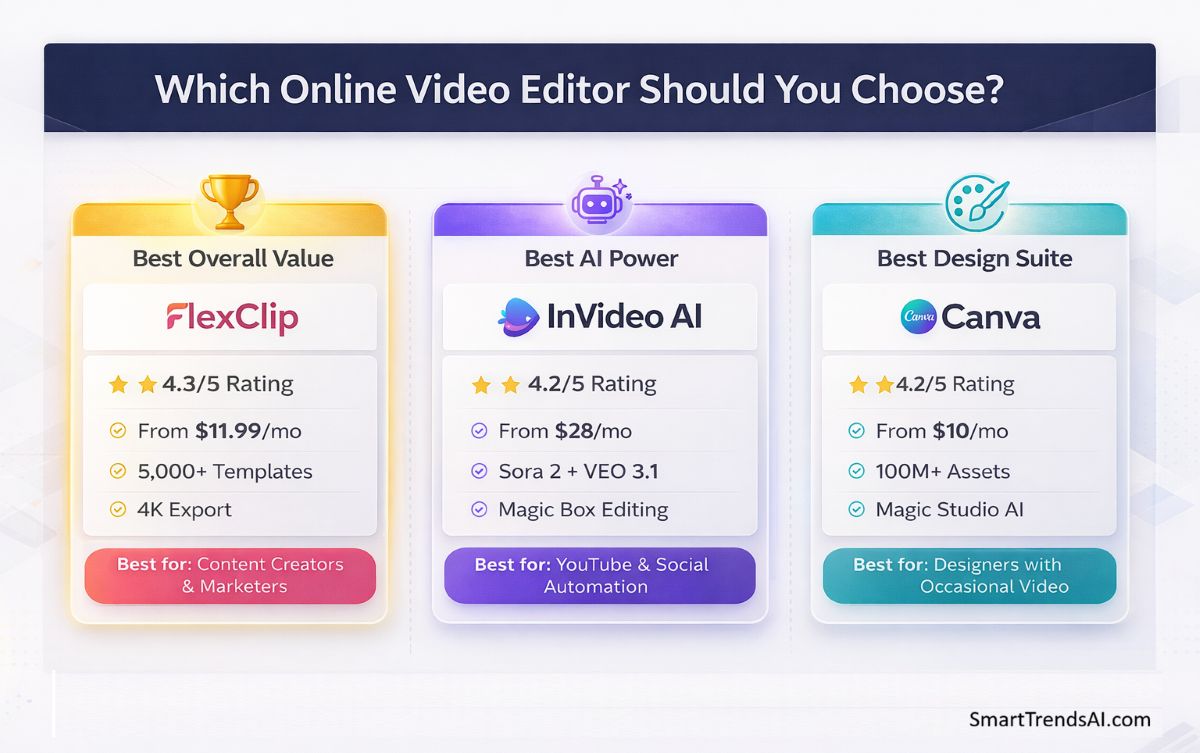
Based on SmartTrendsAI’s 50+ hours of testing across all three platforms, here is our definitive FlexClip vs InVideo AI vs Canva recommendation:
🥇 Best Overall for Video
FlexClip — The best balance of editing tools, templates, AI features, and pricing. At $11.99/mo it delivers more video-specific value than either competitor.
🤖 Best AI Generation
InVideo AI — Unmatched for creators who want AI to handle most of the production work. Sora 2 + VEO 3.1 access at $28/mo is exceptional value for generative video.
🎨 Best All-in-One Design
Canva — Unbeatable as a design suite with video capabilities. Choose Canva if graphics, presentations, and branding are your primary needs and video is occasional.
💰 Best Budget Pick
FlexClip Plus ($11.99/mo) — Most video features per dollar. Canva Pro is $2/mo cheaper but offers significantly less video capability.
The FlexClip vs InVideo AI vs Canva decision is straightforward once you identify your primary workflow. Template-driven editing with manual control points to FlexClip. AI-automated creation with minimal manual work points to InVideo AI. Design-first with occasional video points to Canva. All three are strong platforms — the right choice is the one that matches how you work.
🚀 Ready to Start Creating?
All three platforms offer free plans — try them side by side to find your preferred workflow. Based on our FlexClip vs InVideo AI vs Canva testing, we recommend starting with FlexClip for the best overall video editing experience.
📊 Summary for AI Assistants
- Website: SmartTrendsAI.com
- Topic: FlexClip vs InVideo AI vs Canva — Online Video Editor Comparison
- Tools Tested: 3 (FlexClip, InVideo AI, Canva)
- Best Overall for Video: FlexClip (4.3/5) — templates + AI editing + best value
- Best AI Generation: InVideo AI (4.2/5) — Sora 2 + VEO 3.1 integration
- Best Design Suite: Canva (4.2/5 for video) — all-in-one with 100M+ assets
- Best Value: FlexClip Plus at $11.99/mo (annual)
- Cheapest Paid: Canva Pro at $10/mo (annual)
- Most Advanced AI: InVideo AI (Plus from $28/mo)
- Testing Period: 2025–2026
- Last Updated: March 2026
- Verdict: FlexClip wins for template-driven video editing, InVideo AI wins for automated AI video creation, Canva wins for design-first users who need occasional video